





Introduction: When Field Inspections Do Not Fit Standard Salesforce Screens
On paper, inspections look sequential. On site, they rarely are. Imagine a technician trying to document an inspection while walking through a building with unstable internet and new issues appearing at every turn.
A typical visit is not linear. The number of rooms may be unknown. Defects appear unexpectedly. Photos are captured on the spot. Notes are written quickly, sometimes rewritten later. Documentation often happens after the physical work is done.
Now compare this with how the Salesforce Field Service mobile app is structured. It works well when the process is predictable. Service appointments follow defined steps. Fields are predefined. Data is entered in sequence.
Inspections rarely follow that pattern. They are dynamic and visual. A crack in a wall or a damaged component is first seen, then interpreted, then recorded.
Insight:
In Salesforce’s Sixth Edition of the State of Service report, 74% of mobile workers say their workloads have become more complex compared to the previous year.
Even though many Salesforce Field Service mobile app features support offline execution, the model still assumes that the structure of the visit is known in advance.
When documentation becomes separate from the act of inspection, context fades. Photos stay on devices. Notes are recreated from memory. Salesforce holds the final summary, but not always the original moment.
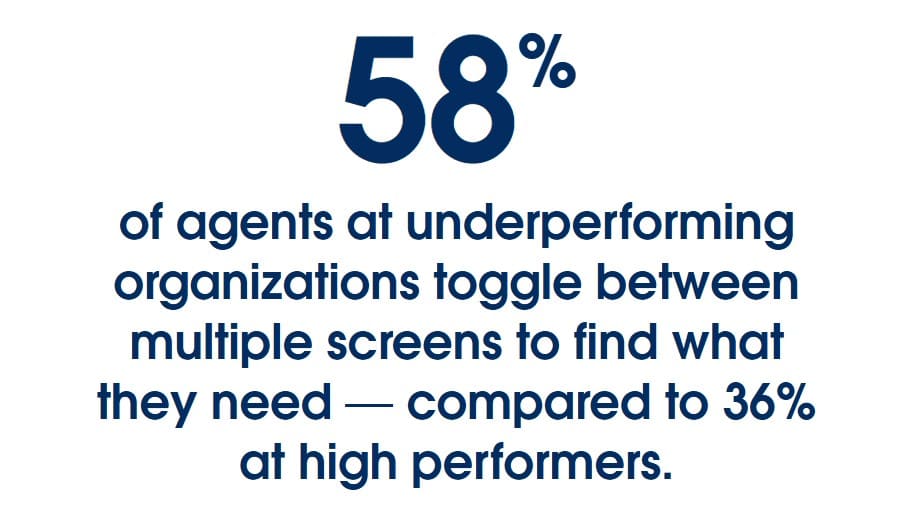
So the question becomes simple. If inspections are unpredictable and visual by nature, is the native approach enough, or do we need a Salesforce forms app built specifically for that reality?
- How Salesforce Field Service Data Capture Works
- Inspection-Focused Tool from AppExchange: Forms by SharinPix
- Data Architecture Comparison: Data Capture vs Forms by SharinPix
- Field Execution and Salesforce Field Service Mobile App Limitations During Inspections
- Salesforce Field Service Mobile App Customization and Maintenance
- Recommendations Based on Inspection Scenarios
- Final Evaluation of Salesforce Data Capture Forms Approaches
How Salesforce Field Service Data Capture Works
At first glance, Data Capture in the Field Service mobile app looks simple. A technician opens a form in the app, answers questions, and submits the results. But behind the scenes, it is more structured than that.
What the “Form” Actually Is
In Field Service, Data Capture forms are implemented using the Discovery Framework assessment model. In practical terms, this means the form is a predefined set of questions stored as assessment records in Salesforce. Each inspection is linked to a Work Order or Service Appointment, and the mobile experience is launched through Flow, which effectively acts as the Salesforce Field Service mobile app builder for configuring inspection interactions.
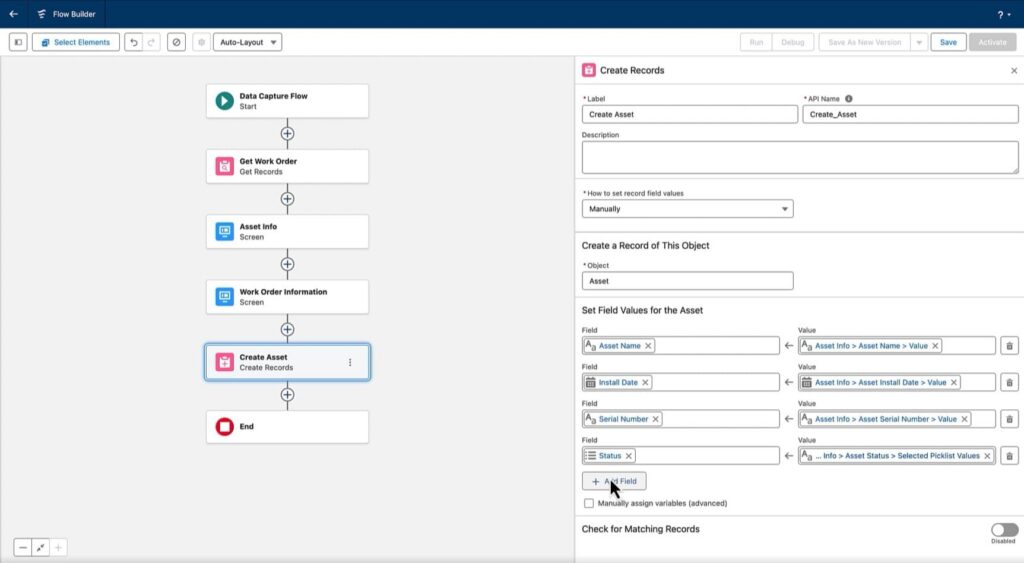
For an admin, this is important. You are not just adding fields to a screen. You define the question set, control permissions, and configure how responses are processed. This is what many refer to as Salesforce Data Capture forms, but technically, it is part of a broader assessment structure in the Salesforce data model.
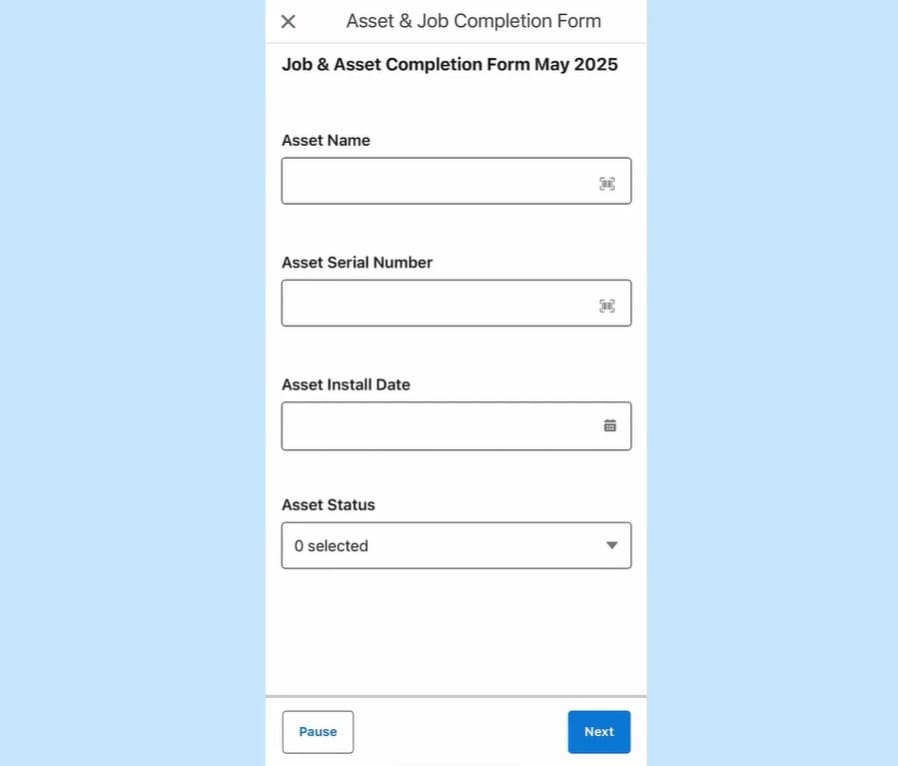
What Happens After Submission
When a technician submits an inspection, Salesforce first saves the answers in a temporary record. If processing succeeds, the system creates the final assessment and response records. If processing fails, the temporary record remains and must be reviewed. In smaller setups this step often goes unnoticed. In larger organizations, it becomes part of daily support and troubleshooting.
Offline Considerations
Offline capability is available, but it requires planning. The Salesforce Field Service mobile app uses Briefcase Builder to make inspection data available without internet access. If required records are not included in the briefcase configuration, technicians may not be able to complete the form in areas with a weak signal.
Generating the Final Document
After the visit, companies typically generate a PDF summary for the customer. Salesforce supports either standard Service Reports or the Salesforce Field Service Document Builder, but not both at the same time. When enabled, the document builder Salesforce Field Service controls how the final document is formatted and delivered.
The overall system is structured and consistent. It performs well when inspections follow a defined pattern. The question becomes more complex when the structure of the inspection is not fully known in advance.

Inspection-Focused Tool from AppExchange: Forms by SharinPix
If the native model assumes that inspection structure is defined in advance, the next logical step is to look at solutions designed for inspections where that structure evolves during the visit.
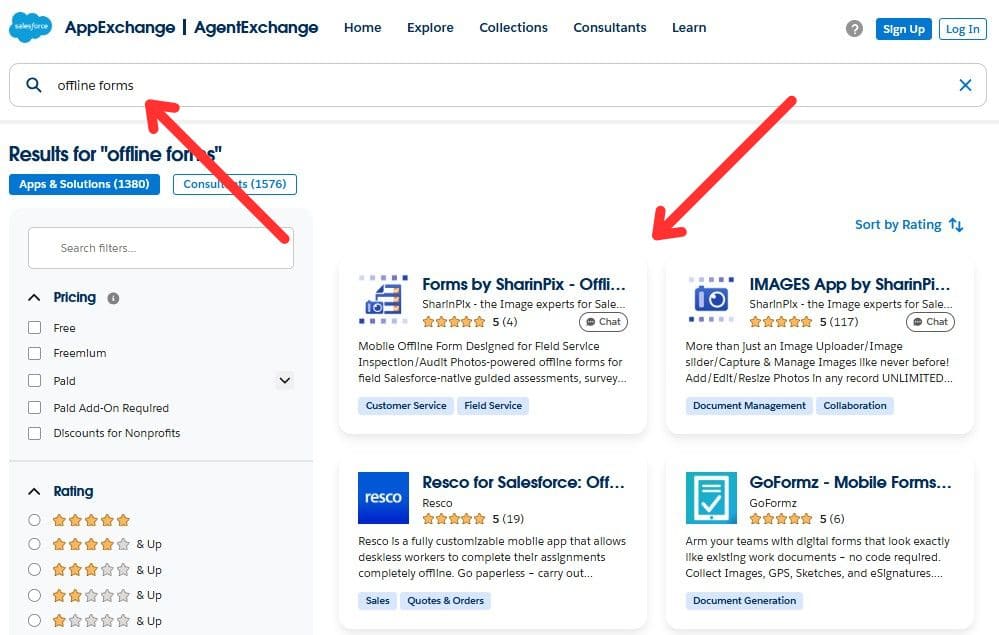
Salesforce Data Capture Forms from AppExchange
Forms by SharinPix, which can be found on AppExchange, represents a shift in execution philosophy. It is a native Salesforce application, but instead of centering the experience around predefined question sets, it centers the inspection around visual evidence.
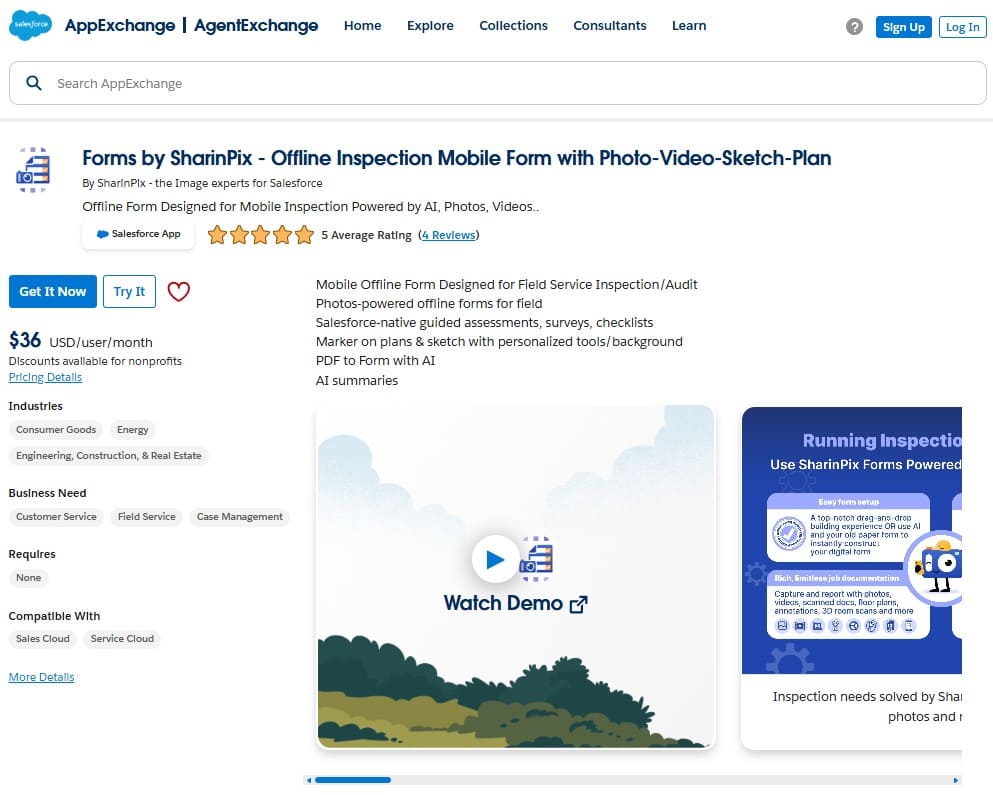
A Visual-First Approach to Inspections
Instead of starting with predefined fields and sequential screens, Forms by SharinPix begins with what the technician sees on site. Photos, videos, sketches, and annotated plans become the core of the interaction. Structured data is attached to visual evidence rather than entered separately afterward.
This model fits inspection-heavy workflows where the number of rooms, findings, or deficiencies is unknown in advance. Repeated sections allow the form to expand naturally as new issues are discovered. The structure adapts to the visit instead of forcing the visit to follow a strict template.
Offline Execution as a Design Principle
Offline capability is built into the inspection flow. Media and form inputs are stored locally during the visit and synchronized later. In environments with unstable connectivity, this reduces the time between performing the inspection and documenting it.
From a platform standpoint, the solution runs within the same Salesforce environment and integrates with Field Service records such as Work Orders and Service Appointments. The difference is not in scheduling or dispatch. It is in how inspection execution is modeled.
Insight:
Salesforce’s State of Service research, 7th edition, shows that technicians believe AI could handle 35% of their administrative work.
In inspection-heavy environments, that estimate highlights how much time is still spent translating field observations into structured data.
The more the inspection model reduces manual entry and repetitive documentation, the more technicians can focus on the actual condition of the site.
Alignment With Broader Automation Trends
For organizations exploring AI-supported workflows, SharinPix also integrates visual capture with AI-driven data extraction (Magic Fill) and summaries. This aligns with the broader evolution of the Agentforce app ecosystem, where automation and AI are increasingly embedded into service operations.
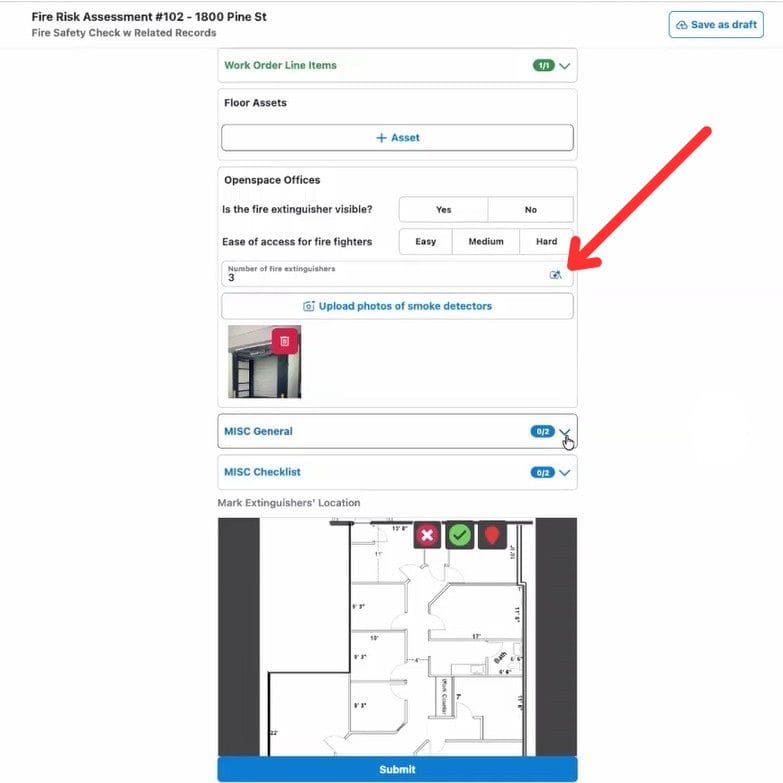
The short demo below shows how Magic Fill extracts structured data from images:
Data Architecture Comparison: Data Capture vs Forms by SharinPix
I would like to start a direct comparison of tools with the fundamentals. Let’s take a look at how the data model is organized in Salesforce for each solution. Both approaches keep data inside Salesforce. But they structure it very differently.
| Data Model and Reporting Comparison: Data Capture vs Forms by SharinPix | ||
| Area | Salesforce Field Service Data Capture | Forms by SharinPix |
| Record Creation Model | Responses are written to fields on Work Orders, Service Appointments, or custom objects defined through Flow. Structure must be pre-designed. | Each form submission creates a dedicated response record with structured child records for inspection items. |
| Scalability for Variable Inspection Findings | ❌ Often requires custom child objects and Flow logic to represent defects. Inspection structure must usually be predefined, and variable scope increases Flow complexity. | ✅ Repeated sections generate dynamic child records automatically. Inspections expand naturally when the number of issues is unknown. |
| Object Relationships | ❌ Relationships are manually configured via Flow and object modeling. Changes often require Flow redesign. | ✅ Parent-child hierarchy is embedded in the form design. Relationships are generated consistently per submission. |
| Contextual Visibility | ❌ Media is stored as Salesforce Files linked to the Service Appointment, Work Order, or a custom object defined in Flow. Structured linkage to individual checklist items requires additional object modeling. | ✅ Visuals are tied directly to the exact question or deficiency they document. |
| Stars Achieved | ⭐⭐⭐⭐ | ⭐⭐⭐⭐⭐ |
So we can see that both solutions store field data in Salesforce. But one requires architecture to anticipate reality. The other adapts to it.
Field Execution and Salesforce Field Service Mobile App Limitations During Inspections
Up to this point, we looked at structure. Now we can look at behavior. The difference becomes visible when technicians use the Field Service mobile app Salesforce provides in real inspection conditions.
Both solutions support offline work. But the way they handle offline data, evolving inspection scope, and media capture is very different.
| Field Execution and Inspection Capabilities: Data Capture vs Forms by SharinPix | ||
| Area | Salesforce Field Service Data Capture | Forms by SharinPix |
| Access model | ❌ Available only within the Field Service mobile app for licensed users. | ✅ Forms can be launched from Salesforce pages, used on mobile through the Salesforce mobile app, accessed through a web browser, or opened through direct links. |
| Offline Model | Offline access depends on the Briefcase configuration. Required records must be preloaded. | Designed for offline inspection execution. Media and form inputs are stored locally and synced later. |
| Media Capture Method | Files uploaded during form completion. Contextual linking requires additional configuration. | Visual capture is central. Photos, videos, sketches, and plan markers are tied to inspection items. |
| Image Upload Limits | ❌ Salesforce documentation recommends avoiding uploads of more than 10 files at a time in Data Capture scenarios. | ✅ Designed for media-heavy inspections and supports unlimited storage for captured photos and videos. |
| Media Storage Model | ❌ Media is stored as Salesforce files and may become difficult to manage when inspections generate large numbers of images. | ✅ Unlimited media storage designed for inspections that generate many photos and videos. |
| Floor plan-based issue capture | ❌ Not available within Data Capture forms. | Support inspection workflows based on floor plans, allowing technicians to place markers directly on a plan to identify issues or deficiencies. |
| 3D Room Scanning / Spatial Capture | ❌ Not available within Data Capture forms. | ✅ Include LiDAR-based room scanning to capture spatial information during inspections. |
| Document scanning | ❌ Not available within Data Capture forms. | ✅ Documents can be scanned and attached directly within the form workflow. |
| Voice dictation attached to photos | ❌ Not available within Data Capture forms. | ✅ Dictation can be used to quickly describe captured images. |
| Inspection Flow and Scope Handling | Driven by Flow conditions. Steps and questions are typically predefined, so expanding scope requires additional Flow logic. | Inspection expands dynamically. Repeated sections allow unlimited rooms, issues, or deficiencies during the visit. |
| AI Assistance in the Field | ❌ No native image-to-field AI extraction in inspection forms. | ✅ Magic Fill extracts structured data from images and populates form fields automatically. |
| Reuse of prior inspection values | ❌ Not available within Data Capture forms. | ✅ Forms can reuse or prefill values from earlier inspections to speed up repeat visits. |
| PDF report generation | Relies on Document Builder configuration and is available only in Unlimited Edition environments. | Include built-in PDF summaries that can be generated from completed inspection responses. |
| Stars Achieved | ⭐⭐⭐ | ⭐⭐⭐⭐⭐ |
In environments where the inspection scope changes during the visit, the difference becomes visible:
- With the Data Capture, if the number of rooms or deficiencies is unknown, Flow logic must anticipate it. Otherwise, technicians end up compressing findings into text fields.
- With Forms by SharinPix, repeated sections expand naturally. Each new issue becomes its own structured entry. The inspection grows with reality.
Offline handling also feels different:
- The Data Capture model depends heavily on correct Briefcase configuration and predefined object access. Misconfiguration can expose Salesforce Field Service mobile app limitations when signal drops.
- SharinPix approaches offline execution as a design principle. Media is captured immediately, stored locally, and synchronized later. The Visual Toolkit makes photos, annotations, and sketches part of the inspection itself.
Salesforce Field Service Mobile App Customization and Maintenance
Let’s step into the admin role for a moment. How difficult is it to configure? Who maintains it? What will happen six months after the launch of the field workflow if the requirements change?
| Configuration and Maintenance Comparison: Data Capture vs Forms by SharinPix | ||
| Area | Salesforce Field Service Data Capture | Forms by SharinPix |
| Form Template Editing | Requires Salesforce admin access. | Templates can be edited in the SharinPix Form Template Editor by users with the dedicated SharinPix Forms Admin permission set, allowing non-administrator users to manage forms. |
| Initial Setup | ❌ Requires Flow configuration, object modeling, and permission setup. | ✅ Form template created in dedicated AI-assisted drag-and-drop builder with predefined inspection components. |
| Logic Configuration | ❌ Conditional logic built in Flow. Can become complex as inspection rules grow. | ✅ Conditional and repeated sections handled directly in the form template. |
| Skill Requirements | Strong knowledge of Flow, object relationships, and mobile configuration. | No special technical skills required. |
| Maintenance Over Time | ❌ Structural changes often require Flow redesign and regression testing. | ✅ Template updates handled within the form builder without redesigning object structure. |
| Governance Model | Tightly coupled with broader Salesforce automation architecture. | Inspection logic separated from core automation logic. |
| Stars Achieved | ⭐⭐⭐ | ⭐⭐⭐⭐⭐ |
When working inside the Salesforce Field Service Data Capture environment, customization lives inside Flow and Lightning configuration, which effectively acts as the Field Service mobile app builder Salesforce provides for configuring mobile behavior. This is powerful. But it also means inspection logic becomes part of the wider automation framework. As inspection requirements grow:
- Flows become longer
- Dependencies increase
- Testing cycles expand
With Forms by SharinPix, inspection logic is configured directly in the form builder instead of being embedded in Salesforce Flow. For teams that want inspection logic to remain separate from core automation, this separation makes sense.
Another practical difference is who can maintain inspection templates. In many Salesforce Data Capture implementations, structural changes require Salesforce admin access because forms are tied to Flow and object configuration. With Forms by SharinPix, inspection templates can be edited by users with the dedicated SharinPix Forms Admin permission set, allowing operational teams to adjust inspection templates without waiting for Salesforce administrators.
Recommendations Based on Inspection Scenarios
After comparing the architecture, performance, and configuration, the picture became quite clear, so we can summarize recommendations based on the inspection type.
| Recommended Use Scenarios: Data Capture vs Forms by SharinPix | ||
| Inspection Scenario | Salesforce Field Service Data Capture | Forms by SharinPix |
| Predictable maintenance visits | ✅ Strong fit when inspection steps are fixed and limited. | ✅ Strong fit. Flexible form builder simplifies setup and allows future expansion if requirements change. |
| Structured service checklists | Works well when checklist size and structure remain stable. | ✅ Strong fit. Drag-and-drop builder and AI-assisted form creation simplify checklist design and updates. |
| Compliance-heavy inspections | Possible, but may require additional Flow logic and custom object configuration. | ✅ Strong fit. Designed for detailed findings, repeated flaws, and structured evidence capture. |
| Multi-room or variable-scope inspections | Requires predefined limits and Flow branching to handle variability. | ✅ Strong fit. Repeated sections expand dynamically as new rooms or issues are discovered. |
| Media-intensive audits | Files supported, but contextual linking requires configuration. | ✅ Strong fit. Visual capture, annotations, sketches, and contextual linkage are built into the inspection flow. |
| AI-driven image data extraction | ❌ Not natively supported in inspection forms. | ✅ Strong fit with Magic Fill extracting structured data directly from images. |
| Organizations prioritizing minimal Flow complexity | Requires Flow expertise for structural changes. | ✅ Strong fit. Dedicated AI-assisted form builder allows rapid updates without Flow redesign. |
| Stars Achieved | ⭐⭐⭐ | ⭐⭐⭐⭐⭐ |
The difference is not about basic capability. Both solutions can support inspections. The difference is in how much flexibility, visual tooling, and future-proofing you get as inspection complexity increases:
- Field Service Data Capture works well in stable, predefined service environments.
- Forms by SharinPix supports those same environments, while also adapting more naturally to variable, inspection-heavy, and media-driven workflows.
Final Evaluation of Salesforce Data Capture Forms Approaches
Throughout this article, we compared both solutions across architecture, execution behavior, offline handling, configuration effort, and long-term maintainability. Instead of focusing on isolated features, we evaluated how each tool performs in real inspection scenarios.
To make the outcome transparent, the final table summarizes the star ratings assigned in each comparison section.
| Final Comparison Summary: Data Capture vs Forms by SharinPix | ||
| Evaluation Area | Salesforce Field Service Data Capture | Forms by SharinPix |
| Data Architecture | ⭐⭐⭐⭐ | ⭐⭐⭐⭐⭐ |
| Field Execution and Inspection Capabilities | ⭐⭐⭐ | ⭐⭐⭐⭐⭐ |
| Configuration and Maintenance | ⭐⭐⭐ | ⭐⭐⭐⭐⭐ |
| Versatility Across Inspection Scenarios | ⭐⭐⭐ | ⭐⭐⭐⭐⭐ |
| Total Stars Achieved | 13 ⭐ | 20 ⭐ |
The Data Capture model performs reliably in predictable, structured service environments. However, as inspection complexity increases, especially when media, variability, and AI-supported data extraction become important, the Forms by SharinPix demonstrate greater adaptability, convenience, and functionality.
Next Steps
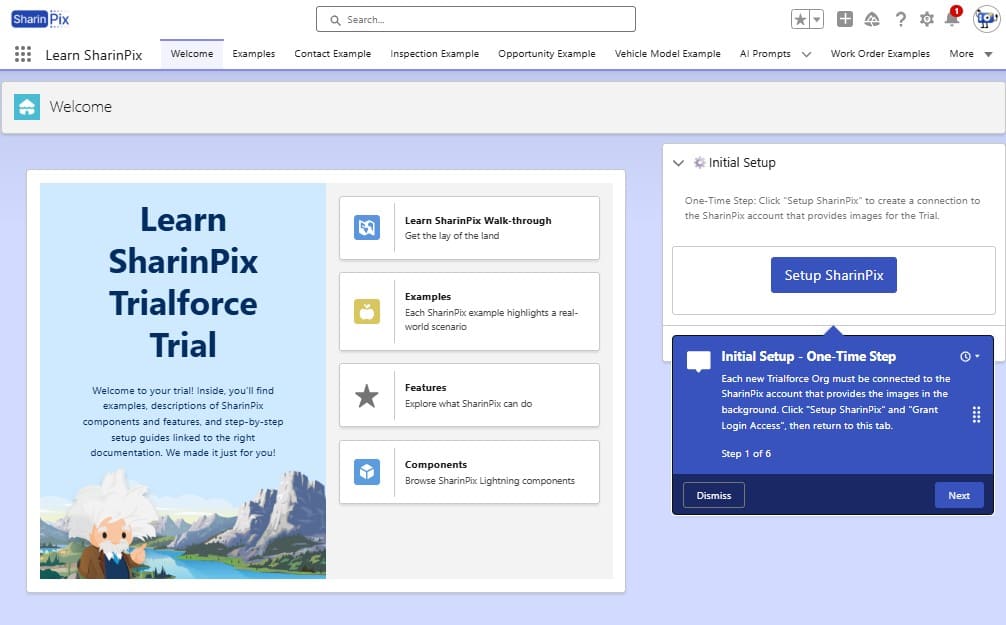
If your organization handles inspection-heavy workflows and wants to evaluate this approach in practice, the next logical step is hands-on testing. Forms by SharinPix is available for a free trial on AppExchange, with a preconfigured Trialforce org provided so teams can explore the inspection experience in a controlled environment.

Mykhailo is a Salesforce Certified Platform Administrator with development experience in the fintech field. Since 2021, he has gained the Double Star Ranger rank on the Salesforce Trailhead education platform, where he acquired 26 Superbadges in Business Administration, Process Automation, Security, and more. With a decade of expertise in consulting and compliance, he aspires to translate complex technical concepts into accessible content, helping organizations make the most of Salesforce. Mykhailo is passionate about using technology for everyday needs, enjoys reading sci-fi and non-fiction books, and playing video games. He also has an interest in history and outdoor activities such as hiking, camping, and kayaking.
 Previous Post
 Next Post