





Understanding Subscription Billing NetSuite
Subscription billing is not just recurring invoicing. In NetSuite, it is a structured contract engine built on SuiteBilling. It manages subscription terms, billing schedules, pricing models, renewals, amendments, and revenue timing. Every subscription follows a defined lifecycle from draft to activation to ongoing billing and possible change orders.
This structure is powerful, but it creates complexity when Salesforce must operate with the same contract data. Subscription billing NetSuite owns the authoritative contract state. Salesforce often drives quoting, renewals, automation, and forecasting. If these systems are not aligned, contract logic and CRM processes can drift apart.
Activating subscription billing Salesforce means more than syncing records. It requires exposing subscription lifecycle data in a way that respects activation states, billing schedules, and amendments defined in SuiteBilling. Done incorrectly, it leads to inconsistent contract status, reporting gaps, and broken automation.
In this article, you will find a clear explanation of how NetSuite subscription management is structured, what activation means inside SuiteBilling, how subscription billing processes depend on accurate contract states, and what steps are required to build NetSuite to Salesforce integration.
- How NetSuite Subscription Management Works at the System Level
- Preparing and Activating NetSuite Subscription Billing
- Why Integrate Subscription Billing to Salesforce
- Ways to Integrate NetSuite and Salesforce
- Step-by-Step: Connecting NetSuite with Salesforce
- Common Issues When Integrating NetSuite Subscription Billing
- Best Practices for NetSuite Integration
- FAQs on Integration in Salesforce
- Final Thoughts on Managing Subscription Billing in Salesforce
How NetSuite Subscription Management Works at the System Level
First, let’s look at how NetSuite delivers subscription billing through SuiteBilling. It is a contract-based framework, not a simple recurring invoice. Subscriptions use related records like subscription lines, billing accounts, schedules, and change orders to define revenue and lifecycle behavior.
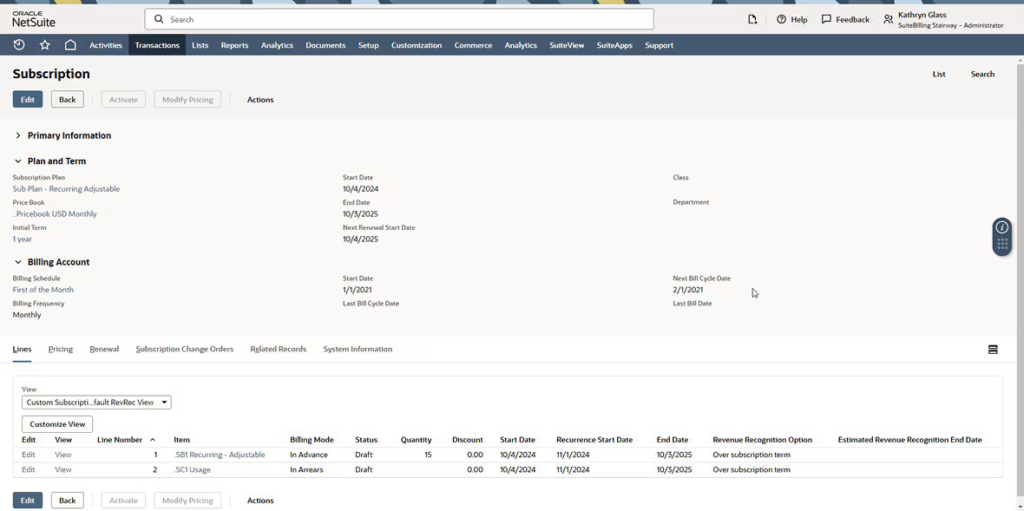
At the core of NetSuite subscription management are the following components:
1. Subscription Record
The subscription record represents the contract. It defines the customer, term dates, currency, and high-level agreement details. A subscription can contain one or more subscription lines, each representing a product, service, or pricing component.
The subscription record moves through lifecycle states such as Draft, Pending Activation, Active, Suspended, or Canceled. These states control billing eligibility and change order processing.
2. Subscription Lines and Price Plans
Each subscription line references a price plan. Price plans define how billing is calculated. NetSuite supports fixed pricing, tiered pricing, usage-based pricing, and time-based pricing models.
This is where NetSuite recurring billing logic is defined. Billing frequency, such as monthly, quarterly, or annual, is determined through the associated billing schedule.
3. Billing Accounts
Billing accounts determine how charges are grouped and invoiced. A single customer may have multiple billing accounts. Subscription lines are tied to billing accounts, which control invoice generation and consolidation.
This structure is critical because subscription billing NetSuite logic does not generate invoices directly from the subscription header. It relies on Billing Accounts and schedules to produce transactions.
4. Change Orders
Once a subscription is active, it cannot simply be edited. Modifications are processed through change orders. Change orders allow upgrades, downgrades, quantity changes, or term adjustments while preserving contract history.
This is one of the most important architectural details. Salesforce recurring subscription billing processes must respect that subscription amendments in NetSuite create new state records rather than overwriting existing ones.
5. Activation State
Activation is a formal system action. When a subscription moves from Pending Activation to Active, NetSuite validates required components and enables billing schedule execution. Only Active subscriptions generate billing transactions.
From a system perspective, activation represents the point at which the subscription becomes financially operative.
Understanding these components is essential before trying to connect subscription billing to Salesforce. Activation and any sync must respect lifecycle states, Billing Accounts, pricing, and Change Orders. Without this alignment, Salesforce records may be incomplete or inconsistent. Next, we will cover what activation means in practice and how to prepare SuiteBilling for synchronization.

Preparing and Activating NetSuite Subscription Billing
Activation in NetSuite is a formal system process that moves subscriptions from a draft or pending state to an active state. Only active Subscriptions generate Billing Schedules, support Change Orders, and can be reliably synchronized with Salesforce. Preparing SuiteBilling correctly is essential to avoid errors or incomplete data in downstream systems.
Step 1: Enable SuiteBilling features
Before creating or activating subscriptions, ensure that SuiteBilling features are enabled:
- Go to Setup > Company > Enable Features > Transactions.
- Enable Subscription Billing, Billing Accounts, and Time-Based Pricing.
- Save the settings.
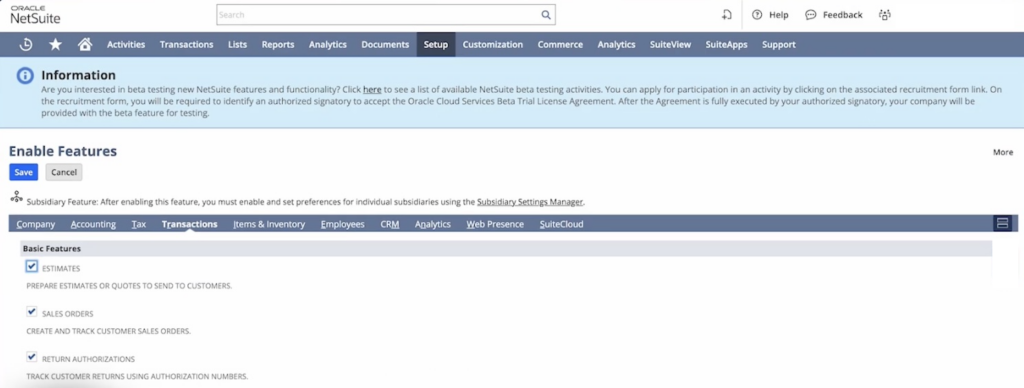
Enabling these features provides the necessary framework for creating subscriptions, billing accounts, and subscription lines. It also ensures that Change Orders and Billing Schedules function as expected.
Step 2: Configure Billing Accounts
Billing Accounts group Subscription Lines and control how invoices are generated. Configure Billing Accounts with:
- Customer association
- Default currency
- Billing frequency
- Payment terms
Each Subscription Line must be linked to a Billing Account to ensure accurate transaction generation.
Step 3: Create and validate Subscription records
Create Subscription records with all required fields:
- Customer and Billing Account
- Subscription Items and Quantity
- Price Plan and Billing Schedule
- Start and end dates
After creation, verify that the records contain valid data. Missing or incorrect fields can prevent activation or cause sync issues later.
Step 4: Activate Subscriptions
To activate a Subscription:
- Review the Subscription for completeness.
- Confirm that all lines and Billing Accounts are properly configured.
- Use the Activate function in SuiteBilling to change the subscription state to Active.
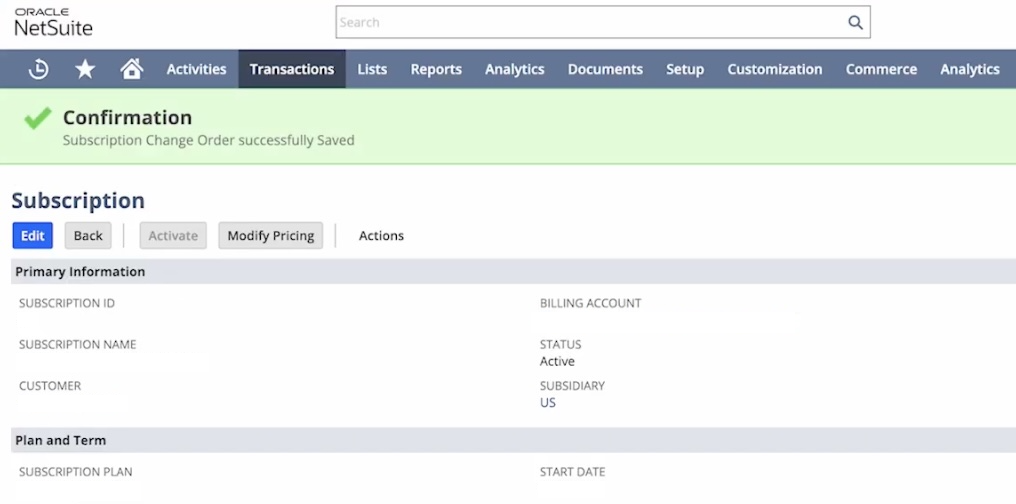
Step 5: Handle Change Orders
Once Subscriptions are active, any modifications must be processed as Change Orders:
- Upgrades or downgrades in quantity or product
- Term adjustments
- Price changes
Change Orders preserve history and ensure that subscription data remains consistent. They are critical for accurate Salesforce subscription billing synchronization.
Proper activation involves three key areas: enabling SuiteBilling features, configuring Billing Accounts, and creating complete Subscription records. Only after these steps can subscriptions be activated and safely synchronized with Salesforce.
Why Integrate Subscription Billing to Salesforce
Integrating subscription billing data into Salesforce gives teams reliable access to critical subscription information. With integration, teams can:
- Track subscription start and end dates, renewal cycles, and billing frequency.
- Link billing data directly to accounts and opportunities.
- Monitor revenue and forecast recurring income accurately.
- Reduce manual reconciliation and data entry errors.
- Support operational workflows and improve responsiveness to customers.
Insight:
The data integration market is projected to grow from $17.58 billion in 2025 to $33.24 billion by 2030, with forecasts above $33 billion by 2030, based Markets and Markets analysis. This rapid growth shows that integration is becoming core infrastructure.
Do you know why? The key driver is AI. AI systems require real-time, connected, and reliable data across ERP and CRM platforms. Without strong integration, AI cannot deliver accurate insights or automation.
Without integration, teams must rely on manual reports. The benefits only appear when subscription billing data is properly synchronized and mapped in Salesforce, allowing automation, reporting, and workflow processes to leverage up-to-date subscription information.
Ways to Integrate NetSuite and Salesforce
There are several approaches to integrate NetSuite and Salesforce data. Each option varies in complexity, flexibility, and maintenance needs.
- Custom build: Use NetSuite SuiteTalk and Salesforce APIs to build a custom integration. This requires development skills, careful field mapping, and ongoing maintenance. It offers full flexibility but can be resource-intensive.
- Integration Platforms (iPaaS): Integration platforms can provide prebuilt templates and flows for syncing Subscription records, Billing Accounts, and Subscription Lines. Flows can run on a schedule or near real-time depending on business requirements, but they require configuration and monitoring, and it is not a fully hands-off solution.
- Prebuilt Connector Apps: Native apps available on AppExchange offer ready-to-use integration between NetSuite and Salesforce. They synchronize active subscription records, link subscriptions to accounts, and ensure key ERP data is available in Salesforce with minimal setup.
For this article, available connectors on AppExchange were reviewed.
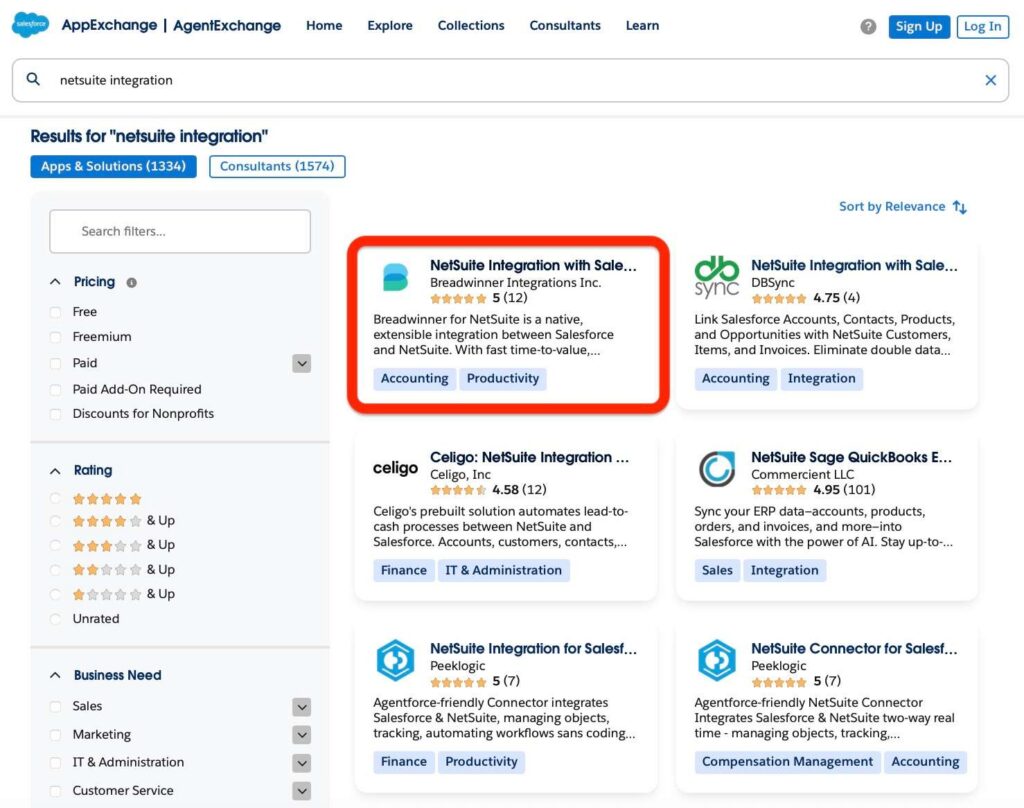
Breadwinner was selected as an example to show how a prebuilt NetSuite connector for Salesforce can synchronize data. It supports synchronization of NetSuite ERP data into Salesforce, including key records such as customers, orders, and billing information, and provides guided tools to create NetSuite records from Salesforce.
In addition, Breadwinner for NetSuite Agentforce extends these capabilities by enabling AI-driven workflows and actions on synchronized NetSuite data inside Salesforce, supporting automation and intelligent process execution.
In the next section, typical configuration steps, field mapping, and activation processes are demonstrated using this connector as an example.
Step-by-Step: Connecting NetSuite with Salesforce
Connecting NetSuite subscription billing to Salesforce involves preparing NetSuite data and configuring the integration to synchronize subscription records, billing accounts, and related objects. Typical steps include:
1. Verify SuiteBilling features activation: Ensure that SuiteBilling features are enabled in NetSuite. Check that Subscriptions, Subscription Lines, Billing Accounts, and Change Orders are active and complete. Confirm that the relevant customer accounts have subscriptions ready to sync.
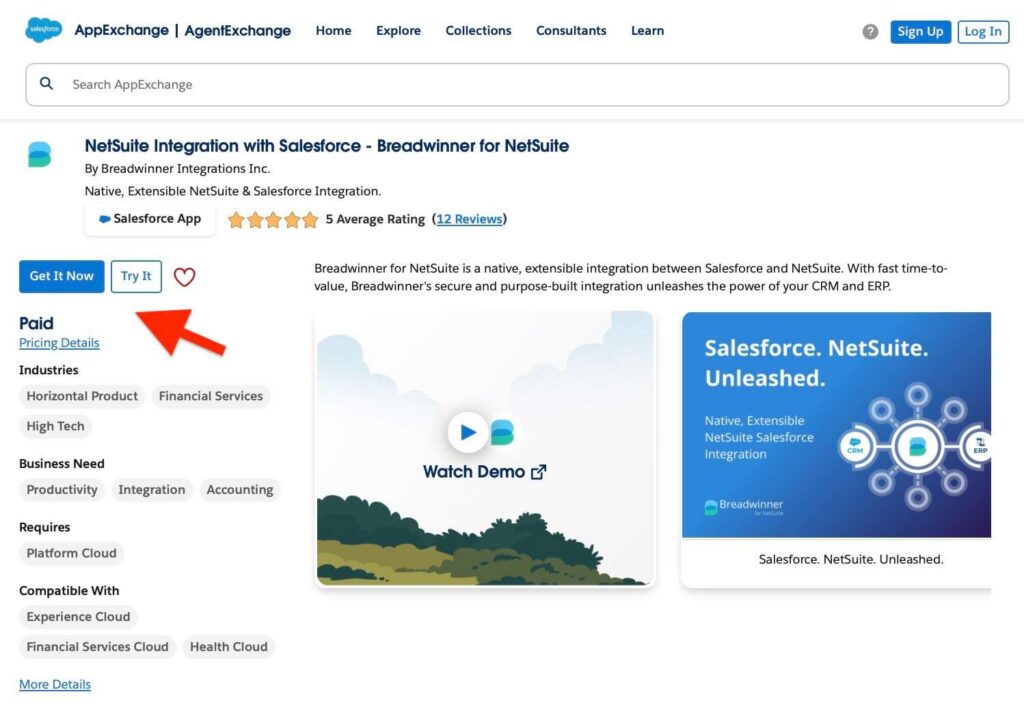
2. Install the Connector App: Get the Breadwinner for NetSuite app from AppExchange and install it in Salesforce. Assign the necessary permission sets to users who will configure or monitor the integration.
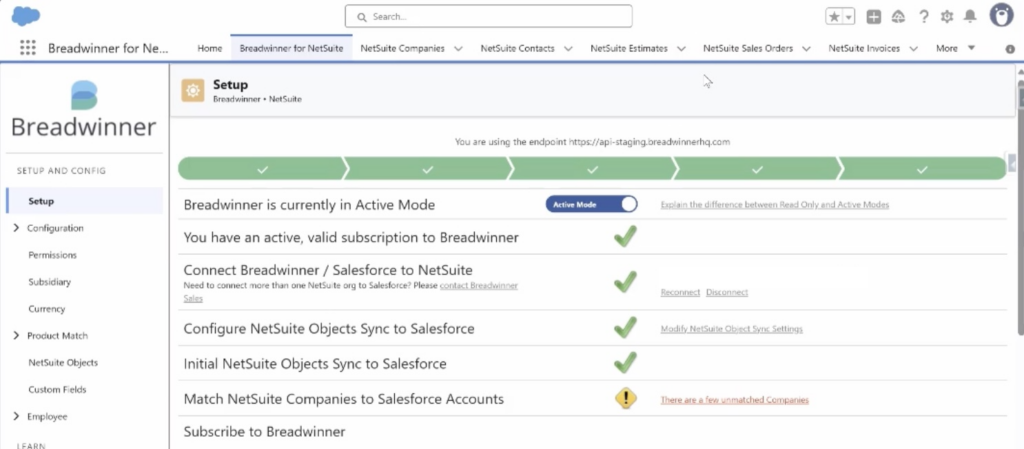
3. Connect Salesforce to NetSuite: Use a NetSuite connector to authenticate the connection. Test the connection to ensure it can retrieve the data.
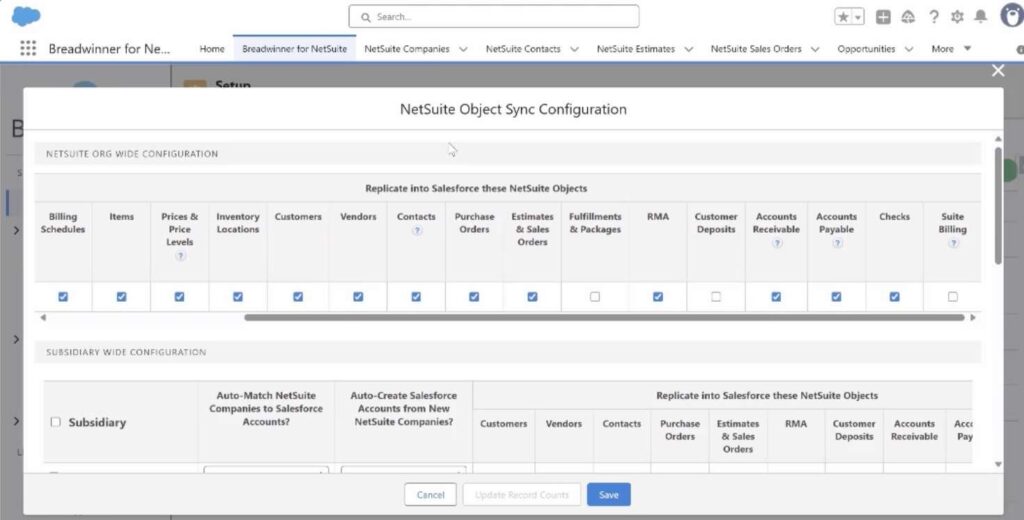
4. Map Objects: Select the objects to sync and map them to ensure accurate data flow.
5. Activate subscription billing from Salesforce: Use Breadwinner’s integration to trigger subscription billing and recurring revenue processes directly from Salesforce.
6. Validate and monitor: Run an initial sync, check a sample of subscription records, and confirm that the objects and fields are correctly populated.
The next sections cover common issues to watch for, best practices, and frequently asked questions when using subscription billing integration.
Common Issues When Integrating NetSuite Subscription Billing
The research shows that over 35% of companies report difficulties in maintaining consistent data flow across integrated systems. This becomes even more complex when subscription billing is involved.
Integrating NetSuite subscription billing into Salesforce introduces additional technical layers beyond standard CRM-ERP synchronization. Subscription records, billing events, renewals, amendments, and revenue schedules must remain fully aligned between both systems.
Understanding these issues helps prevent errors and ensures accurate subscription data.
Issue #1. Complex Change Order Handling
NetSuite treats every subscription amendment as a distinct change order. If the integration does not handle change orders correctly, Salesforce can show outdated or partial subscription states. Mid-cycle changes may generate multiple change order records, and missing one can create inconsistencies.
Issue #2. Increase in Related Records
SuiteBilling generates multiple associated records for each Subscription, including Subscription Lines, Billing Schedules, and Change Orders. Without careful sync design, Salesforce can become cluttered with excessive related records, complicating reporting and reconciliation.
Issue #3. Required Fields and Pricing Dependencies
Some SuiteBilling fields are mandatory for proper synchronization, such as price, quantity, or billing intervals on Subscription Lines. Missing or misaligned values can cause sync errors or incomplete records in Salesforce.
Issue #4. Billing Schedule and Price Plan Complexity
Subscriptions rely on structured Billing Schedules and Price Plans rather than simple recurring amounts. Integrations must account for these schedules; otherwise, billing amounts or periods in Salesforce may be inaccurate.
Issue #5. Split Change Orders
Certain subscription updates in NetSuite may be internally split into multiple change orders. Integrations that do not anticipate this behavior can leave Salesforce with incomplete or mismatched subscription data.
Issue #6. Relational Object Mapping Challenges
Subscription billing involves multiple linked objects: Subscription → Subscription Lines → Billing Account → Billing Schedule → Renewals. Each object must be correctly mapped to avoid orphaned or incomplete subscriptions in Salesforce.
Proactively addressing these subscription-specific issues ensures reliable sync, accurate subscription representation, and fewer operational disruptions for teams relying on Salesforce for billing and revenue management.
| Key Challenges in NetSuite Subscription Billing Integration | |
|---|---|
| Issue | Recommended action |
| Complex change order handling | Capture all change orders and update Salesforce Subscription status |
| Increase in related records | Handle related objects efficiently to avoid duplicates or orphaned records |
| Required fields and pricing dependencies | Populate all required fields and verify pricing data |
| Billing schedule and price plan complexity | Map billing schedules and Price Plans correctly |
| Split change orders | Track split change orders to maintain accurate Subscription data |
| Relational object mapping challenges | Map linked objects to prevent incomplete subscriptions |
Best Practices for NetSuite Integration
Following structured practices helps prevent errors and keeps subscription data accurate when syncing between NetSuite and Salesforce.
- Standardize Account and Subscription data: Ensure Salesforce accounts match NetSuite customers. Verify that Subscription records are complete and accurate to prevent duplicates or sync errors.
- Document field mapping and sync settings: Keep a record of which NetSuite objects and fields map to Salesforce objects and fields. Include custom fields and change order logic. This helps when troubleshooting or updating the integration.
- Monitor logs and errors regularly: Check integration logs for failed records, missing fields, or validation errors. Early detection prevents data issues and keeps Subscription records consistent.
- Train users on subscription data in Salesforce: Make sure users understand which objects store Subscriptions, Subscription Lines, Billing Accounts, and Change Orders. This helps prevent mistakes when accessing or reporting subscription information.
- Adjust sync frequency based on volume and limits: For large volumes of subscriptions or frequent changes, use batch or scheduled syncs instead of real-time to avoid hitting API limits.
- Review integration behavior periodically: Validate that Subscriptions, Billing Accounts, and Change Orders remain aligned between NetSuite and Salesforce. Update field mappings and settings after system or process changes.
- Plan for change orders and billing schedule dependencies: Ensure integration logic handles mid-cycle updates, amendments, and billing schedules correctly. This keeps subscription records accurate and avoids missing or incorrect data.
FAQs on Integration in Salesforce
This section answers common questions about connecting subscription billing with Salesforce and managing Subscriptions effectively.
1. Can Salesforce handle NetSuite subscriptions without a connector?
Salesforce does not natively import NetSuite subscription billing data. Without a connector or integration, Subscription records, Billing Schedules, and Change Orders must be tracked manually, which increases errors and workload.
2. How are NetSuite Change Orders managed in Salesforce?
Change Orders are synchronized as updates to existing Subscription records. The integration ensures that upgrades, downgrades, or cancellations in NetSuite are reflected in Salesforce, keeping Subscription status accurate.
3. What happens if required fields are missing in Salesforce?
If required Salesforce fields are empty or misaligned, the sync can fail. All mandatory fields, including Account lookups, Subscription start and end dates, and status, must have valid values before activating the sync.
4. How often should Subscriptions be synchronized?
The frequency depends on Subscription volume and system limits. Large volumes may require scheduled batch syncs, while smaller organizations can use near real-time updates. The goal is to prevent API limits from being exceeded while keeping data current.
5. Can multiple currencies cause issues during sync?
Yes. If Salesforce currencies do not match the currencies used in NetSuite Subscriptions, billing amounts or statuses may be incorrect. Aligning currencies between systems is essential for accurate subscription data.
Final Thoughts on Managing Subscription Billing in Salesforce
Synchronizing NetSuite subscription billing with Salesforce ensures that data remains accurate across systems. Proper preparation in NetSuite, careful field mapping, and structured activation steps are essential to avoid errors and maintain reliable subscription data.
Prebuilt connector apps, such as Breadwinner, provide a ready-made solution to sync NetSuite data with Salesforce. Breadwinner lets users activate subscription billing and trigger processes directly from Salesforce, while also synchronizing active data into Salesforce.
Following defined steps, monitoring logs, and addressing subscription-specific challenges like Change Orders, Billing Schedules, and required fields helps maintain accurate subscription information in Salesforce. Regular review, validation, and adjustment of sync settings ensure subscription data stays current and supports operational and financial workflows.

Antonina is a Salesforce Admin with six certifications: Salesforce Certified Platform Foundations, Platform Administrator, Platform Administrator II, CPQ Administrator, AI Associate, and Agentforce Specialist. She started working with Salesforce in 2021 as Intern Salesforce Developer. Now, a 2-Star Ranger on Trailhead, she continues to expand her skills and knowledge. She helps manage Salesforce systems, automate tasks, and improve processes. Antonina loves learning new things and exploring better ways to use technology. In her free time, she enjoys reading, playing sports, and exploring new tech ideas.
 Previous Post
 Next Post