





Salesforce CPQ End-of-Sale and the Shift Toward Revenue Cloud
Salesforce CPQ (formerly SteelBrick) has been one of the most widely used quote management solutions in the Salesforce ecosystem for years. Product configuration, pricing rules, guided selling, discount approvals, and quote generation became standard parts of many Salesforce sales operations.
That changed when Salesforce officially moved its legacy Salesforce CPQ managed package into End-of-Sale status for new customers and shifted its long-term revenue management strategy toward Revenue Cloud (Agentforce Revenue Management). Existing customers can continue using Salesforce CPQ, but Salesforce’s strategic product investment is now focused on its newer Revenue Cloud architecture.
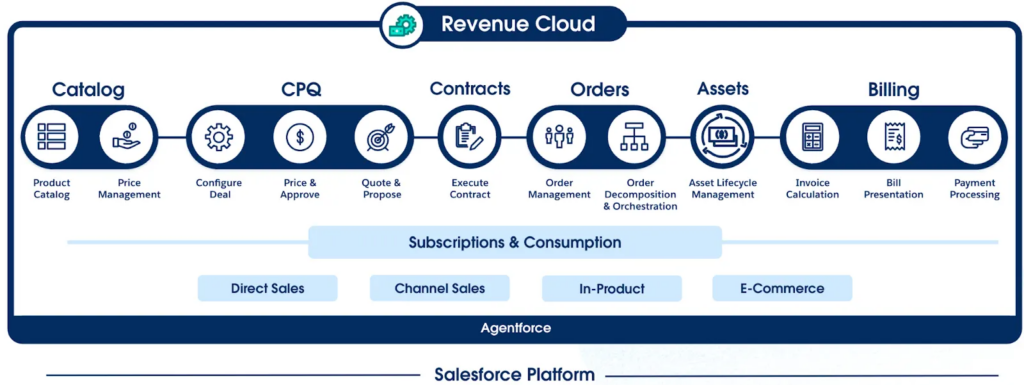
For Salesforce admins and RevOps teams, this creates an important operational question. Standard Salesforce Quotes are often too limited for structured sales processes, while Revenue Cloud implementations may introduce broader architecture, configuration, and administration requirements than some organizations actually need.
Having these challenges in mind, this article focuses on a Salesforce-native CPQ solution that helps teams manage quoting, pricing, and quote generation directly inside Salesforce, keeping the entire process connected and operationally consistent.
- Why Quote Management Becomes a Problem in Salesforce
- Looking for the Best CPQ for Salesforce
- appero quote Overview: A Salesforce-Native CPQ
- Configuring appero quote Inside Salesforce
- Core Capabilities of appero quote the CPQ Tool Salesforce
- Where appero quote Fits Best
- What Other Users Say About appero Salesforce CPQ Tool
- Pricing and Support Model
- Final Thoughts: When appero quote Is the Right Choice
Why Quote Management Becomes a Problem in Salesforce
Standard Salesforce Quotes work well for basic quote generation, but limitations appear quickly as sales processes become more structured.
Teams often need more control over pricing, discounts, approvals, quote presentation, and product configuration than standard functionality can provide out of the box. As a result, quote management frequently expands into spreadsheets, manually updated documents, custom approval flows, or external calculation processes.

Over time, this starts affecting both sales operations and CRM reliability:
- Pricing logic becomes inconsistent across sales teams,
- Different quote versions start circulating outside Salesforce,
- Discount validation requires manual review,
- Sales forecasting becomes less reliable when pricing decisions and quote activity are managed across disconnected processes instead of a centralized workflow inside Salesforce.
Salesforce Revenue Cloud addresses many of these operational challenges through CPQ and revenue management capabilities. At the same time, implementation scope, configuration depth, and long-term administration can become difficult to justify for organizations that mainly need reliable quote and pricing operations.
This is also where typical Salesforce CPQ questions emerge, especially around how to balance flexibility, governance, and system complexity in real sales environments.
This creates demand for alternatives often seen as the best CPQ app besides Salesforce, especially when teams need structured quoting and pricing without full enterprise revenue complexity. These tools keep quoting, pricing, approvals, and documents inside Salesforce while avoiding unnecessary system overhead.
Insight:
Market Growth Reports shows that the global Configure Price and Quote (CPQ) software market is valued at USD 3,916.68 million in 2026 and is expected to reach USD 11,246.35 million by 2035, growing at a CAGR of 12.3% during the forecast period.
A big reason for this growth is the need to automate complex sales processes. Around 58% of B2B companies already use CPQ tools to speed up quoting and reduce pricing mistakes.
At the same time, companies still face problems during implementation. About 39% of enterprises report delays or extra costs when connecting CPQ tools with existing CRM or ERP systems.
Looking for the Best CPQ for Salesforce
During research on AppExchange (now AgentExchange), the goal was to find a native to Salesforce CPQ solution that improves how quotes are created, priced, and managed. The focus was on solving real operational gaps in quoting processes without adding external systems or extra complexity.
Based on the challenges outlined earlier, a simple set of criteria was used to evaluate potential solutions:
- fully native to Salesforce, without relying on external systems,
- focused on quote generation and pricing execution inside Salesforce,
- flexible enough to support different pricing and discount scenarios,
- able to generate structured, usable quote documents,
- easy to adopt without heavy implementation overhead,
- designed for day-to-day sales and admin use, not just system architecture.
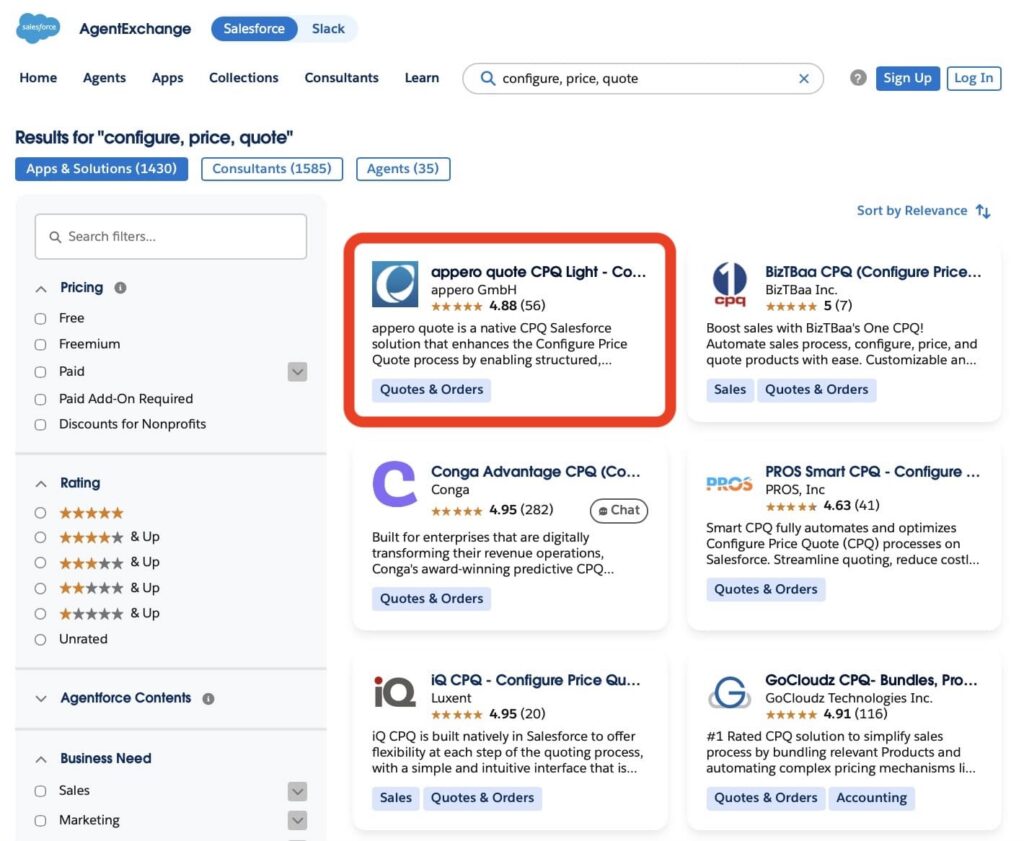
With this in mind, the Salesforce CPQ AppExchange search highlighted appero quote CPQ Light as a solution focused on quote creation and pricing execution directly in the org. Instead of expanding into a full revenue lifecycle platform, this CPQ tool in Salesforce concentrates on core quoting processes such as product configuration, pricing calculations, discount handling, and quote document generation within the environment.
This approach fits common Salesforce setups where standard Quotes are too limited for structured pricing and quoting needs. appero quote addresses this by keeping the entire quote process inside Salesforce, while supporting flexible pricing logic, structured quote outputs, and seamless integration with Salesforce-based approval and reporting processes.
appero quote Overview: A Salesforce-Native CPQ
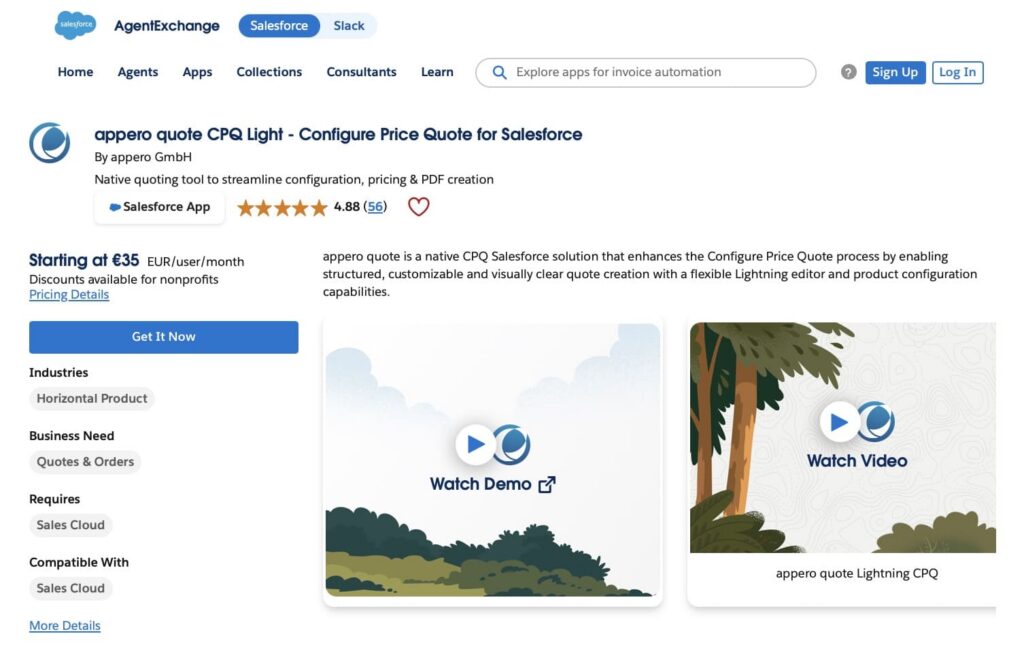
appero quote is a Salesforce-native CPQ application developed by appero GmbH. It runs directly in Salesforce Lightning, allowing users to create and manage quotes without leaving the platform.
The application focuses on four core areas: product configuration, pricing calculation, quote document generation, and quote process management. Its scope is centered on executing the quoting process rather than extending into a full revenue lifecycle platform.
This Salesforce quoting app operates natively and uses standard CRM data structures such as Opportunities, Products, and Price Books to manage quoting, pricing, and document generation without relying on external systems.
A strong part of the platform is quote document generation. Instead of static or rigid outputs, appero quote enables structured and branded quote documents to be created directly inside Salesforce, supporting consistent presentation and controlled formatting.
Overall, the product is designed to keep the entire quote lifecycle within the org while maintaining alignment with standard Salesforce data structures and operational processes.
Getting Started with appero quote
The process starts from Salesforce AppExchange, where appero quote is listed, and access is typically initiated through a “Get It Now” button.
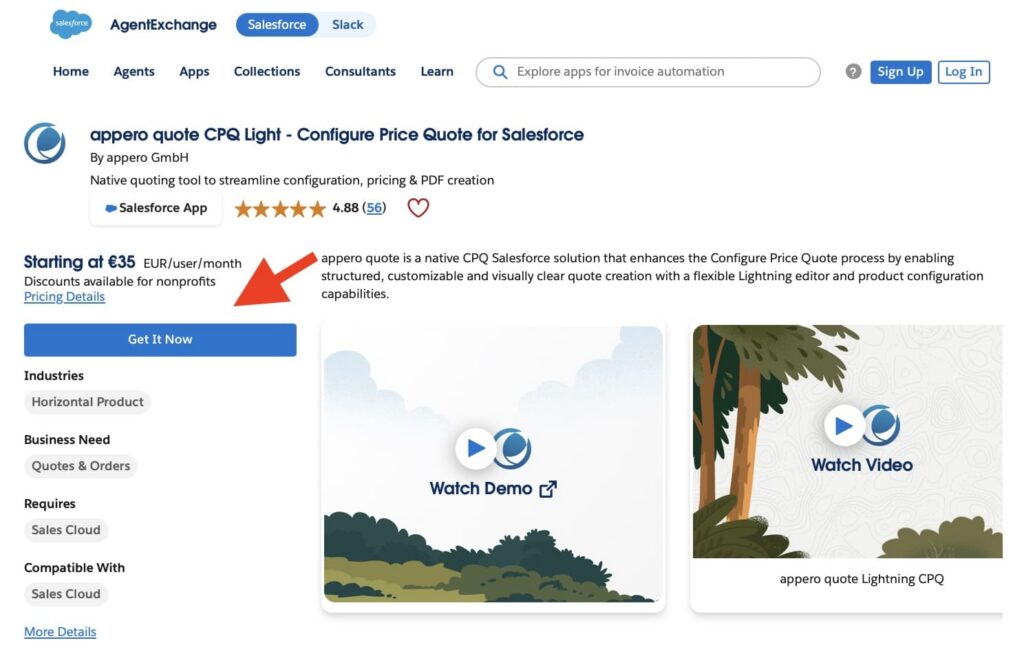
From there, the vendor engages with the organization to understand requirements and define the setup approach before deployment. You can also fill out the contact form on the vendor’s website to show interest in the app, and the team will get back with the next steps.
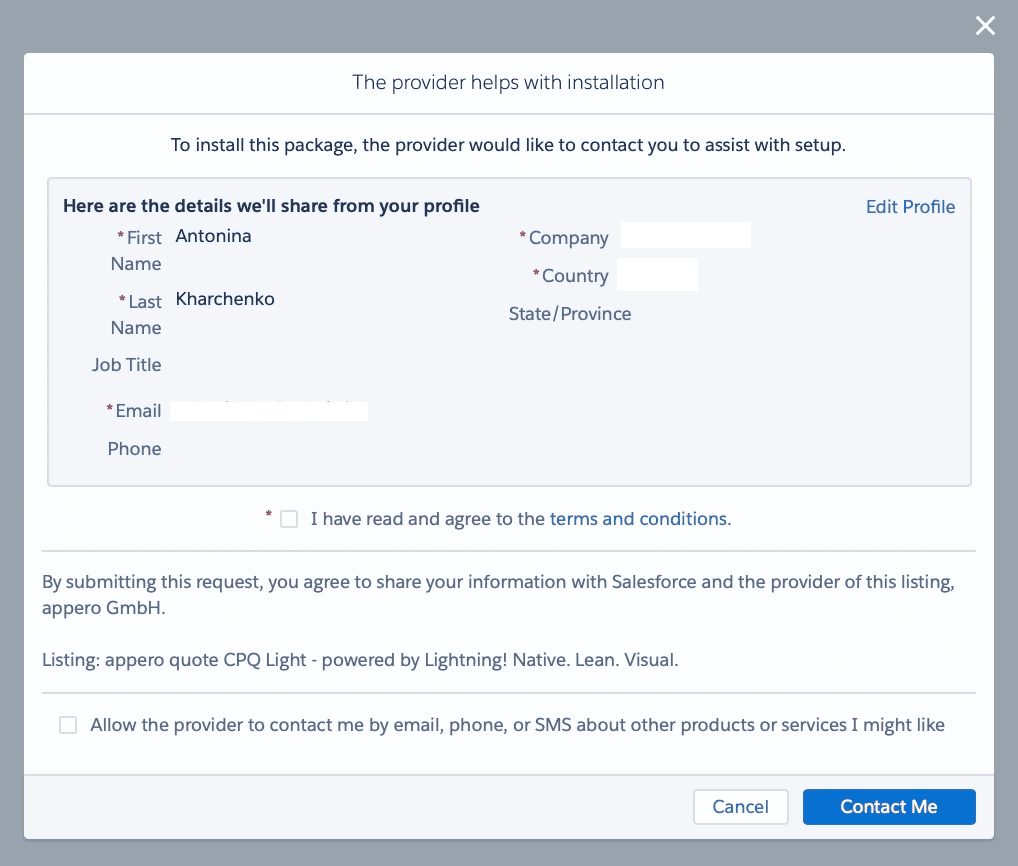
In practice, the AppExchange listing or the vendor website is just the first step. The setup itself is a structured configuration process that may involve pricing logic, product structure, and quote design.
Configuring appero quote Inside Salesforce
After installation, in Salesforce two applications are used: appero quote Setup and appero quote. The setup application is used to configure and manage the system, while the appero quote application is where users work with quotes, templates, and related records.
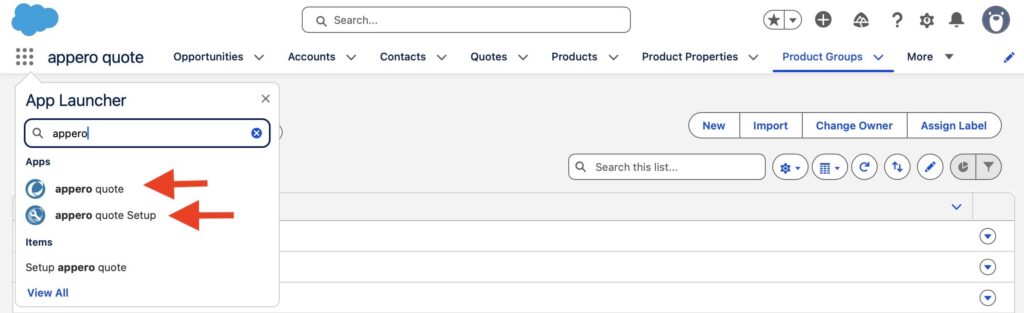
Inside appero quote Setup, the Setup Assistant guides the initial configuration after the numbering system is defined. It appears on the setup home page and provides a structured checklist for the main setup steps.
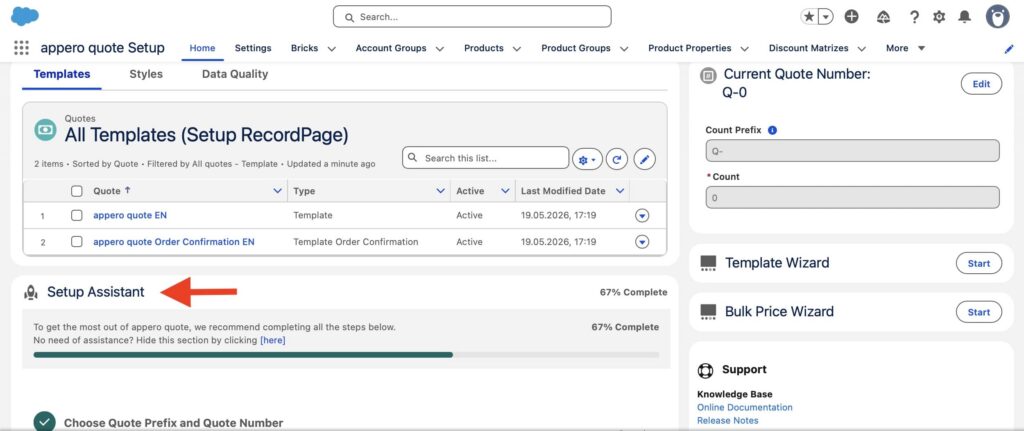
A progress bar shows how much of the configuration is completed, while “View Tasks” allows administrators to open and complete each step in order. This ensures the setup follows a clear sequence instead of being configured in separate, unconnected steps across Salesforce. Configuration steps include:
Step #1. Choose Quote Prefix and Quote Number.
The process starts by defining the quote numbering structure, consisting of a prefix and a starting number for all generated quotes.
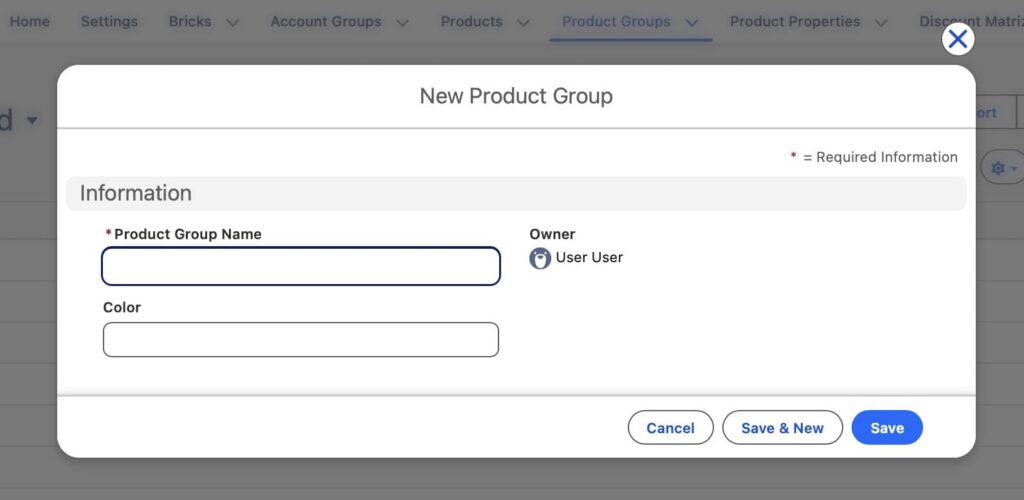
Step #2. Create Product Groups.
Product Groups define how products are organized and how quote values are calculated and displayed. They should be designed based on the structure of the product catalog.
The “Create Product Groups” action opens a list view where groups can be created. Once the first product group is created, this step is marked as complete.
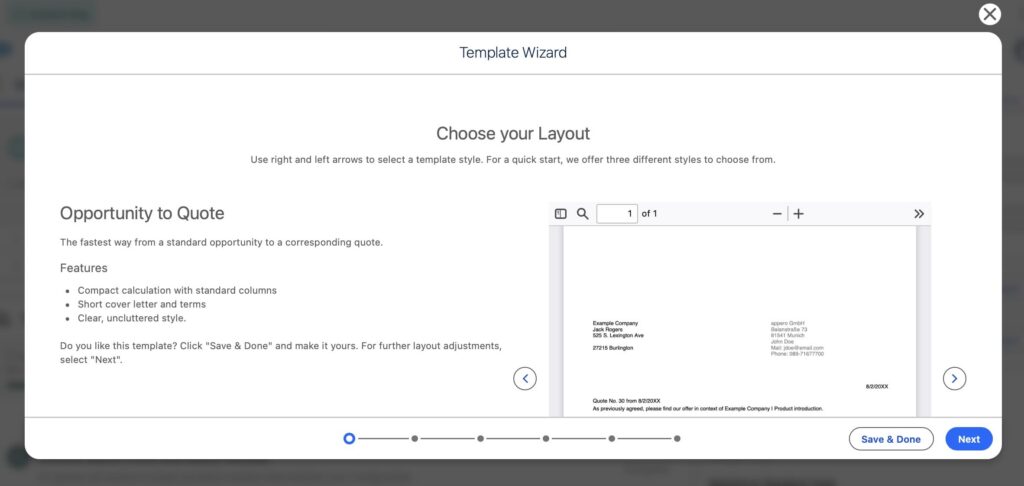
Step #3. Configure Quote templates.
The next step is building a Quote template. This defines how the available data is presented in the final quote document. The Template Wizard is used to speed up this setup.
Step #4. Add Quotes to Opportunity pages.
At this stage, users can enable Quote creation from Opportunity records by adding the “New Quote” button and the related lists to the page layout.
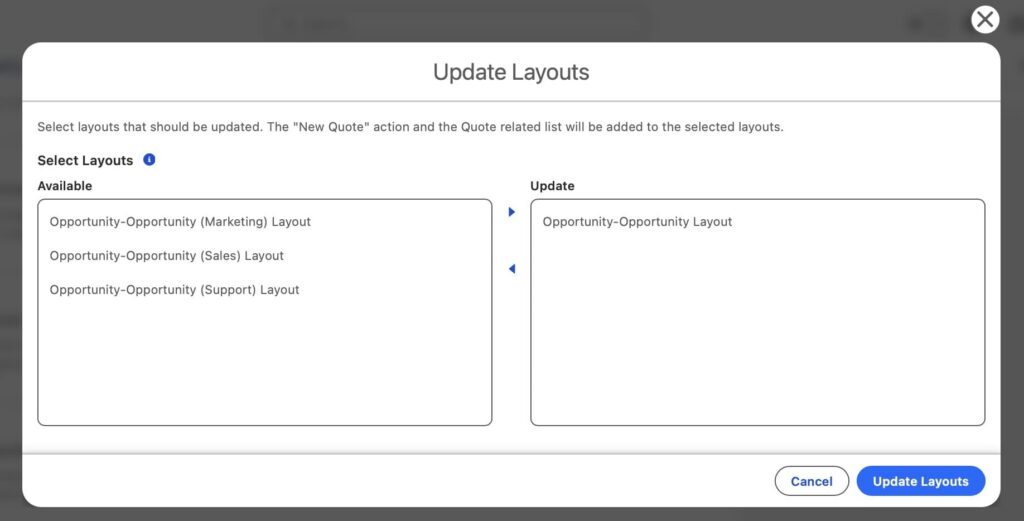
The setup tool provides a way to select which Opportunity layouts should include this functionality. Once selected, the system updates those layouts so users can start creating and viewing quotes directly from Opportunities.
Step #5. Enable access for users.
To work with the app, each user must be granted a license inside Salesforce. This is done in the package settings, where access is assigned per user. After at least one license is active, the system considers this step completed and unlocks the functionality for those users.
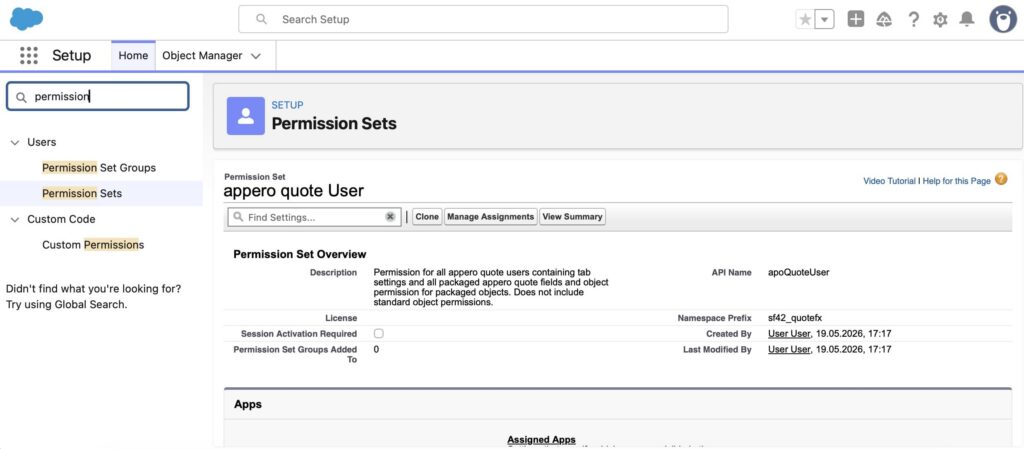
Step #6. Define user permissions.
Beyond licensing, users also need the correct permission setup to interact with quotes and configuration tools. This step is handled through Salesforce permission sets, where access is assigned based on roles.
Core Capabilities of appero quote the CPQ Tool Salesforce
This Salesforce AppExchange CPQ app focuses on quote generation, pricing logic, and document management within the Salesforce environment. The platform combines configurable templates, pricing calculations, product structures, and Salesforce-native administration into a connected quoting workflow.
To better understand how this CPQ app for Salesforce works in practice, let’s take a closer look at some of the main capabilities available inside the platform.
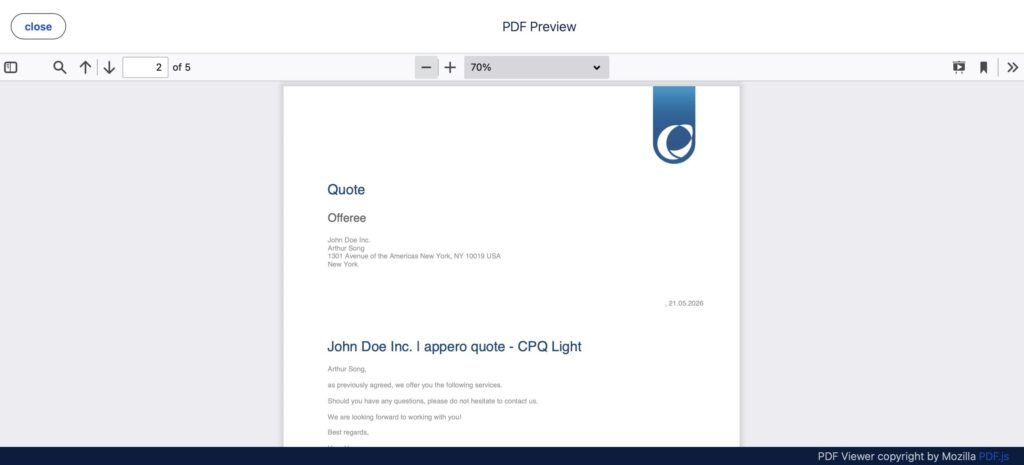
1. Quote Templates and Document Generation
Quotes are created using configurable templates that define structure, calculations, and document layout. Templates rely on Salesforce data and support dynamic values, allowing quote content to reflect real-time CRM information. They include calculation logic such as totals and grouped values, and can be adapted for different sales processes through reusable template components.
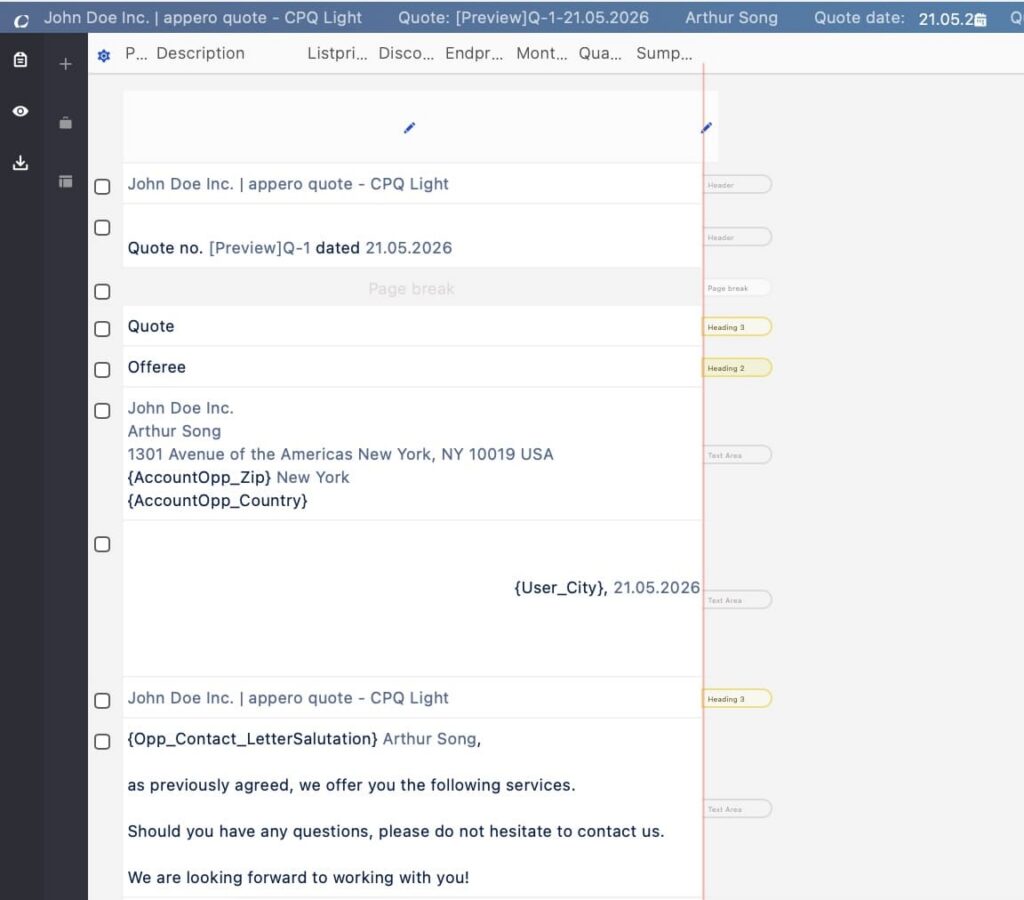
Visual formatting is handled separately through Styles, where branding elements like letterheads, layouts, and CSS-based design rules are defined. A template assistant can generate the CSS file automatically, so no technical skills are required for setup, while still allowing manual adjustments for more advanced formatting if needed. Documents are generated within the Salesforce environment, which keeps quote data connected to standard CRM records such as Opportunities and Products, and ensures alignment with Salesforce security and permissions.
2. Product Groups and Quote Structure
Product Groups define how products are organized within a quote and how they are processed during calculation and display.
They influence how items are structured in the quote, including grouping behavior, subtotal calculation, filtering, and how products are positioned in the editor. Product Groups can also be used to distinguish between different types of offerings such as services, licenses, support, or one-time charges.
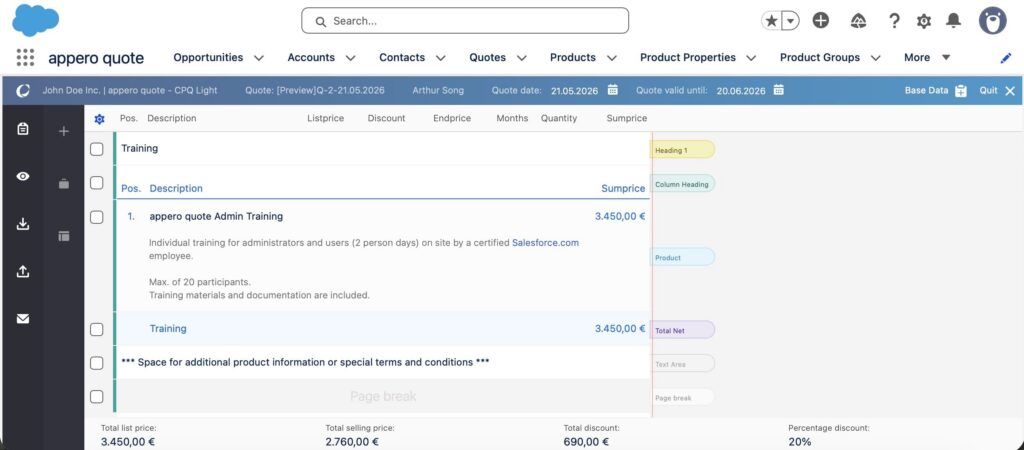
Because they form part of the underlying quote structure, the way Product Groups are designed has a direct impact on how consistent and manageable the quoting setup is over time.
3. Pricing and Calculation Features
appero quote includes configurable pricing and calculation logic directly inside the quote editor.
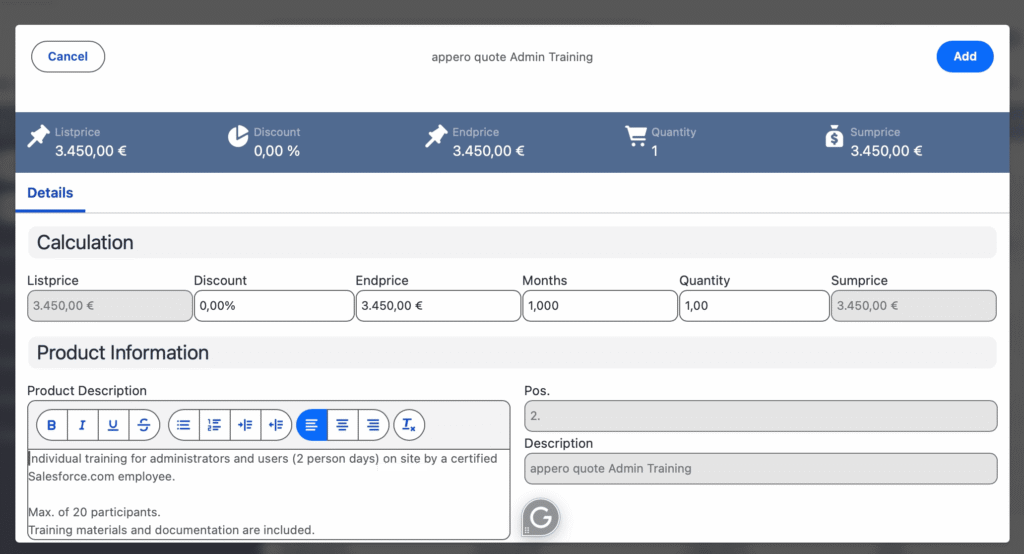
Supported functionality includes:
- discounts and surcharges
- grouped calculations and subtotals
- graduated pricing
- product dependencies
- accessory product relationships
- support cost calculations
Products can also include configurable properties such as editable quantities, editable pricing, default values, and minimum quantities.
4. Salesforce-Native Quote Management
The platform operates directly inside Salesforce Lightning and integrates with Opportunities, Products, Price Books, page layouts, and Salesforce permissions.
This keeps quote generation, approvals, reporting, and administration within the org instead of distributing quoting processes across external tools.
5. Setup and Administration Tools
appero quote includes a dedicated setup application with tools such as:
- Setup Assistant
- Template Wizard
- Bulk Price Wizard
These tools support configuration of templates, pricing structures, Product Groups, quote numbering, and Opportunity integration.
The setup area also includes a Data Quality section used to review configuration consistency and completeness.
6. Multi-Template and Multi-Brand Support
The platform supports multiple quote templates and document styles within a Salesforce org.
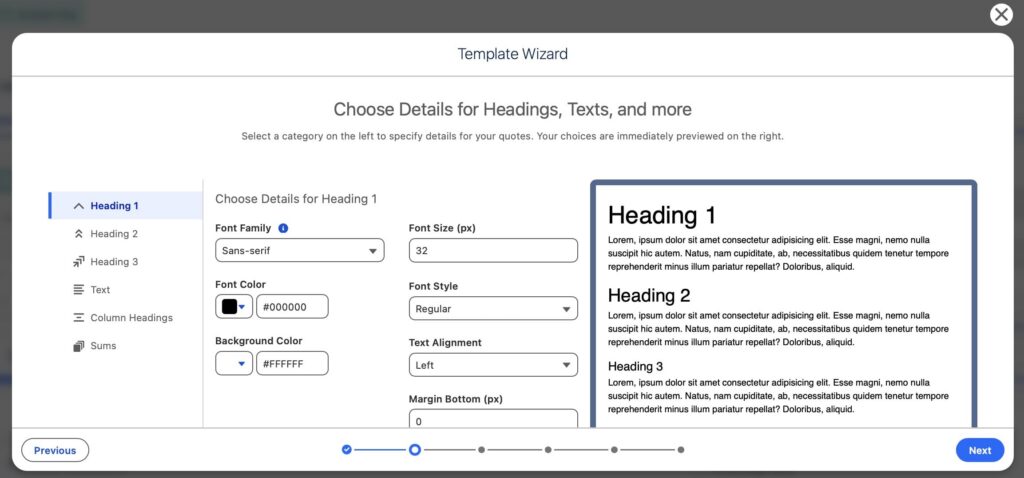
Templates define the structure and calculation logic of a quote, while Styles handle the visual design, including letterheads, page layout, and CSS-based formatting. Both are configured independently and can be combined in different ways depending on the required output.
This separation allows teams to maintain different document layouts and branding formats without changing the underlying quote structure.
Where appero quote Fits Best
appero quote is typically used in Salesforce environments where quote creation and pricing need more structure than standard Salesforce Quotes can provide. It is designed for setups where quoting must stay consistent, controlled, and fully connected to Salesforce data across the sales process.
| Where appero quote Fits Best | |
|---|---|
| Area | Description |
| Quote and pricing structure | Used in Salesforce setups where quoting requires more structure than standard Salesforce Quotes provide |
| Product catalog complexity | Works well where organizations manage larger product catalogs with many items and variations |
| Pricing and approval logic | Supports environments with defined pricing rules and structured discount approval processes |
| Salesforce-native quoting | Suitable for teams that want quoting to stay fully within Salesforce, connected to CRM data |
| Document consistency | Used where standardized quote documents are required across sales teams using templates and styling rules |
| Fragmented legacy processes | Often applied where quoting was previously managed through spreadsheets, manual calculations, or custom-built Salesforce solutions |
| Process consolidation | Helps unify quote creation and pricing into a single structured workflow aligned with Salesforce records |
What Other Users Say About appero Salesforce CPQ Tool
To understand how the product performs in real Salesforce environments, the AppExchange reviews were analyzed. The focus was on recurring patterns across user feedback rather than individual opinions.
Overall rating is 4.88 out of 5 (based on 56 reviews), with no 1,2 or 3 star scores among the ratings.
- Users consistently highlight that quote creation is simple and fast to adopt in day-to-day sales work.
- Many reviews mention strong usability, especially for sales teams working directly in Salesforce Lightning.
- Performance is described as stable, including in setups with more extensive product configurations.
- Deep Salesforce integration is repeatedly emphasized, with users noting that the solution feels fully embedded in their CRM process.
- Several users highlight the ability to create structured, visually consistent Quotes aligned with company branding.
- Template and configuration flexibility are mentioned, especially in relation to adapting quote layouts without heavy technical effort.
- Support is frequently described as responsive, practical, and solution-oriented during both implementation and ongoing use.
- Multiple reviews mention smooth rollout and positive collaboration during setup and adoption phases.
- Some users reference working with large product sets (hundreds of items) while still maintaining usability and performance.
Overall, the feedback shows a strong focus on usability, Salesforce alignment, and operational stability rather than complex configuration overhead.
Pricing and Support Model
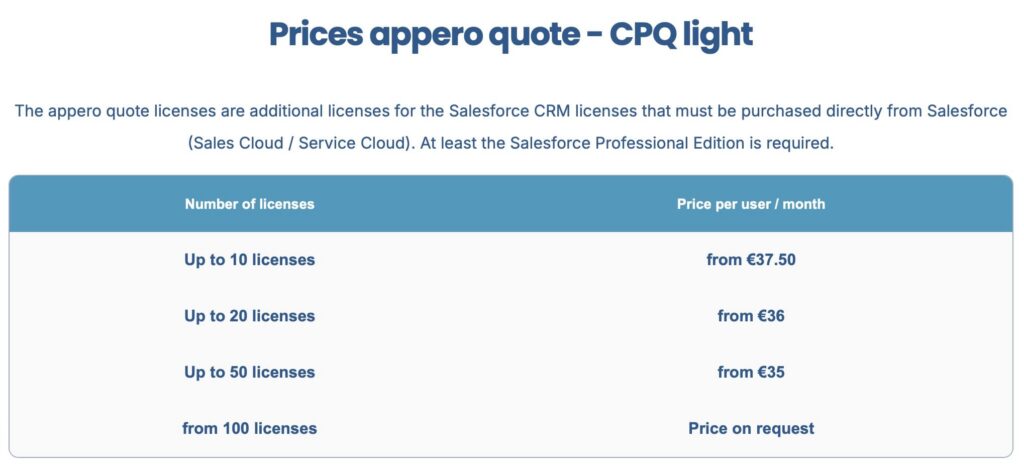
appero quote uses a per-user pricing model, starting at around €37.50 per user/month, with lower rates for larger user volumes.
It runs on top of an existing Salesforce org, so Salesforce licenses are required, with Professional Edition or higher is typically supported, depending on configuration.
Support is part of the vendor offering and includes:
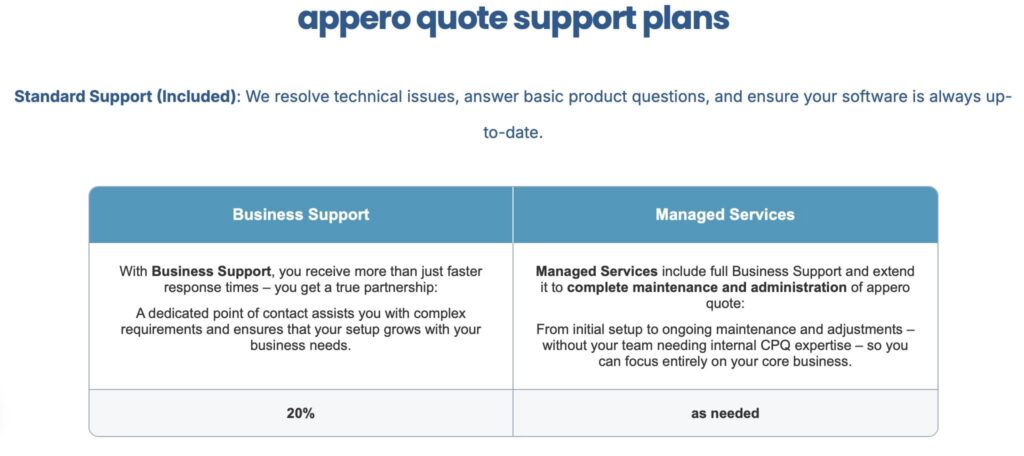
- onboarding support during setup,
- live demos,
- ongoing customer support,
- optional managed services for more complex implementations.
Overall, the model stays predictable in pricing and combines licensing with structured vendor support rather than a heavy enterprise contracting structure.
Final Thoughts: When appero quote Is the Right Choice
appero quote is not positioned as a broad revenue platform, but as a focused Salesforce CPQ app. Its value becomes clearer in environments where quoting needs structure, consistency, and control without introducing unnecessary system complexity.
From the analysis of features, setup approach, and user feedback, a few consistent points stand out:
- It supports structured Quote creation with defined pricing logic,
- Templates and styles help keep quote output consistent across teams,
- Product organization and configuration logic support more controlled quoting setups,
- Users consistently highlight usability and day-to-day efficiency,
- The solution is well-suited for Salesforce-native sales processes where speed and standardization matter,
- Pricing is straightforward, with volume discounts for larger deployments.
In practice, appero quote is best suited for teams that want reliable and structured quoting on the platform and Salesforce optimisation, without moving into heavier enterprise-level CPQ or revenue management layers.

Antonina is a Salesforce Admin with six certifications: Salesforce Certified Platform Foundations, Platform Administrator, Platform Administrator II, CPQ Administrator, AI Associate, and Agentforce Specialist. She started working with Salesforce in 2021 as Intern Salesforce Developer. Now, a 2-Star Ranger on Trailhead, she continues to expand her skills and knowledge. She helps manage Salesforce systems, automate tasks, and improve processes. Antonina loves learning new things and exploring better ways to use technology. In her free time, she enjoys reading, playing sports, and exploring new tech ideas.
 Previous Post
 Next Post