



Agentforce 360 and the Latest Salesforce Announcement
With the newly launched Agentforce 360 come important updates that expand what the platform can do. It now brings together AI agents, unified data, business applications, and Slack integration, allowing information and workflows to connect across departments.
Salesforce Agentforce 360 includes tools for designing and managing AI agents, a data layer that provides context from multiple sources, and integration with Salesforce apps so agents can operate directly within business processes. Slack integration enables users to interact with agents and take actions through conversations without leaving the collaboration space.
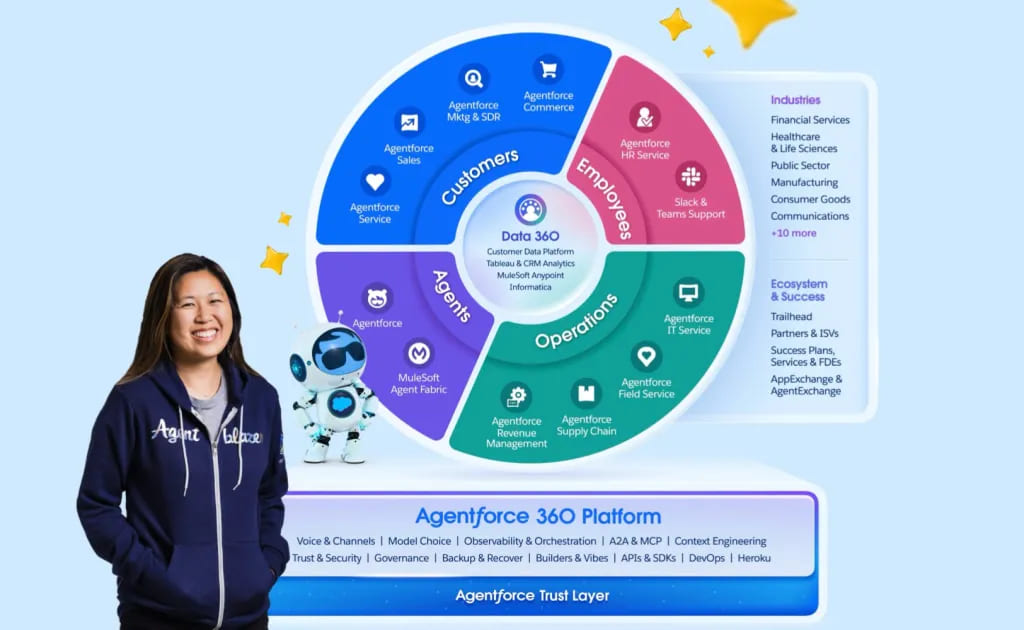
Agentforce 360, image from Salesforce
The platform supports what Salesforce calls the “agentic enterprise,” where AI helps employees work more effectively by understanding context, assisting in decision-making, and performing routine tasks. As a result, businesses can automate their processes to complete their workflows more efficiently, with fewer mistakes, and give employees the ability to manage their day-to-day tasks.
In this article, we will explore the key components and capabilities of Agentforce 360, the ways businesses apply the platform in their workflows, and how Salesforce native applications provide support for them.
- The Components and Capabilities of Agentforce 360
- How Businesses Will Use Agentforce 360 in Real Workflows
- 1. Agents Work with Full Business Context, Not Isolated Data
- 2. Agents Operate Directly Inside Customer 360 Applications
- 3. Agents Support Work Through Slack and Cross-System Workflows
- 4. Routine Tasks Are Handled Automatically, with Professionals Focused on Complex Work
- 5. Agents Surface Insights Across Teams and Systems
- Why Salesforce Native Apps Matter for Agentforce 360
- AppExchange Apps That Support Agentforce
- How Agentforce 360 Platform Works with Titan in Practice
- FAQs on Agentforce 360 Capabilities and Use Cases
- 1. How is Agentforce 360 different from standard Salesforce automation?
- 2. What sorts of tasks can Agentforce 360 perform?
- 3. How does Agentforce 360 use data?
- 4. Can Agentforce 360 work inside Slack?
- 5. Why are Salesforce-native apps critical to Agentforce 360?
- 6. Is coding required to use Agentforce 360?
- Conclusion: Connecting Salesforce Agentforce 360 and Apps in One Workflow
The Components and Capabilities of Agentforce 360
Agentforce 360 platform key features combine several key elements that give users more insight, context, and control over their work in Salesforce.
| Capabilities of Agentforce 360 | |
|---|---|
| Component | What It Does |
| Agentforce 360 Platform | The foundation for creating and managing AI agents that handle tasks, make decisions, and interact with users through voice or chat. Agents can be set up without coding. |
| Data 360 | Brings together structured data such as Salesforce records, fields, tables, and reports, along with unstructured data like PDFs, emails, notes, diagrams, and documents. This gives agents the context they need to act on accurate information. |
| Customer 360 | Salesforce applications include embedded agents that assist with tasks across sales, service, marketing, and other areas, allowing processes to be handled directly inside the apps. |
Together, these elements allow Salesforce Agentforce 360 AI agents to analyze data, act in context, and manage workflows across systems, including scenarios such as legal case management Salesforce processes. They help reduce repetitive work, maintain consistency, and let people focus on decisions that need human judgment.
How Businesses Will Use Agentforce 360 in Real Workflows
Agentforce 360 platform can be used inside everyday business processes, where data, decisions, and actions happen continuously across Salesforce and connected systems. Instead of working only as a background assistant, agents participate in workflows, respond to changes in data, and support employees at the moment work is happening.
1. Agents Work with Full Business Context, Not Isolated Data
Agentforce 360 brings together CRM data, reports, historical activity, and unstructured content such as emails, documents, and notes. This allows agents to understand the broader situation behind a task, so their responses, recommendations, and actions are based on complete and connected information rather than an isolated record or field.
2. Agents Operate Directly Inside Customer 360 Applications
AI agents are embedded into Salesforce apps used by sales, service, marketing, and operations teams. Instead of switching tools or manually checking multiple screens, users can get assistance, check information, and move tasks forward within the same application where they already manage their work.
3. Agents Support Work Through Slack and Cross-System Workflows
Agentforce 360 extends into Slack, where users can interact with agents in conversations, request insights, and trigger actions. This connects collaboration with execution, helping teams move from discussion to action while agents coordinate information and processes across Salesforce data and related systems.
4. Routine Tasks Are Handled Automatically, with Professionals Focused on Complex Work
AI agents can take over repetitive service or operational activities such as answering common questions, updating records, or progressing standard processes. More complex or sensitive situations are escalated to human users, so people focus where judgment and experience are most needed.
5. Agents Surface Insights Across Teams and Systems
Salesforce Agentforce 360 AI platform helps connect information from CRM data, internal documents, and external systems. Agents can bring relevant insights into the workflow, giving teams faster visibility and supporting decisions that involve multiple departments, not just one part of the business.
Insight:
What is the difference between Agentforce 360 and the Agentforce 360 Platform?
Agentforce 360 is Salesforce’s full portfolio, including Data 360, Customer 360 apps, and the Agentforce 360 Platform. It is the broader environment where AI, data, and apps work together.
The Agentforce 360 Platform is the core layer where AI agents are built, managed, and governed. It provides the tools, data access, and security needed to run agents across Salesforce.
Why Salesforce Native Apps Matter for Agentforce 360
Salesforce includes many tools and capabilities out of the box, but there are important workflow needs that it does not cover by itself. Native apps fill these gaps and make Agentforce 360 more effective in everyday work.
Native apps matter for Agentforce 360 because they:
- Native apps have capabilities that are not present by default within Salesforce: For example, tools for advanced form capture or dynamic document generation are not built into Salesforce by default. Without native apps, companies must handle these steps manually or with separate systems.
- Keep all data and activity inside Salesforce: When information is collected or documents are created outside the platform, employees often have to enter or update records by hand. By having native applications, this is eliminated because the entire process will occur within the CRM system.
- Create an automated experience on one platform: Agentforce can trigger workflows, update records, and take actions across Salesforce and native apps in one system. There is no need to switch between separate tools or copy data back and forth.
- Keep all actions related to your business processes consistent: When forms, documents, and related actions live inside Salesforce, every step can be tracked, reported on, and audited. This gives companies more control and visibility into how work progresses.
- Create richer experiences with agents: Since native apps participate in the same data layer as Agentforce, agents can reference form inputs, document status, plus linked records directly in workflows, making decision paths and outcomes clearer.
By using apps that extend Salesforce in areas the platform does not cover on its own, companies make Agentforce workflows more complete and reduce manual work. Native apps help keep automation reliable and ensure the work stays inside the CRM from start to finish.
AppExchange Apps That Support Agentforce
To show how native apps can extend Agentforce, we will use Salesforce First Web Studio by Titan as an example. This app integrates directly with Salesforce, enabling Agentforce to work with data and documents within workflows without leaving the platform.
Salesforce First Web Studio by Titan
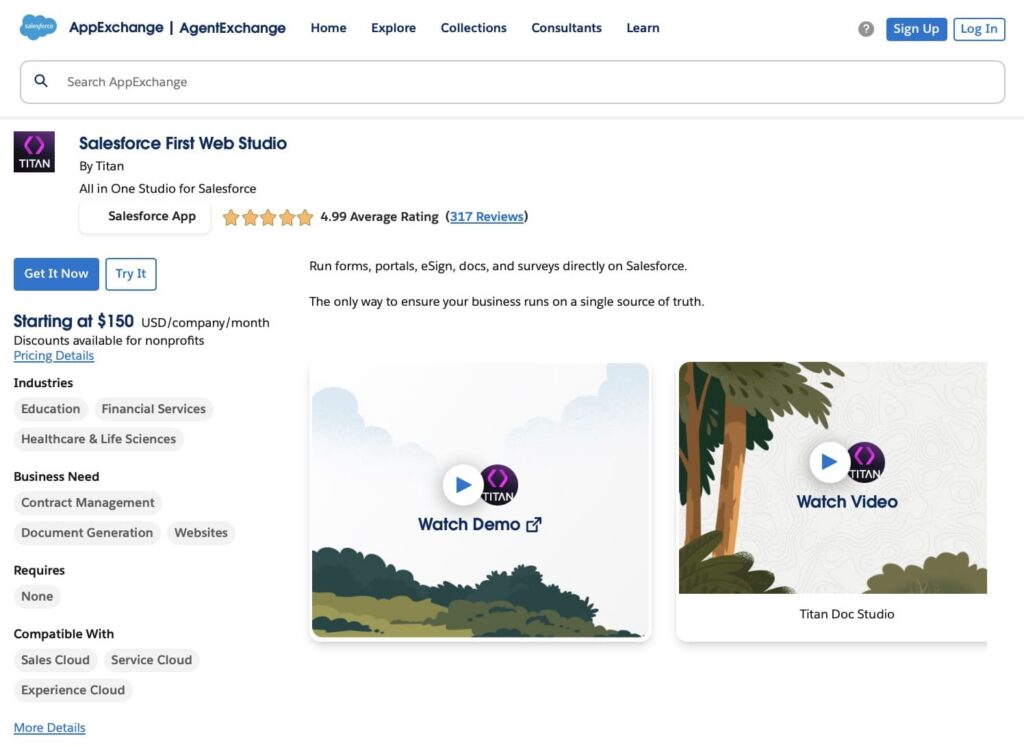
Salesforce First Web Studio is a native AppExchange solution that combines advanced forms and document generation directly inside Salesforce. Teams can collect data and produce business documents without external tools, while everything remains connected to Salesforce records in real time. This means submitted information and generated files are immediately available for workflows, automation, and reporting.
At the core, Web Studio includes both form and document capabilities:
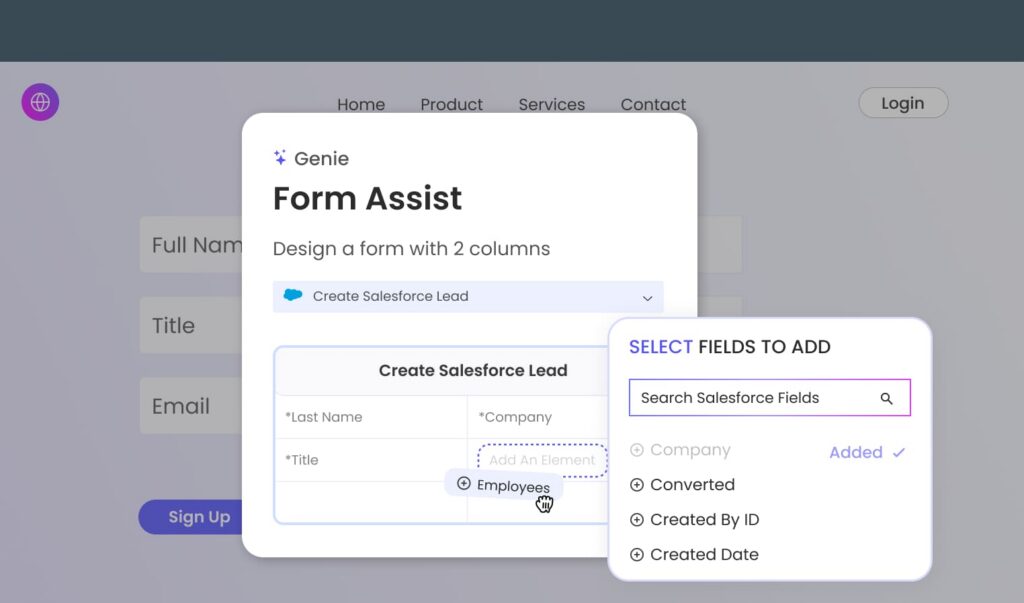
1. Dynamic forms: Build forms that read from and write to Salesforce objects. You can prefill fields from the current record, apply conditional logic based on user input or existing data, and link submissions directly to the right records. Submitted form data flows straight into Salesforce, so processes like record updates, auto-assignment, and workflow triggers can fire immediately.
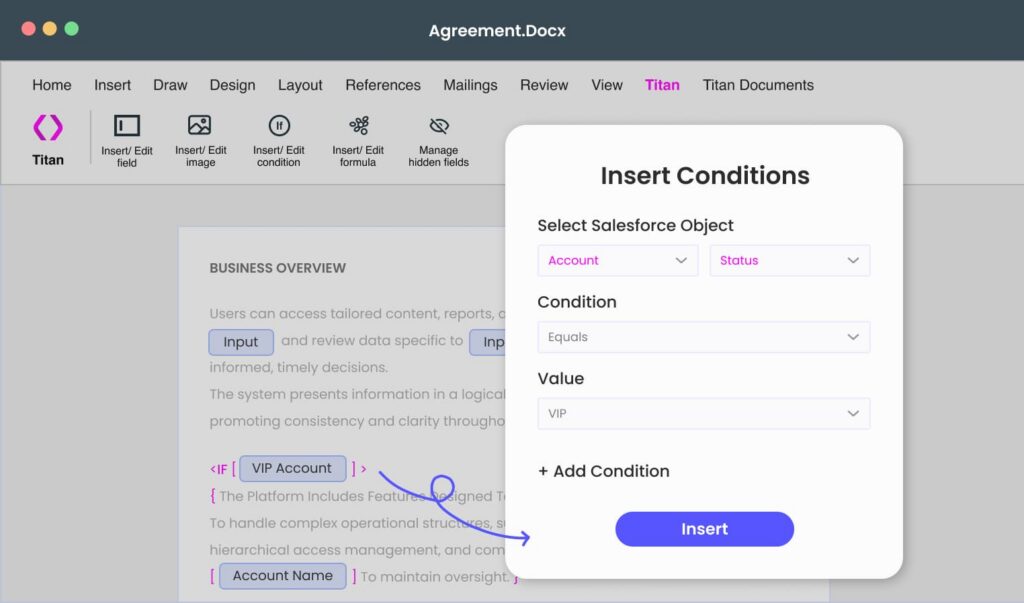
2. Document generation: Create business documents (like proposals, contracts, quotes, or invoices) inside Salesforce using templates that pull live CRM data. Templates can include rules that adjust content based on record values, and output formats include Word and PDF. Generated documents stay linked to their records and can be used in automation, approvals, or downstream processes.
Key features:
- Drag and drop builders for forms and document templates with no coding required
- Real-time integration with Salesforce so forms and documents update records immediately
- Conditional logic and dynamic content driven by Salesforce data
- Support for multiple objects and complex record relationships
- Ability to deploy forms and documents through web pages, portals, emails, or inside Salesforce
- Enterprise-level security and audit support with data governed in Salesforce
By keeping both data capture and document creation inside Salesforce, Salesforce First Web Studio gives Agentforce access to reliable, up-to-date record information and document context. This reduces manual work, keeps processes within the platform, and supports automation based on live CRM data.
How Agentforce 360 Platform Works with Titan in Practice
Agentforce 360 can handle processes across sales, service, and operations. When it works with Salesforce First Forms or Dynamic Docs, tasks happen automatically without switching tools or entering data manually. Let’s look at some examples to see how this works in real situations.
Using Dynamic Forms with Agentforce 360
Customers, partners, and employees frequently submit information using forms. When the form data goes into Salesforce, Agentforce can take the next steps automatically. Here are some examples:
- Salesforce updates the lead record when a new lead submits a contact form. Next actions, like assigning the lead, updating fields, or alerting pertinent users, can be triggered by a flow. Based on the automation rules and context, Agentforce can then take part in that process.
- When a customer submits a service request form, a case record is created in Salesforce. Agentforce can access that context, call existing workflows, and help by pulling related information or flagging cases that need human oversight, letting service processes proceed with less manual work.
- When an employee submits an internal operational or compliance form, the information updates records that run Salesforce automation. Agentforce can engage with these workflows, validate key data, and invoke related automation such as task creation or alerts, so work moves forward without manual checks.
Using Document Generation with Agentforce 360
Documents are a core part of many Salesforce processes, such as proposals, agreements, internal approvals, and customer communications. When documents are created and stored directly inside Salesforce, they become part of the same data environment that Agentforce agents can work with. This kind of Salesforce-connected document handling is what Titan Dynamic Docs is made for.
- A sales document, such as a proposal, is generated from Salesforce record data. Salesforce automation and agent logic can advance the process once the document is linked to the opportunity, for instance, by updating record information based on workflow rules or alerting the appropriate user.
- An internal document used in an approval process is created and stored in Salesforce. Because it is tied to records, workflow steps such as approvals or status updates can be triggered, and Agentforce can operate within those same processes where agent actions are configured.
- Customer-related documents are kept with the relevant Salesforce records. This allows agents and automation to use consistent, record-level information when supporting service or operational processes that depend on documented details.
In this way, document generation and management inside Salesforce becomes part of the same workflow environment where Agentforce functions, instead of being handled in separate tools.
FAQs on Agentforce 360 Capabilities and Use Cases
Agentforce 360 introduces new terms and platform changes, which may seem complicated at first. We have provided answers below to some common questions regarding how these work, where they fit into the Salesforce platform, and how they can integrate with your applications and workflows.
1. How is Agentforce 360 different from standard Salesforce automation?
Standard automation follows fixed rules and flows. Agentforce 360 uses AI agents that evaluate context, interpret data, and decide on the appropriate actions to take within pre-defined parameters.
2. What sorts of tasks can Agentforce 360 perform?
Agents are capable of updating records, reviewing information, creating triggers for follow-up actions in the workflow, responding to requests, and performing multi-stage processes with multiple Salesforce objects and applications in a single workflow.
3. How does Agentforce 360 use data?
Through Data 360, agents can work with both structured CRM data and unstructured content such as documents, emails, and notes. This helps them understand context before acting.
4. Can Agentforce 360 work inside Slack?
Yes. Agents can operate in Slack conversations, provide information, and trigger Salesforce actions without users needing to switch applications.
5. Why are Salesforce-native apps critical to Agentforce 360?
When working with native applications, data and documents reside directly in Salesforce. As a result, Agentforce 360 is able to leverage that information in workflows without relying on manual updates or external tools.
6. Is coding required to use Agentforce 360?
Many use cases can be configured using Salesforce tools. However, advanced scenarios or integrations may require the expertise of a technical specialist.
Conclusion: Connecting Salesforce Agentforce 360 and Apps in One Workflow
By integrating AI agents, data, and actions in the same location where daily operations already take place, Agentforce 360 Salesforce transforms the way work is done and supports a wide range of Salesforce Agentforce use cases. Agents respond to more than one task at a time. They take the next step in a process, involve the appropriate person when necessary, and keep work going by using CRM data, activity history, and business context.
Salesforce native apps play an important role in this setup. Tools like Salesforce First Web Studio make sure that important information and documents are created and stored directly in Salesforce, not in separate systems. As a result, rather than depending on manual updates or disconnected files, Agentforce can use that data as part of ongoing workflows.
When Agentforce and native apps work together, processes can operate with fewer manual steps, better visibility, and more uniform data, form, and document handling across operational, sales, and service tasks. These outcomes reflect key Agentforce 360 platform benefits, where agents, data, and workflow actions are connected inside Salesforce, and processes continue based on real-time information.
If you want to see how this works in practice, Titan’s Salesforce First Web Studio is a practical way to start extending Agentforce workflows inside your own Salesforce environment.

Antonina is a Salesforce Admin with six certifications: Salesforce Certified Platform Foundations, Platform Administrator, Platform Administrator II, CPQ Administrator, AI Associate, and Agentforce Specialist. She started working with Salesforce in 2021 as Intern Salesforce Developer. Now, a 2-Star Ranger on Trailhead, she continues to expand her skills and knowledge. She helps manage Salesforce systems, automate tasks, and improve processes. Antonina loves learning new things and exploring better ways to use technology. In her free time, she enjoys reading, playing sports, and exploring new tech ideas.
 Previous Post
 Next Post