



When Salesforce Marketing Cloud Feels Slower than It Should
Have you ever opened Salesforce Marketing Cloud to create a new email and realized that finding the right image takes longer than building the message itself? Many teams keep assets across different systems, such as cloud drives, internal folders, and several DAM tools. Salesforce sits at the end of this process, waiting for uploads. The result is the same almost every time: downloading files, checking versions, renaming images, and switching tabs just to locate one approved visual.
Insight:
Recent data shows how common this problem is.
The 2025 MuleSoft Connectivity Benchmark Report notes that 66% of organizations do not provide an integrated user experience across their channels, which reflects how often teams work with disconnected content sources instead of a single structured library.
The same report shows that large enterprises use an average of 897 applications, and only 10% of respondents report facing no challenges from data silos.
The rest deal with constant fragmentation in their systems, making tasks like finding the right asset slower and less predictable.
These Salesforce digital asset management challenges appear in everyday work and slow down even simple tasks. A reliable Salesforce digital asset management system helps reduce these problems, and this is where choosing the right DAM integration solution becomes important.
- Why DAM Integration Matters for Salesforce Teams
- DAM Solutions on AppExchange: CI HUB and Sitecore
- CI HUB: Unified Access to External Libraries Inside Salesforce
- Sitecore Salesforce Connector: Enterprise DAM Solution
- Feature-by-Feature Comparison: CI HUB and Sitecore
- CI HUB vs Sitecore: Pricing Comparison
- Setup and User Experience Comparison
- Key Considerations When Choosing a Salesforce DAM Integration Tool
- Conclusion: Who Comes Out on Top?
Why DAM Integration Matters for Salesforce Teams
When Salesforce teams work with assets stored in many different places, even simple tasks start to take more time. A marketer may prepare an email in Content Builder but still needs to leave the workspace to search through cloud drives or a separate DAM tool. Switching between systems slows down the workflow and increases the chance of using the wrong version. This is especially noticeable during campaigns with tight deadlines, where every extra step adds more friction.
A connected approach solves this by giving users access to approved files directly where they build their emails and landing pages. Instead of moving images around or downloading new versions, the right asset appears when it is needed. This supports consistent branding and removes repeated work for both marketers and designers.
When companies look for ways to improve their daily process, they often discover that Salesforce DAM integration brings the most visible improvement. It turns separate tools into one connected workspace and reduces the time needed to prepare each email, message, or template.
DAM Solutions on AppExchange: CI HUB and Sitecore
When teams look for a way to connect external asset libraries to Salesforce, the AppExchange is usually the first place they check. While reviewing it for tools that connect external asset libraries to Salesforce Marketing Cloud, we found a few options designed specifically for controlled asset access inside Content Builder.
CI HUB and Sitecore stood out because both offer direct integrations, support structured asset workflows, and are already used by teams that work with large libraries of approved visuals. Each solution follows a different path, which makes them a practical pair for comparison when evaluating how Salesforce teams can manage and use their assets more efficiently.
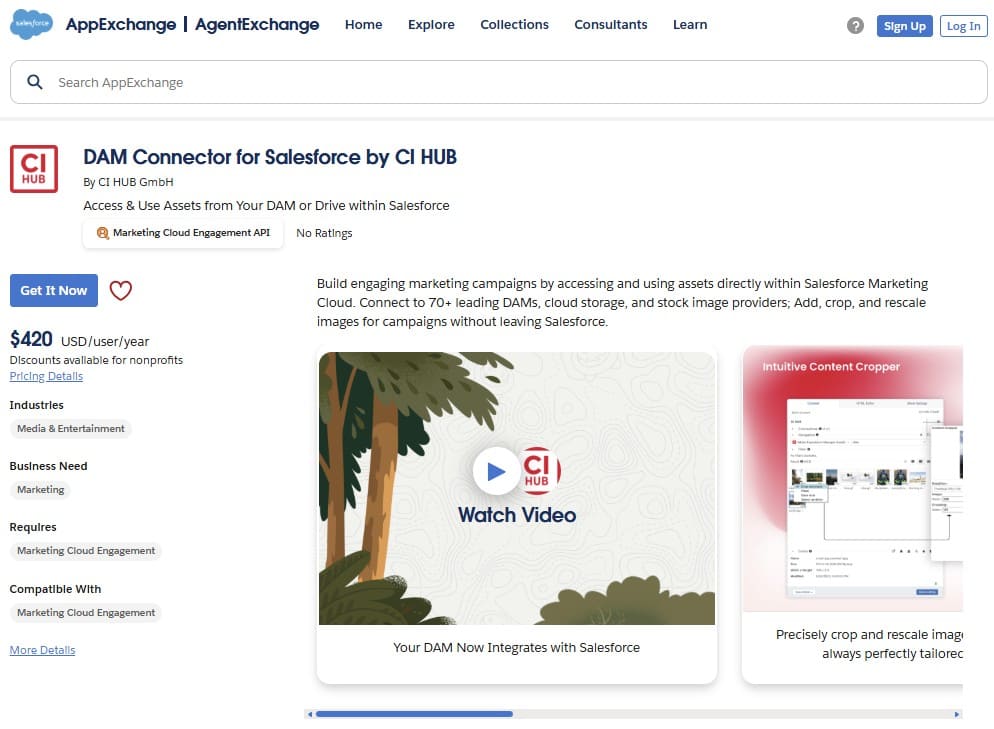
Although their approaches differ, each app aims to solve the same problem: giving Marketing Cloud users a simple way to find and use the right file. CI HUB focuses on broad connector coverage for Salesforce DAM, while Sitecore extends its existing content platform with a dedicated block for Sitecore Salesforce use cases. The available materials also highlight active Sitecore Salesforce integration, which supports teams that already rely on Sitecore’s broader content management tools.
CI HUB: Unified Access to External Libraries Inside Salesforce

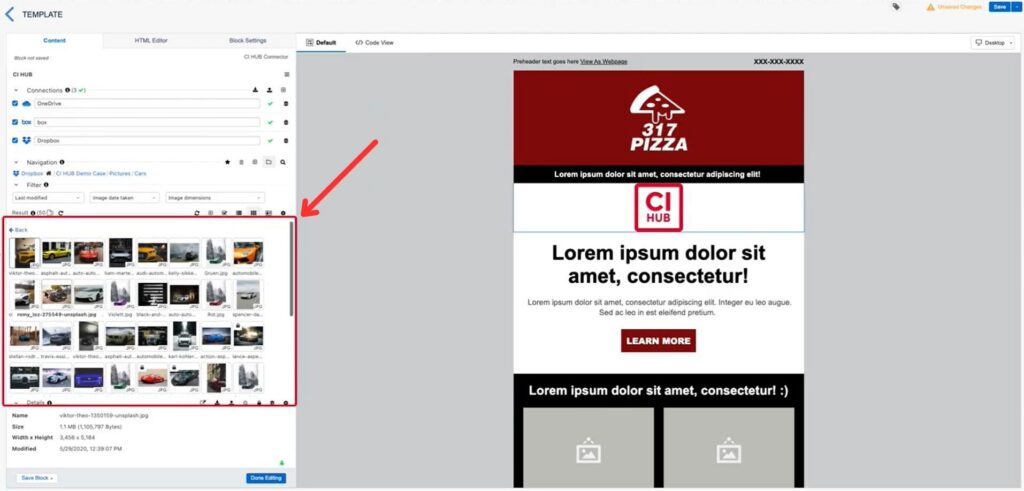
CI HUB Connector is designed to give Salesforce Marketing Cloud users a single access point to all approved assets. Instead of moving between cloud drives or separate DAM platforms, teams can open a panel inside Content Builder and reach files stored in Bynder, Brandfolder, Dropbox, Google Drive, SharePoint, and many other systems, including Sitecore itself. This makes daily work faster and keeps asset usage consistent across campaigns.
A key advantage of CI HUB is that it connects to more than seventy external systems while keeping the interface simple. Users can search, filter, browse folders, or open asset details without leaving their email or page template. According to the CI HUB User Guide, the connector keeps users in sync with their asset repositories and helps manage file revisions efficiently.
Benefits of CI HUB
- Works with many DAM and cloud providers.
- Gives access to approved assets directly inside Content Builder.
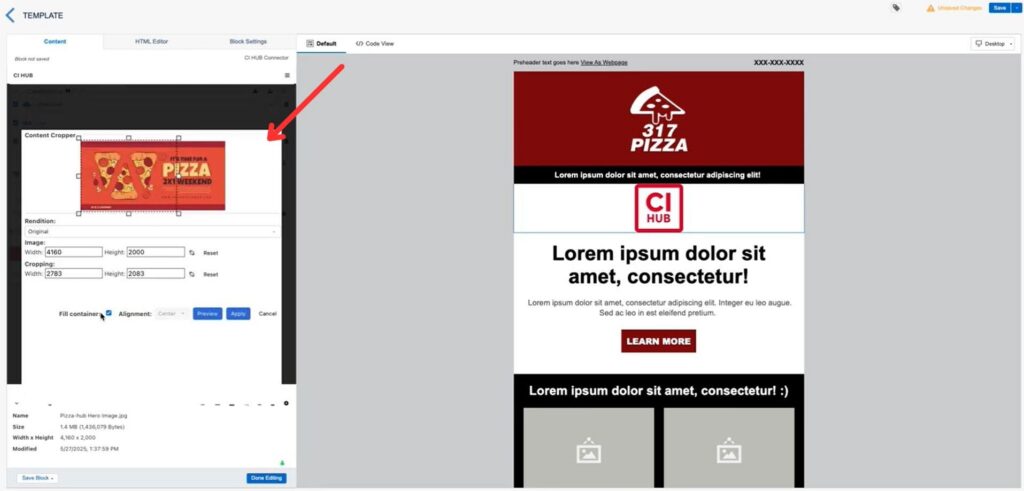
- Supports cropping, resizing, and local edits without switching tools.
- Reduces repeated uploads and version confusion.
- Helps teams use structured asset libraries during message creation.
How CI HUB Works
Imagine a team preparing a seasonal campaign. Without a connector, they download images from several storage systems, rename them, and upload them to Marketing Cloud. With CI HUB, they open the panel, type a keyword, check versions, and place the correct file into the email in a few seconds. This reduces manual steps and supports structured work with DAM Salesforce sources.
Who Benefits Most
CI HUB Connector Professional fits teams that use multiple content sources and want a consistent way to manage assets inside Salesforce. It helps designers, marketers, and admins keep their workflows connected without changing existing storage systems. It also pairs well with CI HUB’s broader ecosystem.
Sitecore Salesforce Connector: Enterprise DAM Solution
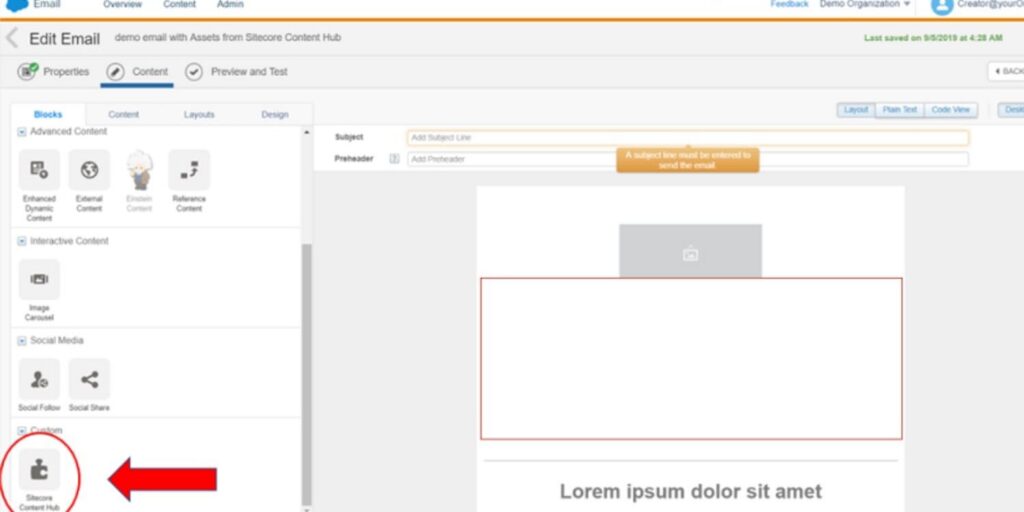
Sitecore offers an enterprise-level approach to managing assets through its own Content Hub platform. It centralizes files, metadata, rights information, and content lifecycle details, which helps teams keep their brand materials organized across different channels. For Salesforce users, Sitecore provides a dedicated connector that brings approved marketing assets into Marketing Cloud, making them available during email and content creation.
This structure fits organizations that already rely on Sitecore for broader content management. The integration focuses on controlled asset usage, including metadata-driven search and version governance. Based on Sitecore documentation, the connector supports the structured delivery of approved content to Marketing Cloud users and helps teams work with large media libraries in a consistent way.
Benefits of Sitecore
- Centralized metadata and rights management.
- Supports large-scale repositories with detailed asset structure.
- Controlled access to approved assets for Salesforce teams.
- Helps maintain brand consistency across digital channels.
- Aligns with existing enterprise content governance models.
How Sitecore Works
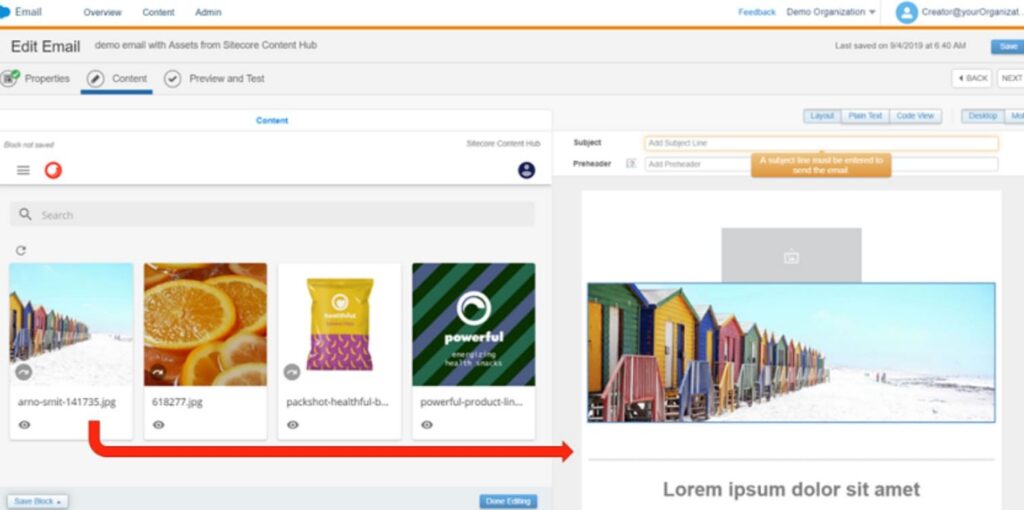
When teams prepare a campaign, they often start with asset discovery. Sitecore helps by organizing files into structured collections with metadata that guides how each asset should be used. The Sitecore DAM connector for Marketing Cloud delivers selected and approved assets into the Content Builder workspace. Through the Sitecore Salesforce connector, users can reach images, videos, and other media while keeping version information intact. This supports organizations that want Salesforce to reflect the same content rules already used across other channels.
The Sitecore Salesforce CRM connector fits this requirement by maintaining controlled access and guiding the use of assets across customer-facing messages.
Who Benefits Most
Sitecore fits companies with a mature content governance strategy, especially those already using Sitecore Content Hub for asset management. It supports large teams, structured workflows, and environments where metadata, compliance, and approved usage rules are part of daily work.
Feature-by-Feature Comparison: CI HUB and Sitecore
Both CI HUB and Sitecore give Salesforce teams a way to work with approved assets, but they follow different approaches. CI HUB focuses on connector coverage and daily productivity inside Content Builder. Sitecore emphasizes structured governance, metadata, and enterprise-level content rules. Understanding how each tool handles key areas helps teams choose the option that fits their workflow and asset library.
| CI HUB vs Sitecore: Features Comparison | ||
|---|---|---|
| Capability | How CI HUB Handles It | How Sitecore Handles It |
| Integration approach and supported sources | Connects to more than seventy DAM and cloud systems, accessed through a panel inside Content Builder, including Sitecore, Bynder, Brandfolder, Dropbox, Google Drive, SharePoint, and more. Helps users work with external sources without moving files. | Connects Salesforce Marketing Cloud to Sitecore Content Hub through a dedicated connector. Designed for teams that already use Sitecore for structured content governance. |
| Content Builder usage | Assets appear directly in the panel with search, filters, folder navigation, and version details. | Assets are delivered from Sitecore into Marketing Cloud as approved selections controlled by metadata and governance rules. |
| Editing capabilities | Supports cropping and resizing inside Content Builder, reducing back-and-forth with design teams. | Editing is managed within Sitecore Content Hub, which controls metadata and approved use cases. |
| Metadata handling | Uses metadata passed from connected DAM or cloud systems. | Strong metadata framework for tagging, rights, expiry, and lifecycle, inherited from Content Hub. |
| Version control | Checks asset versions from the connected DAM or cloud system before insertion. | Version control follows Sitecore’s governance rules, ensuring only approved versions reach Salesforce. |
| Ease of setup | Quick setup inside Salesforce Marketing Cloud with connector installation and source configuration. | Requires Sitecore environment configuration plus connector setup, fitting companies with dedicated technical resources. |
| Admin experience | Minimal ongoing maintenance because assets remain in their original systems. | Admins manage metadata, approvals, rights, and lifecycle governance within Sitecore. |
| Marketing Cloud depth | Designed specifically for daily use inside Content Builder, improving repetitive asset work. | Focused on enterprise content alignment, with assets delivered under controlled rules. |
| Best fit | Teams that want fast access to many external sources with a simple setup. | Organizations that require a strict content model and structured management, which use the Sitecore DAM solution. |
| Overall Rating | ⭐⭐⭐⭐⭐ | ⭐⭐⭐⭐ |
Teams with broad connector needs and frequent campaign updates may prefer CI HUB for handling digital asset management Salesforce tasks. Organizations with a deep content governance model often look at Sitecore integration with Salesforce to maintain internal approval rules.
CI HUB vs Sitecore: Pricing Comparison
Both CI HUB and Sitecore follow different pricing models because they serve different needs. CI HUB uses a straightforward per-user subscription. Sitecore uses an enterprise-level license that fits companies running large content operations. Understanding these approaches helps teams decide which structure aligns with their budget and the size of their asset library.
| Pricing Overview: CI HUB vs Sitecore | ||
|---|---|---|
| Category | CI HUB | Sitecore |
| Pricing model | Per-user license | Enterprise platform license |
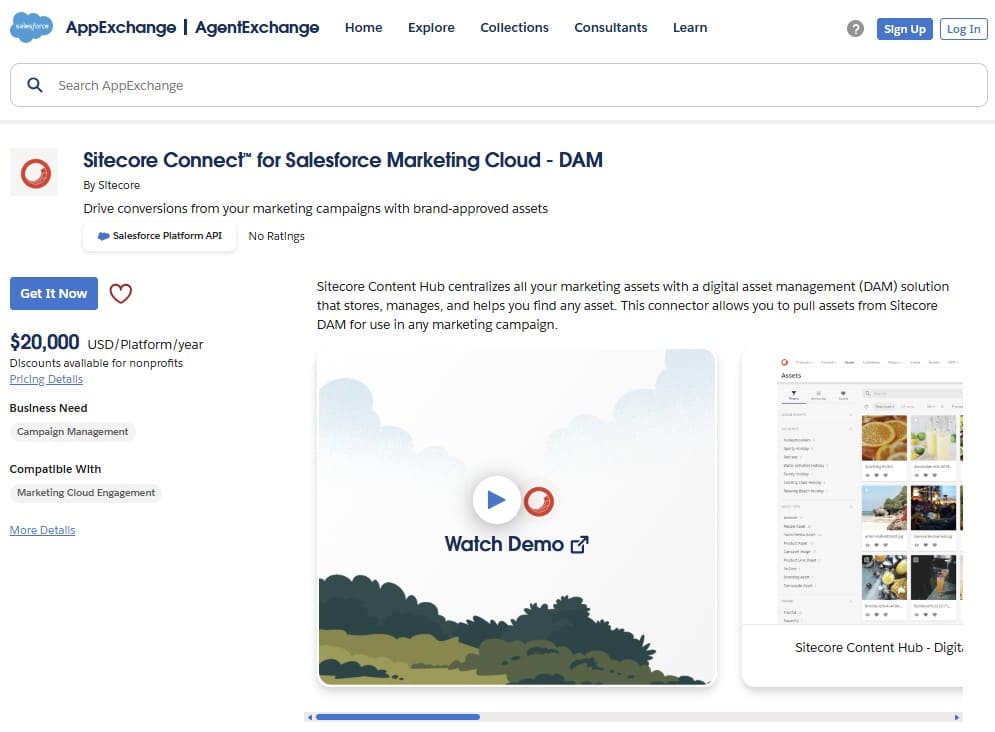
| Cost shown on AppExchange | $420 USD/user/year | $20,000 USD/platform/year |
| Free trial offer | Free trial available for 30 days | Free trial available for 30 days |
| Scaling impact | Cost grows based on the number of Marketing Cloud users | Pricing may change when the connector is used across multiple Salesforce environments. |
| Maintenance costs | Low, because assets remain in existing systems | Higher, due to metadata management, governance, and Content Hub configuration |
| Best fit | Small to mid-size teams that want flexible access to multiple external libraries | Large organizations with structured content models |
| Overall Rating | ⭐⭐⭐⭐⭐ | ⭐⭐⭐⭐ |
Teams comparing both tools often consider Sitecore alternatives when they need flexibility and lower upfront cost. CI HUB delivers this through a simple license structure, while Sitecore focuses on companies that rely on a centralized content environment and need advanced governance.
Setup and User Experience Comparison
Setup and daily usability matter because teams want a tool that works smoothly from the first day. CI HUB focuses on a quick start inside Salesforce Marketing Cloud, with installation steps that are clear and predictable. Sitecore follows a different approach. Since it is part of a broader content platform, setting up the Sitecore Salesforce Marketing Cloud connector often requires more preparation and coordination with existing systems.
| CI HUB vs Sitecore: Setup and User Experience | ||
|---|---|---|
| Category | CI HUB | Sitecore |
| Installation steps | Installed directly in Marketing Cloud. Users log in, connect sources, and begin working with assets. | Requires Sitecore Content Hub environment plus connector setup for Marketing Cloud. |
| Initial configuration | Users choose a DAM or cloud source from the supported list and connect it with their credentials. | Teams prepare approved assets in Content Hub and activate the connector for Marketing Cloud. |
| Learning curve | Short. Users select a source, search, and place assets. | Longer. Users work with structured metadata, asset rules, and lifecycle controls. |
| Daily experience | Assets appear in a panel beside the email or page being created. | Assets appear in Salesforce as approved selections delivered from Sitecore. |
| Admin tasks | Minimal, since asset structure and updates are handled in the connected DAM or cloud system. | Minimal, since asset structure and approvals are handled in Sitecore Content Hub. |
| Navigation | Folder browsing, filters, and search options help users locate files quickly. | Users select from curated asset sets prepared in Content Hub. |
| Finding assets | Users can search across many DAM and cloud systems from one place. | Searches follow the structure and metadata rules defined in Content Hub. |
| Working with files | Assets can be previewed, checked for versions, cropped, and resized before insertion. | Assets appear as approved items, with details managed upstream in Content Hub. |
| Overall Rating | ⭐⭐⭐⭐⭐ | ⭐⭐⭐⭐ |
Both tools support asset work in Marketing Cloud, but the differences in setup and usability are clear. CI HUB gives teams a quick start, simple configuration, and a short learning curve, working with assets stored in the DAM or cloud systems you already use. The Sitecore Salesforce adapter offers a more structured process that fits organizations already working with Sitecore solutions.
Key Considerations When Choosing a Salesforce DAM Integration Tool
Choosing a DAM integration for Salesforce means looking beyond features and thinking about how each option fits your daily work. The best connector is the one that supports your team’s habits and the way your assets are already stored. Many companies also review how quickly marketing teams can adopt the tool and how well the connector fits into their existing setup.

Here are a few points that help teams compare CI HUB and Sitecore during planning:
- What type of asset sources do you use today?
If your assets live across several DAM and cloud systems, CI HUB gives a direct way to use them without moving files. Sitecore fits teams that already manage everything inside Sitecore Content Hub.
- How much control do you need over asset rules?
Some organizations rely on detailed metadata, expiry dates, and rights information. Sitecore supports this structure across teams that work with Sitecore Salesforce processes. CI HUB takes a lighter approach and works well when speed and flexibility are most important.
- How fast do you want users to adapt?
Marketing teams often prefer tools that feel familiar. CI HUB offers a shorter learning curve, while Sitecore requires more time because of its structured environment.
- What does your long-term content plan look like?
If you expect your asset library to grow across different systems, CI HUB supports that model. If your team plans to centralize asset management under Content Hub, Sitecore becomes a natural part of that strategy.
How CI HUB and Sitecore Fit Different Needs
CI HUB fits teams that want flexibility and speed
- Works with many DAM and cloud systems without moving files.
- Quick setup inside Marketing Cloud.
- Short learning curve for marketers and designers.
- Helps teams work faster with assets already stored in the systems they use every day.
- A practical option for teams building a Salesforce digital asset management system across multiple sources.
Sitecore fits organizations with strict content governance
- Uses the existing structure of Sitecore Content Hub.
- Supports detailed metadata, rights, and approval rules.
- Matches companies that centralize content management under one platform.
- Helps teams maintain control over which assets appear in Salesforce.
- Suitable for large enterprises with defined processes.
Conclusion: Who Comes Out on Top?
We have reached the point where all three comparison areas come together. The earlier tables showed how each connector performs in features, pricing, and daily usability. Now it is time to see which solution offers the strongest fit for most Salesforce Marketing Cloud teams.
Our Winner: CI HUB!
Both CI HUB and Sitecore support controlled asset work inside Salesforce, and each tool fits a different type of organization. CI HUB stands out because it gives teams a quick start, simple configuration, and wide support for DAM and cloud systems that companies already use. It also offers a straightforward pricing model and a shorter learning curve, which makes it easier for marketing teams to begin working with their existing assets right away.
| CI HUB vs Sitecore: Final Results | ||
|---|---|---|
| Section | CI HUB | Sitecore |
| Features | ⭐⭐⭐⭐⭐ | ⭐⭐⭐⭐ |
| Pricing | ⭐⭐⭐⭐⭐ | ⭐⭐⭐⭐ |
| Setup and User Experience | ⭐⭐⭐⭐⭐ | ⭐⭐⭐⭐ |
| Total Stars: | 15 ⭐ | 12 ⭐ |
- CI HUB is a strong choice for teams that want flexibility, support for many external sources, and a simple workflow that requires little adjustment from marketers. It helps teams work with their existing storage systems without changing how assets are organized.
- Sitecore fits organizations that already manage assets in Content Hub and want Salesforce to follow the same governance rules. It works well for companies with established content processes and a centralized model.
For teams comparing Salesforce Marketing Cloud digital asset management solutions, CI HUB is a strong option due to its broad connector coverage, fast setup, and flexible pricing model. You can explore how CI HUB works with your existing DAM and cloud systems by starting a 30-day free trial on AppExchange and testing it in your own environment.

Mykhailo is a Salesforce Certified Platform Administrator with development experience in the fintech field. Since 2021, he has gained the Double Star Ranger rank on the Salesforce Trailhead education platform, where he acquired 26 Superbadges in Business Administration, Process Automation, Security, and more. With a decade of expertise in consulting and compliance, he aspires to translate complex technical concepts into accessible content, helping organizations make the most of Salesforce. Mykhailo is passionate about using technology for everyday needs, enjoys reading sci-fi and non-fiction books, and playing video games. He also has an interest in history and outdoor activities such as hiking, camping, and kayaking.
 Previous Post
 Next Post