





Salesforce Support Calls and Where Problems Start
Salesforce is built to work well for customers who prefer to communicate by writing. Email, chat, messaging apps, portal requests, and Agentforce conversations fit naturally into the system, so every message can be tracked, linked to cases, and stored with customer records.
But what about customers who want to call?
Salesforce does support voice through Service Cloud Voice (Salesforce Voice), but it is primarily built to work with Amazon Connect. Many companies, though, run phones on systems like Avaya, Cisco, or Teams. Integrating those takes extra setup, and until it’s done, calls often start outside Salesforce.
The trouble begins here: the system holding customer history doesn’t know the call is happening. The contact center agents have to figure out who’s calling, find the right record, and update or create a case, all while talking to the customer. Important call details, like duration, queue, or wait time, often stay stuck in the phone system instead of the case.
This article looks at the challenges support teams face when handling voice calls in Salesforce. You will find the most common issues that occur during real calls and practical ways to address them. Finally, we will highlight the main benefits of using apps for Salesforce Voice integration for on-premise call centers.
- Why Challenges Happen in Salesforce Environments
- Common Challenges Support Teams Face When Using Salesforce with Voice
- Challenge #1: Agents Switch Between Salesforce and the Phone System
- Challenge #2: Existing Phone Systems Limit Access to Modern Salesforce Voice Features
- Challenge #3: No Customer Context When a Call Starts
- Challenge #4: Call Activities Are Logged Inconsistently
- Challenge #5: No Real-Time Transcription in Salesforce
- Challenge #6: Limited Insight Into Call and Support Performance
- Challenge #7: No Unified Routing and Limited System Choice
- Key Benefits of Using Salesforce Voice Apps for Support Teams
- Conclusion: Making Voice Work Seamlessly in Salesforce
Why Challenges Happen in Salesforce Environments
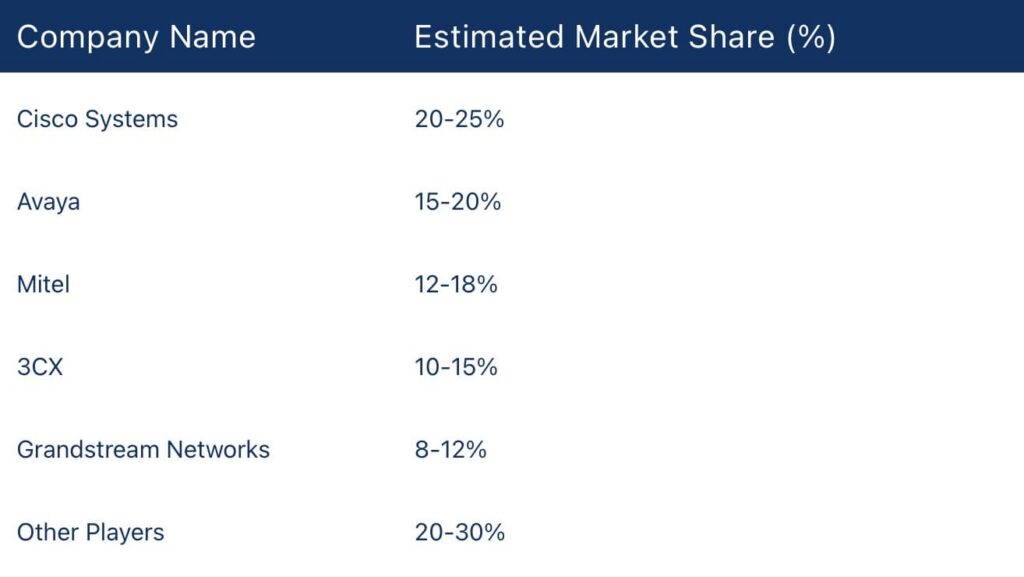
First, let’s understand the problem from the top. Most companies rely on systems like Avaya, Cisco, or Microsoft Teams for phone support, while Salesforce manages customer records, cases, and histories separately. Because these systems don’t natively communicate, call data and CRM information often remain disconnected. The chart below shows the market share of these PBX systems.
Connecting phone calls with Salesforce isn’t straightforward. Differences in data formats, system design, and integration requirements create gaps that agents and managers face every day.
The main reasons this happens:
- Systems were built for different purposes: Telephony handles call setup, routing, and queues. Salesforce tracks cases, contacts, and history. Without a connection, calls don’t automatically appear in the CRM.
- Integration takes careful work: Each phone system needs configuration, field mapping, and sometimes custom logic. Even small mistakes can leave data missing or linked incorrectly.
- Data formats don’t match: Call duration, queue information, and other metadata may not map naturally to Salesforce objects. Differences between platforms create gaps in records.
- Older systems lack modern APIs: Legacy telephony setups weren’t designed for cloud CRM. Connecting them can require custom middleware or complex workarounds.
- Ongoing maintenance is required: Even after integration, configurations must be updated as systems evolve. If this isn’t done, data gaps reappear, and agents face friction daily.
| What PBX Systems Cannot Do in Salesforce Without a Connector | |
|---|---|
| Feature / Capability | Limitations of PBX (Cisco, Avaya) with Salesforce |
| Call handling inside Salesforce | Agents cannot answer/control calls in Salesforce without a connector |
| Click-to-dial from Salesforce records | Requires a connector to translate Salesforce actions into PBX dialing |
| Real-time transcription | Not a native PBX function; needs an external transcription engine feeding CRM |
| AI insights (live agent assist, coaching, sentiment) | Cannot work without CRM transcription stored in Salesforce |
| Intelligent routing (align with CRM rules) | PBX routing runs separately; CRM logic requires integration |
| Automatic call logging | PBX does not push call records into Salesforce without integration |
| Supervisor dashboards & reporting | PBX call data remains outside Salesforce without syncing |
| PBX-specific features (dial plans, extensions, voicemail) | Handled entirely by PBX; Salesforce does not replace this |
| Setup & maintenance | Integration requires configuration and ongoing maintenance |
| Platform replacement required | Not required, existing PBX can remain with proper Salesforce connector |
Common Challenges Support Teams Face When Using Salesforce with Voice
When managing voice calls with a CRM like Salesforce, challenges remain, making call tracking metrics Salesforce integration essential. These problems can appear in real time, while contact center agents are on live calls, not just during initial setup. Agents often have to switch between systems, which can increase customer wait times and make reporting incomplete.
On top of that, 70% of customers expect support to recognize their identity and context immediately, and when Salesforce doesn’t provide this at the start of a call, agents can’t meet that expectation. The following are some of the biggest issues support teams face daily when handling voice calls alongside Salesforce.

Challenge #1: Agents Switch Between Salesforce and the Phone System
Imagine a contact center agent taking a call in the company’s phone system, for example, Cisco. As they speak with the customer, they realize they need information stored in Salesforce. Sound familiar? So, the agent has to switch screens, search for the right record, and then update the case, all while the customer is on the line. This back-and-forth slows responses, interrupts the conversation, and makes it easy to miss important details.
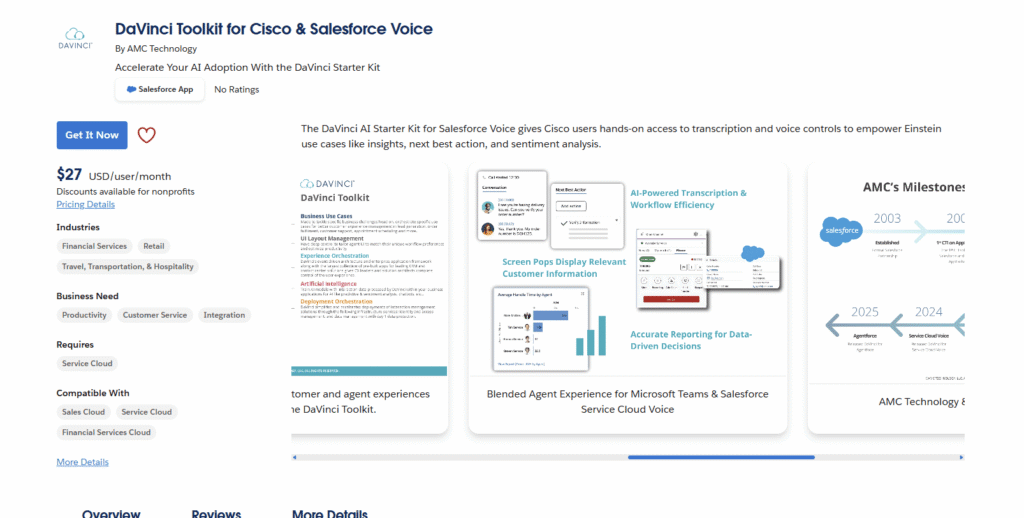
Solution: To avoid this, companies can bring calls and customer data together with Cisco CTI integration with Salesforce. For example, DaVinci Toolkit for Cisco & Salesforce Voice lets agents handle calls directly inside Salesforce. With click-to-dial, call controls, and instant access to customer information on one screen, agents don’t have to switch tools, and the call stays focused on the customer.
Challenge #2: Existing Phone Systems Limit Access to Modern Salesforce Voice Features
Other example: a support team has been running calls on Avaya for years. The system is reliable, agents know it well, and replacing it would be disruptive. Then they hear about Salesforce Voice features like real-time transcription, AI-powered call summaries, and insights, but they assume these only work with cloud telephony platforms. Teams feel caught between keeping a system that works and accessing new capabilities.
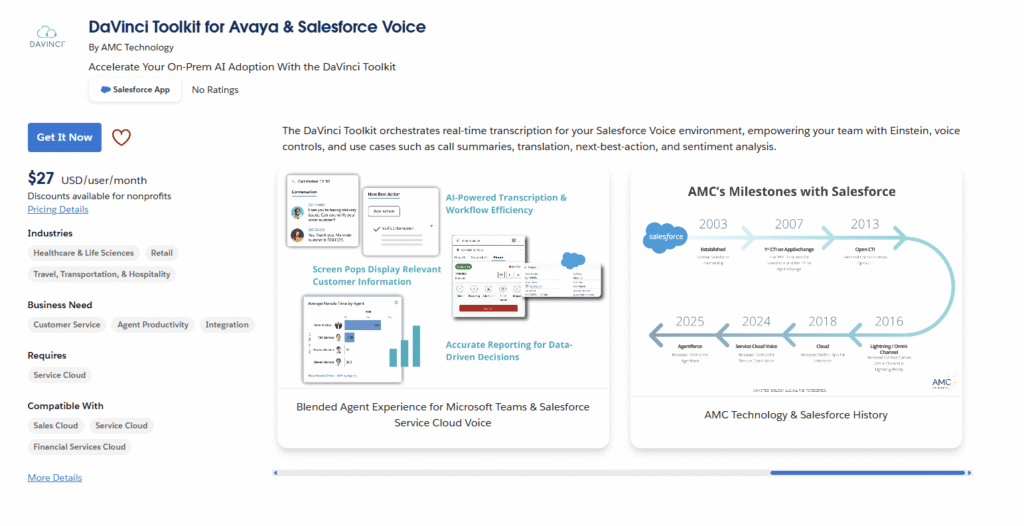
Solution: The good news is that there is a way to get the benefits of Salesforce Voice for Avaya. Tools like DaVinci Toolkit for Avaya & Salesforce Voice connect the existing phone system directly to Salesforce. Calls, transcripts, and AI-driven insights appear inside Salesforce alongside the customer record. Agents can see context instantly, managers get complete visibility, and teams can take advantage of modern voice features without disrupting the telephony system they already rely on.
Challenge #3: No Customer Context When a Call Starts
Incoming calls can arrive with no context without the Microsoft Teams integration with Salesforce. Agents will not be able to see the contact, any open cases, or any previous issues right away. They will have to cover again information that has already been entered into Salesforce, which lengthens the call, slows resolution, and frustrates both the customer and the agent. Therefore, without having the context from the beginning, contact center agents will take significantly more time and effort to resolve the customer’s issue.
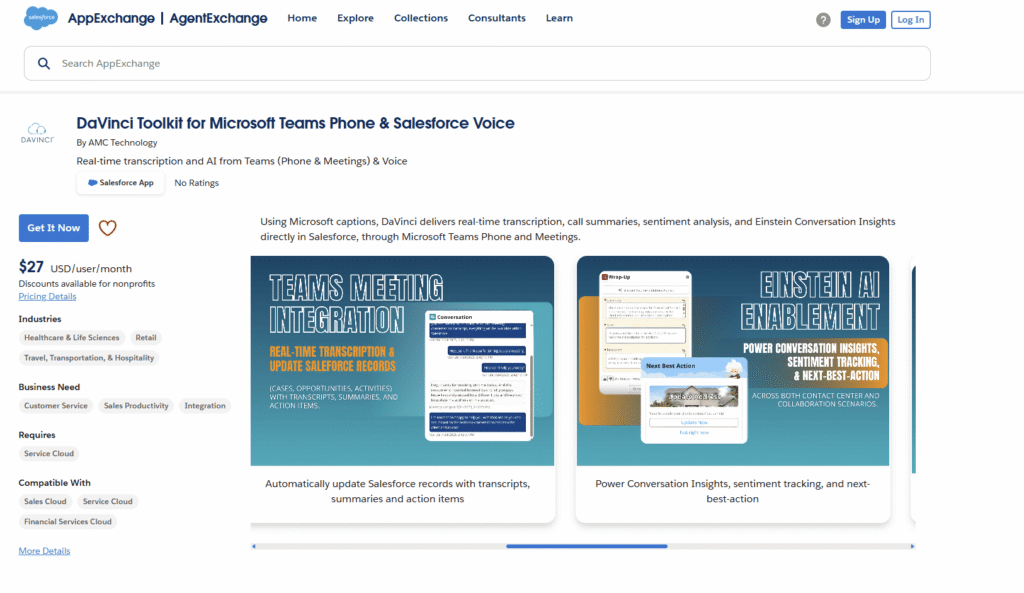
Solution: Bringing the customer’s data directly into Salesforce as the call begins fixes this. Apps like DaVinci Toolkit for Microsoft Teams Phone & Salesforce Voice show the customer’s details, open cases, and history instantly. Agents have everything they need at their fingertips, allowing the conversation to flow naturally and improving the overall experience.
Challenge #4: Call Activities Are Logged Inconsistently
Imagine the case where, after a busy shift, an agent finishes several calls but hasn’t logged every interaction in Salesforce. Some calls were entered manually, some automatically, and a few may have been missed entirely. This inconsistent logging creates gaps in case history, making it difficult for managers to understand what happened and for other agents to continue the conversation seamlessly.
Solution: In this case, it’s better to automate call logging, which means connecting the phone system so that all call details are captured automatically. This can include who made the call, who answered, the call duration, and links to the relevant contact, account, or case. Once set up, calls are recorded without manual effort, notes and recordings are stored correctly, and managers have reliable data for reporting and analysis. Agents can then focus fully on the conversation.
Challenge #5: No Real-Time Transcription in Salesforce
Another scenario: an agent is on a fast-paced call and tries to take notes while listening to the customer. Without real-time transcription, critical details can be missed, and agents must rely on memory or manual notes. This slows down follow-ups and limits the ability to act immediately or use AI-driven insights during the call.
Solution: Salesforce Voice real-time transcription captures the conversation as it happens and feeds it into Salesforce immediately. The text can then power AI features while the call is still in progress, for example, live agent assist, coaching prompts, call summaries, and Einstein Conversation Insights such as sentiment analysis and key takeaways. By making insights available during the interaction, agents can respond faster, capture details accurately, and provide a better experience for the customer.
Challenge #6: Limited Insight Into Call and Support Performance
A support manager reviews Salesforce reports to understand team performance, but the numbers do not tell the full story. Call volumes, durations, wait times, or queue data may still sit in the phone system instead of Salesforce. As a result, managers cannot clearly see how calls connect to cases, how workloads are distributed, or where delays happen. This makes it difficult to improve processes or make decisions based on complete data.
Solution: By bringing call data directly into Salesforce reporting, you can close this gap. When call metrics, transcription, and activity details are stored alongside cases and customer records, managers get a full picture of support performance. This leads to more accurate insights, better forecasting, and clearer visibility into how calls impact service quality and the overall support operation.
Challenge #7: No Unified Routing and Limited System Choice
And the last common challenge comes when call routing and Salesforce case routing operate separately. A customer call may be directed by the phone system using queue rules, while Salesforce routes cases and digital channels based on different logic. Because these routing processes are not aligned, calls do not always reach the most suitable agent. Skills, case history, or customer priority stored in Salesforce may not be considered when the call is delivered. At the same time, teams may feel that improving routing means replacing their phone platform, even if the current system already works well.
Solution: This challenge can be addressed. For example, apps like DaVinci Toolkit for Cisco & Salesforce Voice or DaVinci Toolkit for Avaya & Salesforce Voice support what many call Salesforce Voice Orchestration, meaning they bring telephony routing and CRM logic together inside Salesforce, just like chat or email. By leveraging Avaya CTI integration with Salesforce, calls are matched to the right agent at the moment of interaction. This creates consistent omnichannel metrics, reduces routing blind spots, and lets teams keep their existing phone systems while still adding modern voice capabilities inside Salesforce.
Key Benefits of Using Salesforce Voice Apps for Support Teams
When voice calls are fully integrated with Salesforce, like Salesforce Voice for Cisco, support teams see immediate benefits for their daily work. Agents spend less time switching between multiple systems, call information is captured reliably, and managers have a detailed picture of agent performance. Routing becomes smarter, and therefore, a better customer experience. Here are more benefits:
1. One workspace for agents.
Agents handle calls, customer details, and case updates on the same screen. This reduces distractions, shortens handling time, and helps agents stay focused on the conversation instead of switching systems.
2. Consistent and automatic call records.
Call details such as time, duration, and interaction history are stored with the right contact, account, or case. This creates a complete service timeline and reduces missed or incorrect logs.
3. Clearer performance reporting.
Managers can see how calls connect to cases, workloads, and service outcomes. With voice data inside Salesforce, reporting reflects real support activity rather than partial information from separate systems.
4. Better routing decisions.
Calls can follow the same logic used for other service channels, such as skills, priority, or customer status. This improves how interactions are distributed and reduces routing mismatches.
5. Improved customer experience.
Agents have context at the start of the call and do not need to ask customers to repeat information that already exists in Salesforce. Conversations are more efficient and feel more personal.
6. No need to replace existing phone systems.
And most importantly, organizations can keep platforms like Cisco, Avaya, or Microsoft Teams while improving how voice works with Salesforce, avoiding large system changes.
Conclusion: Making Voice Work Seamlessly in Salesforce
Voice-related challenges in Salesforce support are common and can slow down both agent workflows and the customer experience. The good news is that you don’t need to replace existing phone systems to fully leverage Salesforce. The right tools on the market, like DaVinci Toolkit Salesforce Voice for Microsoft Teams by AMC Technology, allow you to have a central location for managing calls, managing customer records, and logging call data automatically, while also enabling AI features that aren’t available when voice data stays outside the platform.
Agents can manage calls and access records in one place, call data is logged automatically, and managers get a complete view of performance. By leveraging telephony integration in Salesforce with these solutions, organizations gain all the benefits of Salesforce Voice features without major system changes. Which helps create a more seamless experience for your customers.

Antonina is a Salesforce Admin with six certifications: Salesforce Certified Platform Foundations, Platform Administrator, Platform Administrator II, CPQ Administrator, AI Associate, and Agentforce Specialist. She started working with Salesforce in 2021 as Intern Salesforce Developer. Now, a 2-Star Ranger on Trailhead, she continues to expand her skills and knowledge. She helps manage Salesforce systems, automate tasks, and improve processes. Antonina loves learning new things and exploring better ways to use technology. In her free time, she enjoys reading, playing sports, and exploring new tech ideas.
 Previous Post
 Next Post