




Why Automating Salesforce Workflows Matters
Salesforce CRM is designed to help organizations manage customer relationships and business processes more efficiently by centralizing data, tracking deals, and coordinating team activities in one system. The platform also provides tools that allow teams to configure automation across many routine processes. However, these capabilities must first be configured, and in many organizations this step is not fully implemented. As a result, many everyday CRM tasks are still handled manually inside Salesforce. Leads may be assigned individually by managers, customer records updated after calls or meetings, and follow-ups tracked through reminders, spreadsheets, or emails.
There is still a gap between what Salesforce can do and how it is actually used in daily work. While the platform already provides powerful automation tools, including Salesforce AI-powered CRM features, many processes are still handled manually. To illustrate this, let’s look at findings from a survey on the adoption of AI solutions. According to McKinsey, no more than 10% of organizations report scaling AI agents in any individual function, while most remain in experimentation or pilot stages. This highlights a significant gap between what AI-driven automation can do and its actual use in real business processes.
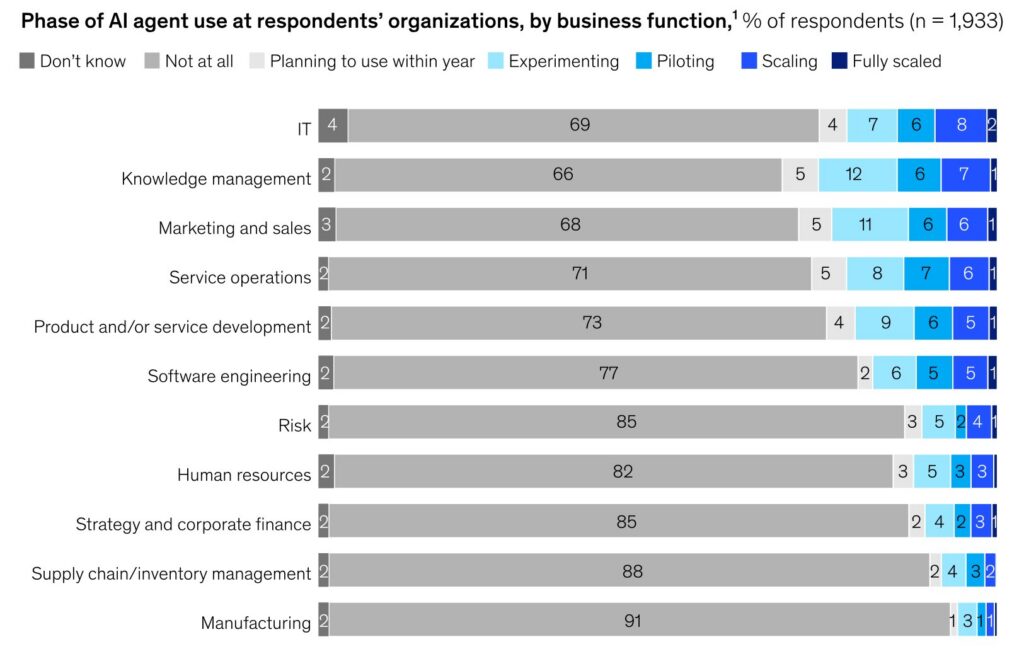
At the same time, only 45% of companies have a clearly defined AI strategy, indicating that many organizations are still building the foundation for effective AI use.
To unlock the potential of Salesforce automations, organizations need practical tools that make processes easier to design and manage. This is where Agentforce Builder becomes relevant. This article explains how this tool helps companies replace manual CRM routines with structured automation by clarifying its role within Salesforce and showing how it supports more accurate, consistent, and efficient processes.
- What Is Agentforce Builder and How It Helps
- Top Use Cases for Agentforce Builder
- Implementation Guide: Building a Workflow with Agentforce Builder
- How Agentforce Builder Compares to Existing Salesforce Solutions
- Common Challenges and Key Issues to Beware Of
- Best Practices for Building and Maintaining Workflows with Agentforce Builder
- FAQs About Agentforce Builder Workflows
- Conclusion: How Agentforce Builder Supports Reliable CRM Workflows
What Is Agentforce Builder and How It Helps
Agentforce Builder is a Salesforce-native tool used to create, configure, and deploy AI agents that support CRM processes. It provides a guided interface that helps define how each AI assistant should behave, what data it should use, and how it should interpret context to decide which actions to take. These agents operate directly on Salesforce data and can invoke actions such as updating records, assigning tasks, or sending notifications. Unlike traditional rule-based automation, agents can interpret context, apply reasoning, and determine the next step based on available data. They can work with existing automation, such as Flows, Apex, and integrations, extending automation by adding a decision-making layer on top of existing logic.
One of the key advantages of this approach is that many AI assistants can be configured using low-code tools. This means the tool can be used by both technical administrators and business users. Understanding how decisions should be made within a business process is usually enough to configure the tool.
In the Agentforce Builder basics, AI agents are structured around three core components:
- Topics: Define the business areas or processes to focus on and determine the scope of tasks to be handled.
- Instructions: Describe how information should be interpreted and what actions should be taken in different situations.
- Actions: Define what operations can be executed based on the evaluated context, such as updating records, creating tasks, sending notifications, or triggering existing automation.
This structure makes AI-driven processes easier to design and maintain because the logic follows real business scenarios rather than strict technical rules. As more organizations begin experimenting with AI in CRM processes, tools like this are gradually becoming part of how teams manage routine operations.
For organizations working to align Salesforce CRM for business goals, tools like Agentforce Builder help connect automation, data, and AI in a single environment. This strengthens the overall Salesforce CRM effect on business by reducing manual work while ensuring that important actions happen consistently across the system.
Top Use Cases for Agentforce Builder
The strength of Salesforce Agentforce Builder lies in its versatility. Many organizations are exploring different Agentforce use cases as they expand automation across sales, support, and operational processes. From lead assignment and opportunity updates to case routing and follow-up tasks, AI-powered assistants can interpret Salesforce data and support everyday workflows by determining the next step. Common examples include:
1. Lead qualification and assignment
Agents can be configured to review incoming lead data and, based on defined criteria and connected automation such as Flows, determine the appropriate sales representative. With the right setup, they help route leads faster, reduce manual review, and ensure follow‑ups happen consistently across the CRM.
2. Opportunity monitoring and follow-up
You can set up the agent to examine opportunity records and check for conditions you define, such as deal stage, size, or last activity date. When these criteria are met, the agent can trigger connected workflows or alerts to update fields, create follow-up tasks, or notify relevant team members. This setup helps sales teams stay on top of opportunities, reduce manual effort, and ensure key deals receive timely attention.
3. Case routing and support coordination
In service environments, an AI agent can use the details of a support record together with defined logic to decide what should happen next. When specific conditions are met, the agent can trigger connected automation or custom actions that move requests to the appropriate queue or assign them to a specialist. With the right setup, this improves response time and ensures requests reach the right team more quickly, which is a common pattern in Agentforce Service Agent Salesforce scenarios.
4. Task creation and process coordination
You can configure the agent to evaluate Salesforce records against defined conditions and, when those conditions are met, invoke connected automation, such as Flows, to create follow‑up tasks or initiate internal review steps. With this setup, teams ensure workflows stay consistent and important follow‑ups are not overlooked.
5. Maintaining data consistency
AI assistants can check records against criteria you set and trigger connected automation or custom processes to fill in missing information or update outdated fields. With proper configuration, this helps teams keep CRM data reliable and ensures decisions are based on accurate, up-to-date information. These examples show how automation can support everyday processes inside Salesforce. However, automation only works effectively when structured information enters the system.
Insight:
Only 14% of organizations have fully integrated their data, highlighting how most companies still struggle to unify systems for AI.
This is a common challenge for many organizations, where data is often spread across different tools or entered inconsistently. As a result, even when automation is available, it cannot be fully utilized. To address this, data needs to be captured in a structured and consistent way directly inside the CRM. Instead of relying on emails or spreadsheets, users can submit information through portals, forms, or documents integrated with Salesforce. Once the data enters the system, AI-driven logic and connected automation can interpret the context and determine the appropriate next step.
Two examples of Salesforce-native applications that support this process are Salesforce-Synced Portals and Salesforce First Web Studio by Titan. Both allow organizations to collect structured information that flows directly into Salesforce records, where it can trigger automated workflows and support broader Salesforce CRM AI capabilities.
Let’s take a closer look at what each of these tools does and how they support automated CRM processes.
Salesforce-Synced Portals Overview
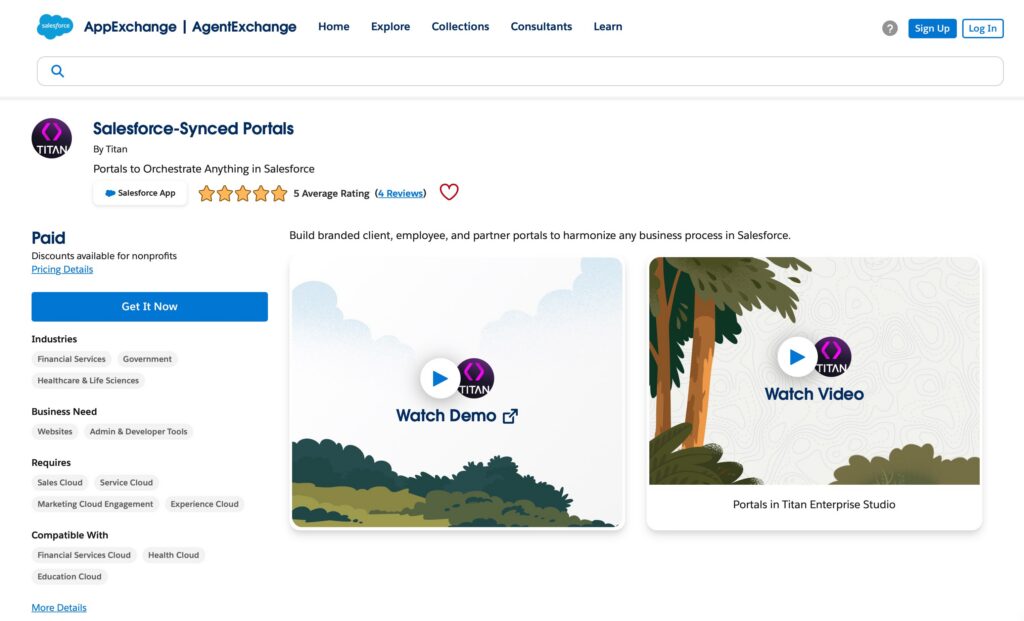
Salesforce-Synced Portals by Titan is an AppExchange application that allows organizations to create secure portals connected to Salesforce, where customers, partners, or internal users can submit information through structured forms that write directly to Salesforce records. Because the portal submits information directly to Salesforce records, the data becomes immediately available in the CRM and can be used by automation and AI agents.
Key capabilities include:
- Secure portals connected to Salesforce records
- Structured data submission that creates or updates Salesforce objects
- Configurable forms and portal interfaces connected to Salesforce data
- Real-time synchronization with Salesforce
- Immediate workflow triggering
Once information enters Salesforce through the portal, AI agents can interpret the data and determine the appropriate next step. For example, a submitted request may result in creating a Lead or Case, notifying the responsible team, or launching connected Salesforce automation such as Flows or Apex logic.
Salesforce First Web Studio Overview
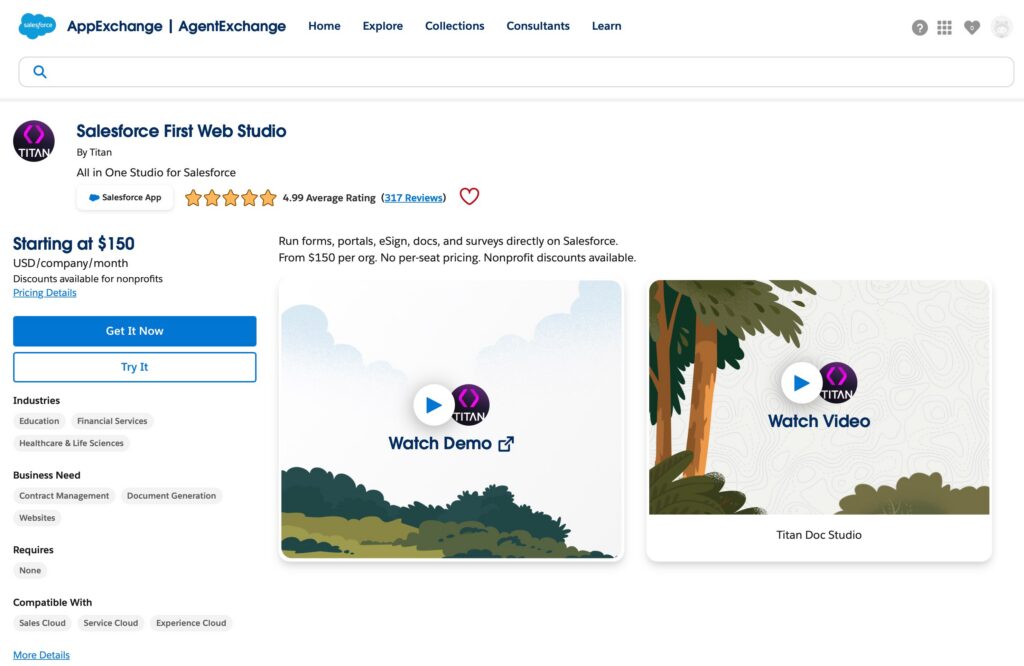
Salesforce First Web Studio is a platform used to build forms, portals, and documents connected directly to Salesforce data. It allows organizations to collect structured information from customers or partners and store it immediately in Salesforce objects.
By collecting information in a structured format, organizations can connect user interactions with CRM processes and automation. This makes it easier for AI assistants to interpret incoming data and, when triggered, determine the appropriate response.
Key capabilities include:
- Dynamic forms connected to Salesforce records
- Document generation using Salesforce data
- Customer and partner portals
- Electronic signature workflows
- Surveys and structured data collection
Because all information flows directly into Salesforce, AI agents can immediately respond to it. For example, once a form is submitted or a document is signed, Salesforce automation can create records, initiate approval processes, assign tasks, or notify the appropriate team, while AI helpers determine which actions should be taken based on the context.
Implementation Guide: Building a Workflow with Agentforce Builder
To better understand how Salesforce Agentforce AI Agent Builder features work in practice, it helps to look at how an AI agent is actually created and configured.
To illustrate the process, consider a simple scenario. A company wants to handle incoming leads more efficiently and make sure they are assigned to the right person without manual review. Instead of checking each lead individually, an AI assistant can evaluate the available information, determine the next step, and trigger actions such as assigning the lead or starting a follow-up process.
Step 1: Initial Setup for Agentforce Builder
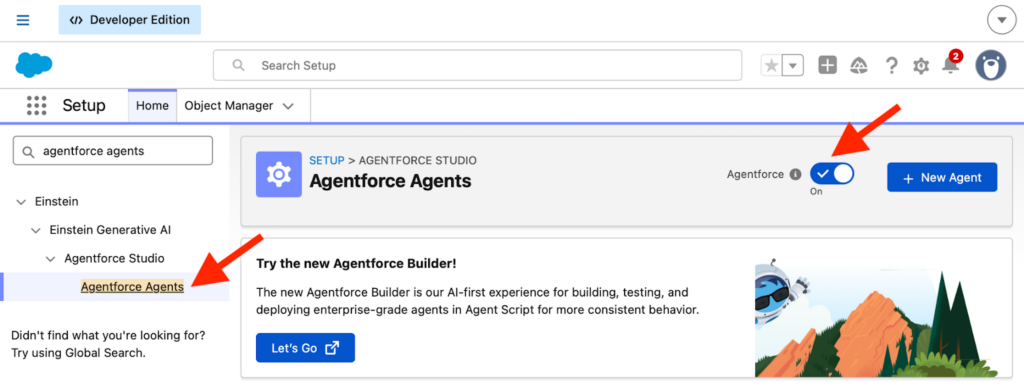
To start building an AI agent, first you need to enable Agentforce and access the agent configuration area.
- Go to Setup in Salesforce.
- Find the Agentforce Agents option. You can use Quick Find to locate it more quickly.
- Make sure Agentforce is enabled by turning on the toggle.
Step 2: Create and Set Up the Agent
Start by creating the agent and defining its initial setup.
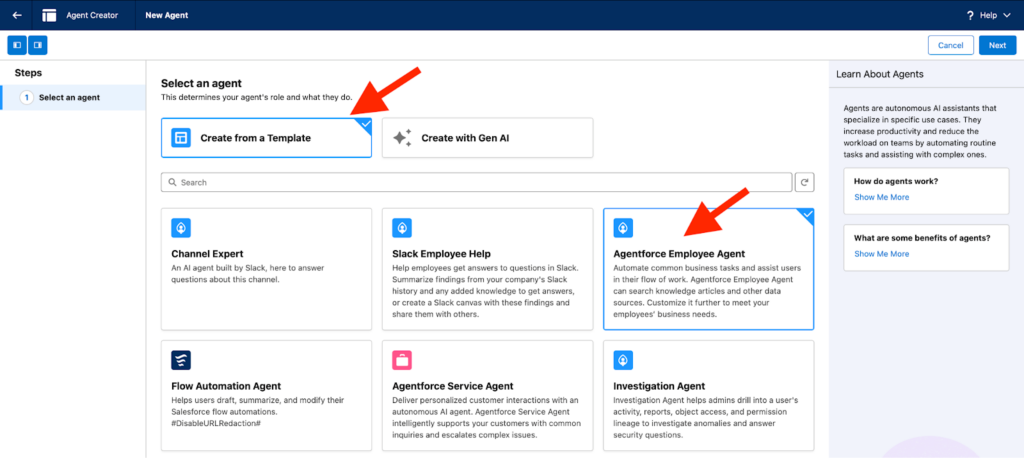
- Click New Agent. Start by clicking New Agent to begin creating a new AI assistant.
- Select Create from a Template. Choose the Create from a Template option to start with a predefined structure. In our scenario, it provides a clear and simple starting point for standard processes like Lead Qualification and Assignment.
- Pick a Suitable Template. Select a suitable template based on your use case and choose the one that best fits your needs. For this example, select Agentforce Employee Agent, as it is a general-purpose template that can be easily adapted for Lead Qualification and Assignment through topics, instructions, and actions.
- Click Next.
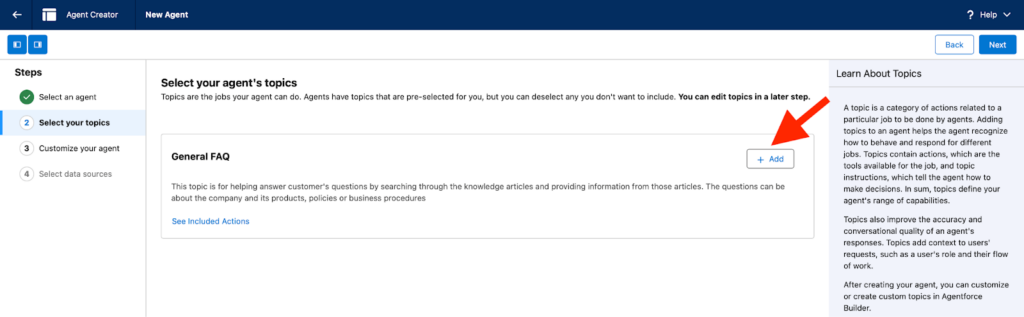
After selecting the agent, we need to choose the topics it will work with. They define the general areas it can handle.
- Review the available Topics. The types of Topics depend on the template selected earlier.
- Click Add to include a Topic. Add the General FAQ as a starting point so the assistant has an initial topic. More specific topics for Lead Qualification can be adjusted or added in the next steps.
- Click Next.
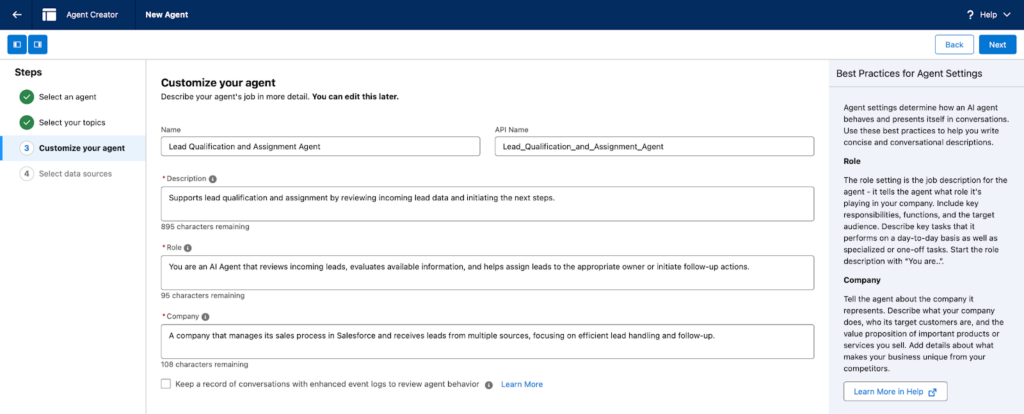
Then, define how the agent should behave and what role it plays in the process.
- Update the Name to reflect the use case.
- Fill in the Description to explain what it is designed to do.
- Define the Role to describe how it should act when working with data.
- Add Company information to provide additional business context.
- Click Next, then click Create to finish setting up.
For our scenario, the agent is configured to review incoming leads, evaluate available data, and support lead assignment and follow-up actions. This step defines its responsibilities and behavior in different situations.
Step 3: Configure Topics and Actions in Agentforce Builder
After the previous steps, you are finally redirected to the Agentforce Builder, where you configure how the agent works in practice.
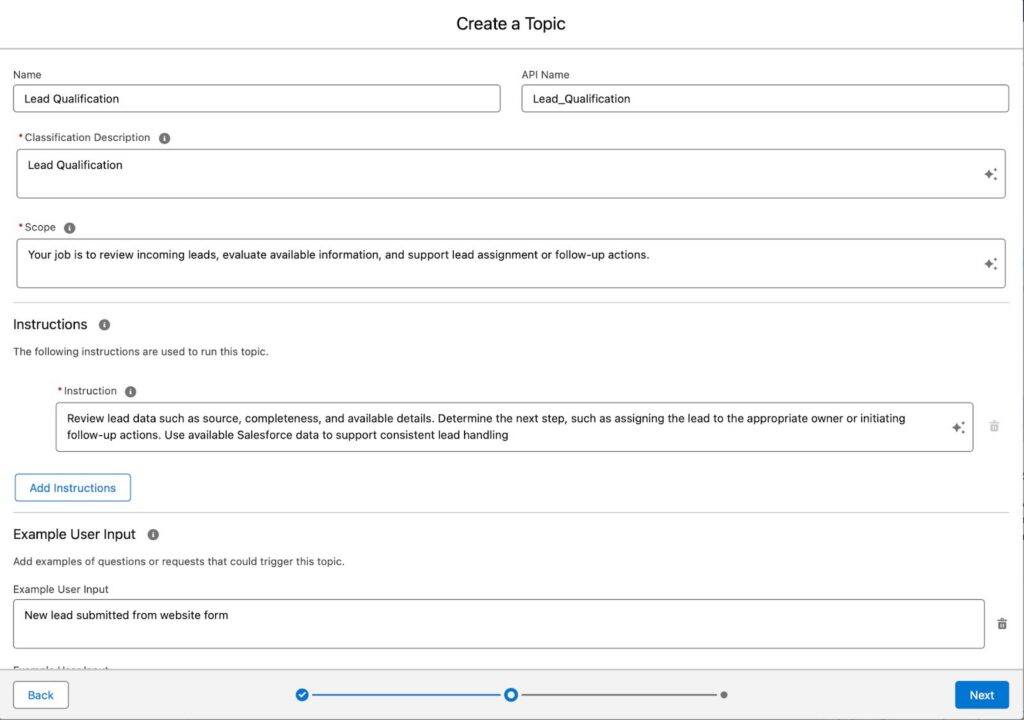
Start by setting up the Topic:
- Open the Topics section.
- Click New Topic to create a topic specific to your scenario.
- Fill in the Topic fields according to your use case.
- Add Instructions, in our case, describing how the agent should review Lead data and determine the next step.
- Click Next.
In the same Topic setup, the next step is to configure Actions. This section defines what the agent can do after it evaluates the data. You need to select actions based on your use case.
In our example, we selected Create Sales Contact Record, which allows the AI assistant to create or match a contact based on the available lead information.
In this section, you can also connect existing automation, such as Flows, Apex logic, or external integrations. In our case, a Flow could be used to handle lead assignment or create follow-up tasks after the agent determines the next step.
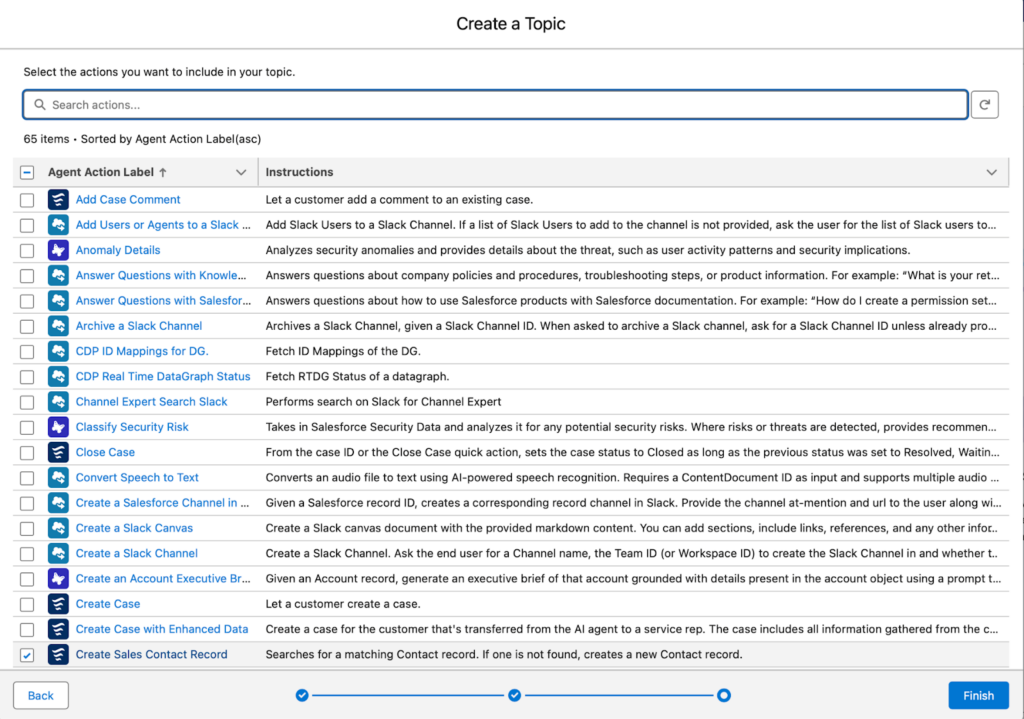
This step is where the agent becomes functional. Topics define the context, while the Actions define what can be done in response.
Step 4: Test the Agent
After completing the setup, test how the workflow works.
- Open the agent in Agentforce Builder
- Go to the Preview or Test panel
- Simulate an Opportunity update, such as changing the Stage to Proposal
- Check that:
- the correct Topic is triggered
- the expected actions are selected
- the Flow or automation runs as expected
Testing ensures that the workflow behaves correctly before using it in real scenarios.
Step 5: Deploy the Agent
Once it is confirmed to work as expected, the final step is deployment.
- Click Publish to make the agent available.
- Deploy the Agent to the required environment, such as Salesforce or a connected channel.
After deployment, the AI assistant can start supporting CRM processes by evaluating data and invoking actions based on the configured logic.
How Leads Enter Salesforce
Let’s continue with our scenario. Before an AI agent can process leads, the data first needs to be entered into Salesforce. This step is just as important, because the quality and structure of incoming data directly affect how well automation works.
If we are already using an AI agent to handle leads, it makes sense to structure and automate how this data is captured. Lead data can be collected in a consistent format through Salesforce-connected forms and written directly into Salesforce records.
One way to implement this is through Salesforce-Synced Portals by Titan, a Salesforce-native application that allows forms and portals to write submitted data directly into Salesforce records.
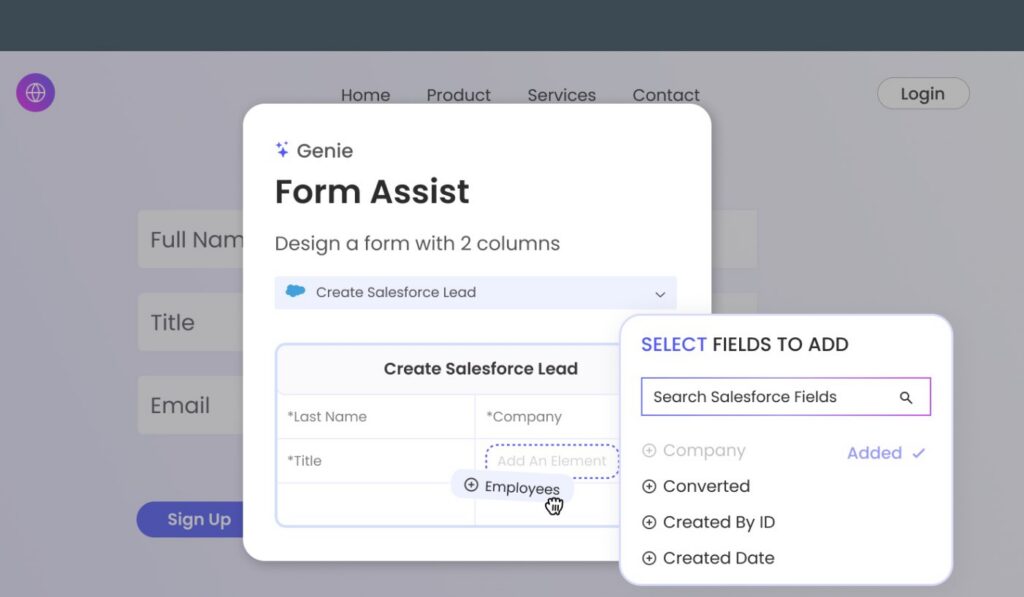
The form is connected to the Lead object, and each field maps to a corresponding Salesforce field. When a visitor submits the form, a new Lead record is automatically created in Salesforce. As a result, the information is immediately available in the system and can be processed right away.
How Agentforce Builder Compares to Existing Salesforce Solutions
Salesforce includes several tools that help automate processes inside the CRM. The most commonly used ones today are:
- Agentforce Builder: a low-code environment to create AI agents that can interpret data, make decisions, and perform actions across Salesforce. Unlike traditional rule-based automation, it combines AI reasoning with structured tasks. This allows teams to build agents that analyze and understand the full context and then reason through decisions on the next steps, rather than relying only on predefined rules.
- Salesforce Flow: a powerful automation tool used to build complex multi-step workflows with advanced logic.
- Approval Processes: a built-in feature that manages record approvals when certain actions require managerial review.
Each tool serves a different purpose depending on the complexity of the workflow. To better understand how they differ, let’s take a look at a comparison.
| Salesforce Automation Tools Comparison | |||
|---|---|---|---|
| Criteria | Agentforce Builder | Salesforce Flow | Approval Process |
| Main purpose | Automating CRM tasks with AI-assisted logic and structured workflows | Building complex multi-step workflows | Managing record approvals |
| Process flexibility | Structured and easy to manage | Highly flexible but more complex | Limited to approval steps |
| Best for | AI-assisted task automation and guided workflows | Complex multi-step automation | Approval chains |
| Maintenance | Moderate and easy to manage | Higher maintenance for complex flows | Simple but limited |
As shown in the table, Salesforce offers several automation tools that can be used depending on the complexity of the workflow. In many everyday scenarios, automation built with Agentforce Salesforce AI Agent Builder is enough to handle routine CRM actions. These workflows can work even more effectively when combined with applications that bring structured data directly into Salesforce. Tools such as Salesforce-Synced Portals or Salesforce First Web Studio by Titan can capture information or documents inside the CRM, allowing the workflows to react immediately and support more complete automation across business processes.
Common Challenges and Key Issues to Beware Of
While automation can significantly improve CRM processes, it also introduces several challenges that organizations should consider when building workflows with Agentforce Agent Builder. Some of the most common issues include:
1. Managing complex workflows. As automation expands, agents may include many topics, instructions, and actions, making workflows harder to understand and maintain.
2. Conflicts with existing automation. Salesforce environments often contain multiple automation tools such as Flow, validation rules, or approval processes. If these rules interact with the same records, they may trigger unexpected behavior or duplicate actions.
3. Keeping workflows updated. Business processes rarely stay the same. When they change, the agent configuration and connected automation must also be updated to reflect those changes.
4. Handling external data and integrations. Workflows that rely on external systems may fail if incoming data is incomplete, delayed, or incorrectly mapped.
Being aware of these challenges helps teams design workflows that remain reliable as Salesforce environments evolve.
Best Practices for Building and Maintaining Workflows with Agentforce Builder
To keep workflows reliable and easy to maintain, organizations should follow several practical recommendations when working with Salesforce AI CRM features.
- Design workflows in a modular way. Break complex automations into smaller agents or workflows that handle specific tasks, making them easier to understand, maintain, and update.
- Document triggers and logic. Clear descriptions of topics, instructions, and actions help administrators manage workflows and avoid confusion during updates.
- Test workflows thoroughly before activation. Creating test records ensures triggers, conditions, and actions work correctly before automation runs in production.
- Review workflows regularly. Periodic reviews help ensure automation continues to match current business processes.
- Use Salesforce-native apps within workflows. When workflows interact with portals, forms, or document tools, structured data helps automation run reliably without adding unnecessary maintenance complexity.
FAQs About Agentforce Builder Workflows
Below are some common questions organizations often have when working with Agentforce Builder.
1. Do I need deep technical knowledge to use Agentforce Builder?
No. It is a low-code tool, so you don’t need deep technical skills. Understanding your business process is usually enough to create and configure an agent.
2. Do I need to adjust my existing automations to implement an AI agent?
No. Existing Salesforce automations can be used as part of the agent’s actions. In many cases, you don’t need to adjust or rebuild Flows, Apex, or other automation. It works with what you already have, adding a decision layer without disrupting existing logic.
3. Can agents work with custom Salesforce objects?
Yes. Agents can use both standard and custom objects as context. This allows organizations to apply the same logic across different business processes, not just standard CRM scenarios.
4. How does the agent decide what to do?
The agent analyzes the situation, matches it to a topic, and selects the most appropriate action based on instructions and available data.
5. How can I monitor if the agent works correctly over time?
You can track how the agent performs by reviewing interaction details, logs, and Salesforce reports. This helps you see how it responds in real scenarios, identify issues, and adjust topics, instructions, or actions if needed.
Conclusion: How Agentforce Builder Supports Reliable CRM Workflows
Agentforce Builder helps organizations turn routine CRM processes into AI-guided workflows by defining topics, instructions, and actions. Teams can reduce repetitive work, improve data consistency, and ensure that important steps are handled in a more reliable way.
When combined with Titan’s applications, such as Salesforce-Synced Portals and Salesforce First Web Studio, automation becomes even more effective. These tools collect structured information and documents directly inside Salesforce, allowing agents and connected automation to respond immediately when new data appears.
Together, structured data collection and AI-assisted automation help organizations build CRM processes that are more reliable, easier to manage, and better aligned with their business goals.

Antonina is a Salesforce Admin with six certifications: Salesforce Certified Platform Foundations, Platform Administrator, Platform Administrator II, CPQ Administrator, AI Associate, and Agentforce Specialist. She started working with Salesforce in 2021 as Intern Salesforce Developer. Now, a 2-Star Ranger on Trailhead, she continues to expand her skills and knowledge. She helps manage Salesforce systems, automate tasks, and improve processes. Antonina loves learning new things and exploring better ways to use technology. In her free time, she enjoys reading, playing sports, and exploring new tech ideas.
 Previous Post
 Next Post