




Introduction: How Agentforce Improves Salesforce Workflows
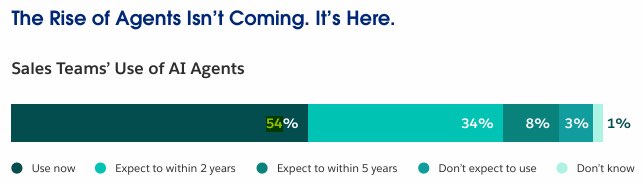
Salesforce’s Agentforce is becoming a core platform for deploying AI agents that work directly with CRM data and business processes. Organizations adopt Agentforce when manual workflows, repetitive tasks, and fragmented knowledge bases begin to slow down operations, especially across sales, service, and back-office teams. Unlike basic chatbots, these agents can reason over both structured and unstructured data, interact with Salesforce objects and existing automation, and operate across multiple channels without constant human input. The use of AI agents is already expanding, which is reflected in practice. Salesforce’s State of Sales report shows that AI agent adoption is accelerating quickly: 54% of sellers say they’ve used agents, and nearly 9 in 10 plan to by 2027.
Let’s look at a simple example. An Opportunity moves to a stage where a contract process starts. This includes internal approval, contract generation, and collecting signatures.
Salesforce can manage parts of this process through approvals and automation, but document creation and signature handling are often executed in separate systems. This creates fragmentation across the workflow and makes it harder to track the full process in one place.
Agentforce helps by analyzing the Opportunity context and deciding what should happen next. Execution of each step is then handled through Salesforce Agentforce AI automation or connected tools, depending on the type of action required.
In this article, we explain how Agentforce adds a decision layer to your workflows and how execution stays connected using Salesforce automation and supporting tools for steps like documents and signatures. We also cover key steps, considerations, and best practices for implementation.
- Understanding Agentforce and Its Role in Salesforce
- Getting Ready to Implement Agentforce
- Step-by-Step Guide to Agentforce Implementation
- Extending Agentforce with Document and Signature Automation
- Common Challenges and Considerations
- Best Practices for Managing Agentforce Workflows
- FAQs About Agentforce Implementation
- Conclusion on Agentforce Implementation
Understanding Agentforce and Its Role in Salesforce
Agentforce is an AI-powered solution within Salesforce that allows AI to be applied directly to business processes. It allows AI agents to interpret data and apply logic based on instructions and context, while business actions are executed through existing Salesforce automation such as Flows, Apex, or integrations.
Agentforce operates through a defined structure where Topics set the scope of work, Instructions define how data should be interpreted, and Actions represent available steps that can be selected as part of the workflow.. This approach allows workflows to be driven by context and logic, rather than only predefined rules.
In practice, Agentforce can support different types of workflows across Salesforce. The table below shows common Agentforce use cases.
| Common Agentforce Use Cases | |
|---|---|
| Use Case | What Agentforce Does |
| Record evaluation | Interprets record data and context, then selects the appropriate automation to update records or trigger actions. |
| Task creation | Initiates follow-up tasks through configured actions when contextual conditions are met. |
| Notifications | Issues alerts or messages based on interpreted conditions and topic logic. |
| Process coordination | Chooses and sequences actions across steps in a multi‑stage process using automation tools. |
| Triggering automation | Initiates predefined automation such as Flows, Apex, or integrations based on workflow logic. |
For technical administrators, it provides a structured and flexible way to design workflows and integrate with existing systems using Salesforce Agentforce automation capabilities. For business users, it helps ensure processes are handled consistently while reducing reliance on manual coordination.
Overall, Agentforce adds a decision layer on top of Salesforce workflows, helping structure how processes move forward across systems and automation.
Getting Ready to Implement Agentforce
Before starting Salesforce Agentforce implementation, it is important to understand how Agentforce will fit into your existing Salesforce setup. While many companies are actively adopting AI, they still face challenges related to data quality, implementation, and strategy, and only 45% have a clearly defined AI strategy. This is why careful planning is essential before moving forward with the next steps.
You should focus on the following:
- Identify processes suitable for Agentforce: Look for processes with multiple steps or decision points, where it is not always obvious what should happen next. These are good cases where Agentforce can help interpret the data and guide the next action within the workflow.
- Define clear objectives: Decide what you want to improve. For example, reducing manual effort, making actions more consistent, or improving how decisions are handled in the process.
- Understand the data used in the process: Identify which Salesforce objects and key fields are involved. You don’t need to define everything in detail yet, but you should understand what data the process depends on.
- Review existing automation: Check current Flows, Apex, validation rules, or approval processes. Since Agentforce works with this logic, it’s important that everything is clear and working as expected.
- Consider integrations and dependencies: If your process involves external tools or additional features, make sure they are aligned with how the workflow will run.
Planning at this stage helps you implement Agentforce on top of a clear and stable process instead of trying to fix issues later.
Step-by-Step Guide to Agentforce Implementation
To understand how Agentforce works in practice, let’s walk through a concrete example. This Salesforce Agentforce implementation guide shows how to apply Agentforce to an Opportunity workflow when a deal reaches a stage like Proposal/Price Quote. The goal is to ensure that each stage triggers the right actions, keeps the process structured, and reduces manual coordination.
The steps below show how to set up this process:
Step 1: Define the Records and Fields the Workflow Will Rely On
Start by preparing the data the workflow will rely on to ensure a clear and consistent structure for Agentforce. You need to ensure that key fields are available, add simple custom fields if needed, and confirm related records used in the process.
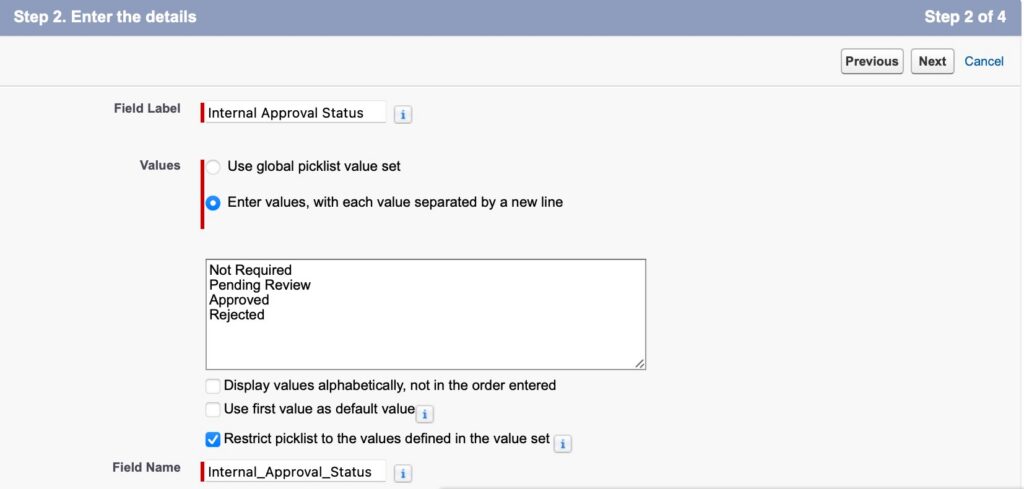
For our example, we will add a custom field, Internal Approval Status, on the Opportunity, to control when approval or follow-up actions should happen.
Step 2. Define the Workflow Logic and Actions
Next, make sure the workflow logic is clearly defined using existing automation, and add or update it if needed so it can be used by Agentforce within the process.
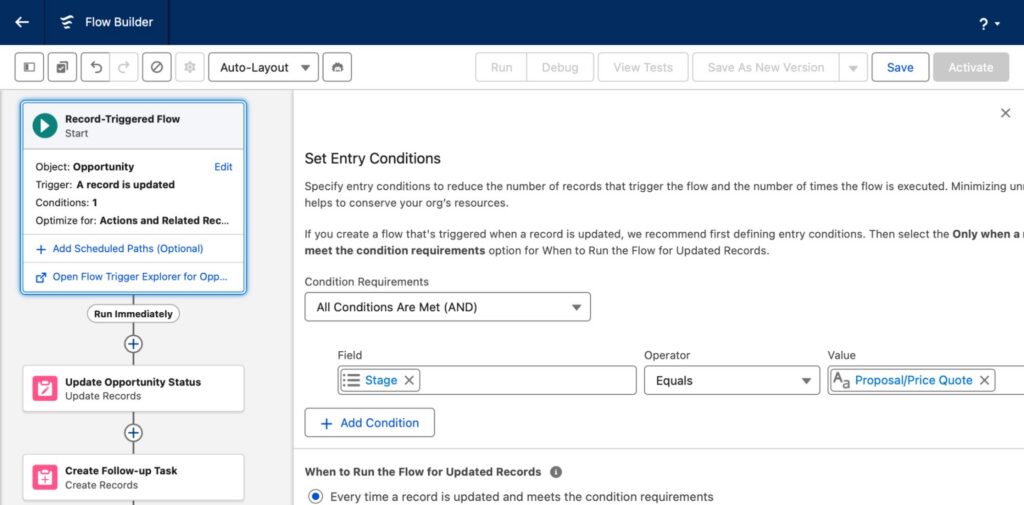
In our example, we add new automation so that when the Opportunity Stage changes to Proposal/Price Quote, the system evaluates the record and triggers the next steps. This includes a Flow for updates or tasks and an approval process when validation is required.
1. Flow configuration
Configure the workflow in Flow Builder using a record-triggered Flow. It evaluates Opportunity data and performs actions such as updating fields and creating follow-up Tasks, while controlling how the process continues.
2. Approval Process configuration
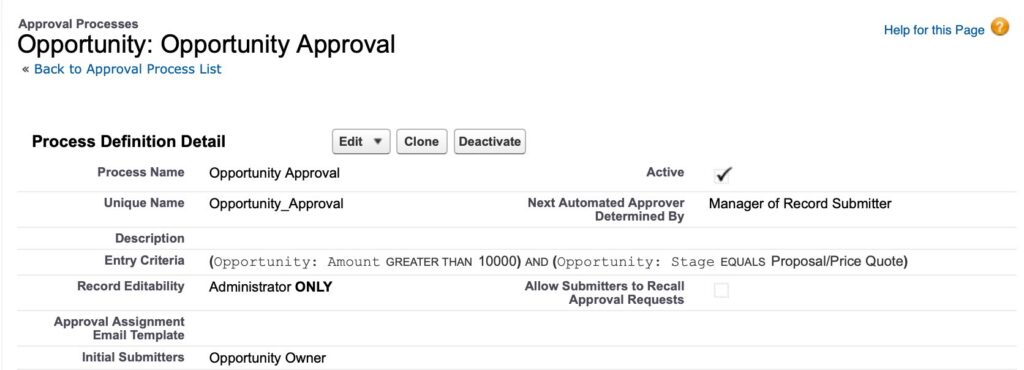
Next, we create an approval process to handle cases that require manual validation. In this scenario, the Opportunity is submitted for approval when specific conditions are met, allowing approval to be handled as part of the workflow while keeping it separate from automated Flow logic.
Step 3. Configure Agentforce and Connect It to the Workflow
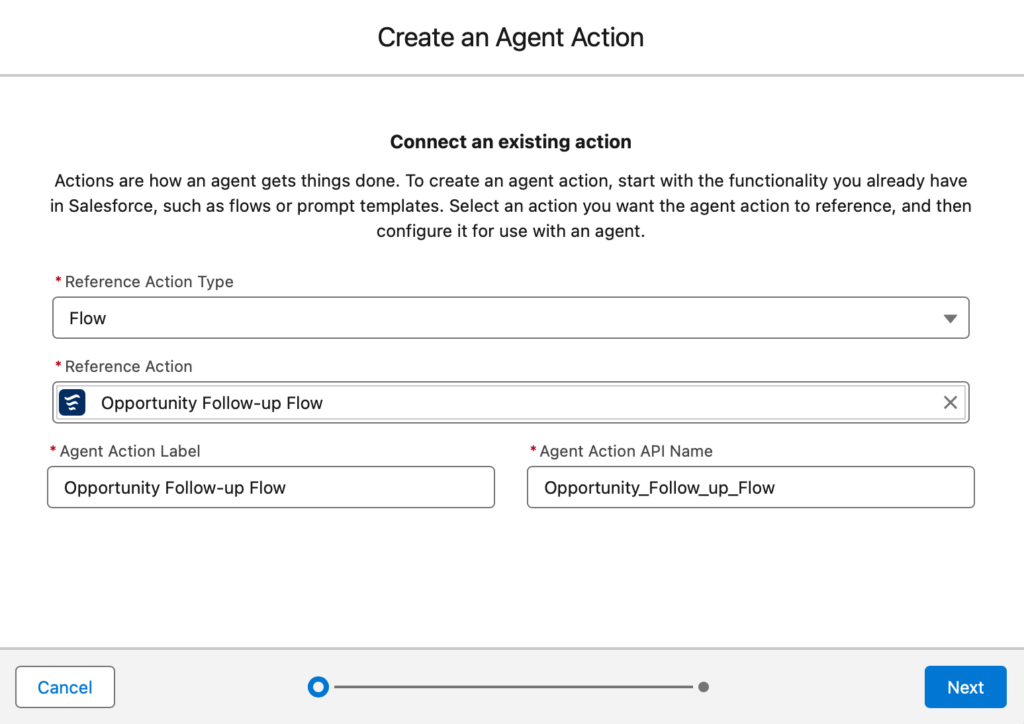
After setting up the workflow logic, the next step is to connect Agentforce to the process. At this stage, the workflow already includes both automated actions and approval steps. Agentforce is configured to work on top of this logic and help determine which path the process should follow.
In Agentforce Builder, configure the agent for the Opportunity scenario and define the available actions it can use within the workflow, such as triggering a Flow or initiating an approval process.
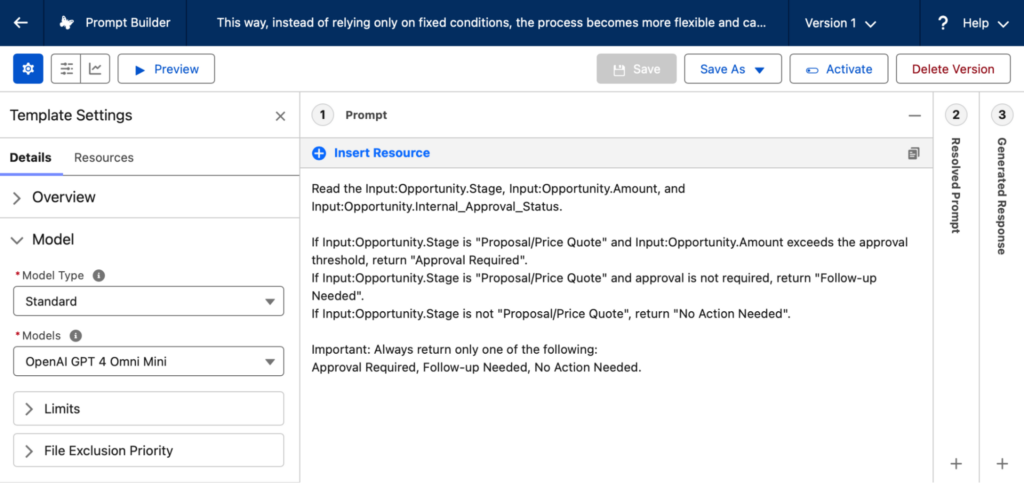
Once Agentforce is connected to the workflow, a prompt can be used to support decision-making by interpreting Opportunity data more clearly.
For this scenario, the goal is to understand whether the deal requires approval or can proceed with follow-up actions, based on Opportunity details. A prompt in Prompt Builder can use data such as Stage, Amount, and Approval Status to return structured output that supports this decision.
This allows the workflow to adapt based on context, while execution is still handled by Salesforce automation.
Step 4. Test and Validate the Setup
Once Agentforce is configured, test how the process works in practice. For our scenario, use an Opportunity that reaches the selected stage and observe how Agentforce interacts with the process.
It is important to:
- Test different scenarios: Use Opportunities with different values to verify how the process behaves.
- Validate actions: Check that the correct actions are applied, such as task creation, record updates, or approval routing.
- Review Agentforce behavior: Ensure the process follows the defined workflow and logic consistently and does not trigger unintended workflow paths.
Once validated, the setup is ready for use and further scaling.
Extending Agentforce with Document and Signature Automation
The workflow described above extends beyond core Salesforce automation when document and signature steps are part of the process. Continuing the same Opportunity scenario, once Agentforce has supported the initial decision-making steps, document generation and e-signature must be handled as part of the execution layer.
While Agentforce can determine when these steps are required, Salesforce does not natively provide full document generation and end-to-end signature orchestration within a single workflow. These capabilities are typically delivered through AppExchange solutions such as
Dynamic Docs Built for Salesforce and Sign & Sync in Salesforce by Titan. This allows organizations to keep the entire process inside Salesforce while extending execution capabilities beyond standard Flow and approval automation.
In this extended setup, documents are generated from Salesforce records using mapped fields in Dynamic Docs Built for Salesforce, and signature requests are triggered through Sign & Sync in Salesforce. Once completed, signed documents and status updates are written back to the same records, ensuring that all data remains consistent, centralized, and traceable.
Together, these components demonstrate how Agentforce-driven decision-making can be combined with Salesforce-native automation and AppExchange tools to support complete end-to-end business processes.
Dynamic Docs Built for Salesforce
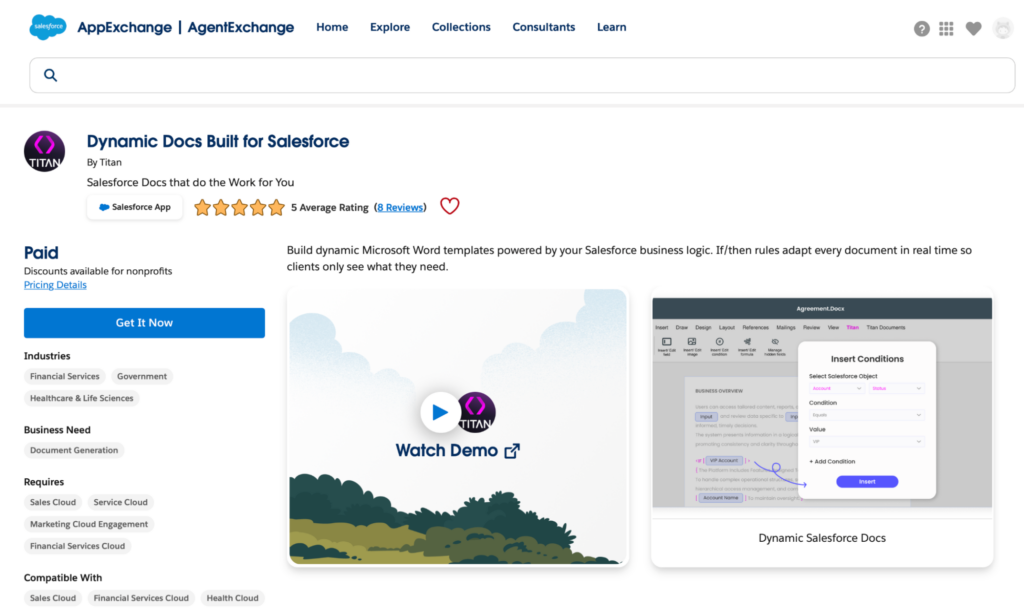
Dynamic Docs Built for Salesforce by Titan is used to generate documents directly from Salesforce data.
It allows organizations to:
- create document templates
- map fields from objects such as Opportunity or Account
- generate documents automatically based on configured workflow conditions
- ensure that documents always reflect the latest CRM data
For example, when an Opportunity reaches a stage such as Proposal/Price Quote, a document generation process can be triggered based on mapped Salesforce data such as account details, pricing, and product information. This is typically orchestrated through Salesforce automation after Agentforce determines that a document step is required. The document creation is handled by Titan, ensuring the process stays aligned with the CRM workflow and does not require manual preparation.
Sign & Sync in Salesforce
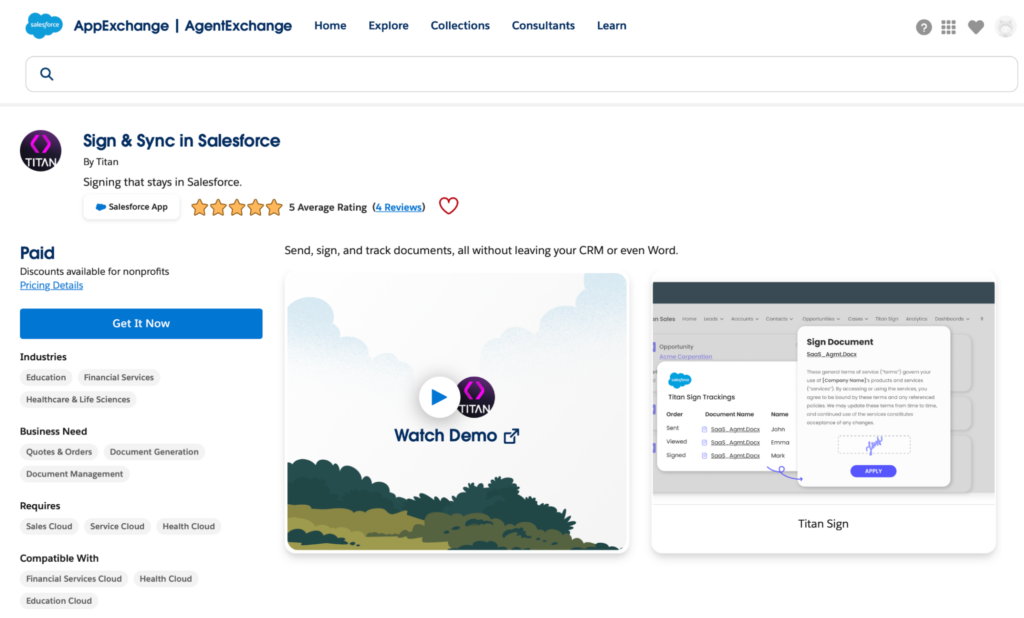
Sign & Sync in Salesforce by Titan handles the e-signature process and keeps it fully connected to Salesforce.
It enables:
- sending of signature requests as part of the workflow
- support for one or multiple signers
- tracking of signature status directly in Salesforce
- syncing signed documents and updates back to records
Continuing the same scenario, once the contract is generated, Agentforce determines that the deal is ready for signature as the next step in the process. Salesforce automation then triggers the signature workflow. Sign & Sync handles the signing execution, and once completed, the final document and its status are written back to the Opportunity record, keeping all information in one place.
Common Challenges and Considerations
When implementing Agentforce, it is important to consider how decision logic, data, and existing automation work together. Since Agentforce operates on top of Salesforce processes, issues in configuration or data can affect the entire workflow and limit the effectiveness of Salesforce AI automation.
Some of the most common challenges include:
- Workflow complexity. Multi-step workflows involving approvals, document generation, and signature processes can become difficult to manage if not clearly structured across Salesforce intelligent automation with Agentforce and supporting tools such as Titan.
- Data quality and field mapping. Agentforce relies on structured data. Incomplete or inconsistent fields, as well as incorrect mappings used for document generation, can lead to incorrect decisions or outputs.
- Conflicts with existing automation. Existing Flows, Apex, or validation rules may overlap with new logic, causing duplicate or conflicting actions.
- Dependencies between steps. Many processes depend on sequence, for example, when approval must happen before document generation or signature. If steps are not properly ordered, workflows may fail or behave inconsistently.
- Maintenance as processes evolve. As business requirements change, workflows can become outdated if not reviewed and updated regularly.
Insight:
AI adoption is growing, yet only 33% of AI initiatives are meeting ROI targets.
This highlights that AI needs to be properly integrated into business processes to deliver consistent results. To avoid these issues, workflows should be designed with a clear structure, tested thoroughly, and monitored over time to ensure consistent performance.
Best Practices for Managing Agentforce Workflows
To keep Agentforce workflows organized, scalable, and easy to maintain, it is important to follow a structured approach and focus on the best Agentforce use cases for your business processes. Since Agentforce operates as a decision layer on top of Salesforce processes, poorly designed workflows can quickly become difficult to manage or extend.
The following best practices help ensure workflows remain reliable and efficient:
1. Design workflows in a modular way.
Break complex processes into smaller, clearly defined Topics and steps. This makes it easier to manage logic, reuse components, and update specific parts without affecting the entire workflow.
2. Clearly define triggers and decision logic.
Document what starts the workflow, for example, record changes, and how decisions are made through Instructions and conditions. Agentforce relies on structured logic to evaluate data and determine the next step, so clarity here is critical.
3. Keep actions aligned with existing automation.
Actions should be clearly defined and connected to Flows, Apex, or integrations. Avoid overloading a single workflow; each step should have a specific responsibility.
4. Test workflows end-to-end.
Validate the full process, including dependencies such as approvals, document generation, and signatures. This ensures that all steps work together correctly and reduces the risk of failures in production.
5. Structure integrations with external apps carefully.
When integrating tools such as Titan, treat document generation and signature processing as a dedicated execution layer. Ensure these steps are clearly separated, triggered in the correct order, and aligned with Salesforce workflow logic to avoid unnecessary complexity.
6. Review and update workflows regularly.
As business processes evolve, workflows should be reviewed and updated to remain aligned with current requirements.
FAQs About Agentforce Implementation
This section answers common questions teams have when planning and implementing Salesforce Agentforce in their Salesforce environment.
1. What is included in Agentforce implementation in Salesforce?
Agentforce implementation includes defining objectives and strategy, setting up AI within Salesforce, using pre-built Salesforce Agentforce AI automation features, and integrating it with your data and workflows. It also includes customising the setup to fit your business needs and testing to ensure everything runs smoothly.
2. Does Agentforce replace Salesforce Flows or Apex?
No. Agentforce works alongside existing automation. It evaluates data and determines what actions should be taken, then relies on Flows, Apex, or integrations to execute those actions.
3. What improvements can you expect after implementing Agentforce?
After implementation, Agentforce helps teams spend less time on manual work and reduces delays between steps so processes move faster and more smoothly. It makes workflows easier to manage, improves decision-making with data, and allows processes to scale and adapt as the business grows.
4. Can Agentforce work with custom data in Salesforce?
Yes. Agentforce can work with both standard and custom data, as long as it is included in the workflow and properly configured.
5. How can external apps be included in Agentforce implementation?
External apps can be included by integrating them into Salesforce workflows that Agentforce works with. For example, tools like Titan can be used for document generation and e-signature, while Agentforce helps coordinate when these steps should happen as part of the overall process.
6. How can Agentforce workflows be tested during implementation?
Workflows can be tested using built-in tools such as Conversation Preview to simulate agent decisions, as well as by running test scenarios in Salesforce to verify that the correct logic, actions, and integrations are executed as expected.
Conclusion on Agentforce Implementation
In this article, we explored how Agentforce implementation helps bring Salesforce AI-powered workflow automation by extending existing workflows with more context-driven decision-making. Instead of relying only on predefined rules, processes can adapt based on data and support more consistent execution across different steps.
We also looked at how Agentforce can be extended with tools like Titan apps to support document generation and e-signature processes directly within Salesforce. Including these steps within the same workflow will help you avoid fragmented processes, reduce manual handoffs, and keep your data and process execution fully aligned within a single system. To see how this works in practice, explore Titan apps and try to integrate them into your Salesforce workflows.
Overall, effective Agentforce implementation and AI-powered Salesforce automation depends on building it on top of well-structured workflows, clearly defined logic, and reliable data. This approach ensures that automation remains consistent, scalable, and aligned with business processes over time.

Antonina is a Salesforce Admin with six certifications: Salesforce Certified Platform Foundations, Platform Administrator, Platform Administrator II, CPQ Administrator, AI Associate, and Agentforce Specialist. She started working with Salesforce in 2021 as Intern Salesforce Developer. Now, a 2-Star Ranger on Trailhead, she continues to expand her skills and knowledge. She helps manage Salesforce systems, automate tasks, and improve processes. Antonina loves learning new things and exploring better ways to use technology. In her free time, she enjoys reading, playing sports, and exploring new tech ideas.
 Previous Post
 Next Post