





Introduction: How Salesforce Administration Becomes Complex at Scale
Salesforce administration often appears straightforward at the beginning, but becomes progressively more complex as an organization grows. What starts as routine configuration work gradually evolves into a high-volume, repetitive manual process involving objects, fields, permissions, profiles, layouts, and other interconnected metadata components.
These tasks are rarely isolated, as a single change often needs to be reflected across multiple elements and environments, which increases both effort and the risk of inconsistencies.
Salesforce research shows why this complexity keeps growing. The 2026 Connectivity Benchmark Report found that enterprises now manage 957 applications on average, while only 27% of applications are connected. At the same time, Salesforce’s 2025 State of IT report notes that many IT teams are already working with legacy systems, siloed data, and limited resources, contributing to missed project deadlines in nearly one in three cases. For Salesforce admins and developers, repetitive manual configuration work can make this pressure worse when changes must be repeated across objects, profiles, permission sets, and environments.
At the same time, native Salesforce capabilities are not always well-suited for large-scale metadata operations. Many common tasks still require navigating through multiple setup screens, repeating the same steps across different records, or manually comparing configurations between environments. This becomes especially challenging in organizations that work across multiple sandboxes, follow frequent release cycles, or maintain complex permission and access models.
Eventually, a significant portion of administrative work is spent less on building and improving systems and more on maintaining, replicating, and validating existing configurations.
Insight:
According to the Low-Code Security Alliance,
Salesforce customizations and platform technologies can be expressed as metadata, and there are over 700 types of Salesforce metadata.
This means many parts of a Salesforce org, from data models and automation to permissions and security settings, are managed as metadata rather than as isolated setup choices.
This flexibility is powerful, but it also means that configuration changes can affect connected components, environments, and governance processes, increasing the complexity of administration at scale.
As the volume of metadata grows, the need for more structured, efficient, and reliable ways to manage it at scale becomes critical for day-to-day operations.
- Exploring Solutions for Scalable Metadata Management
- Installing and Getting Started with Bulk Object Field Creator (BOFC) in Salesforce
- Core Capabilities of the Bulk Object Field Creator (BOFC)
- Common Real-World Use Cases of BOFC in Salesforce Metadata Management
- Practical Insights and User Feedback from the BOFC AppExchange Listing
- Pricing Structure and Trial Options Overview
- Final Thoughts: Making Salesforce Metadata Management More Practical at Scale
Exploring Solutions for Scalable Metadata Management
As Salesforce environments grow in size and complexity, companies often reach a point where manual administration is no longer sustainable. To address this, leadership starts looking for Salesforce admin tools that will reduce operational overhead and free up time for more valuable activities, such as system improvements or new feature delivery.
Because native Salesforce functionality has limited support for bulk operations and cross-environment visibility, organizations frequently turn to third-party solutions. Rather than building custom scripts or relying heavily on APIs, many prefer ready-made tools that can be implemented quickly and used by both admins and developers without extensive technical setup.
In most cases, the search for such solutions begins with Salesforce AgentExchange, where a wide range of native applications are available. When searching for Salesforce metadata management tools, one of the first tools that appears is Bulk Object Field Creator by AYAN Softwares.
It is designed to streamline common administrative tasks by enabling bulk operations across metadata components, such as creating, updating, cloning, or deleting objects, fields, and related configurations.
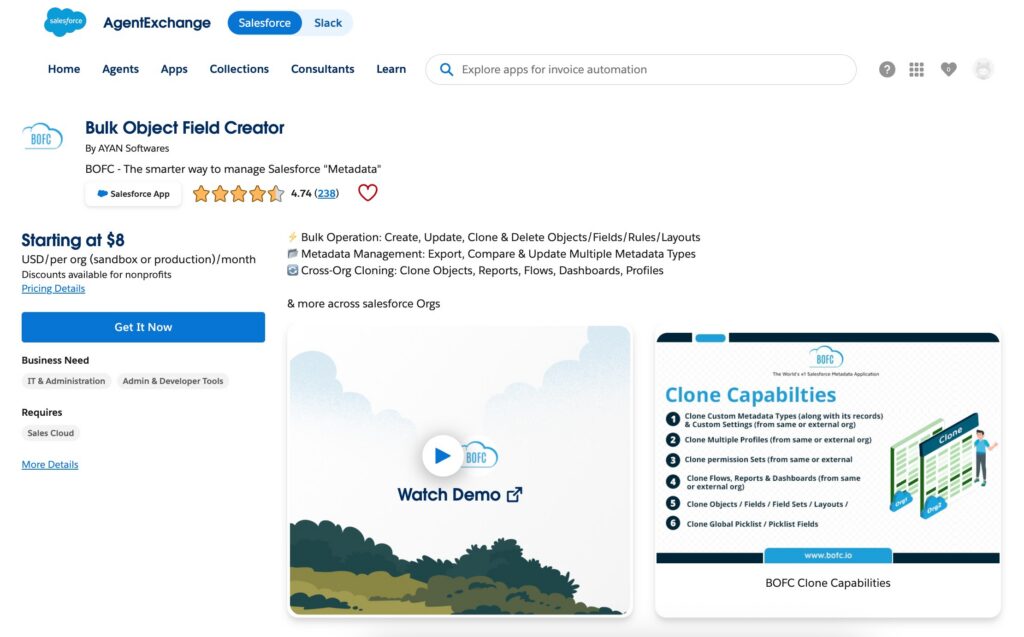
Beyond basic bulk actions, the solution supports working across environments, allowing users to compare and replicate metadata between sandbox and production orgs. It also provides structured ways to export and manage configurations, covering components like reports, dashboards, flows, profiles, permission sets, layouts, and more.
This tool focuses on reducing repetitive steps, improving consistency, and providing better visibility into metadata. Instead of handling configurations one item at a time, admins can work with multiple components in parallel, which helps save time and minimize errors in daily tasks.
Installing and Getting Started with Bulk Object Field Creator (BOFC) in Salesforce
The installation process is straightforward and requires only a few easy steps, similar to most AgentExchange (AppExchange) applications:
- Install the package either by visiting the official website or directly from AgentExchange (AppExchange).
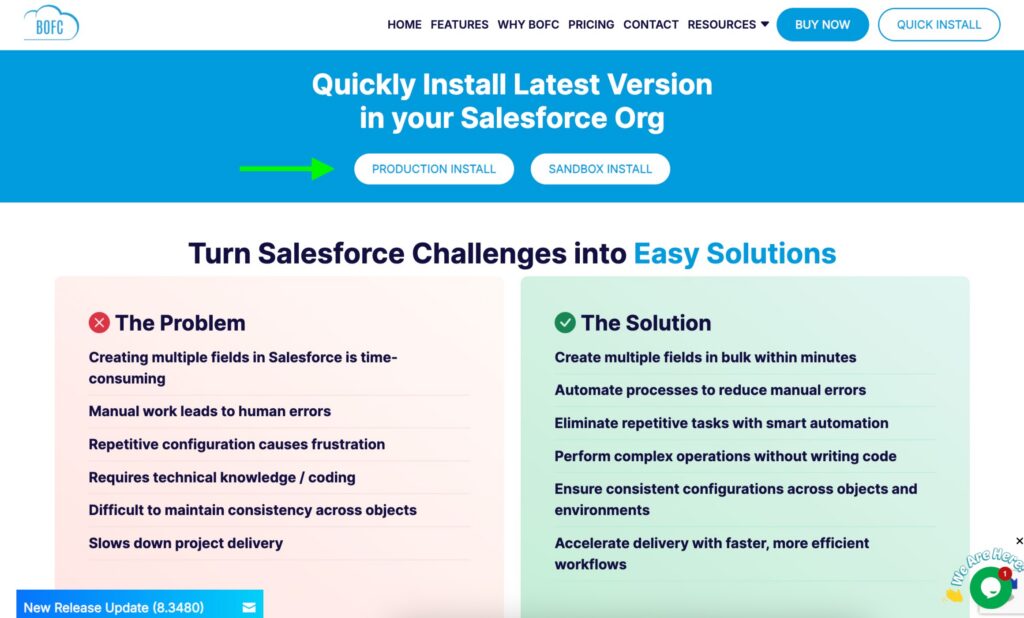
- Choose the installation scope: all users, specific profiles, or admin-only.
- Approve required third-party access and wait for the installation to complete.
- After installation, the app must be activated using the license key provided via email. License availability and org activation limits depend on the selected pricing plan. For example, the Starter plan supports activation in a single Salesforce org.
Once installed, the app becomes available in the App Launcher, where admins can open it and start configuring connections or running operations.
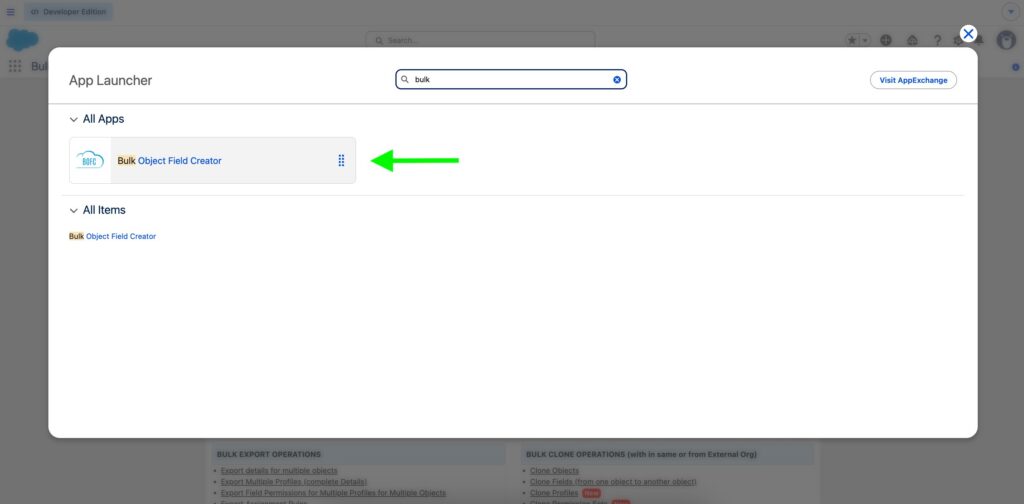
Access for additional users is managed through a dedicated permission set, which can be assigned as needed depending on roles and responsibilities.
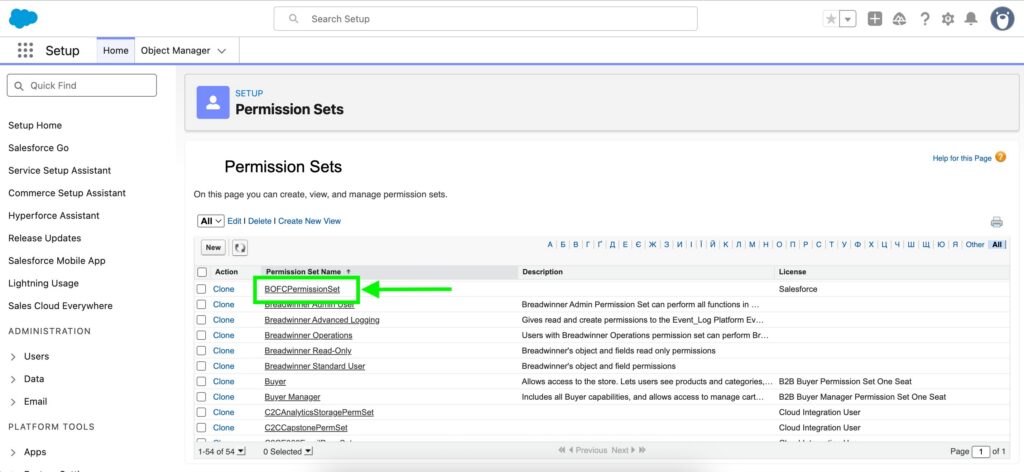
Setup does not require any complex configuration, so admins and dedicated users can start using the core functionality shortly after installation.
Core Capabilities of the Bulk Object Field Creator (BOFC)
In practice, BOFC is especially useful for Salesforce Admins, Developers, and Architects who need to manage large volumes of metadata more efficiently. The platform supports major metadata management operations, including bulk actions, cross-org management, metadata comparison, exports, security management, and cloning workflows.
1. Bulk Operations
A large portion of Salesforce administration involves repeating the same configuration steps across multiple components. Creating fields one by one, updating permissions per profile, or rebuilding objects manually can quickly become time-consuming, especially in larger orgs. This is where the main features of the BOFC Salesforce app become useful.
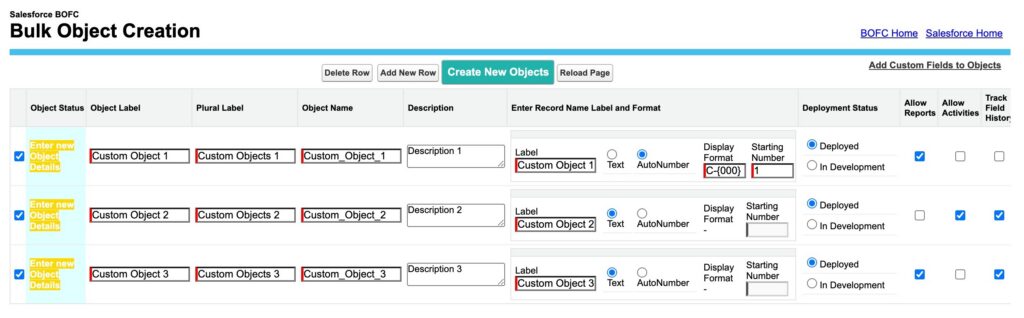
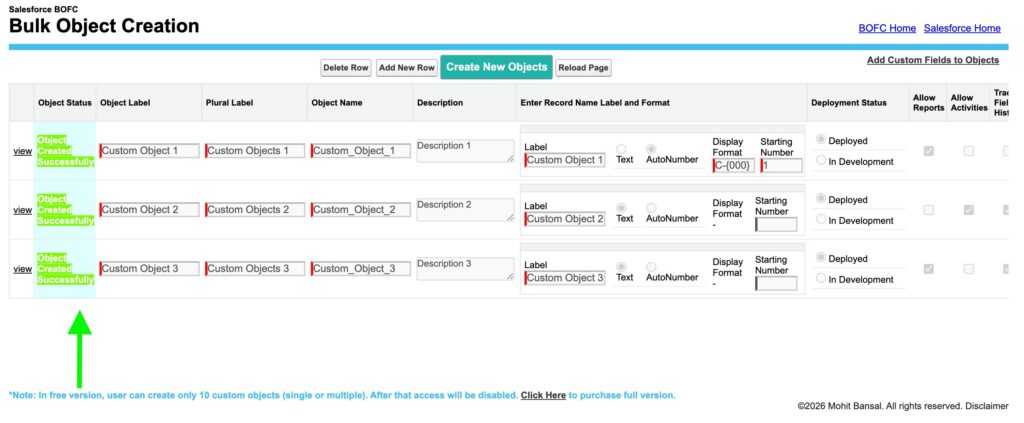
The solution allows admins to perform actions such as mass creation of multiple fields or Objects in a single operation by defining them in a tabular format rather than configuring each item individually in Setup. For example, instead of going through several screens to create each custom object, you can define key attributes, like labels, record names, and settings, for multiple objects at once and process them together. This reduces both the number of steps performed and the likelihood of human error during manual configurations.
It also supports bulk cloning of metadata, including objects with their fields, profiles, permission sets, list views, reports, dashboards, and more. In a manual approach, replicating even a moderately complex object requires recreating each component separately and ensuring dependencies are correctly linked. Here, those elements can be selected and copied in one flow, including handling dependencies like picklists or relationships, which would otherwise require additional setup.
For cleanup tasks, bulk deletion of objects or fields is handled through a selectable list, making it easier to remove multiple items at once. The app also provides feedback if some operation cannot be performed due to dependencies or permission limitations, which helps avoid trial-and-error.
For users who want to explore these operations in more detail, AYAN Softwares also provides a dedicated Video Tutorial Library with guided walkthroughs and feature demonstrations.
2. Cross-Org Management
Working across multiple Salesforce environments, such as Sandbox and Production, often involves duplicating configurations, validating differences, and ensuring everything stays aligned. This can mean repeated manual setup or relying on deployment tools that don’t always provide clear visibility into what has changed.
The solution supports cross-org metadata cloning, allowing components like objects, fields, profiles, and reports to be transferred without rebuilding them from scratch. The Salesforce metadata tool also provides a way to compare configurations across environments, making it easier to identify differences before or after deployment.
To enable this, the solution includes a “Manage Environments” setup where users can register external Salesforce orgs by providing connection details. Once added, these environments can be selected as source or target during cloning operations, making cross-org work reusable.
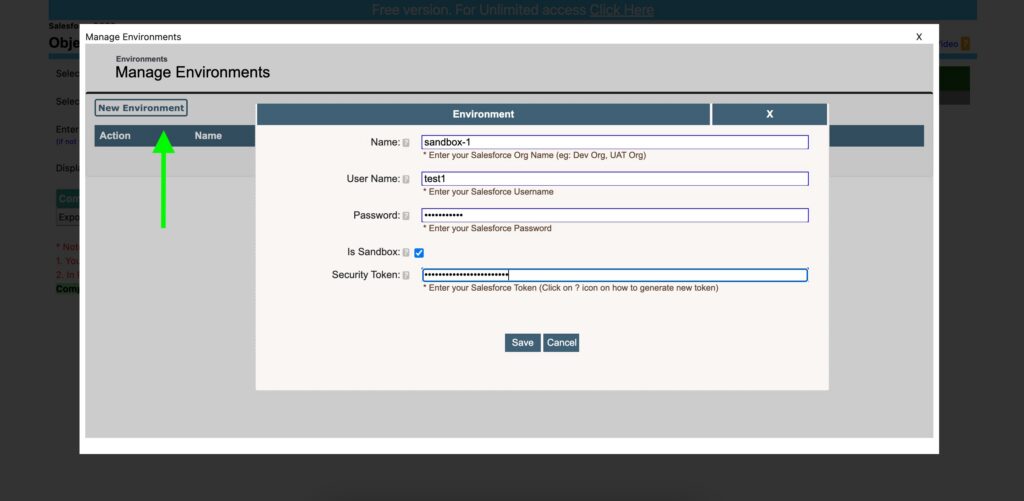
For teams working with multiple orgs on an ongoing basis, this makes it easier to keep configurations aligned. It is particularly useful in scenarios like environment synchronization, migrations, or release validation, where small inconsistencies can lead to functional issues.
3. Comparison & Analysis
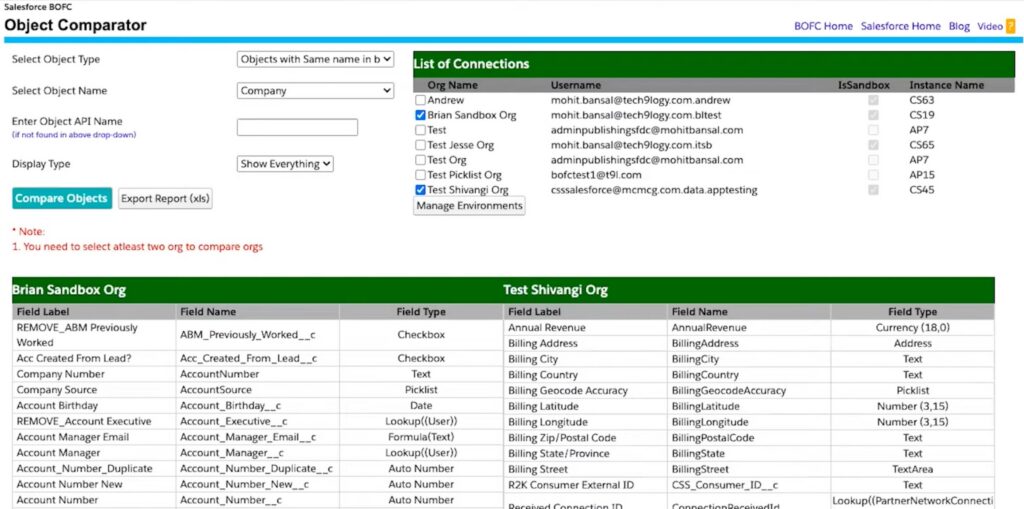
Reviewing differences in Salesforce configurations is often a time-consuming, fragmented process. The tool addresses part of this with built-in comparison tables for specific components. For objects, users can select source and target environments and generate a structured, side-by-side view of fields and their properties. This makes it easier to identify differences in configuration, such as field types, settings, or missing elements in one centralized view. To make the analysis more focused, results can be filtered to show only differences, only similarities, or full details, depending on the task.
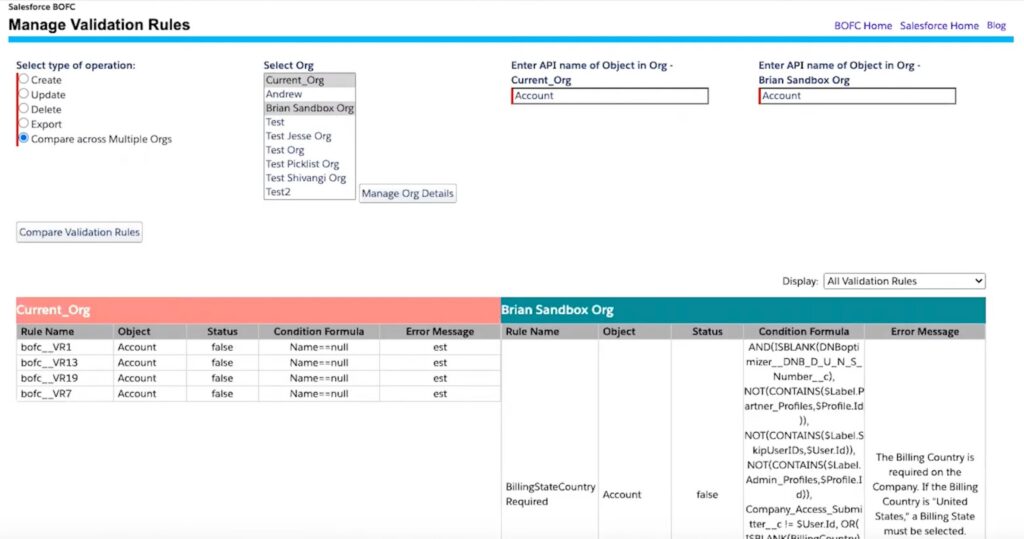
A similar approach applies to validation rules, where differences can be reviewed in a tabular format. BOFC allows admins to compare logic, formulas, and configurations using a single table.
While these built-in comparison views are useful for certain metadata types, they do not cover all configuration areas, particularly more complex components like permissions or access settings. In those cases, the comparison requires exporting data into files, so it can be analyzed more easily.
For governance work, profile and permission set comparison is especially important because it helps teams identify access differences, validate configuration changes, and reduce the risk of permission drift across environments.
4. Export & Reporting
For components that are harder to compare directly in the UI, the tool provides structured exports to support analysis.
Users can export metadata into Excel files, where each component is organized in a tabular format. For example:
- Field-level security exports show access (Read/Edit) across multiple objects and profiles
- Permission set exports provide a consolidated view of permissions across objects components
- Profile exports include object permissions, user permissions, tabs, and other settings
- List view exports allow comparison of columns, filters, and configurations
- Page layout exports include information about sections, fields, and their behavior settings
- Assignment rule exports include rule entries such as assigned user or queue, assignment type, rule formula, and other detailed criteria
This approach makes it possible to perform side-by-side comparison outside Salesforce, which is often more practical for large datasets. Admins can scan, filter, and analyze differences directly in a spreadsheet.
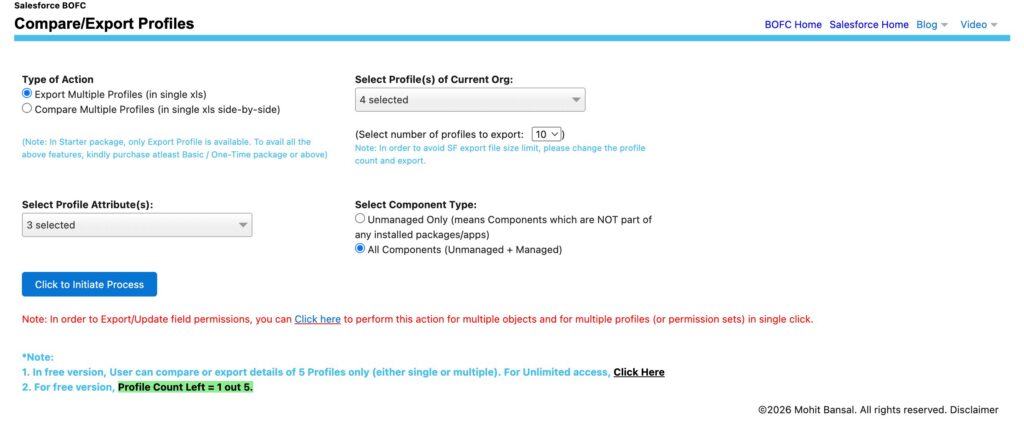
Another common use case is reviewing field-level security across multiple profiles, where inconsistencies are difficult to detect manually. Exporting this data into a single file provides a clearer overview and simplifies audits or validation tasks.
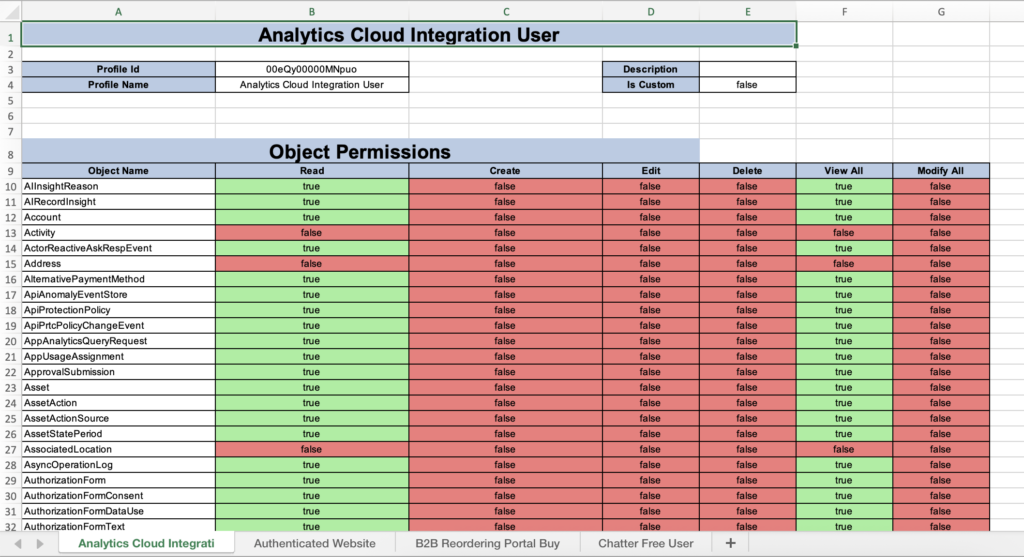
Because the data is structured and shareable, it also enforces collaboration with other team members, including those who may not work directly in Salesforce.
5. Field & Security Management
Managing permissions at scale is one of the more time-intensive aspects of Salesforce administration. Updating field-level security by hand requires opening each profile or permission set, locating the relevant object, and adjusting access one field at a time. This operational complexity directly contributes to security risk.
As highlighted by Forbes, privilege creep happens when users accumulate unnecessary access rights over time due to role changes, getting temporary permissions, and weak governance. This increases security risk because over-permissioned accounts can be exploited for unauthorized access, showing the need for more structured, centralized approaches to permission management.
The solution simplifies this by allowing field-level security updates across multiple objects and profiles or permission sets in a single process. Admins can export a consolidated file of permissions, make changes in bulk, and apply them across the selected components.
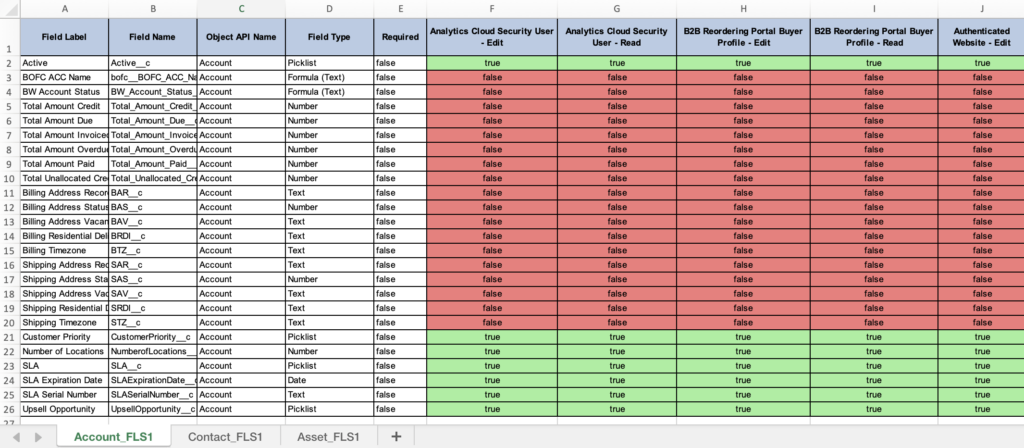
In addition to direct updates, the solution supports a more structured approach where existing permissions can be reviewed and adjusted before being applied, which is useful for validating your changes.
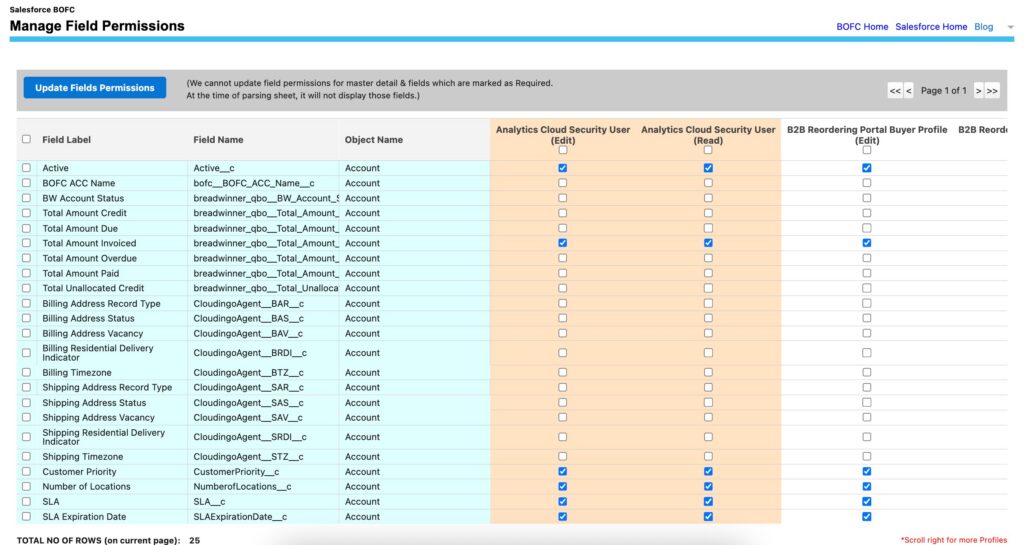
The main benefit is improved visibility into access control. When permissions are handled in bulk, it becomes easier to spot gaps, such as missing access for certain roles or unintended permissions, which is particularly useful when standardizing access across teams or updating permissions during deployments.
6. Cloning & Replication
Reusing existing configurations is often more efficient than rebuilding them, but Salesforce does not always make this straightforward, especially when dependencies are involved.
The tool supports cloning of objects along with their associated metadata, including fields, validation rules, page layouts, and record types. Users can choose what components to include and replicate them in a single flow, with the option to clone into a new object or an existing one.
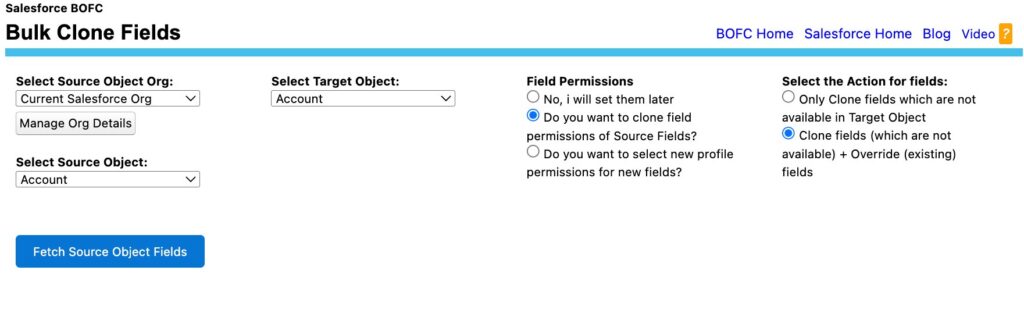
Beyond objects, the app handles cloning of dashboards and reports together with their dependencies, such as report types, filters, and folder structures. All related components are cloned as part of the same process, resulting in usable dashboards and reports without extra adjustments.
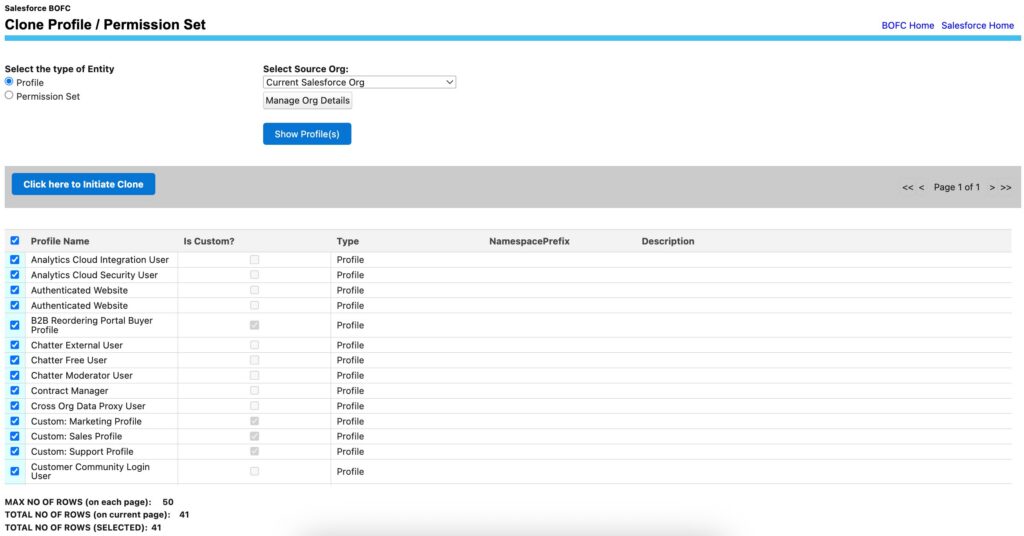
Similarly, profiles and permission sets can be replicated, including detailed access configurations like object permissions, field visibility, user permissions, and more. This helps maintain consistency across environments, particularly when setting up new orgs or migrating configurations.
Additional Capabilities
The features we’ve presented cover the main areas of functionality, but they are not exhaustive. The solution also includes support for other metadata operations such as working with list views, flows, process builder, custom metadata, picklist value sets, approval processes, Lead conversion, and more. Salesforce BOFC app can be used across a wider range of administrative and configuration tasks beyond the core features outlined here.
This can also be useful when a Salesforce org includes specialized business apps, such as a Salesforce digital signature solution, because these apps often introduce their own objects, fields, permission sets, layouts, automation, and configuration dependencies that still need to be managed over time.
Common Real-World Use Cases of BOFC in Salesforce Metadata Management
The solution is applied across a wide range of everyday Salesforce administration tasks, particularly where scaling and repetition become a burden. The scenarios below reflect common, real-world patterns that consistently arise in Salesforce projects.
| Typical Use Cases for BOFC in Salesforce Metadata Management | ||
|---|---|---|
| Feature | Manual Approach | Using Bulk Object Field Creator |
| Updating Field Permissions in Bulk | Open each profile or permission set, navigate to relevant objects, and update field permissions one by one, repeating the process across multiple components. | Export permissions into Excel, update them in bulk, and upload the file once to apply changes across selected objects and profiles. |
| Comparing Profiles / Permission Sets | Open multiple setup pages or browser tabs, manually compare configurations, and track differences separately. | Generate a side-by-side comparison and export structured results for easier review. |
| Migrating Configurations Between Orgs | Recreate objects, permissions, and reports manually or rely on deployment tools that may not cover all dependencies. | Clone metadata such as objects, profiles, permission sets, and reports directly between environments. |
| Exporting Metadata for Audit or Documentation | Rely on limited built-in options, using reports, screenshots, or manual tracking to document configurations. | Export structured metadata for objects, profiles, permissions, and configurations into organized, reusable files. |
| Cloning Reports / Dashboards with Dependencies | Clone dashboards manually, then recreate or relink associated reports and fix broken references across components. | Clone dashboards along with their underlying reports, preserving relationships and dependencies automatically. |
| Comparing Objects Across Orgs Before Deployment | Review objects in separate environments and manually identify differences in fields and configurations. | Run automated comparisons and generate structured outputs with differences clearly highlighted. |
| Bulk Creating or Cloning Objects | Create objects and fields individually through Setup, repeating steps for each component and configuration. | Create or clone multiple objects in bulk, including fields, layouts, and associated rules in a single operation. |
Across all of these scenarios, users typically need a structured approach to metadata management in Salesforce. This includes being able to review configurations clearly, apply changes consistently across multiple components, and avoid the overhead of manual, step-by-step updates in the Salesforce interface.
Practical Insights and User Feedback from the BOFC AppExchange Listing
From my perspective, what stands out most is how the app simplifies complex tasks without overcomplicating the experience.

What I found useful:
- The interface is relatively simple, and most functionality is centralized instead of spread across multiple tools
- Operations follow a clear, point-and-click workflow, so there’s no need to work with metadata files or code
- Common tasks like field creation, cloning, or permission updates are structured and repeatable
- Status tracking (success/error per item) makes it easier to validate results without manual checks
Overall, the tool feels designed to reduce operational overhead rather than introduce new complexity, which is especially noticeable when working with larger orgs.
What End Users Say
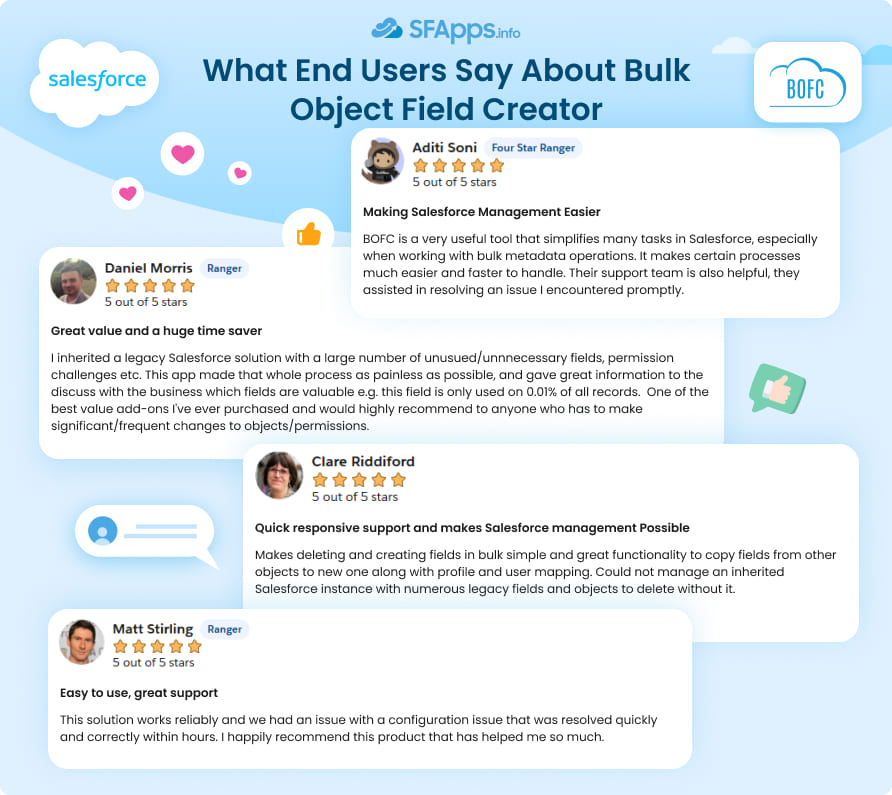
User feedback on the BOFC AppExchange app is largely positive, with an average rating of 4.74/5 based on more than 230 reviews. Most reviews highlight time savings as the main benefit, particularly for bulk field creation, object cloning, and general metadata management tasks. Users often mention that it helps simplify the administration of complex or inherited Salesforce orgs, especially during cleanup or migration work.
Another consistent point is support responsiveness, which users describe as helpful and reliable. While some note that the number of features can take time to get used to, overall feedback suggests the tool is practical and effective for day-to-day Salesforce administration.
Customer Reviews of BOFC from AgentExchange (AppExchange)
Pricing Structure and Trial Options Overview
The pricing model is tiered, allowing teams to start small and scale based on their needs. Plans include Starter, Basic, Professional, and Enterprise, with most licenses offered on a 12-month basis. Higher-tier plans generally expand usage limits, such as the number of supported orgs or active environments, and may include additional capabilities like broader metadata support and more advanced cloning options.
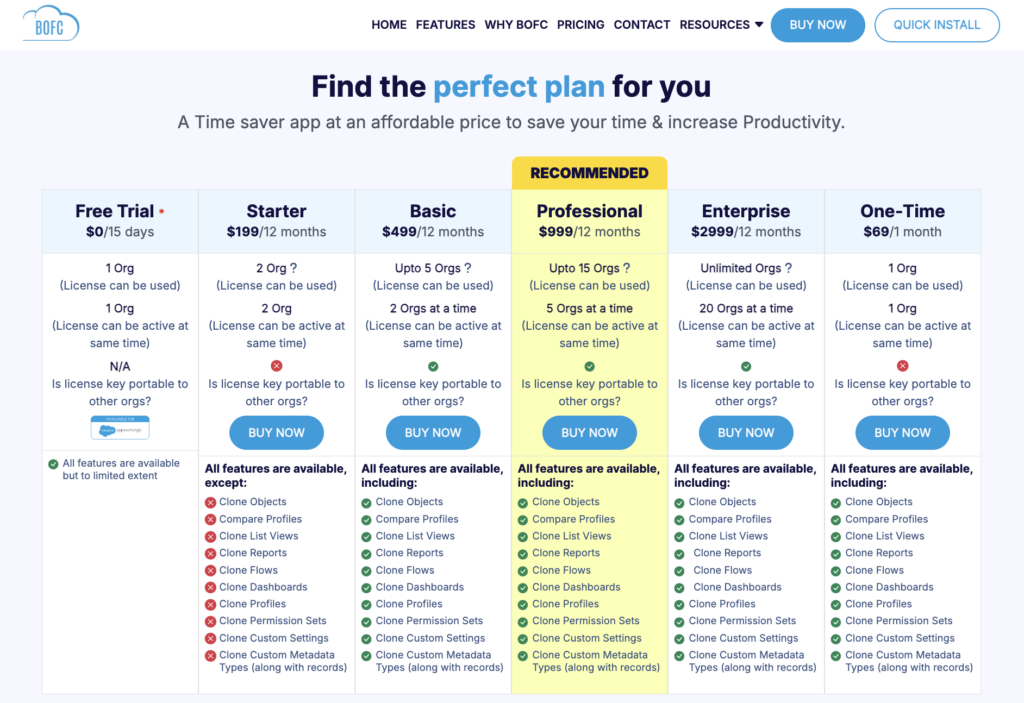
There is also a 15-day Free Trial, giving access to core features with some usage limits. The trial can be installed in either a Sandbox or Production org, making it easier to evaluate the tool in a real-world setup. In addition, the One-Time plan is available – a one-month option for those who want to test the tool in a real environment without a long-term commitment.
Final Thoughts: Making Salesforce Metadata Management More Practical at Scale
Bulk Object Field Creator can become part of an admin or developer’s everyday Salesforce work, especially in environments where metadata changes are frequent and repetitive. Instead of introducing entirely new capabilities, the tool focuses on improving how existing Salesforce operations are executed, making them faster, more structured, and less error-prone.
In practice, the app helps reduce manual effort in areas like field and object management, permissions, cross-org deployments, and metadata comparisons. By consolidating these tasks into guided workflows, it removes a lot of the repetitive navigation and setup work that usually slows down administration. The tool doesn’t aim to replace existing Salesforce functionality, but rather make it more practical to work with at scale.
If you are looking to simplify day-to-day Salesforce metadata management without committing long-term, you can start with the 15-day free trial and explore all the features in your own environment. Installation is quick and available directly via the official BOFC website, allowing you to test it in a sandbox or production org and see how the tool can simplify your daily workflow.

Mykhailo is a Salesforce Certified Platform Administrator with development experience in the fintech field. Since 2021, he has gained the Double Star Ranger rank on the Salesforce Trailhead education platform, where he acquired 26 Superbadges in Business Administration, Process Automation, Security, and more. With a decade of expertise in consulting and compliance, he aspires to translate complex technical concepts into accessible content, helping organizations make the most of Salesforce. Mykhailo is passionate about using technology for everyday needs, enjoys reading sci-fi and non-fiction books, and playing video games. He also has an interest in history and outdoor activities such as hiking, camping, and kayaking.
 Previous Post
 Next Post