





When Invoice Work Leaves the Salesforce Record
What happens when all sales details are already in Salesforce, but the invoice still starts with finance asking sales to confirm products, billing terms, customer data, or the latest quote?
This is a common Salesforce challenge. The commercial data is already in the CRM, but invoice work often moves somewhere else. A finance user may create the invoice in an accounting tool. A sales user may track the customer conversation in Salesforce. Payment status may live in a bank portal, a spreadsheet, or a separate finance system.
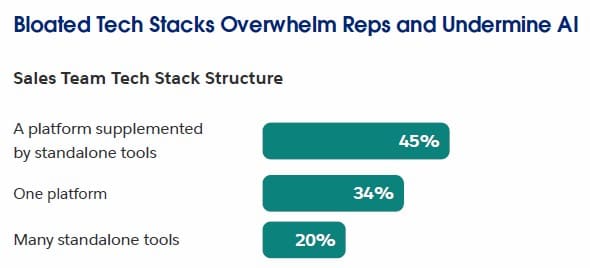
Sales teams already work across a crowded toolset. Salesforce reports that sellers use an average of 8 tools to close deals, and only about a third of sales teams use an all-in-one platform. If invoicing then moves into another separate system, the handoff from sales to finance can become even harder to control.
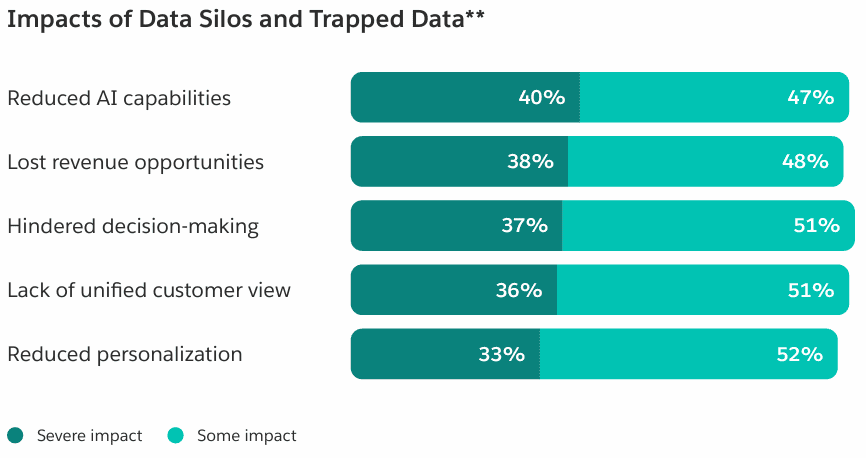
The problem is not only tool switching. The same Salesforce’s State of Sales report says 51% of sales leaders with AI say tech silos delay or limit AI initiatives. The same logic applies to invoicing: when sales data and finance data are separated, teams lose context exactly when the customer process should move forward.
There are different ways to solve this. Some companies connect Salesforce to an external accounting system. Some use document generation tools to create invoice PDFs from Salesforce data. Others look for apps that keep more of the invoice process inside Salesforce itself, including invoice records, payments, reminders, e-invoices, and related finance documents.
Salesforce native marketplace AppExchange (now AgentExchange) lists many apps for accounting and invoice management. For this article, I selected Finblick and EasyFlow Invoices because both bring invoice-related work into Salesforce, but they represent two different approaches: a broader finance workflow and a more focused invoice management process.
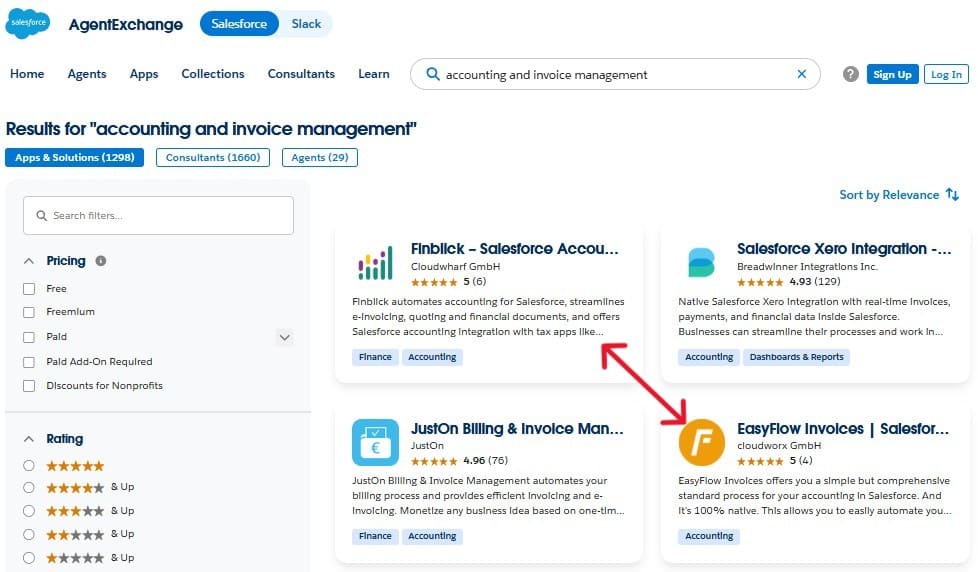
Finblick and EasyFlow Invoices both help teams manage invoicing work in Salesforce, but they do it with different levels of scope. Finblick is positioned as a wider finance document app, while EasyFlow Invoices is positioned as a standard invoice process.
So, which Salesforce invoicing app fits better? The answer depends on what you expect Salesforce to handle. Do you need a focused invoice workflow? Or do you want a broader finance process connected to sales data? This article compares both apps from that practical angle.
- Finblick Quick Overview: A Salesforce Invoice Generation Solution for Finance Workflows
- EasyFlow App Quick Overview: The Tool for Standard Invoice Processes
- Feature Comparison: Salesforce Invoice Management in Daily Work
- Usability and Setup: How Teams Create Invoice in Salesforce
- Buyer Signals: AppExchange Reviews, Documentation, and Testing Options
- Pricing Comparison: Base Licenses and Add-Ons
- Final Takeaway: Choosing the Right App for Sales Invoicing on Salesforce
Finblick Quick Overview: A Salesforce Invoice Generation Solution for Finance Workflows
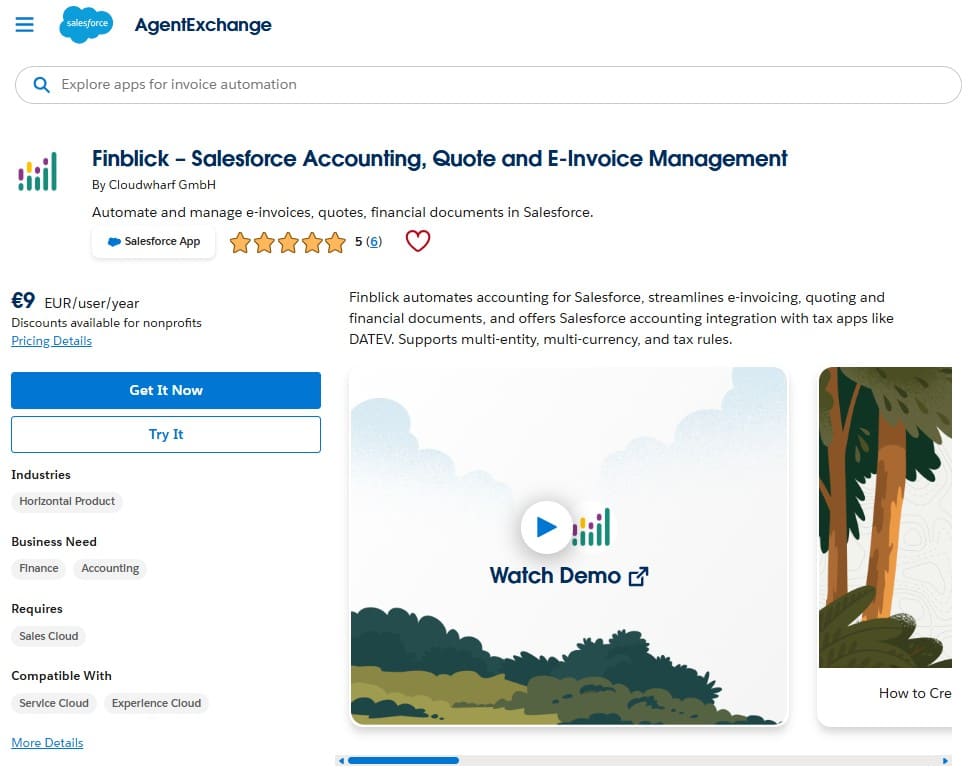
Overview:
“Finblick – Salesforce Accounting, Quote and E-Invoice Management” is developed by Cloudwharf GmbH. The app is built for companies that want financial document work to stay close to Salesforce records. In practical terms, that means a team can work with quotes, orders, invoices, credit notes, and e-invoices without moving the whole process into a separate finance tool.
The important point about Finblick is the scope. Finblick is a wide finance document and accounting app, covering quotes, orders, invoices, credit notes, e-invoicing, DATEV, banking, and SEPA-related workflows.
As a Salesforce invoice generation tool, it covers several steps around the commercial document lifecycle. A sales user can work with quotes, while a finance user can continue with orders, invoices, credit notes, payment status, DATEV export, or payment-related functions, depending on the assigned license and enabled modules.
Setup and configuration:
The process of installing and configuring Finblick can be broadly divided into the following steps:
- Prepare the Salesforce org first. Before installing Finblick, the org needs the required Salesforce features enabled. For example, Quotes must be enabled before the package installation.
- Install the managed package from AppExchange. Once the org prerequisites are ready, the admin can install the Finblick package. For the first installation, admin-only access is the safer choice.
- Complete the Finblick connection step. After installation, the admin needs to open Finblick Setup and connect the app to the Finblick service.
- Assign licenses and permission sets. Access should be assigned based on the user’s role. Read-only users can view records. Sales users can work with quotes and quote documents. Finance users can work with quotes, orders, invoices, credit notes, and related finance records.
- Review application settings. After access is in place, the admin should check the settings that control how Finblick behaves in the org. This may include items such as quote approval, customer and supplier number generation, multiple legal entities, and other business-specific settings.
- Prepare the Salesforce pages where users will work. Finblick also needs UI configuration, especially on the records where financial documents are created and managed. In practice, this means checking page layouts or Lightning record pages, adding the needed related lists, actions, fields, tabs, or components, and making sure users can work with quotes, orders, invoices, and credit notes from the right places.
Key features:
Finblick supports a broad financial document workflow:
- Quote, order, invoice, and credit note management.
- PDF invoices and e-invoices (XRechnung and ZUGFeRD support)
- Customizable document templates.
- Invoice attachments and supporting documents.
- Multilingual and multi-currency use cases.
- Tax handling.
- Partial invoices, down payment invoices, and final invoices.
- Cancellation invoices and credit notes.
- DATEV export.
- Bank integration.
- SEPA Direct Debit.
- Multiple legal entities or multi-tenancy.
- Payment tracking.
- Invoice payment reminders.
Best fit:
For me, Finblick fits best when a company does not want to stop at invoice creation in Salesforce, but also needs related work around quotes, orders, credit notes, e-invoices, payment status, DATEV, banking, and SEPA payments. For companies that plan to implement Salesforce for banking workflows, Finblick is worth reviewing as part of a broader finance process rather than only as an invoicing add-on.
EasyFlow App Quick Overview: The Tool for Standard Invoice Processes
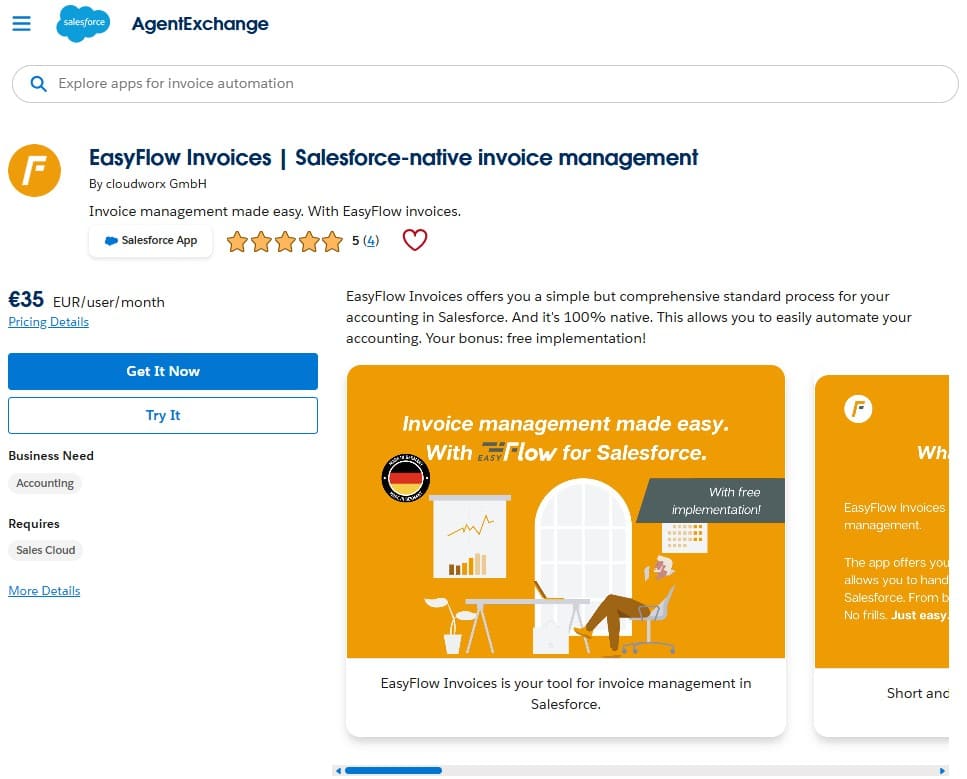
Overview:
“EasyFlow Invoices | Salesforce-native invoice management” is developed by cloudworx GmbH. The app is built for companies that want to manage invoice-related records directly in Salesforce, without creating a fully custom finance process from the ground up.
The main point about EasyFlow is its focused scope. It is positioned as a standard invoice process for Salesforce, covering invoice creation, incoming payments, cancellations, reminders, and invoice-related dashboards. Compared with Finblick, EasyFlow looks narrower and is more about organizing invoice workflows around Salesforce records solely.
In practical terms, EasyFlow Invoices can create invoice records based on Opportunity or Order stages. It can also track incoming payments in a dedicated data structure and update the invoice status to “Paid” after the customer settles the outstanding amount. For teams that mainly need invoice records, payment tracking, reminder records, and cancellation handling in Salesforce, that scope may be enough.
Setup and configuration:
For a Salesforce admin, EasyFlow Invoices setup starts with package installation and then moves into invoice process configuration:
- Install the managed package from AppExchange. The package is installed from AppExchange. During installation, the admin should select installation for administrators only and grant access to the required third-party websites when prompted.
- Assign licenses and permission sets. After installation, the admin assigns EasyFlow Invoices licenses from the installed package. Permission sets are assigned separately, mainly for admin users and standard users.
- Share reports and dashboards. EasyFlow includes reports and dashboards. These folders need to be shared with internal users; otherwise, the app home screen may not display correctly for non-admin users.
- Review the configuration record. EasyFlow uses a configuration data record to control basic app behavior in the “EasyFlow Invoices Admin” app, which is included in the installation package. Some default settings are already present, but the admin can review and adjust them to match the company’s invoice process.
- Configure stage settings, reminder levels, and number ranges. Stage settings control when invoice records are generated from Opportunities or Orders. Reminder levels control when reminder records are created. Number ranges define numbering for invoices, reminders, and cancellations.
- Prepare the object interface. EasyFlow Invoices needs a configuration around the standard Salesforce records used in the invoice process. The admin should review Opportunities, Opportunity Products, Orders, and Order Products, and make sure the needed fields, related lists, buttons, and user-facing elements are available where users create or review invoice-related data.
Key features:
EasyFlow Invoices covers a focused invoice management process in Salesforce:
- Invoice record creation from Opportunities or Orders.
- Full or partial invoicing.
- Incoming payment tracking.
- Automatic invoice status update to “Paid” after payment is recorded.
- Cancellation records.
- Reminder records.
- Reminder levels for overdue invoices.
- Invoice, reminder, and cancellation number ranges.
- Dashboards for invoice overview.
- Receipt and settlement records.
- Option for GoBD-related traceability.
Note on other cloudworx applications:
EasyFlow Invoices should be evaluated as a focused invoice management app. Its main scope is invoice records, payments, cancellations, reminders, and process tracking. At the same time, cloudworx offers other Salesforce apps that can add related finance functions to EasyFlow. For example, XRSF covers XRechnung and ZUGFeRD e-invoicing, millio covers banking integration, and integraid can connect EasyFlow with external systems such as DATEV. These should be treated as separate products when checking setup, licensing, and pricing.
Best fit:
EasyFlow Invoices is best suited when a company wants a simpler invoicing process within Salesforce. It is a good match for teams that mainly need to generate invoice records, track payment receipts, manage cancellations, and handle reminders.
Insight:
Finance teams still spend serious time on invoice processing.
The 2024 Accounts Payable Automation Trends report found that 52% of AP professionals spent more than 10 hours per week processing invoices, while 60% of invoices were still manually entered into ERP or accounting software.
For a Salesforce team, this is a reminder that moving invoice data between systems is not only inconvenient but can also create extra manual work.
Feature Comparison: Salesforce Invoice Management in Daily Work
After looking at both quick overviews, the first practical question is simple: what kind of invoice work can each app support day to day?
Both apps help teams keep invoice-related work in Salesforce, but they are not built around the same scope. Finblick covers a wider document lifecycle, from quotes and orders to invoices, credit notes, e-invoices, payments, and accounting export. EasyFlow Invoices focuses more on the standard invoice process itself, including invoice records, payment status, cancellations, reminders, and dashboards.
| Feature Comparison: Finblick vs EasyFlow Invoices | ||
|---|---|---|
| Area | Finblick | EasyFlow Invoices |
| Main process | Quote, order, invoice, credit note, and e-invoice lifecycle in Salesforce | Invoice records, incoming payments, cancellations, reminders, and invoice dashboards in Salesforce |
| Invoice creation | Creates invoice records directly in Salesforce as part of the quote, order, invoice, and credit note flow. Supports partial invoices, down payment invoices, and final invoices | Creates invoice records directly in Salesforce from Opportunities or Orders. Supports full or partial invoicing |
| Quote support | Finblick supports quote creation and has a stronger quote module with approvals, templates, attachments, multilingual documents, discounts, and pricing logic | EasyFlow may rely on Salesforce Quotes for the complete feature set, but its main focus is on invoice management |
| PDF and document generation | Finblick generates PDF invoices and e-invoices directly in its document flow | EasyFlow can include document creation, but PDF generation relies on cloudworx.compose, a separate tool from cloudworx, so it should be checked as part of the EasyFlow setup and pricing |
| E-invoicing | Supports XRechnung and ZUGFeRD directly in Finblick | E-invoicing can be added through XRSF, a separate cloudworx app for XRechnung and ZUGFeRD |
| Payment tracking | Finblick includes payment tracking and payment reconciliation through bank integration | EasyFlow supports incoming payment tracking and updates the invoice status when payment is recorded. For bank automation, it can be used with millio as an additional cloudworx app |
| Reminders | Supports invoice payment reminders | Supports reminder records based on reminder levels |
| Cancellations and credit notes | Supports cancellation invoices and credit notes as financial document types, including partial or full correction scenarios | Supports cancellation records based on invoice status and tracks the cancellation process. |
| Accounting export | Supports DATEV export as part of the Finblick scope | DATEV connection can be handled through additional cloudworx tools, such as integraid |
| Banking | Bank integration is part of the Finblick offering | Banking can be covered through millio, a separate cloudworx app |
| Multi-entity and multi-currency | Supports multiple legal entities and multi-currency use cases | Supports multiple currencies |
| Best feature fit | Teams that need invoicing connected with a wider finance document process | Teams that need a focused invoice workflow with payments, cancellations, and reminders |
| Stars Achieved | ⭐⭐⭐⭐⭐ | ⭐⭐⭐ |
Key takeaways:
Both apps can support invoice work in Salesforce. The difference is the depth around the invoice:
- Finblick is stronger when the invoice is only one part of a larger process. For example, if the team needs quotes, orders, e-invoices, credit notes, payment tracking, DATEV export, banking, and SEPA-related work in one Salesforce-based flow, Finblick is closer to that requirement.
- EasyFlow Invoices is easier to understand as a focused invoice process app. It can be enough when the team mainly wants to create invoice records from sales data, track payment receipts, manage cancellations, and send reminders. If e-invoicing, banking, or DATEV connection becomes part of the same project, those areas should be checked as separate cloudworx products, not assumed as built-in EasyFlow Invoices features.
Usability and Setup: How Teams Create Invoice in Salesforce
Usability in this category is not only about whether the interface looks clean. The bigger question is what the admin has to prepare before users can reliably create invoices, check payment status, manage reminders, and work with related financial records.
| Usability and Setup: Finblick vs EasyFlow Invoices | ||
|---|---|---|
| Area | Finblick | EasyFlow Invoices |
| Setup starting point | Starts with Salesforce org prerequisites before installation, including required Salesforce features such as Quotes and Orders | Starts with package installation and then invoice process configuration in the EasyFlow admin area |
| Main admin tasks | Prepare org features, install the package, connect Finblick, assign role-based licenses and permission sets, review app settings, and prepare Salesforce pages | Install the package, assign licenses and permission sets, share reports and dashboards, review the configuration record, configure stage settings, reminder levels, number ranges, and object interface |
| User access model | Uses separate access levels for read-only, sales, and finance users. This fits teams where sales and finance need different control over documents | Uses admin and user permission sets. This is easier to understand when the process is mainly invoice management |
| Salesforce interface work | Requires page and record configuration for its finance document flow, so users can work with quotes, orders, invoices, and credit notes from the right Salesforce pages | Requires standard object configuration around Opportunities, Opportunity Products, Orders, and Order Products, so invoice creation and invoice-related data fit the sales process |
| Daily user flow | Better suited when users move through several finance document steps, such as quote, order, invoice, credit note, payment status, and export | Better suited when users mainly need invoice creation, payment tracking, cancellations, reminders, and dashboard visibility |
| Extra products to check | All functions sit inside the Finblick scope, so setup is wider but centralized | Some related functions depend on separate cloudworx apps, so setup should be checked per product |
| Learning curve | Higher if the company uses the full finance document process | Lower for the core invoice process, but higher if several cloudworx apps are combined |
| Stars Achieved | ⭐⭐⭐⭐⭐ | ⭐⭐⭐⭐ |
Key takeaways:
The main difference is how each app grows after the first setup:
- Finblick starts with a wider setup because its scope already includes more finance-related work. That can take more admin planning, but it also gives sales and finance users one connected place to manage more of the document lifecycle.
- EasyFlow Invoices feels lighter at the beginning. A team can focus on invoice records, payment tracking, cancellations, reminders, and dashboards. But the admin setup becomes more complex when the team wants to add document generation, e-invoicing, banking, or external integrations through other cloudworx apps.
Buyer Signals: AppExchange Reviews, Documentation, and Testing Options
Both apps have positive AppExchange ratings, but ratings alone do not tell the full story. For a Salesforce admin or buyer, the more useful question is: how easy is it to understand the app before installation?
That means checking three things. First, what do users mention in their reviews? Second, is product documentation openly available? Third, can the buyer test the app in a realistic way before committing to setup work?
| Buyer Signals: Finblick vs EasyFlow Invoices | ||
|---|---|---|
| Area | Finblick | EasyFlow Invoices |
| AppExchange positioning | Salesforce accounting, quote, and e-invoice management | Salesforce-native invoice management |
| AppExchange rating | 5 stars | 5 stars |
| Number of reviews | 6 reviews | 4 reviews |
| What users focus on in reviews | Reviewers mention DATEV integration, self-billing, e-invoicing volume, SEPA Direct Debit, Salesforce-based finance workflows, invoice creation, and strong support from the Cloudwharf team | Reviewers mention simpler invoice processing in Salesforce, automation of invoice work, flexibility for custom needs, support from the cloudworx team, incoming and outgoing invoices, and use with millio for banking-related steps |
| Documentation accessibility | Finblick has open product documentation covering installation, setup, configuration, and all built-in app features | EasyFlow Invoices has open product documentation covering installation, setup, configuration, and app features. If the setup also uses other cloudworx tools, such as XRSF, millio, integraid, or cloudworx.compose, their separate documentation should be checked as well |
| Testing options | Offers a 30-day free trial and an AppExchange Test Drive org. The Test Drive lets buyers explore a fully configured Finblick environment before doing their own installation | Offers a 30-day free trial. No preconfigured AppExchange Test Drive org, so buyers need to install and configure the app before testing the full workflow |
| Stars Achieved | ⭐⭐⭐⭐⭐ | ⭐⭐⭐⭐ |
Key takeaways:
The buyer signals are positive for both apps, but they point in different directions:
- Finblick has more public review volume, an AppExchange Test Drive, and documentation that supports its wider finance document scope. The reviews also focus on complex finance use cases, such as DATEV integration, self-billing, e-invoicing volume, SEPA Direct Debit, and support quality. This helps a buyer understand that Finblick is not only an invoice record tool, but a broader finance process app inside Salesforce.
- EasyFlow invoices also has positive reviews and open product documentation, but the evaluation needs one extra step for testing. The core EasyFlow documentation is useful for invoice records, payments, reminders, cancellations, and setup. However, if the planned setup includes broader EasyFlow apps Salesforce options (XRSF, millio, integraid), each of those products should be checked separately. This matters for setup, licensing, pricing, and testing.
Pricing Comparison: Base Licenses and Add-Ons
Finblick and EasyFlow use different pricing logic:
- Finblick separates users by role and then adds paid modules for specific finance functions.
- EasyFlow has a simpler user-based price for the invoice app itself, with a separate price for additional apps and solutions.
But if the buyer wants e-invoicing, banking, DATEV-related automation, or document generation through the wider cloudworx setup, the pricing needs to include those separate products as well.
| Pricing Comparison: Finblick vs EasyFlow Invoices | ||
|---|---|---|
| Area | Finblick | EasyFlow Invoices |
| Base pricing model | Role-based pricing for View-Only, Sales, and Finance users | User-based pricing with two plans, depending on whether document creation is included |
| User license pricing | Three pricing layers:View-Only starts at €9 per user/month, Sales at €23 per user/month, and Finance at €39 per user/month. Yearly pricing lowers the effective monthly cost | Two pricing layers:€35 per user/month without document creation and €50 per user/month with document creation |
| Document generation | Included in the Finblick document flow. Access depends on license type: – Sales users can generate quote documents. – Finance users can generate documents for quotes, orders, invoices, and credit notes | Available in the higher EasyFlow plan, but PDF generation should be configured through the separate cloudworx.compose setup |
| E-invoicing cost | XRechnung and ZUGFeRD are part of the Finblick scope. No separate e-invoicing add-on is listed in the reviewed Finblick pricing | E-invoicing requires XRSF as a separate cloudworx app. XRSF is listed at €160 per month for 1,000 inbound and outbound invoices, with unlimited users and a 30-day free trial |
| Banking and payment reconciliation | Banking Integration is listed as a paid add-on at €29 per company/month | Banking automation requires millio as a separate cloudworx app. millio is listed at €140 per user/month |
| DATEV-related cost | DATEV Integration is listed as a paid add-on at €29 per company/month | DATEV-related integration requires integraid as a separate cloudworx app. integraid is listed at €160 per provider/month, including 2,500 API operations, with a 30-day free trial |
| Multiple company setup | Multi-Tenancy is listed as a paid add-on at €29 per company/month | Multi-tenancy or multiple legal entity support is not listed as a supported EasyFlow Invoices capability |
| Stars Achieved | ⭐⭐⭐⭐⭐ | ⭐⭐⭐ |
Key takeaways:
The main pricing difference is how each vendor packages the process:
- Finblick can look more complex at first because it has several license types and add-ons. But this structure also helps separate sales users, finance users, view-only users, and company-level finance modules.
- EasyFlow invoices is easier to price as a standalone invoice app. The buyer can quickly see the difference between the plan with document creation and the plan without it. But if the planned setup includes XRSF, millio, integraid, or cloudworx.compose, I would not compare only the €35 or €50 EasyFlow license against Finblick. In that case, the buyer should calculate the full setup cost across all required cloudworx apps.
For example, three Finblick Finance users cost €117 per month. With DATEV Integration and Banking Integration added at €29 per company/month each, the rough total becomes €175 per month.
Three EasyFlow users with document creation cost €150 per month, but adding XRSF, millio for three users, and integraid brings the rough total to about €890 per month. The pricing models are not identical, but this shows why the full quote matters more than the base user license.
Final Takeaway: Choosing the Right App for Sales Invoicing on Salesforce
We compared Finblick and EasyFlow Invoices from several practical angles: feature scope, setup work, public buyer signals, testing options, and pricing. Both apps can help teams manage invoice-related work inside Salesforce, but they are built for different levels of process depth.
- EasyFlow Invoices is a focused invoice management app. It is easier to understand as a standard workflow for invoice records, payment tracking, cancellations, reminders, and dashboards.
- Finblick goes further into the finance document lifecycle, with quotes, orders, invoices, credit notes, e-invoices, DATEV export, banking, SEPA Direct Debit, multiple legal entities, and payment tracking inside one wider app scope.
| Final Comparison: Finblick vs EasyFlow Invoices | ||
|---|---|---|
| Section | Finblick | EasyFlow Invoices |
| Feature Comparison | ⭐⭐⭐⭐⭐ | ⭐⭐⭐ |
| Usability and Setup | ⭐⭐⭐⭐⭐ | ⭐⭐⭐⭐ |
| Buyer Signals | ⭐⭐⭐⭐⭐ | ⭐⭐⭐⭐ |
| Pricing Comparison | ⭐⭐⭐⭐⭐ | ⭐⭐⭐ |
| Total Stars Achieved | 20 ⭐ | 14 ⭐ |
Based on this comparison, Finblick comes out as the more comprehensive and budget-friendly option, especially when the buyer needs more than basic invoice records. But even at the basic user-license level, a Finblick Finance user is listed at €39 per user/month, while an EasyFlow Invoices user with document creation is listed at €50 per user/month.
And when we compare a broader setup with DATEV and banking needs, Finblick’s company-level add-ons can make the total quote easier to manage than combining EasyFlow with several separate cloudworx apps.
Which App Fits Which Team?
EasyFlow Invoices is a good fit when the company wants a simpler invoice process in Salesforce and does not need a full finance document workflow from day one. It can work well for teams that mainly need invoice creation, payment tracking, cancellations, reminders, and a clear invoice overview.
Finblick is the stronger option when the company wants a simple invoice process or a larger finance and accounting process within Salesforce. If quotes, e-invoices, credit notes, DATEV, banking, SEPA payments, and multi-company work are part of the same requirement, Finblick is the app I would test first.
To see whether this matches your process, explore Finblick’s AppExchange Test Drive or start a trial with your own invoicing, payment, and accounting scenarios.

Antonina is a Salesforce Admin with six certifications: Salesforce Certified Platform Foundations, Platform Administrator, Platform Administrator II, CPQ Administrator, AI Associate, and Agentforce Specialist. She started working with Salesforce in 2021 as Intern Salesforce Developer. Now, a 2-Star Ranger on Trailhead, she continues to expand her skills and knowledge. She helps manage Salesforce systems, automate tasks, and improve processes. Antonina loves learning new things and exploring better ways to use technology. In her free time, she enjoys reading, playing sports, and exploring new tech ideas.
 Previous Post
 Next Post