





When Accounting Lives Outside Salesforce
A deal is agreed, the quote is finalized, and the customer is ready to be billed. At this point, Salesforce already holds the products, pricing, account details, and commercial terms. But in many companies, the invoice is still created in a separate system.
This means the same deal is handled twice: once in Salesforce, then again in the accounting system. At first, that may seem manageable. Over time, though, it usually leads to manual re-entry, mismatched fields, and delays between closing the deal and starting the billing process.
And when someone asks a simple question, such as “What is the actual financial status of this deal?”, there is no single place to find the answer.
This situation is typical for companies that rely on Salesforce as their main system for sales operations but still manage invoicing and accounting separately. Sales and finance are working with the same information, but not always in sync.
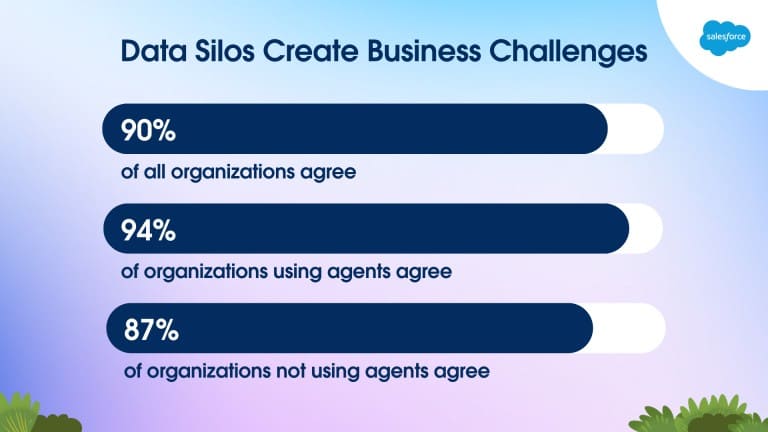
Separate systems create a business problem. Asana found that knowledge workers spend 60% of their time on “work about work,” including switching between tools and chasing updates. At the same time, Salesforce reports that 90% of IT leaders say data silos are creating business challenges in their organization, which helps explain why companies are looking for ways to keep quotes, invoices, and related financial data closer to the same workflow.
To address this issue, companies are exploring ways to integrate their financial processes with Salesforce. The goal is not to replace all financial tools, but to avoid duplication and, where possible, centralize the entire “quote-to-cash” cycle in one place.
- From Workarounds to Solutions: Where Finblick Appears
- What Finblick Brings as a Salesforce Accounting App
- Setting Up Finblick as an Accounting App for Salesforce
- Core Features of Finblick as a Salesforce Invoicing App
- Typical Daily Scenarios for Finblick
- Why I Loved Finblick
- What Other Users Say About Finblick Cloudwharf
- Pricing, Trial, and Licensing Structure
- FAQs About Finblick
- Final Thoughts: Finblick as Native Salesforce Accounting Software
From Workarounds to Solutions: Where Finblick Appears
So, the next question is practical: how do teams deal with such a challenge?
Salesforce itself already covers part of this area. Revenue Cloud (now Agentforce Revenue Management) supports quote-to-cash processes, and Revenue Cloud Billing can handle invoicing inside Salesforce. But not every company wants or needs a broader revenue setup.
Some teams connect Salesforce to an external accounting system through integrations, exports, or scheduled syncs. That approach can work, but it usually leaves the same basic issue in place: the financial picture is still split between systems.
What other option is there in this situation? One of the key advantages of Salesforce as a platform is its incredible flexibility. With over 6,000 apps on AgentExchange (formerly AppExchange), you can add almost any feature to your Salesforce organization.
Thus, instead of pushing data out and trying to sync it back, let’s explore how accounting in Salesforce could work directly inside the CRM.
If you browse categories like accounting solutions on AgentExchange, you will notice that solutions tend to fall into a few groups. Some focus only on syncing data with external systems. Others handle invoicing but stop short of covering the full process. And a smaller group brings the quote-to-cash flow into Salesforce itself.
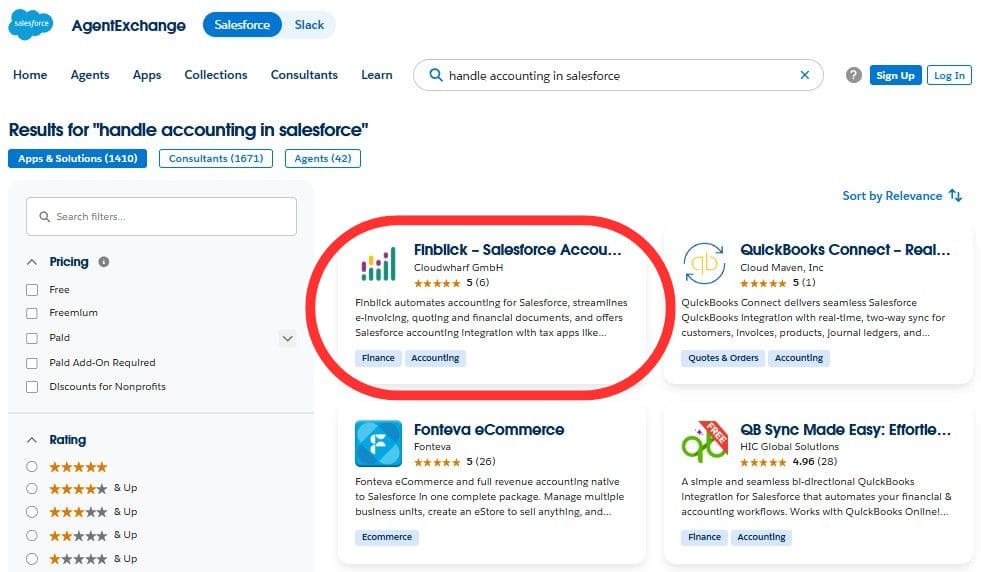
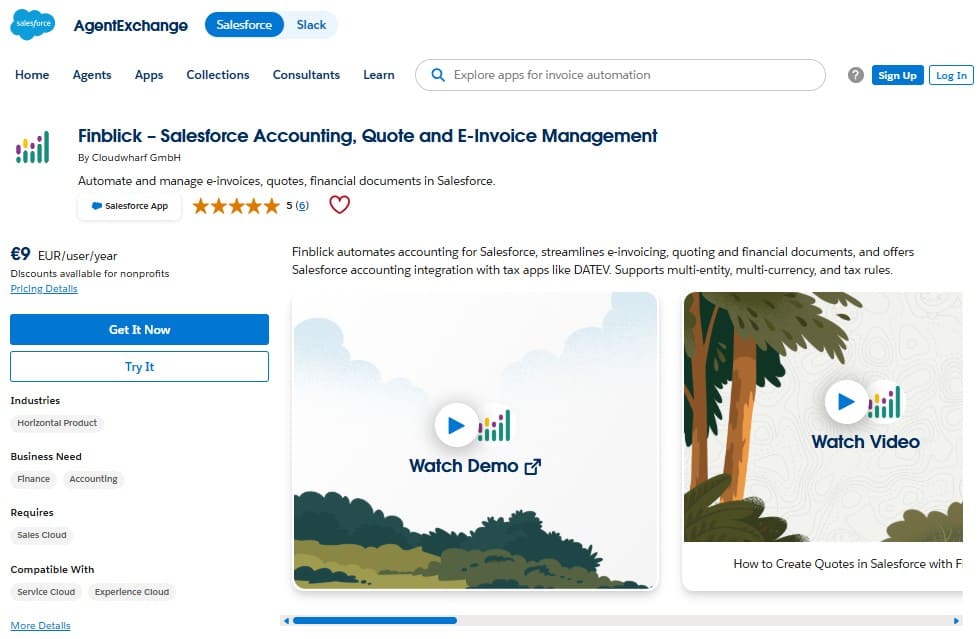
One such solution is Finblick by Cloudwharf GmbH. It is presented as a way to manage quotes, invoices, and related financial steps without leaving Salesforce, while still connecting to external systems when needed. In other words, instead of moving data back and forth between tools and teams, the process stays where the deal already lives.
In the next sections, we will walk through how this approach actually works in practice.
What Finblick Brings as a Salesforce Accounting App
At this stage, let’s take a closer look at what Finblick actually is.
Finblick is built for companies that already run sales in Salesforce and want the financial document work to happen there as well. In practical terms, that means creating and managing quotes, orders, invoices, and credit notes in the same system where the Opportunity, account, products, and pricing already live.
The app is not focused on only one narrow task. The product combines:
- document creation,
- template control,
- numbering,
- tax handling,
- attachments,
- approvals, and
- status tracking inside Salesforce.
It also supports multilingual documents, multiple currencies, and multiple legal entities, so the scope is wider than a tool for a single team or a single market.
Finblick is aimed at daily work shared by sales and finance. Sales users can prepare quotes and move them forward. Finance users can work with invoices, credit notes, exports, and payment-related processes.
The product also covers:
- e-invoicing formats (such as XRechnung and ZUGFeRD),
- DATEV export,
- bank integration,
- SEPA direct debit, and
- self-billing for freelancers and partners.
This solution works a bit like a Swiss Army knife inside Salesforce: one product, several practical tools, all kept close to the record where the deal already lives. Instead of sending the document side of the quote-to-cash process to another system, teams can keep quotes, invoices, credit notes, and status updates tied to the CRM context.
That gives both sales and finance a clearer view of what has been created, what has been sent, what has been paid, and what still needs attention.
Setting Up Finblick as an Accounting App for Salesforce
The process of Finblick installation looks structured and readable in the official documentation, which is exactly what you want from an accounting app for Salesforce.
In practice, the setup can be understood in six main steps.
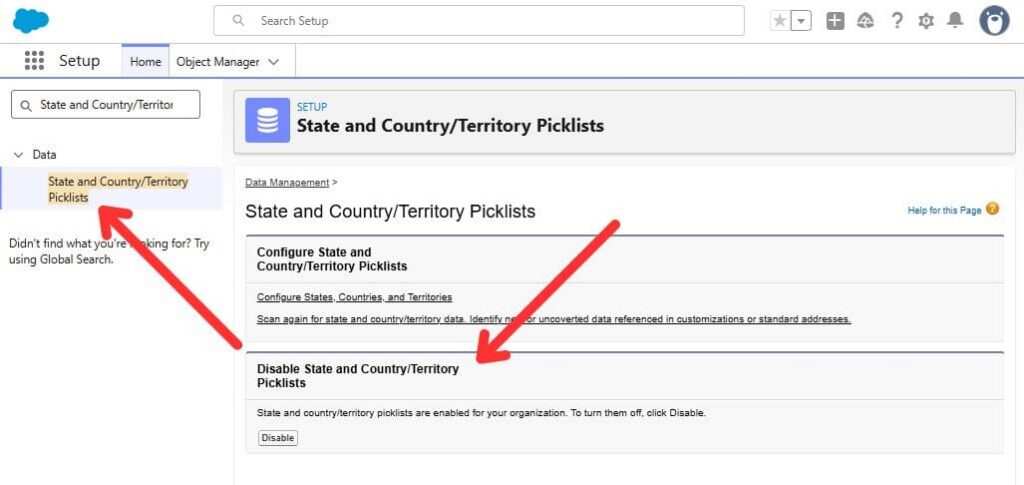
- Check the org prerequisites: Before installation, the documentation asks you to make sure State and Country or Territory Picklists, Quotes, Orders, and Custom Address Fields are enabled in Salesforce.
- Install the package from AppExchange: Once those prerequisites are in place, the next step is the package install itself. Go to the AgentExchange (formerly AppExchange) listing page and start the install flow for admins.
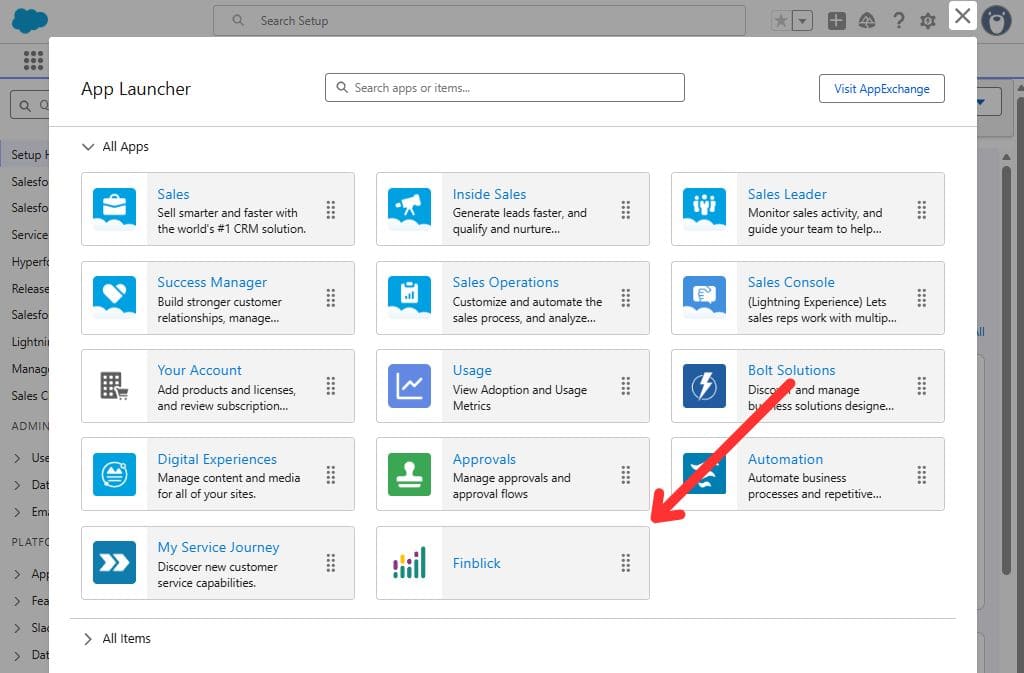
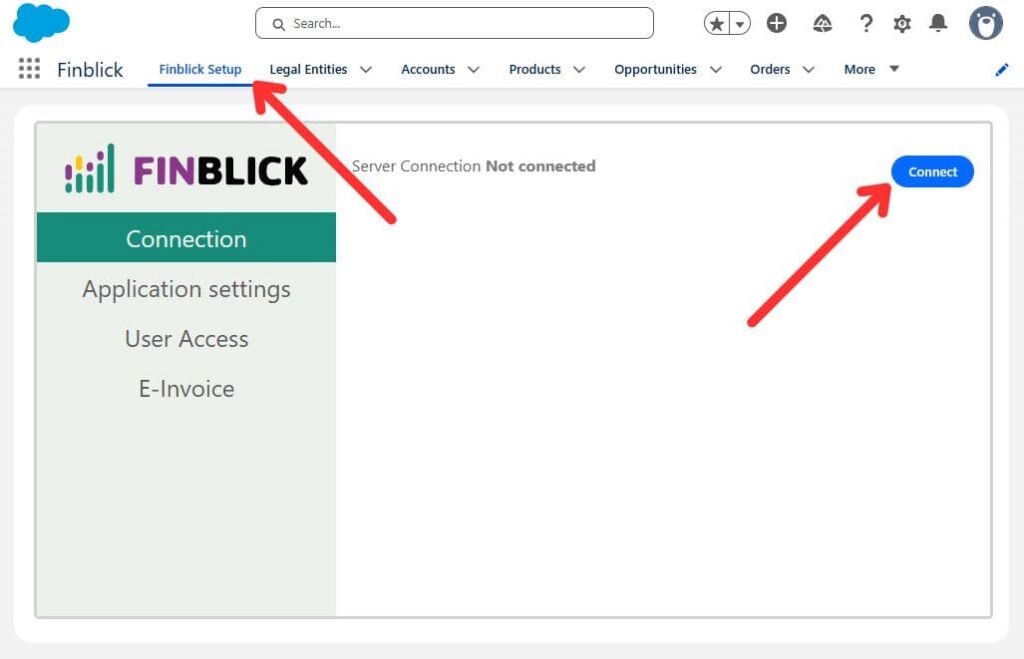
- Connect Finblick after installation: After the package is installed, you open the Finblick app, go to Finblick Setup, then Connection, and authorize the connection to the Finblick service.
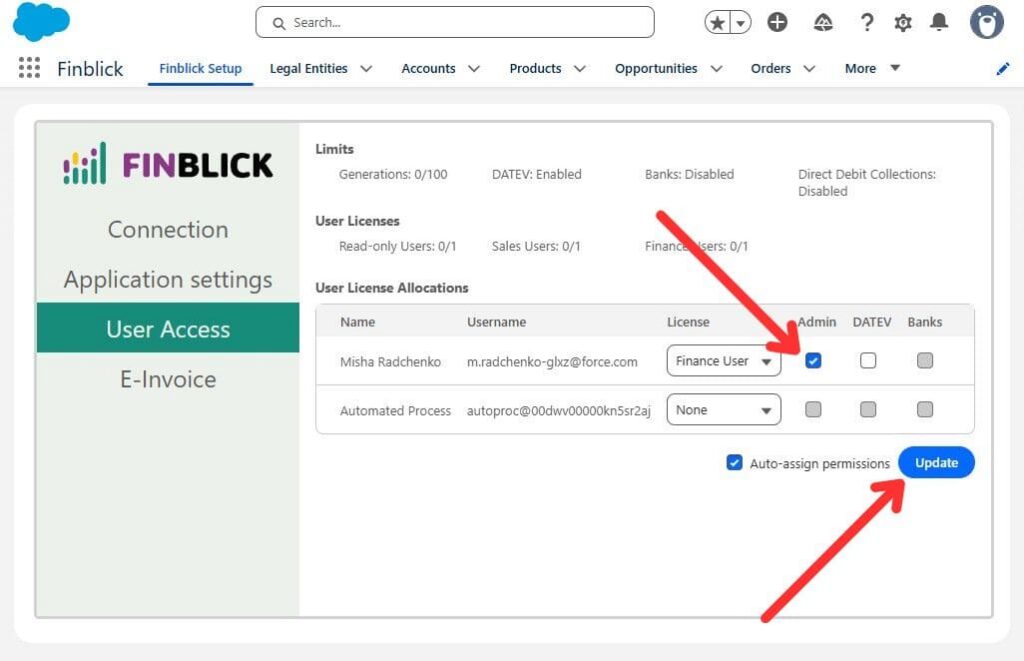
- Assign user access: Finblick separates access by role, with different access levels for Read-only, Sales, and Finance users, so the app can match how work is split between people who prepare quotes and people who handle invoices and related finance tasks.
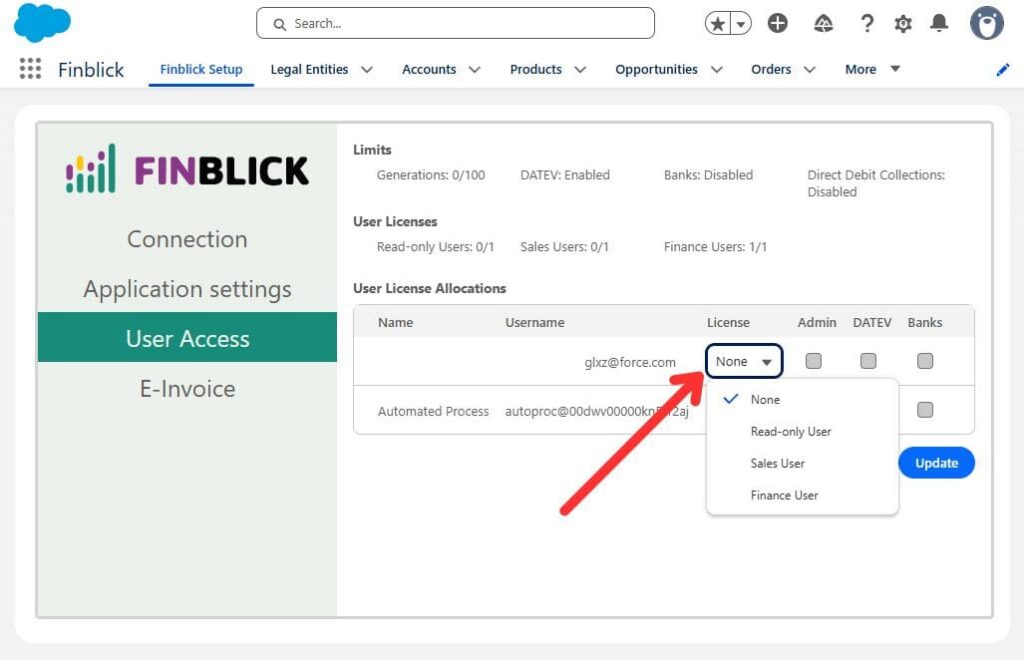
There is also a separate Finblick Admin permission set for the people responsible for setup and governance inside the app, such as Legal Entities, Tax Rules, and Finblick Setup itself. What helps here is that permissions can be assigned automatically during this stage, which makes the first rollout easier for the admin.
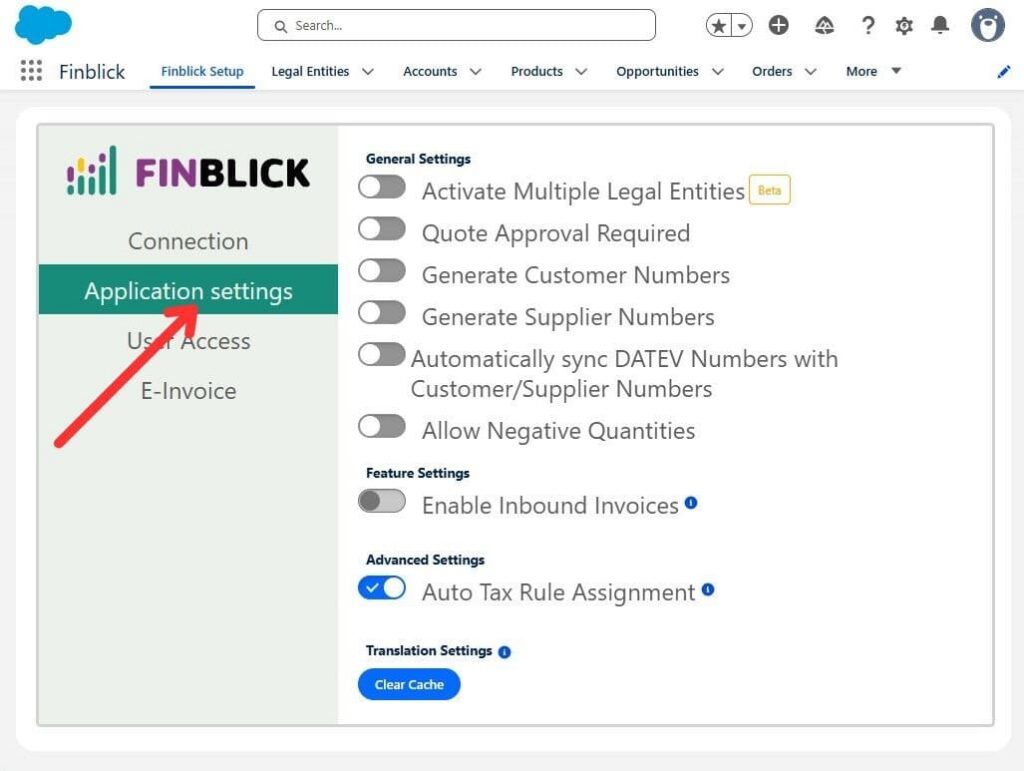
- Review the application settings: This is where an admin starts shaping how the product behaves, for example, quote approval, customer and supplier numbering, or multiple legal entities.
- Prepare the first document flow: The last part is more like normal Salesforce admin work: configure the Order and Quote record pages so the needed related lists, quick actions, and Finblick components are available, review the Legal Entity record, then create the first document and test generation.
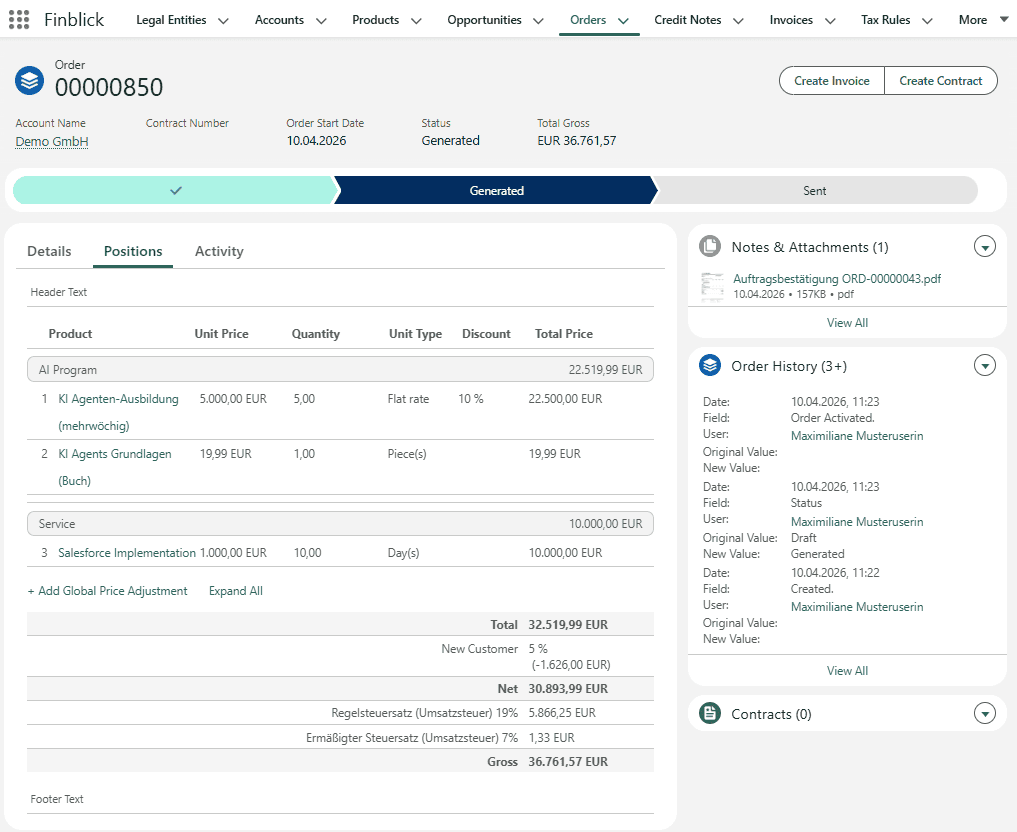
Taken together, this setup feels like a short implementation round. You install the package, connect the service, assign the right access, review the settings, and prepare the pages where users will actually work. Because the true value of this app lies in the features and workflows it brings into everyday sales and finance work.
Core Features of Finblick as a Salesforce Invoicing App
Among current Salesforce finance solutions, Finblick covers a fairly wide range of day-to-day finance work inside Salesforce. Here are the core capabilities that shape the product:
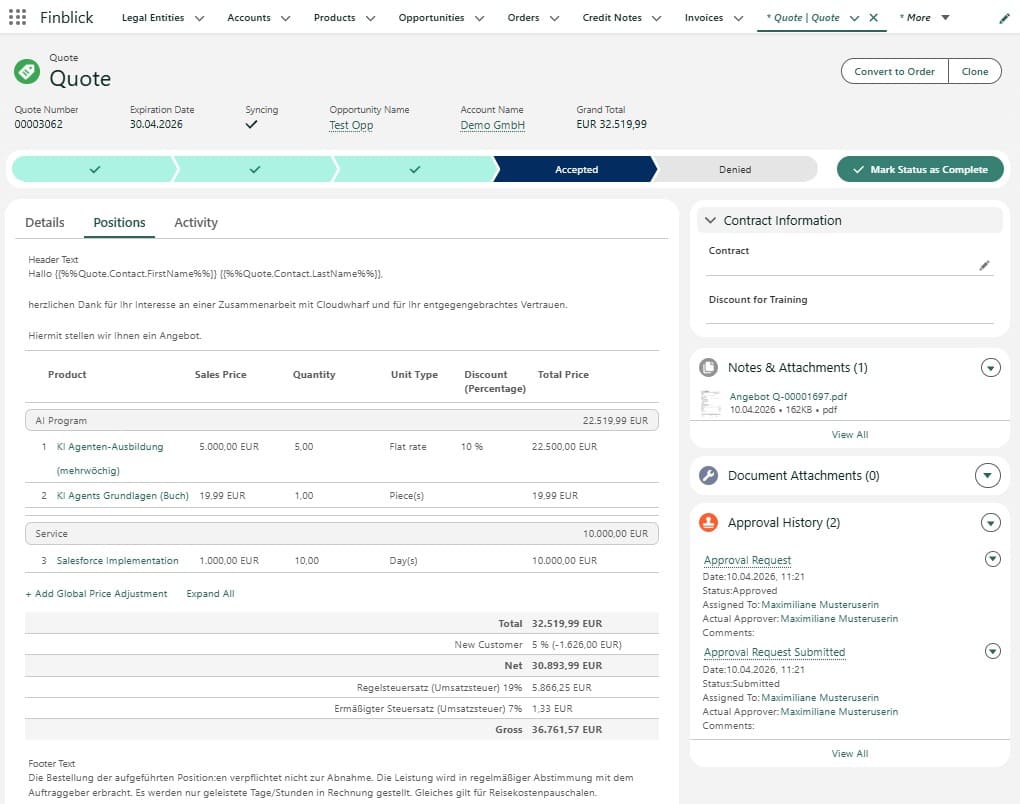
- Quote management with richer business logic: Finblick can create, manage, and send quotes directly from Salesforce records, using account, product, price, and tax data already stored in the org. It also supports approval processes, quote email delivery, and a connected path from quote to order confirmation and invoice.
- Orders, invoices, and credit notes in the same flow: The app does not stop at quote output. It also covers orders, invoices, and credit notes, so the document lifecycle stays close to the CRM record instead of being split across tools.
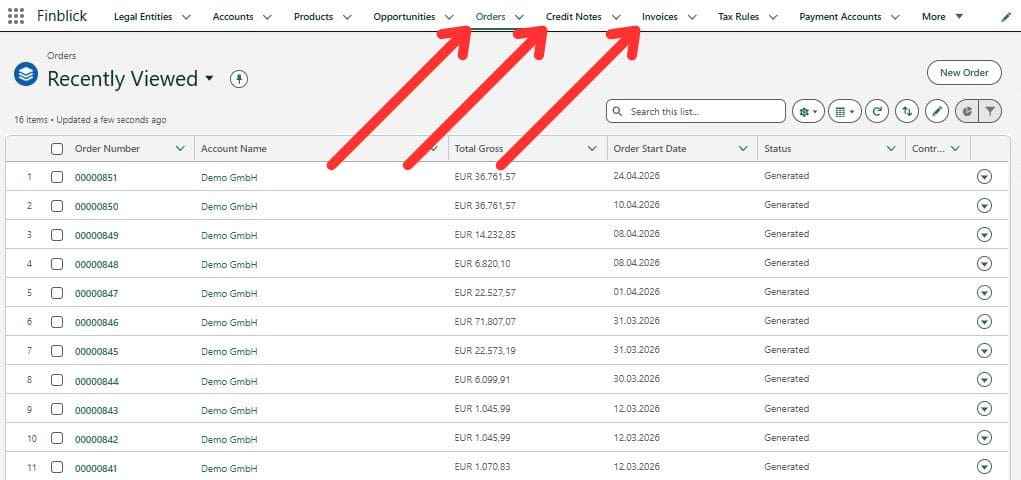
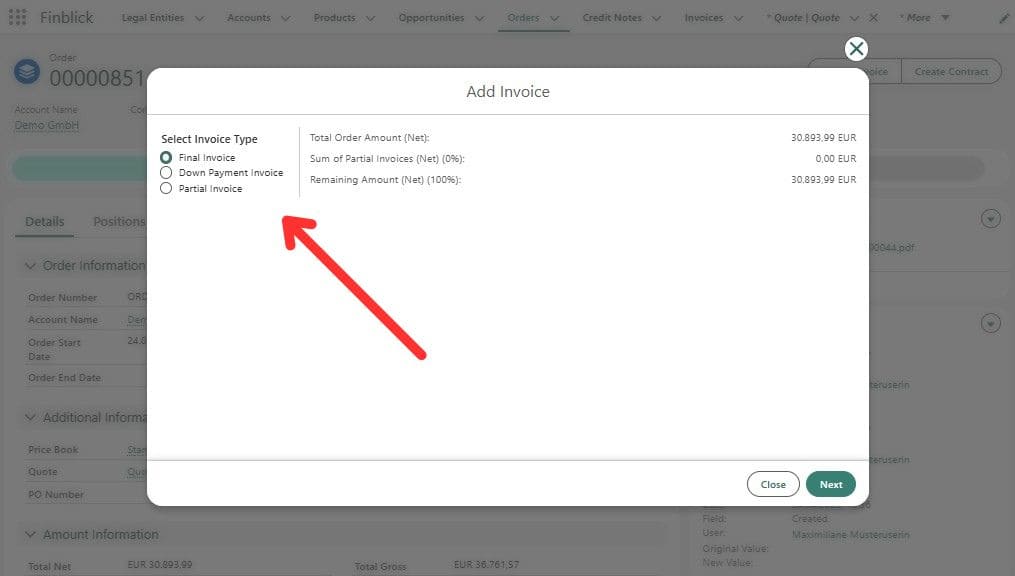
- Invoice handling for multiple invoice scenarios: Finblick supports partial invoices, down payment invoices, and final invoices. It also supports cancellation invoices and credit notes, with corrections possible at the line-item level.
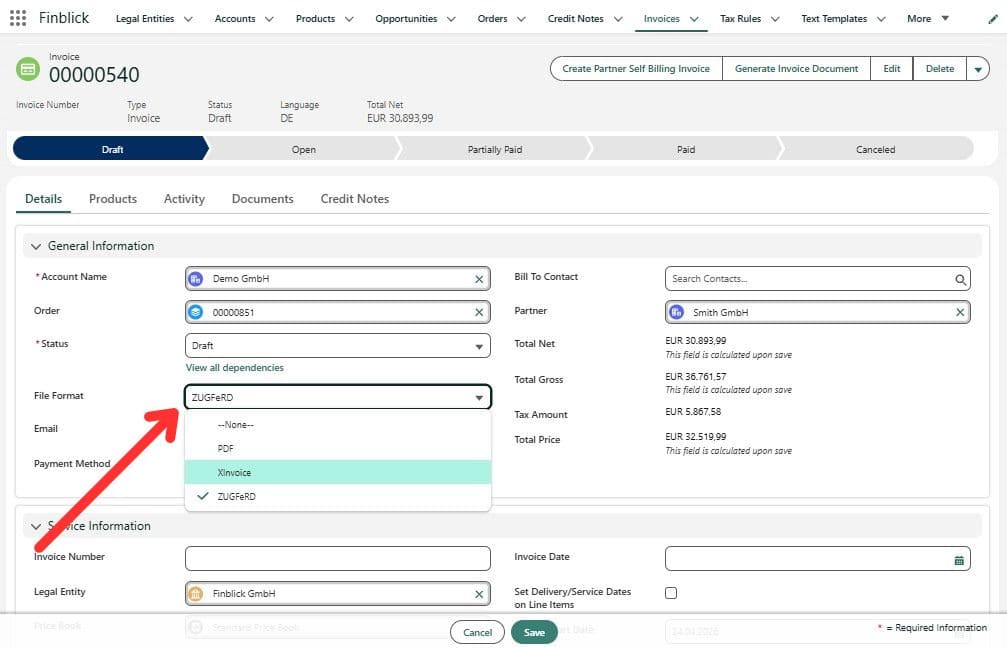
- E-invoicing support: Finblick supports e-invoices directly in Salesforce, including formats such as ZUGFeRD and XRechnung.
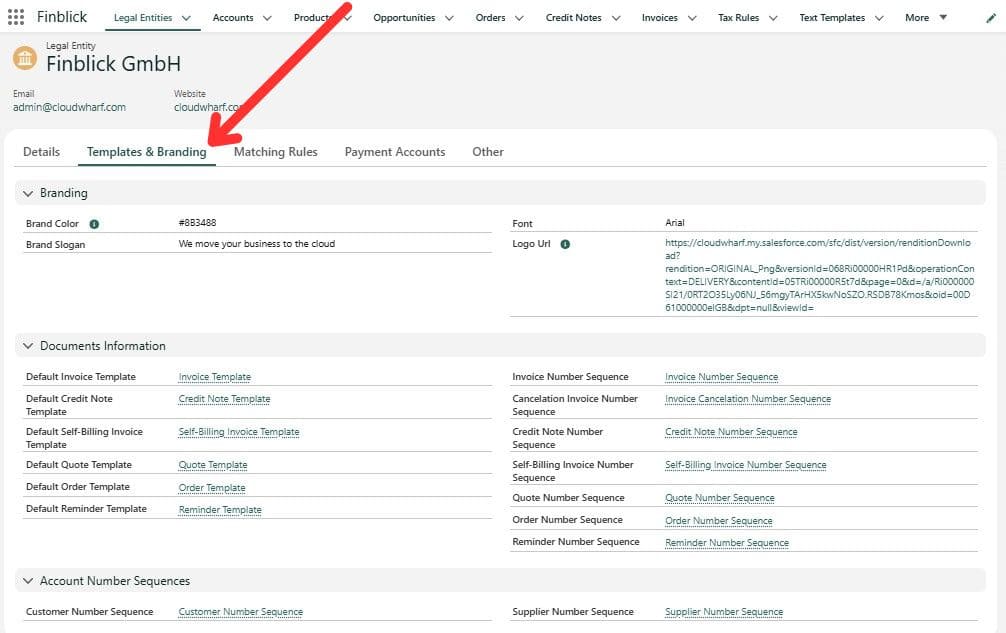
- Document templates, branding, and supporting documents: Finblick supports customizable templates for quotes and invoices, including company branding and multilingual text elements. It also lets teams include supporting documents such as terms, product sheets, contracts, service reports, and other related files in the document flow.
- Tax logic, pricing rules, and account determination: Finblick applies tax rules and pricing logic directly in Salesforce. It also supports automatic account determination, which helps keep the financial data consistent when documents move into accounting processes.
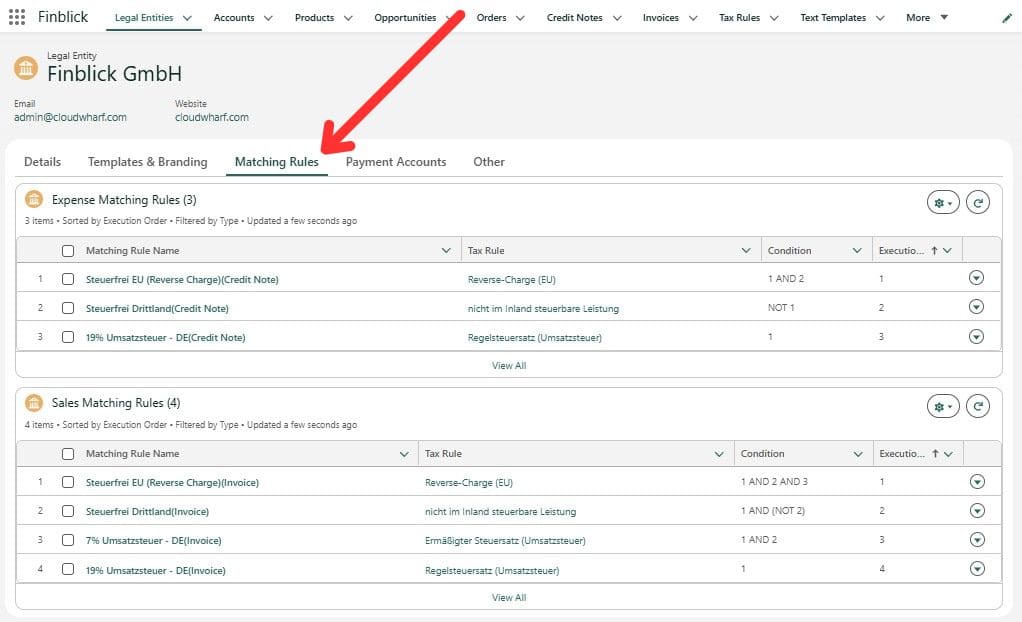
- Multiple legal entities, numbering, languages, and currencies: For companies working across markets or company structures, Finblick supports multiple legal entities, multiple currencies, multilingual documents, and document numbering configuration. That gives admins room to align the setup with how the business is organized.
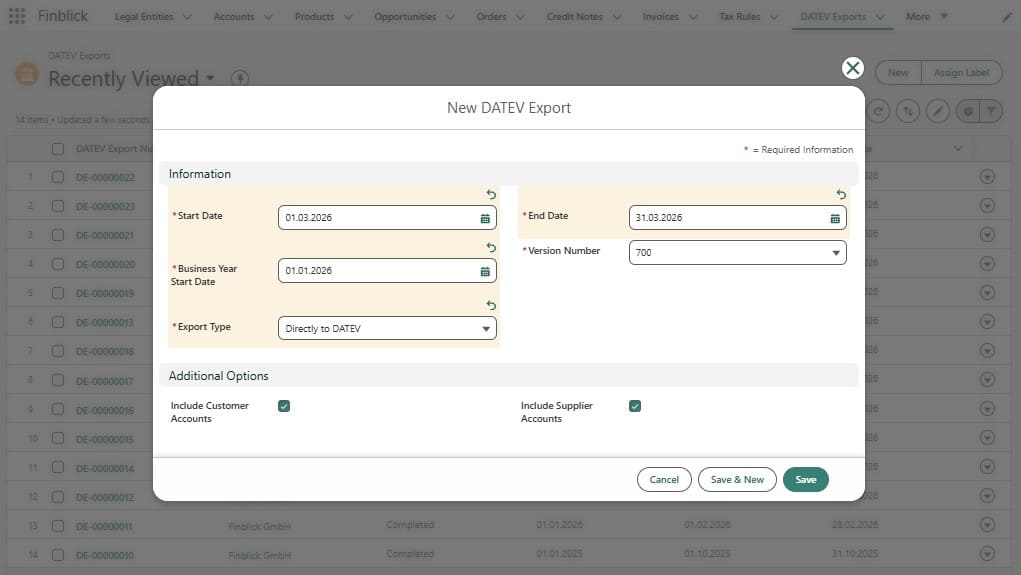
- DATEV export for accounting handoff: Finblick can export customer and vendor data, booking entries, and DATEV-ready export files covering down payment invoices, partial invoices, final invoices, cancellation invoices, and credit notes.
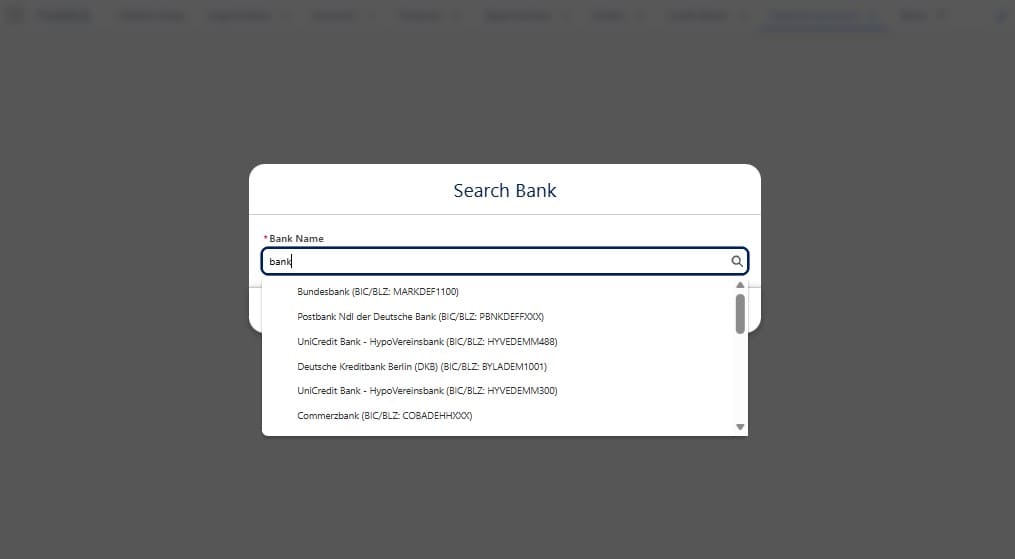
- Bank integration and SEPA direct debit: Finblick can retrieve bank transactions into Salesforce, match them against invoices and credit notes, update payment status, and support SEPA direct debit when a valid mandate exists. This brings payment tracking closer to the same place where the documents were created.
- Invoice payment reminders: Finblick supports invoice payment reminders, so finance teams can follow up on open or partially paid invoices directly from Salesforce. This fits well with the payment tracking flow.
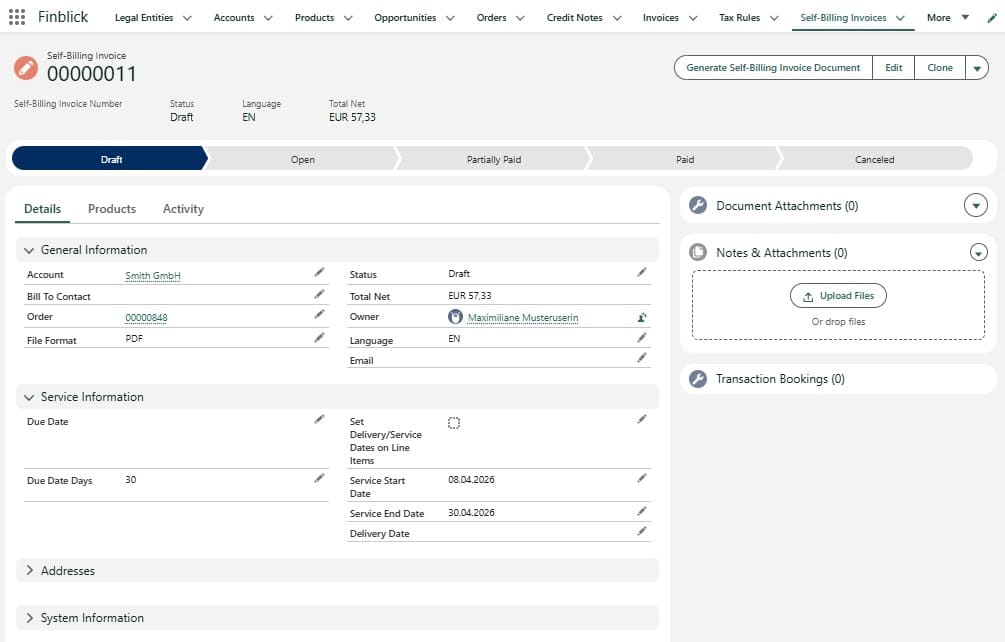
- Self-billing for partners and freelancers: Finblick supports dedicated self-billing workflows for partners and freelancers directly in Salesforce, including partner commissions and recorded working time.
Put simply, Finblick is built around the idea that invoicing and related finance workflows can stay inside Salesforce. Some apps focus on sync, some focus on a single document type, and some focus on accounting export alone. Finblick covers a broader operational set, and the powerful quote module is one of the clearest examples of that.
Insight:
One thing that stood out to me is the quote module.
It feels stronger than a quick glance at the listing might suggest, and it adds real business value to standard Salesforce quoting by bringing pricing logic, branded output, approvals, attachments, and the next document steps into one process.
Typical Daily Scenarios for Finblick
The feature list shows what Finblick can do. The next question is where it becomes useful in real work. In practice, Finblick fits best when sales, billing, and part of finance already meet in Salesforce, but document management is still handled externally. Let’s take a look at scenarios where the idea of native Salesforce accounting software would be practical.
- Service businesses that quote often and need more control: Consulting teams, agencies, training providers, and implementation firms often need more than a simple quote PDF. They may need approvals, branded output, attachments, tax handling, and a clean next step after quote acceptance. In that kind of flow, Finblick is useful because the quote stays close to the Opportunity and can continue into order and invoice work inside the same org.
- Teams working with staged billing: Some companies do not send one invoice at the end of the job. They work with down payment invoices, partial invoices, final invoices, credit notes, and corrections. Once this starts happening outside Salesforce, the team usually has to check several places to understand what has already been billed and what is still open. Finblick helps by keeping those document steps tied to the same business record.
- Organizations that need finance visibility inside CRM: A common use case for an accounting app Salesforce teams can run inside CRM is simple: people want to see document status without switching tools. Sales wants to know what was sent. Finance wants to know what is still open and can act on that visibility by sending payment reminders for open invoices directly from Salesforce. Managers want a clearer picture of the deal after closure. Finblick works well when shared visibility matters.
- Companies handling European e-invoicing or DATEV handoff: Finblick fits teams that need e-invoice formats, such as ZUGFeRD or XRechnung, or that need to continue the process into DATEV export. In that sense, it can also act as a Salesforce accounting integration solution for businesses that want core document work inside Salesforce but still need accounting output.
- Businesses with multiple entities, currencies, or languages: This is relevant when one Salesforce org supports several business units or several markets. Those teams often need one place to manage records while still keeping templates, numbering, currencies, and document language aligned with the way the business is structured. The same pattern often appears in broader Salesforce financial cloud implementation work, where finance-related processes need to stay close to CRM data.
Why I Loved Finblick
Based on my experience during setup and testing, I’d like to highlight a few points that contributed to my positive experience. What I liked most was that this app feels like it belongs in Salesforce.

- The app looks as if it’s an integral part of Salesforce. The interface follows familiar record-page patterns, tabs, related lists, actions, and status paths, so even when Finblick adds its own components, it does not feel foreign. The app is visually consistent and easy to navigate.
- Another thing I liked was the way the document flow holds together. Quotes, orders, invoices, credit notes, and payment-related steps stay close to the same business record. That sounds like nothing special on paper, but in daily work, it matters. It means less context switching, clearer status visibility, and a better chance that sales and finance are looking at the same picture.
- The quote module deserves special mention. It feels deeper than the listing first suggests. Taxation rules, branded templates, attachments, approvals, and the path into the next document stage make it feel like a real robust tool, not a thin add-on around standard quote output.
- I also liked the setup model. The admin work makes sense in Salesforce terms: user access, app settings, page configuration, Legal Entity data, templates, and quick actions. Nothing here felt random. It felt like a product built by people who understand how Salesforce admins actually think when they prepare an app for real users.
That is probably my main takeaway from Finblick Cloudwharf. The app offers a lot of finance functionality, but the part I appreciated most was how clearly and comfortably it fits into the Salesforce environment.
What Other Users Say About Finblick Cloudwharf
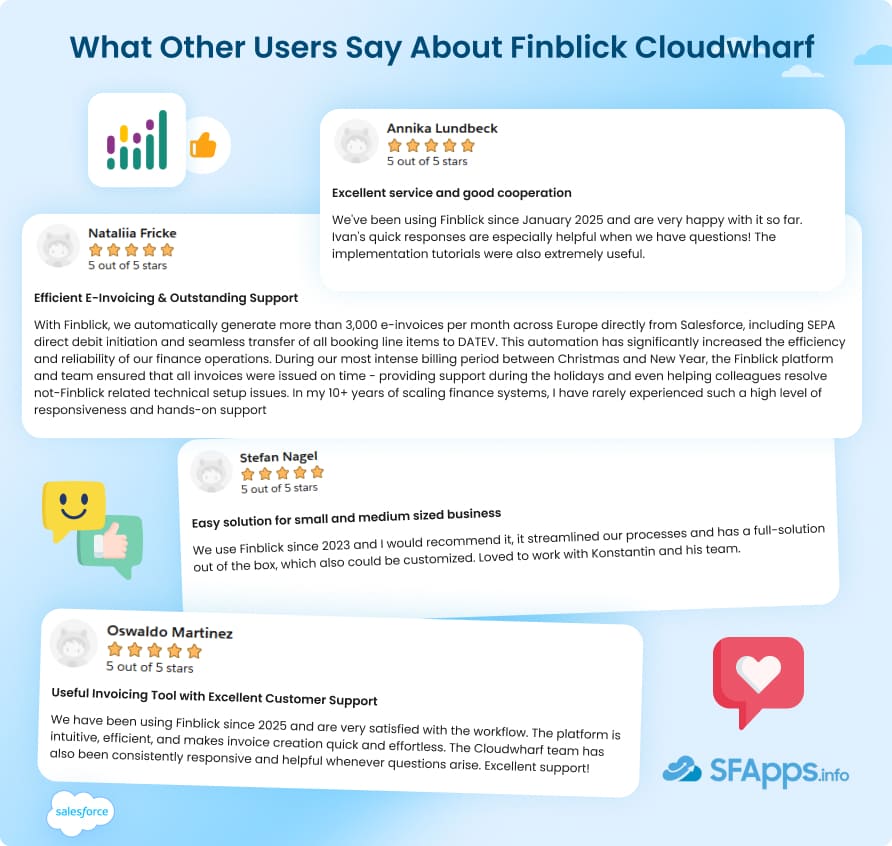
AppExchange listing page has six published reviews giving Finblick 5 out of 5 stars, and they point to the same strengths: dependable support, smooth invoice work, and a product that feels useful in real operations.
One review particularly stands out: A customer says Finblick is used to generate more than 3,000 e-invoices per month across Europe directly from Salesforce, with SEPA direct debit initiation and transfer of booking line items to DATEV.
That is not a lightweight example. It shows the app being used in a serious billing environment. The same reviewer also highlights the team’s responsiveness during a peak invoicing period at the end of the year.
The other reviews repeat two ideas:
- The invoicing workflow is described as intuitive and easy to work with.
- The support experience comes up again and again, with mentions of quick responses, helpful cooperation, and useful implementation tutorials.
Taken together, the reviews suggest that Finblick is not only feature-rich on paper. Users also seem to value how it works in daily use and how the Cloudwharf team supports it after implementation.
Pricing, Trial, and Licensing Structure
For a team evaluating accounting software integrated with Salesforce, Finblick’s pricing is fairly easy to read. The model is role-based, which makes sense for a product used by sales, finance, and managers in different ways.
There are three user tiers: View-Only, Sales, and Finance, plus separate add-ons for DATEV, Banking Integration, and Multi-Tenancy.
| Finblick License Tiers and Add-Ons | |||
|---|---|---|---|
| License / Add-on | What it is for | Monthly | Yearly |
| View-Only User License | For management or support users who need read access to Finblick records, reports, and dashboards, but do not create documents | €9 per user/month | €8 per user/month |
| Sales User License | For users who prepare and generate quotes, work with quote approvals, templates, attachments, and multilingual quote documents | €23 per user/month | €20 per user/month |
| Finance User License | For users who need broader control over invoices, credit notes, orders, and related finance work, in addition to Sales capabilities | €39 per user/month | €35 per user/month |
| Banking Integration Add-on | Add-on for teams that need bank connection and payment reconciliation features | €29 per company/ month | – |
| DATEV Integration Add-on | Add-on for teams that need DATEV export | €29 per company/ month | – |
| Multi-Tenancy Add-on | Add-on for teams managing multiple companies in one Salesforce org | €29 per company/ month | – |
For example, a company can give quote work to sales users, broader document control to finance users, and low-cost visibility to managers or support staff, without forcing everyone into the same license level.
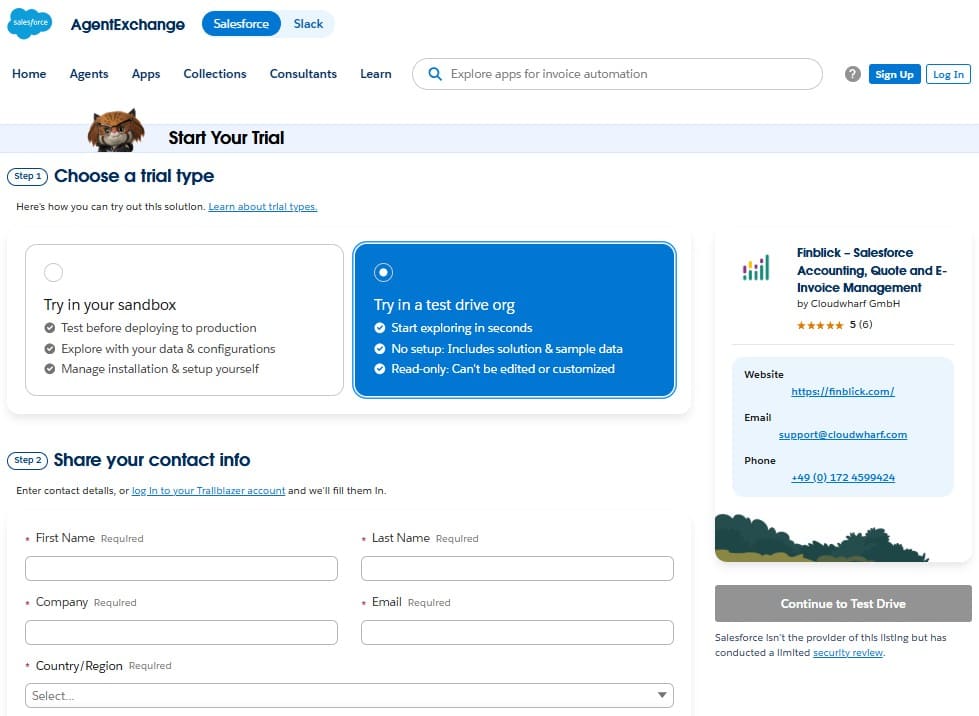
Alongside the 30-day free trial, the AppExchange listing also offers a Test Drive org, which is useful when you want to click through the product before any real setup starts.
FAQs About Finblick
Is Finblick a native Salesforce app or an external accounting tool?
Finblick is a native Salesforce app designed to run financial document workflows inside Salesforce. It uses Salesforce records for quotes, orders, invoices, and related processes instead of treating Salesforce as only a source system for export.
What financial documents can Finblick create and manage in Salesforce?
Finblick can create and manage quotes, orders, invoices, and credit notes in Salesforce. It also supports different invoice scenarios, including down payment invoices, partial invoices, final invoices, and cancellation invoices.
Does Finblick support e-invoicing formats such as ZUGFeRD and XRechnung?
Yes. Finblick supports e-invoicing directly in Salesforce, including ZUGFeRD and XRechnung. These formats are presented as part of its invoice generation capabilities for teams working with European invoicing requirements.
Does Finblick support DATEV export from Salesforce?
Yes. Finblick supports DATEV export for accounting handoff from Salesforce. It can export customer and vendor data, booking entries, and related output needed for DATEV-based accounting processes.
Does Finblick support multiple legal entities, currencies, and document languages?
Yes. Finblick supports multiple legal entities, multiple currencies, and multilingual documents. This is relevant for companies that operate across several markets or manage more than one company structure in the same Salesforce org.
Does Finblick offer a free trial or a Test Drive on AppExchange?
Yes. The AppExchange listing shows a 30-day free trial, and it also offers a Test Drive org for product evaluation before full implementation.
Final Thoughts: Finblick as Native Salesforce Accounting Software
After going through the setup, interface, features, and user feedback, my impression is clear: Finblick is a strong fit for companies that already run a serious part of their sales process in Salesforce and want billing and related finance work to stay close to that same data.
What makes the app convincing is not one isolated feature. It is the way quotes, orders, invoices, credit notes, e-invoicing, and accounting handoff are kept in one working environment. That gives sales, finance, and admins a more consistent view of what is happening after the deal moves forward.
I would look at Finblick most closely if your team needs stronger quote handling, staged invoicing, payment reminders, DATEV export, e-invoice formats, or support for multiple entities, currencies, and document languages. I would also pay attention to the quote module. If this sounds close to the way your team works, the easiest next step is to review the Finblick AppExchange listing and explore the Test Drive org or free trial.
Overall, Finblick comes across as a well-built Salesforce app with a clear use case, practical depth, and a setup model that makes sense for real Salesforce teams.

Mykhailo is a Salesforce Certified Platform Administrator with development experience in the fintech field. Since 2021, he has gained the Double Star Ranger rank on the Salesforce Trailhead education platform, where he acquired 26 Superbadges in Business Administration, Process Automation, Security, and more. With a decade of expertise in consulting and compliance, he aspires to translate complex technical concepts into accessible content, helping organizations make the most of Salesforce. Mykhailo is passionate about using technology for everyday needs, enjoys reading sci-fi and non-fiction books, and playing video games. He also has an interest in history and outdoor activities such as hiking, camping, and kayaking.
 Previous Post
 Next Post