





The Rapid Growth of Online Payments Worldwide
Online payments have become an essential part of modern commerce and everyday life. Businesses selling products or services online are expected to offer fast and convenient digital payment options through websites and mobile applications. Before the growth of online payment systems, transactions were primarily handled through cash, checks, bank transfers, or in-person card payments, which made purchasing slower and less accessible, especially across different regions or countries.
Since the first recognized e-commerce transaction in 1994, online payments have grown rapidly. Today, customers can purchase almost any product or service from virtually anywhere using only their smartphone.
Insight:
According to the Global Payments Report 2026, digital wallets accounted for 56% of global e-commerce transaction value and 33% of global point-of-sale transaction value in 2025, with global digital wallet spending exceeding $13.8 trillion, demonstrating how widely businesses and consumers have adopted digital payment methods worldwide.
These trends show that online payment adoption continues to expand, increasingly requiring businesses to implement reliable systems that can securely process transactions, manage subscriptions and billing, and integrate payment operations with other business platforms such as CRM systems. Payment processors and platforms like Stripe have become central to this trend, providing the infrastructure that enables companies to accept payments globally while integrating with tools for customer management, analytics, and automation.
In this article, we’ll explore why businesses implement Salesforce to Stripe integration, compare popular integration solutions, review common implementation challenges, and walk through the basic setup process using AppExchange connectors.
- Why Businesses Integrate Stripe with Salesforce
- Available Salesforce Stripe Integration Methods
- Recommended Apps for Stripe to Salesforce Integration
- Typical Challenges in Stripe Integration with Salesforce and How to Address Them
- Financial Breakdown of Stripe Salesforce Integration Costs
- Why Work With an Integration Service Provider
- FAQs about Salesforce to Stripe Integration
- 1. How long does it take to set up a Salesforce-Stripe integration?
- 2. Do I need coding knowledge to connect Stripe with Salesforce?
- 3. Can I use Stripe for subscriptions and recurring billing in Salesforce?
- 4. Is Stripe data stored in Salesforce?
- 5. What happens if a payment fails or is refunded?
- 6. Can I customize what data is synced between Stripe and Salesforce?
- Key Takeaways on Stripe and Salesforce Integration
Why Businesses Integrate Stripe with Salesforce
Stripe is a financial technology platform that helps businesses accept and manage online payments. It supports functions such as processing credit and debit card transactions in multiple currencies and countries, handling online checkout, managing subscriptions and generating invoices. Businesses of many types use Stripe in their daily operations. For example, a manufacturing or distribution company may combine Stripe payment processing with an Acumatica Salesforce integration to centralize customer, order, invoice, and revenue data across CRM and ERP systems, while a SaaS company may rely on it to manage recurring monthly subscriptions.
One of the main reasons Stripe is widely adopted is its developer-friendly APIs and tools, which make it relatively easy to integrate payment functionality into digital platforms, such as websites or mobile apps. However, payment processing is only one part of a broader business workflow. Companies also utilize CRM platforms, such as Salesforce, to manage customer relationships, sales processes, service operations, marketing activities, and revenue-related workflows.
When payment systems and CRM platforms operate separately, teams often face operational and reporting challenges. Without a Stripe and Salesforce integration, businesses often need to enter data manually across multiple systems, increasing the risk of errors and duplicate records while making it harder to maintain visibility into customer activity, payments, subscriptions , and cross-team coordination. This fragmentation has a measurable financial impact: 60% of UK retailers reported losses caused by integration issues, while 10% stated that such problems cost their businesses more than £1 million annually.
Available Salesforce Stripe Integration Methods
Implementing Stripe integration with Salesforce helps keep sales and financial data aligned without manual data entry across systems. There are several approaches to achieve this. Some organizations build custom integrations using Stripe APIs through Apex HTTP callouts or Salesforce Flow-based integrations, while others use middleware platforms such as MuleSoft. A common and more practical approach is using a prebuilt Stripe Salesforce connector from Salesforce AppExchange (AgentExchange). This is where many native and third-party solutions are listed, offering different ways to implement Stripe payment gateway integration in Salesforce, from basic syncing to full billing automation and in-person payments.
This guide focuses on AppExchange-based connectors because they typically offer faster implementation and lower maintenance effort than fully custom integrations.
Before selecting a solution, it is important to define your business requirements and current setup. This includes how you manage customers, subscriptions, invoicing, and reporting, as well as whether you need basic payment processing or full revenue and subscription lifecycle automation. Once requirements are clear, the next step is selecting an AppExchange package and testing it in a sandbox environment before moving to production.

How to Install AppExchange Packages in Salesforce
AppExchange applications are installed directly into Salesforce and typically include a guided setup process. While setup details vary between vendors, the overall implementation flow is generally similar.
For this guide, we use Salesforce Stripe Integration – Subscriptions, Payments & Revenue Data by Breadwinner Integrations Inc. as an example, because it is a widely adopted AppExchange solution with strong user reviews and well-documented functionality for syncing Stripe customers, invoices, subscriptions, and payment data with Salesforce. The platform also provides a straightforward setup process, which makes it a great practical example for demonstrating the typical steps involved in a Stripe Salesforce integration.
Follow these steps to connect Salesforce and Stripe and start syncing your data:
Step 1: Install Breadwinner
- Go to Salesforce AppExchange.
- Search for Salesforce Stripe Integration by Breadwinner.
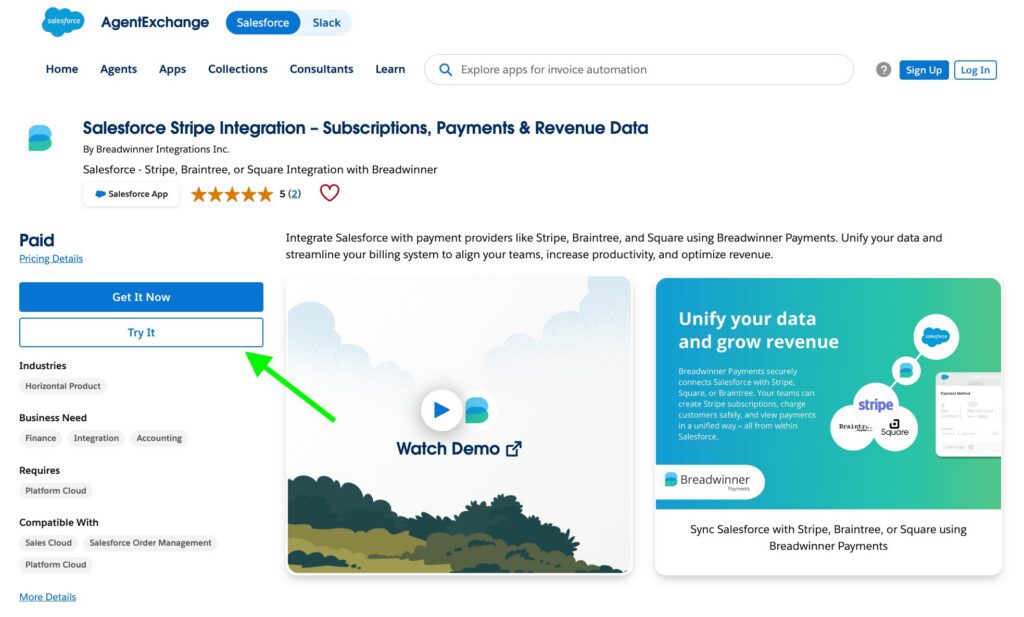
- Click Get It Now and follow the instructions to install the app.
- Choose the environment – sandbox or production.
- Review permissions and click Install.
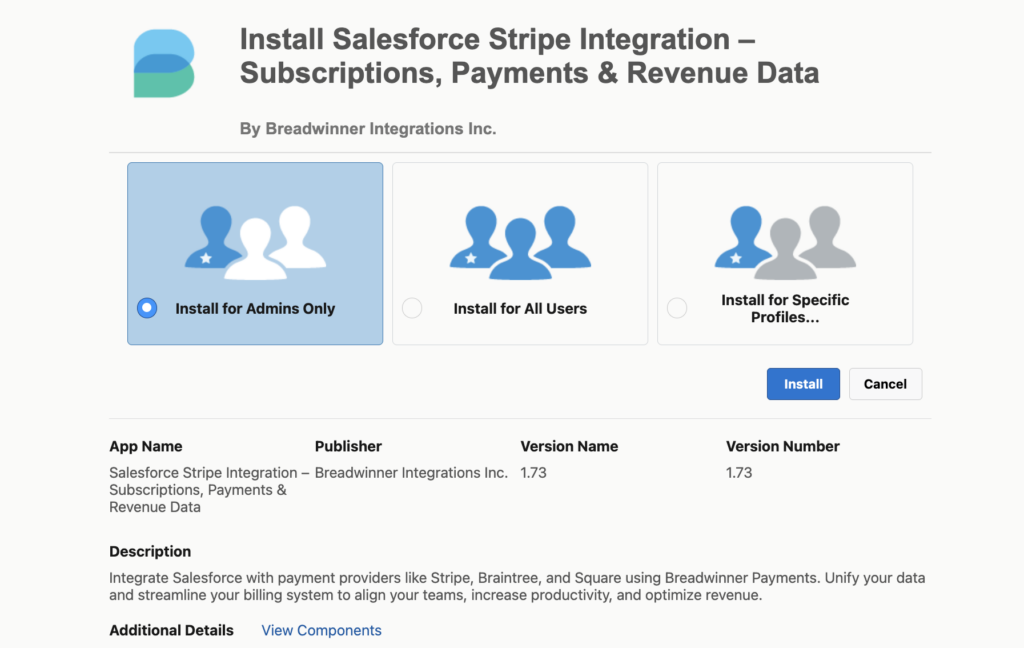
- Wait for installation to complete.
Step 2: Connect and Perform Setup
- Connect to Stripe via Connect with a Payment Processor.
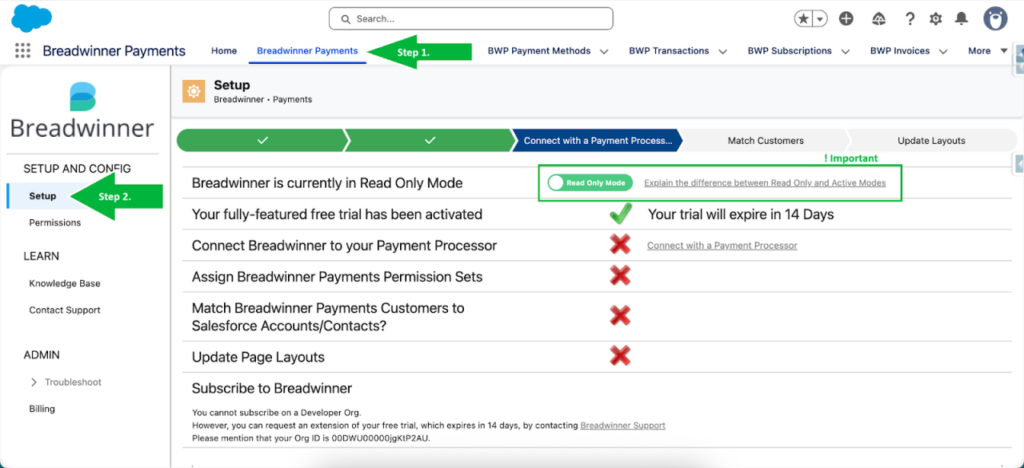
- Select Stripe from the dropdown.
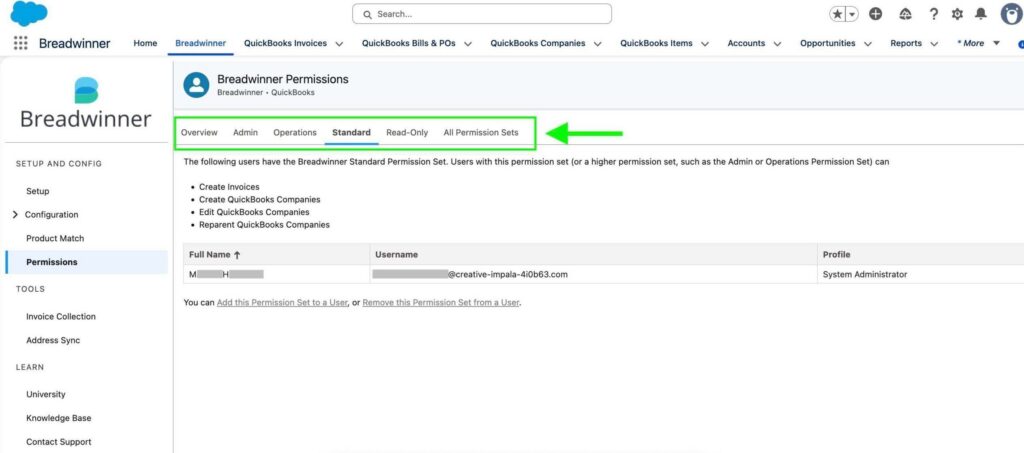
- Assign user permissions using pre-defined permission sets.
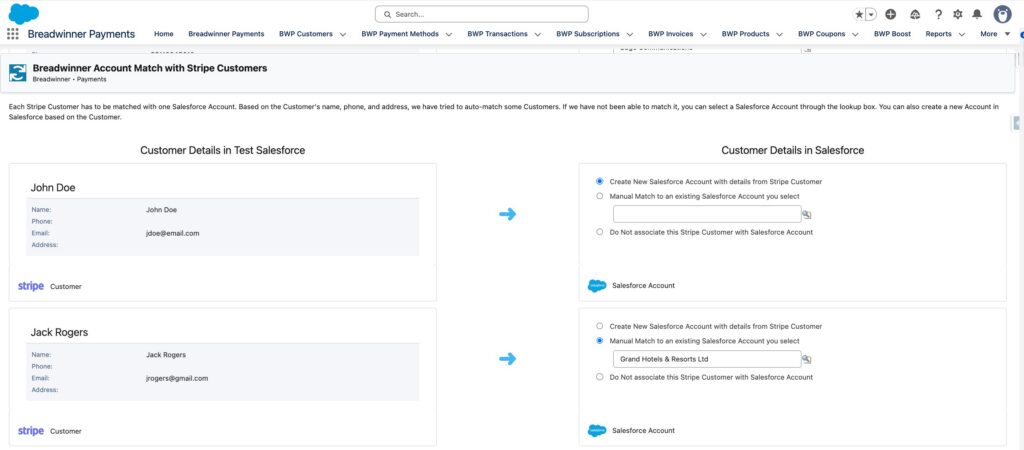
- Review suggested Customers to Accounts/Contacts matches before confirming data linking.
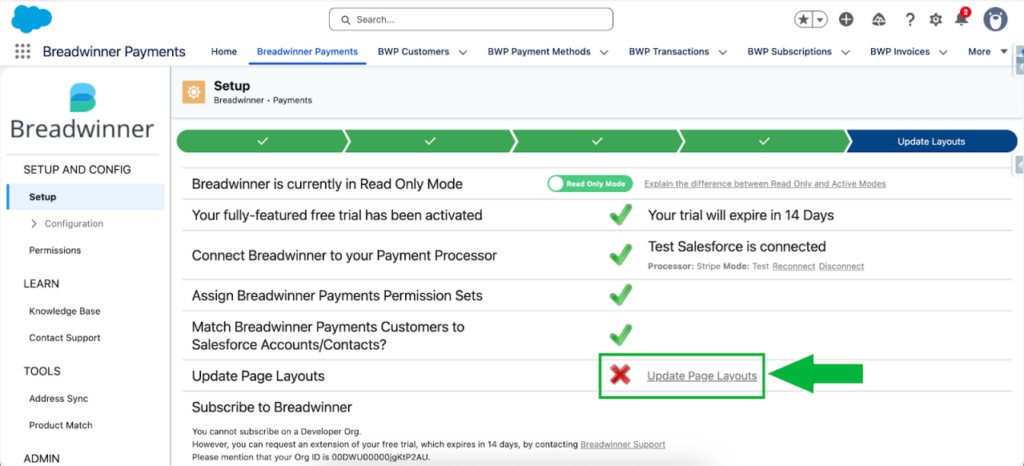
- Apply components to page layouts by clicking Update Page Layouts.
Step 3: Define Default Settings
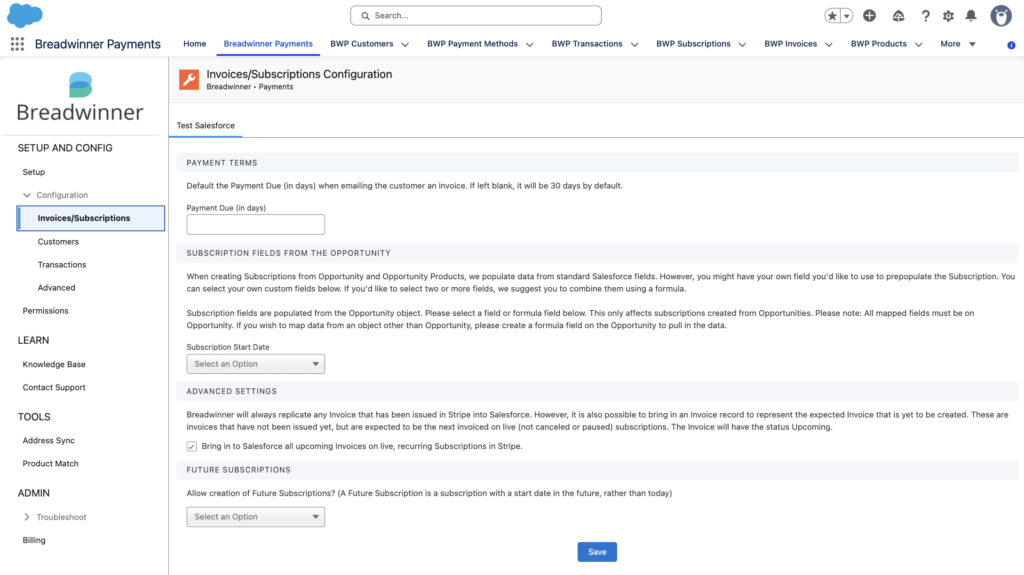
- Configure invoice and subscription settings.
- Define customer matching rules and field mappings.
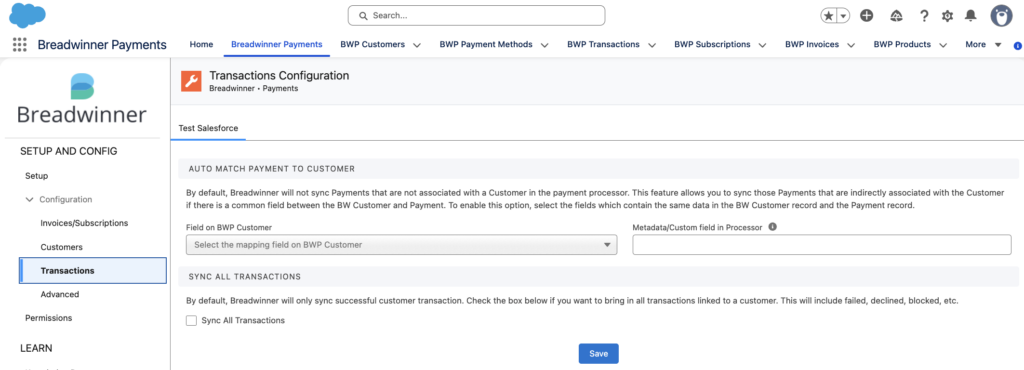
- Customize transaction syncing.
- Set up data sync frequency and automation preferences.
Step 4: Test the Connection
- Open a Contact or Opportunity record page in Salesforce.
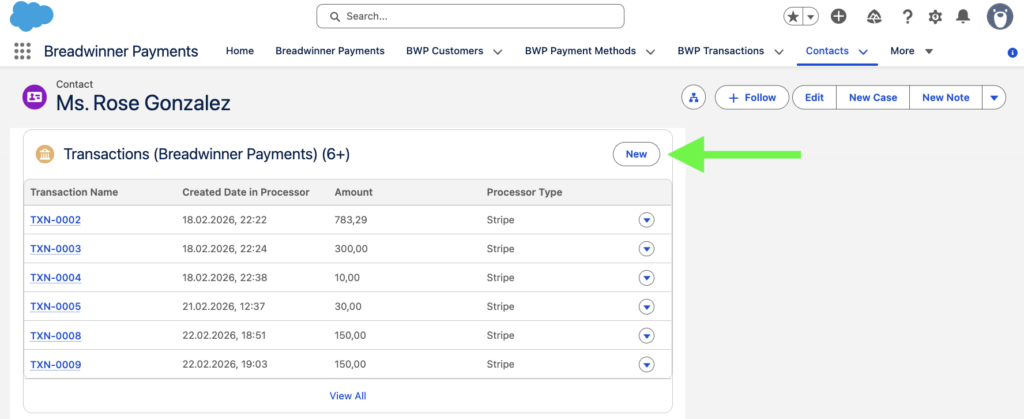
- Click New from the Transactions related list.
- Complete the guided flow and provide all the necessary details.
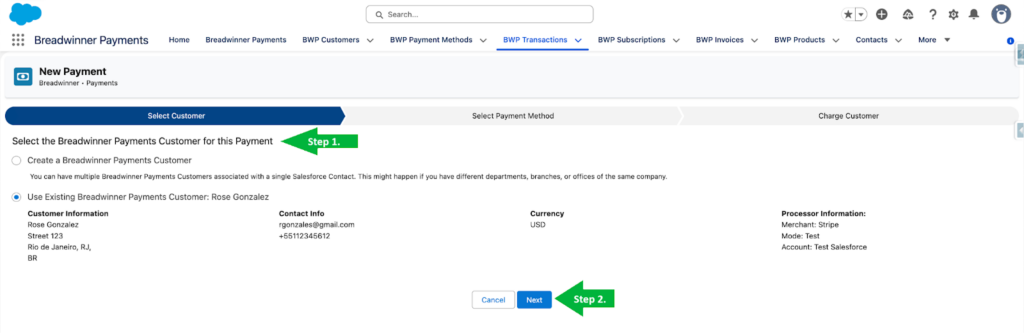
- Verify that the transaction was executed and appears correctly in both Salesforce and Stripe.
Recommended Apps for Stripe to Salesforce Integration
When looking for apps to perform Stripe to Salesforce integration, we explored Salesforce AppExchange using the keyword “stripe integration.”
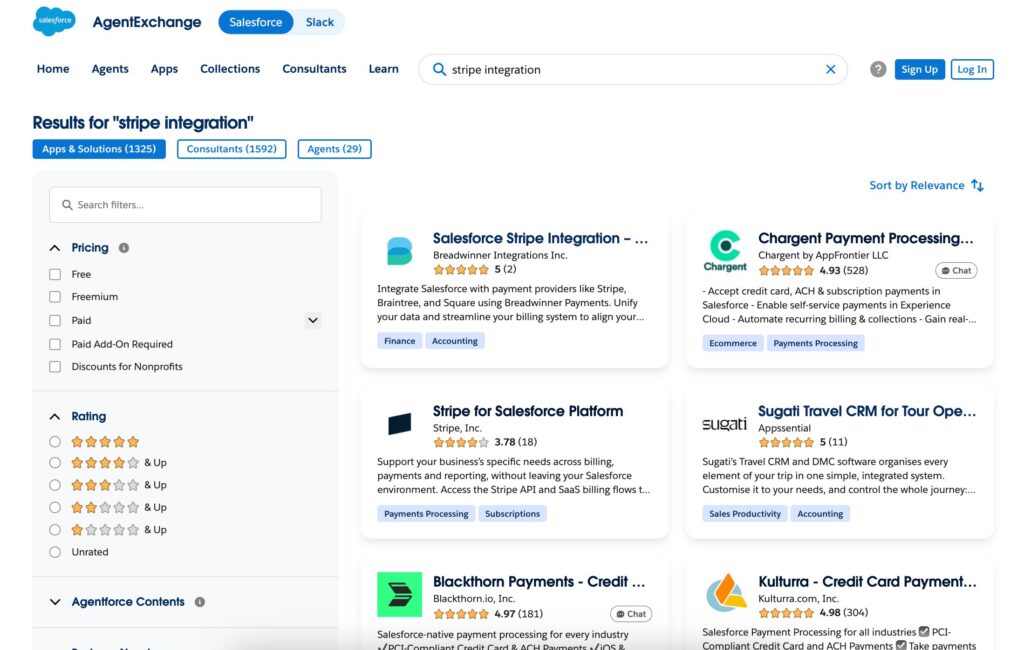
When evaluating the apps, we considered the following criteria:
- Real-time or reliable data sync between Stripe and Salesforce
- Subscription and recurring billing management capabilities
- Payment processing features (cards, ACH, refunds, invoices)
- Automation options for workflows and payment events
- Flexibility for customization or API-based extensions
Let’s take a look at a comparison of the most relevant apps we found. The apps are presented in no particular order and are not ranked by quality or suitability.
1. Blackthorn Payments
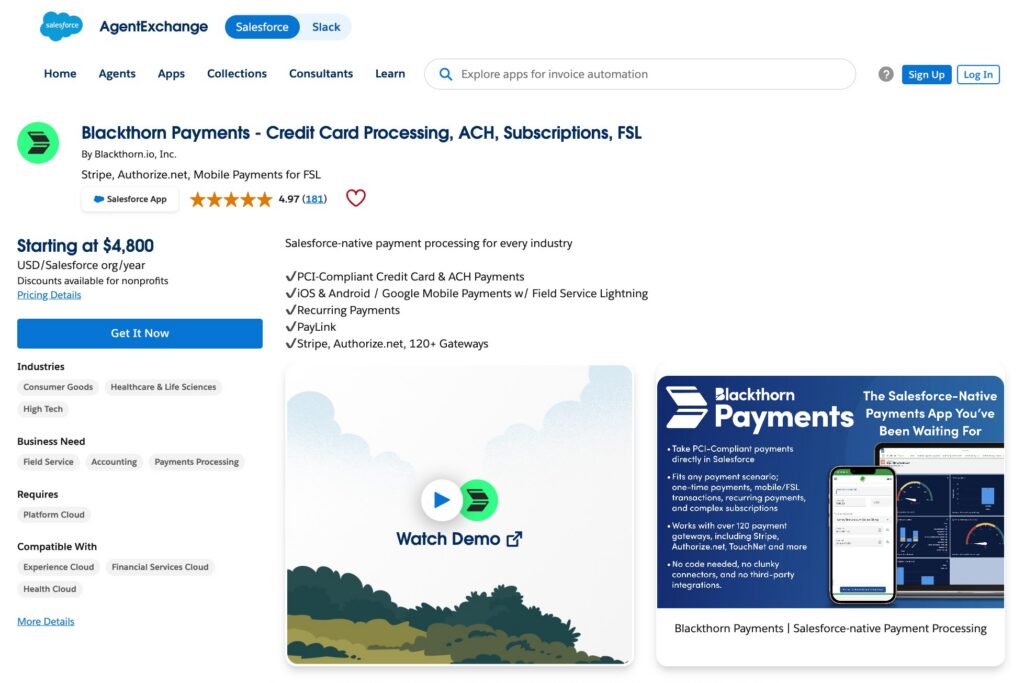
Overview:
Blackthorn Payments is an app designed for flexible payment processing, subscription management, and mobile payment experiences across multiple Salesforce clouds and industries. The platform supports Stripe along with more than 120 payment gateways for businesses evaluating Stripe billing alternatives Salesforce integration solutions. The platform offers deep integration with Salesforce Field Service Lightning (FSL), enabling technicians and field teams to accept real-time mobile payments from iOS and Android devices using tap-to-pay, EMV, swipe, and chip card readers.
The solution also includes no-code payment tools such as PayLink and DocumentLink, which let organizations create payment links, invoices, and payment requests from Salesforce. It supports recurring billing, virtual terminals, secure payment handling, Apple Pay and Google Pay, and works across different industry clouds.
Pricing: Plans start at $4,800 per Salesforce org annually and include support, with premium support plans available separately. A 7-day free trial is offered, and nonprofit organizations receive discounted pricing.
Rating: 4.97 ⭐⭐⭐⭐⭐ (181+ reviews)
Link: Blackthorn Payments
2. Paytram Credit Card Processing
Overview:
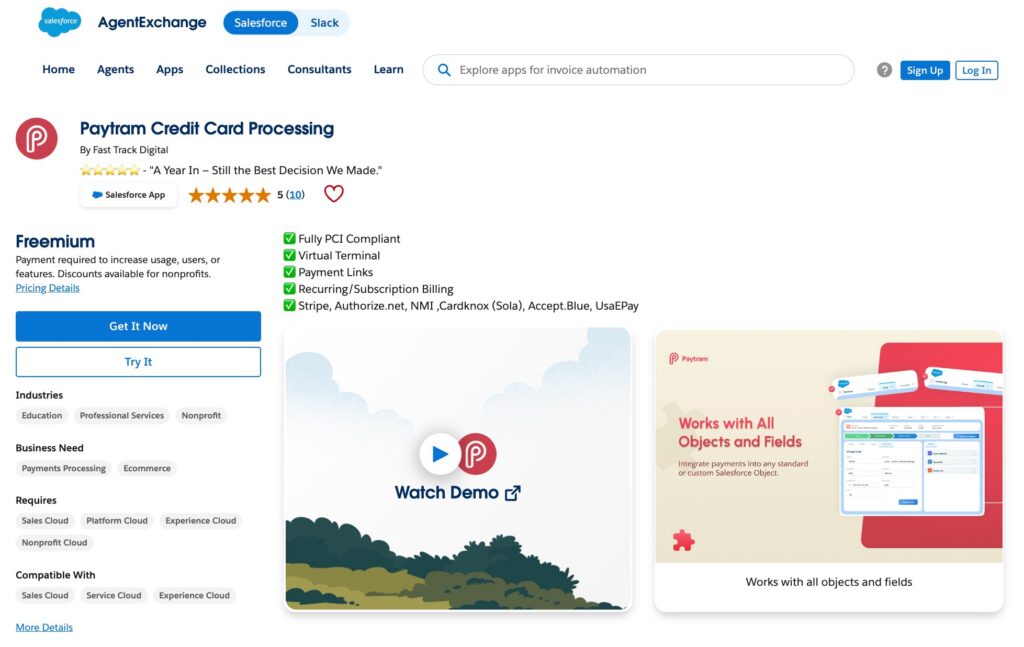
Paytram Credit Card Processing is a payment platform developed to support Salesforce and Stripe integration as well as other payment gateways such as Authorize.net, NMI, Cardknox/Sola, Accept.Blue, and USAePay, allowing businesses to process credit card payments, ACH/eCheck transactions, subscriptions, recurring billing, payment links, and refunds within Salesforce.
Paytram integrates with Salesforce Flow, allowing payment processing to be added to existing business processes, Digital Experience pages, and workflows without custom development. It also includes secure payment handling, support for recurring and split payments, payment reminders, and works with standard and custom Salesforce objects across Sales Cloud, Service Cloud, and Nonprofit Cloud. User reviews frequently highlight its flexibility, nonprofit-friendly pricing, and responsive support team.
Pricing: Paytram Plus starts at $2,500 per Salesforce org annually, with nonprofit discounts available and no per-user licensing fees. A free version with limited functionality is available.
Rating: 5 ⭐⭐⭐⭐⭐ (10+ reviews)
Link: Paytram Credit Card Processing
3. AOB Payments | Credit Card Processing, ACH, Subscriptions & Pay Links
Overview:
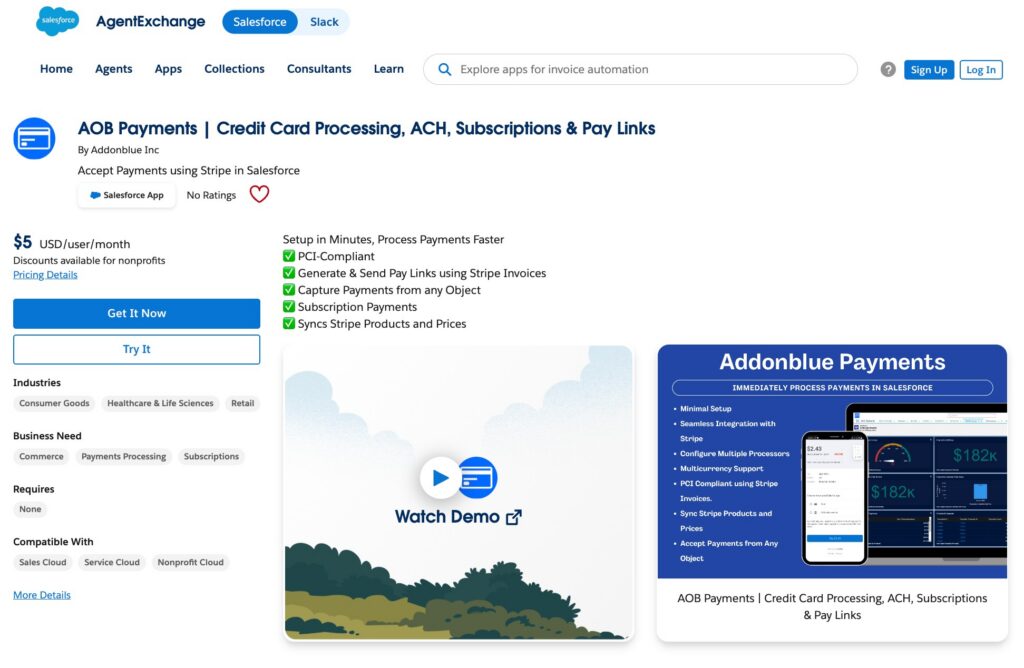
AOB Payments provides functionality for Stripe payment processing, subscription billing, ACH transactions, and payment link management within Salesforce. The platform allows organizations to accept one-time and recurring payments from virtually any Salesforce object while using Stripe-hosted invoice pages to maintain PCI compliance. It also supports synchronization of Stripe products and pricing, making it easier to manage payment catalogs and subscription plans without duplicating configuration across systems.
One of the app’s key strengths is its focus on automation and ease of use. Users can generate and send Stripe payment links directly from Salesforce email templates, automate payment link creation through Salesforce Flow, and manage subscriptions, invoices, and payment methods from a single interface. Additional features include multicurrency support, configurable billing schedules, automated payment retries, subscription status tracking, and support for multiple payment processors.
Pricing: Starts at $5/user/month, with nonprofit discounts available. Support is included and there are no setup fees.
Rating: No Ratings
Link: AOB Payments
4. Re:Source Payments – Your ready-made Stripe solution for Salesforce
Overview:
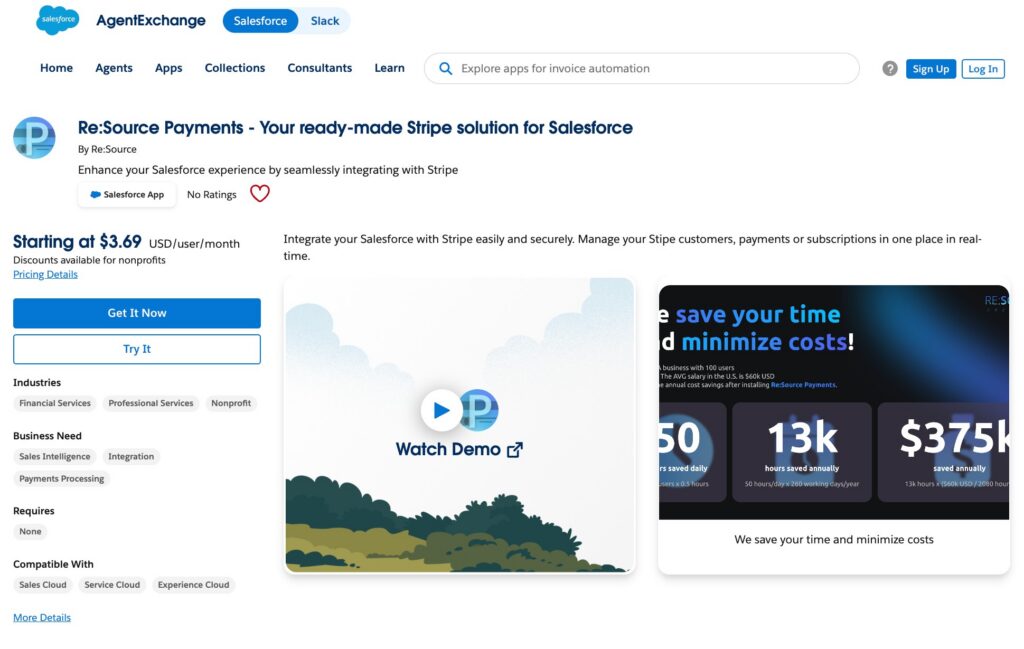
Re:Source Payments is a lightweight, user-friendly Stripe integration that brings payment management, subscriptions, invoices, and payment links into Salesforce. Built on Lightning Web Components and integrated with the official Stripe for Salesforce connector, the solution enables organizations to access real-time Stripe data without complex API development or custom integrations. Users can generate payment links, create subscriptions, view invoice history, and manage customer payment activity from within Salesforce, helping reduce context switching between systems.
The platform focuses on usability and operational efficiency through drag-and-drop components, secure OAuth authentication, and support for both online and in-person payments via Stripe Terminal and Tap-to-Pay. Additional capabilities include automated payment link delivery, subscription management, real-time payment visibility, and configurable workflows that can be embedded into existing Salesforce processes.
Pricing: Starts at $3.69/user/month (Base) and $13.86/user/month (Pro). Enterprise pricing is available for larger organizations. A 14-day free trial is offered.
Rating: No Ratings
Link: Re:Source Payments
5. Salesforce Stripe Integration – Subscriptions, Payments & Revenue Data
Overview:
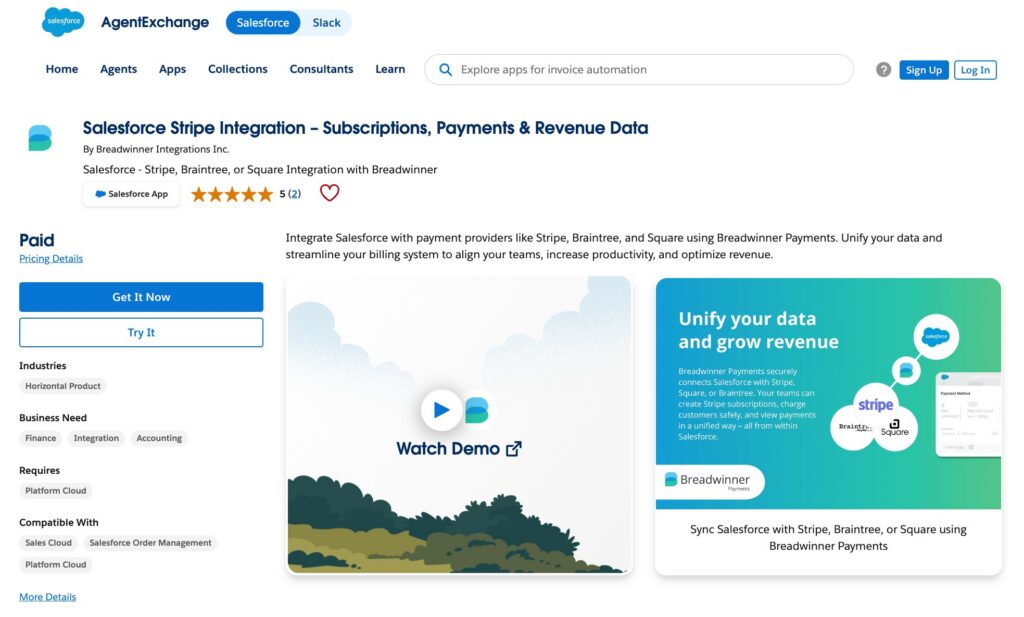
Salesforce Stripe Integration – Subscriptions, Payments & Revenue Data by Breadwinner Integrations Inc. integrates payment processors such as Stripe, Braintree, and Square with Salesforce. The platform synchronizes customers, payment methods, transactions, invoices, subscriptions, products, and coupons between Stripe and Salesforce, providing a centralized view of financial and customer data without requiring custom development. Its two-way synchronization capabilities help keep billing and CRM records aligned while supporting both standard and custom Salesforce objects.
Users can manage invoices, payments, refunds, subscriptions, and customer records directly from Salesforce pages while maintaining real-time synchronization with Stripe. Additional capabilities include automated customer and product matching, configurable synchronization schedules, permission-based access controls, historical data imports, and API extensibility for advanced use cases.
Pricing: Breadwinner offers Basic, Pro, and Business plans, with higher tiers adding features like subscription management, billing automation, and custom workflows. Custom pricing is available through its sales team.
Rating: 5 ⭐⭐⭐⭐⭐ (2+ reviews)
Link: Salesforce Stripe Integration – Subscriptions, Payments & Revenue Data
Typical Challenges in Stripe Integration with Salesforce and How to Address Them
Even though Stripe integration to Salesforce through AppExchange packages can look straightforward at first, many issues may only appear once systems are in production. Below are the most common challenges and ways to reduce them.

Common Issue #1: Matching Customers Between Salesforce and Stripe
One common problem in a Salesforce Stripe integration is correctly matching Salesforce Accounts or Contacts with Stripe Customers. Businesses often struggle with which fields to use for matching, such as email, name, external IDs or domains, especially when inconsistent or incomplete data already exists. This can lead to duplicate customers, incorrect invoice associations, or missing subscription records.
Potential solution: Clean existing data before implementation and evaluate the connector’s matching logic. Strong solutions should allow configurable matching rules, preview matching results, and store Stripe customer IDs in Salesforce records.
Common Issue #2: Duplicate Processing and Webhook Idempotency
While AppExchange tools provide integration infrastructure, additional customization with Flows, Apex, or triggers can introduce duplicate webhook processing. Stripe intentionally retries webhook deliveries if a timeout or temporary connection issue occurs to ensure payment events are not lost. Without proper safeguards, developers can accidentally create automations that generate duplicate payments, invoices, or subscription updates from a single transaction event.
Potential solution: Consider implementing idempotency keys to ensure each event is handled only once. Other common approaches include storing unique Stripe event IDs, checking whether events were already processed before creating records, saving webhook data before automation starts, and processing updates asynchronously instead of directly inside Flows.
Common Issue #3: Sandbox and Environment Cloning
Sandbox management can become another problem in Salesforce integration with Stripe, especially when using packaged AppExchange applications. Teams commonly clone Salesforce sandboxes and copy production configurations as part of normal development and testing processes. However, Stripe explicitly warns against copying Stripe configuration objects, webhook settings, or authentication data between environments. Without proper separation between environments, unexpected issues may occur such as test webhooks triggering production automations, duplicate synchronizations, broken authentication, invalid API keys, or corrupted sandbox environments.
Potential solution: Set up each environment separately with its own Stripe API keys and webhook endpoints. Avoid copying Stripe configuration during sandbox refreshes and clean any duplicated settings after cloning.
Common Issue #4: Uncovered Edge Cases and Business-Specific Scenarios
Even well-established AppExchange integrations may not fully cover all business-specific or edge-case scenarios. Common workflow gaps include subscription lifecycle sync problems, failed upgrades/downgrades, cancellation drift, failed payment handling gaps, and outdated Opportunity stages. These are especially common in setups involving Salesforce CPQ, Revenue Cloud, or custom subscription logic, where state changes in Stripe must be continuously reflected in Salesforce. Reporting gaps can also occur, including challenges with revenue reconciliation, payout tracking, fee allocation, refunds, and MRR consistency, often requiring manual workarounds.
Potential solution: Validate real business scenarios during demos or trials and confirm support for required workflows, reporting, and edge cases before implementation. Additionally, engaging stakeholders from finance, operations, and sales during evaluation can help ensure all requirements are covered.
Careful planning, testing, and data preparation are key to avoiding common challenges. For more complex setups, organizations may choose to hire Salesforce Stripe integration company to ensure proper implementation and maintenance.
Financial Breakdown of Stripe Salesforce Integration Costs
Implementing Stripe connector for Salesforce involves several cost components depending on the integration approach, business complexity, and required level of automation. Below is a high-level estimate of typical expenses.
| Estimated Budget for Salesforce-Stripe Integration | |
|---|---|
| Component | Estimated Cost (USD) |
| AppExchange Integration (Connector) | $1,000 – $25,000+ per year |
| Stripe Transaction Fees | 2.9% per transaction + 30¢ |
| Salesforce Licensing | $1,200 – $6,600+ per user/year (varies by edition) |
| Implementation & Setup | $1,100 – $8,800 (one-time) |
| Ongoing Administration & Maintenance | $5,400 – $13,500 per year |
Note: Estimates are based on publicly available Stripe, Salesforce, and AppExchange pricing, as well as typical U.S. consulting rates, where Salesforce Administrators earn an average of $51.55 per hour, Salesforce Developers around $62.31 per hour, and Salesforce Consultants approximately $65 per hour according to Indeed. Actual costs may vary depending on integration complexity, transaction volume, customization needs, and the chosen implementation partner.
Businesses should also consider Stripe transaction fees, which typically range from ~3% to 8% of revenue for international SaaS companies due to card processing, currency conversion, subscription tools, and disputes or refunds.
Salesforce licensing, implementation, and customization costs should also be factored in, especially for more complex setups that require automation, subscription management, or connections to accounting software that integrates with Salesforce. Overall cost depends on both the selected tool and the complexity of business requirements.
Why Work With an Integration Service Provider
Integrating Stripe with Salesforce can be done internally, but many businesses choose to work with a Salesforce Stripe integration company to reduce risk, accelerate implementation, and ensure long-term stability. Experienced implementation partners can help organizations avoid common integration pitfalls, align payment workflows with business processes, and build a scalable solution that supports future growth.
Key benefits include:
- Faster implementation: Providers bring proven experience with Stripe-Salesforce integrations, reducing setup time and avoiding trial-and-error.
- Cross-platform expertise: They understand Stripe’s payment and subscription models and how to properly structure them within Salesforce.
- System setup and configuration: Includes configuring Salesforce objects, fields, permissions, and connecting Stripe via API keys and webhooks.
- Tailored implementation: Integration is adapted to specific business processes such as billing, subscriptions, and revenue tracking.
- Testing and deployment: Critical scenarios (payments, refunds, failures, subscriptions) are validated before going live.
- Ongoing support: Providers monitor integrations, resolve sync issues, and adjust configurations as business needs evolve.
Choosing the best Salesforce Stripe integration company can help businesses reduce implementation complexity, avoid common integration problems, and maintain a scalable system supported by real-world expertise and ongoing support.
Need help with your Stripe-Salesforce integration?
Work with our experts to design, implement, and optimize your integration.

FAQs about Salesforce to Stripe Integration
By understanding these common questions about Stripe-to-Salesforce integration, businesses can choose the approach that best aligns with their needs and long-term goals.
1. How long does it take to set up a Salesforce-Stripe integration?
Setup time varies depending on the approach. AppExchange connectors can often be configured within hours or days, while custom integrations or complex subscription models may take several weeks or more, including testing.
2. Do I need coding knowledge to connect Stripe with Salesforce?
Not always. Many AppExchange solutions offer guided setup and no-code configuration. However, more advanced use cases (custom objects, CPQ, complex automation) may require developer expertise.
3. Can I use Stripe for subscriptions and recurring billing in Salesforce?
Yes, depending on the integration tool. Many solutions support recurring billing, subscription management, renewals, cancellations, and invoice synchronization between Stripe and Salesforce.
4. Is Stripe data stored in Salesforce?
Sensitive payment data is not stored in Salesforce. Instead, integrations typically use tokenization and store references such as Stripe Customer ID, Subscription ID, or Transaction ID.
5. What happens if a payment fails or is refunded?
Failed payments, refunds, and disputes are usually sent via Stripe webhooks and can automatically update records in Salesforce if the integration is properly configured.
6. Can I customize what data is synced between Stripe and Salesforce?
Yes. Most solutions allow configuration of field mappings, sync rules, and automation logic so you can control what data flows between systems. Businesses with more complex requirements may choose to hire Salesforce Stripe integration services to help configure and optimize the integration.
Key Takeaways on Stripe and Salesforce Integration
Digital payments are now a core part of how modern businesses operate, enabling fast and global transactions. Stripe plays a major role in this ecosystem, with businesses on Stripe generating $1.9 trillion in payment volume in 2025, around 1.6% of global GDP, showing how widely the platform is adopted.
At the same time, Salesforce remains central for managing customers, sales, and revenue processes, having been ranked the world’s #1 CRM provider for the 12th consecutive year. A Stripe integration Salesforce setup can help remove data silos, improve reporting accuracy, and reduce manual work across teams.
However, integration should be planned carefully to avoid technical and operational issues. Businesses that work with experienced Salesforce Stripe integration services are often better positioned to implement scalable, reliable integrations aligned with their billing, subscription, and reporting business requirements.

Antonina is a Salesforce Admin with six certifications: Salesforce Certified Platform Foundations, Platform Administrator, Platform Administrator II, CPQ Administrator, AI Associate, and Agentforce Specialist. She started working with Salesforce in 2021 as Intern Salesforce Developer. Now, a 2-Star Ranger on Trailhead, she continues to expand her skills and knowledge. She helps manage Salesforce systems, automate tasks, and improve processes. Antonina loves learning new things and exploring better ways to use technology. In her free time, she enjoys reading, playing sports, and exploring new tech ideas.
 Previous Post
 Next Post