





Short answer: CloudFiles Document AI and MuleSoft Intelligent Document Processing (MuleSoft IDP) both read documents for Salesforce. MuleSoft IDP extracts the fields you define and returns them as JSON, billed at 30 Automation Credits per page, and the Salesforce records are built afterwards in Flow or a Mule app. CloudFiles Document AI is document automation for Salesforce: it reads, classifies and splits documents, then creates the parent record, its lookups and its line items in one pass from a no-code Document Mapper, with no Anypoint Platform or Data 360 license needed.
- Why Intelligent Document Automation in Salesforce Matters
- CloudFiles Document AI Quick Overview: Document Automation Inside Salesforce
- MuleSoft IDP Quick Overview
- CloudFiles vs MuleSoft IDP: Document AI and OCR Capabilities
- From Extracted Data to Salesforce Records: CloudFiles vs MuleSoft IDP
- CloudFiles vs MuleSoft IDP: Usability and Administration Comparison
- CloudFiles vs MuleSoft IDP: Licensing and Scalability Comparison
- Looking for MuleSoft Alternatives for Document Processing?
- CloudFiles vs. MuleSoft IDP: Final Verdict
Why Intelligent Document Automation in Salesforce Matters
Salesforce works well until the information a process needs arrives inside a document. Invoices come in as PDF attachments, signed contracts come back as scans, and order forms and onboarding packs land in a shared inbox. Someone then has to open each file, read it, and make sure the right values reach the right Salesforce records.
This becomes more important as more teams run their processes on Salesforce:
- Sales teams receive signed order forms that should become opportunities with the right products and quantities.
- Finance teams receive invoices that must match existing accounts and purchase orders.
- Service teams handle claim forms and supporting evidence that decide how a case resolves.
- Operations teams receive onboarding packs, often one merged PDF, where each document inside belongs on a different record.
Reading a document is only the first step. The document also has to be recognized for what it is, split if several arrived as one file, matched to the right records, written where it belongs, and held for review when something does not add up. That whole chain is what intelligent document automation in Salesforce has to cover, and it is why the category is growing quickly.
Insight:
According to Fortune Business Insights, the global intelligent document processing market is expected to grow from $13.33 billion in 2026 to $88.91 billion by 2034. This forecast points to growing demand for automation that turns business documents into structured, usable data.
Salesforce offers document processing through MuleSoft Intelligent Document Processing (IDP). This capability allows teams to extract structured information from invoices, purchase orders, contracts, forms, and other business documents directly in Salesforce Flow. Administrators define which fields to extract, and Flow can use the returned data in subsequent steps, such as creating or updating records. The process also supports human review when extracted values need verification.
A third-party alternative is available through Salesforce’s AgentExchange. A search of the marketplace for “document AI” brought up several solutions, with CloudFiles Document AI appearing first in the search results.
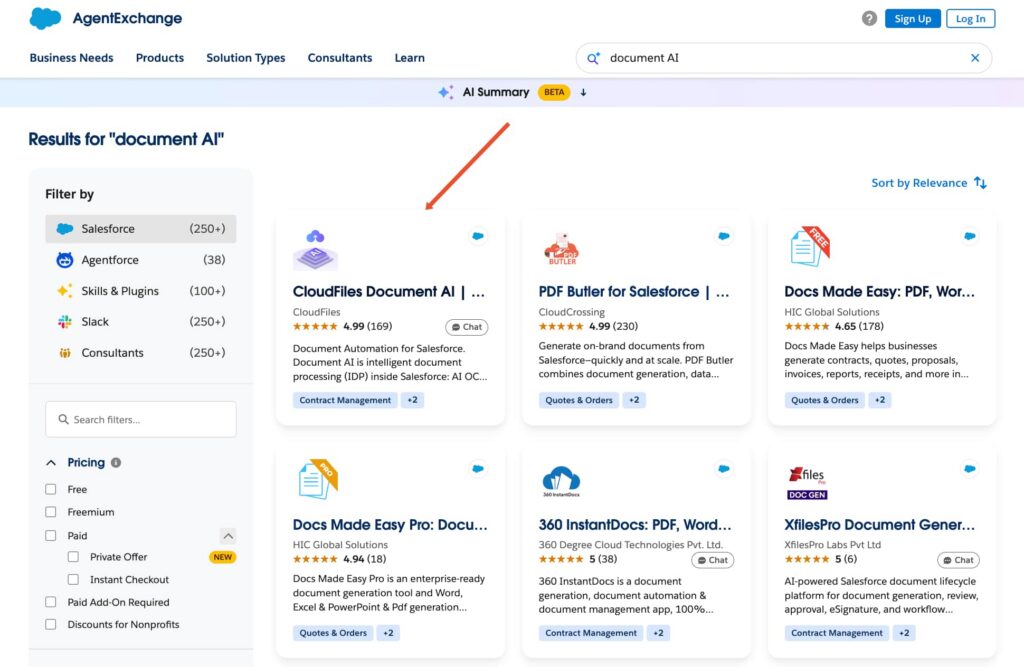
CloudFiles stands out for its range of document processing capabilities. Its application uses document AI OCR to read PDFs, scanned files, and images, classify document types, split combined PDFs, and extract fields, tables, and line items.
These 2 solutions provide a basis for comparing different options available to Salesforce teams: a Salesforce-provided document processing capability and a third-party application discovered through AgentExchange. Both address document data extraction and automation, but their configuration, processing capabilities, and approaches to working with Salesforce records differ.
The comparison covers 4 areas: intelligent document automation Salesforce and capabilities, converting extracted information into Salesforce records and actions, usability and administration, and licensing. Each category includes a scorecard evaluating both solutions against the same criteria. The category scores are then combined to calculate the final results and determine which solution offers a better fit for different Salesforce requirements.
CloudFiles Document AI Quick Overview: Document Automation Inside Salesforce
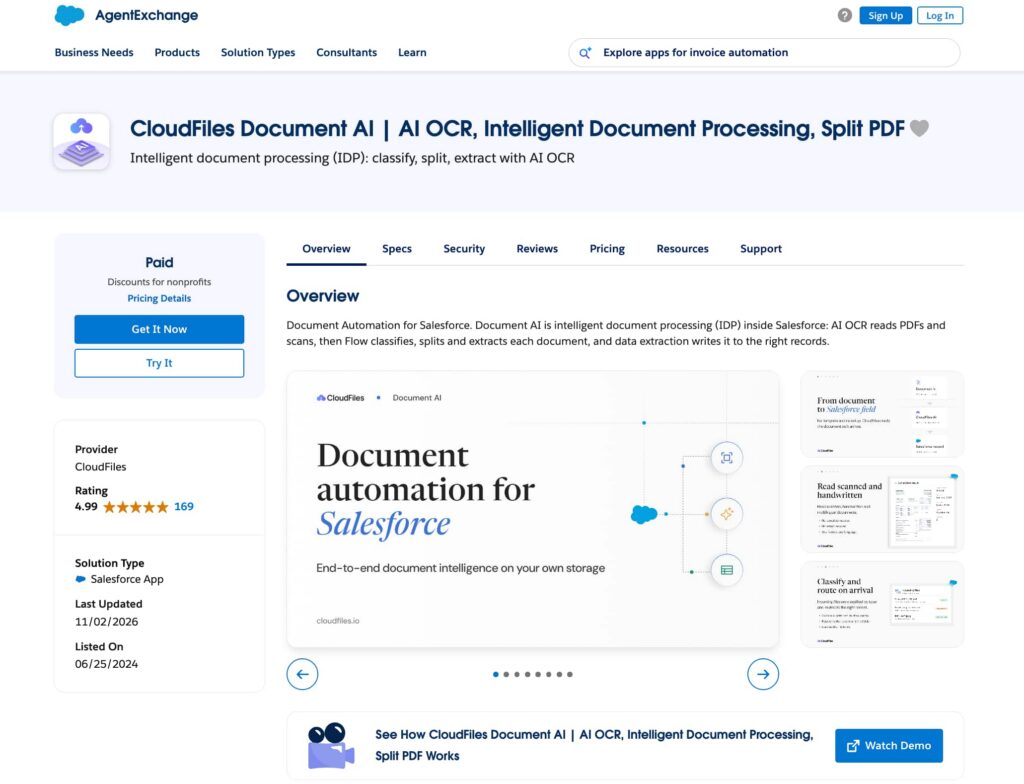
CloudFiles Document AI is developed by CloudFiles and runs document automation inside Salesforce. A document arrives, is read with the org’s own context, is classified and split if needed, is matched against existing records, is written to the right objects, and is held for review where confidence is low. It reads PDF, Word, Excel, PowerPoint, CSV and image files, including scanned, handwritten and multilingual documents.
Administrators do not pick or maintain AI models. CloudFiles reads the task and the document and chooses the model and processing strategy for each operation, so there is no model list to study and no migration work when a model is retired. Files stay in the customer’s own storage and are never used to train AI models.
Document AI sits on CloudFiles’ document management foundation, so documents can arrive from Salesforce Files, SharePoint, Google Drive, OneDrive, Amazon S3, inbound email or e-signature tools, with triggers that start processing as soon as a file lands.
Setup and configuration
Step 1. Install the managed package and access CloudFiles. After installing the package from AppExchange, the administrator can open CloudFiles from the Salesforce App Launcher.
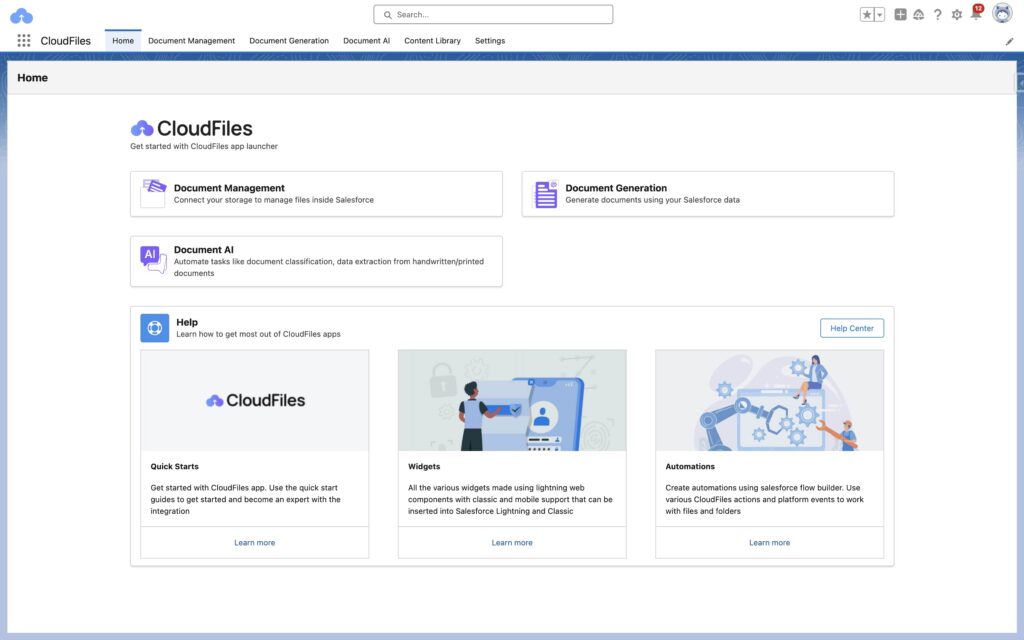
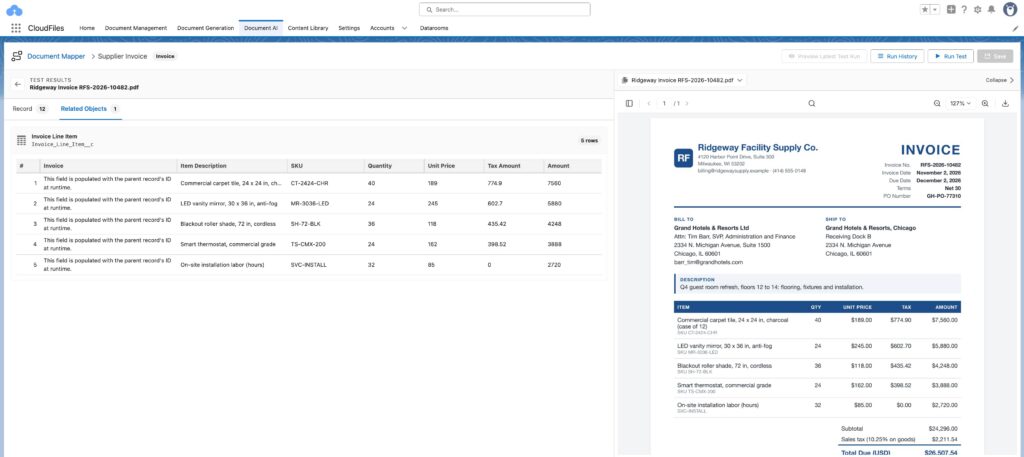
Step 2. Configure the Document Mapper. Pick the target object. Every field appears in one workspace, grouped into Main Record, Lookups and Child Relationships, and each is described in one plain-language line.
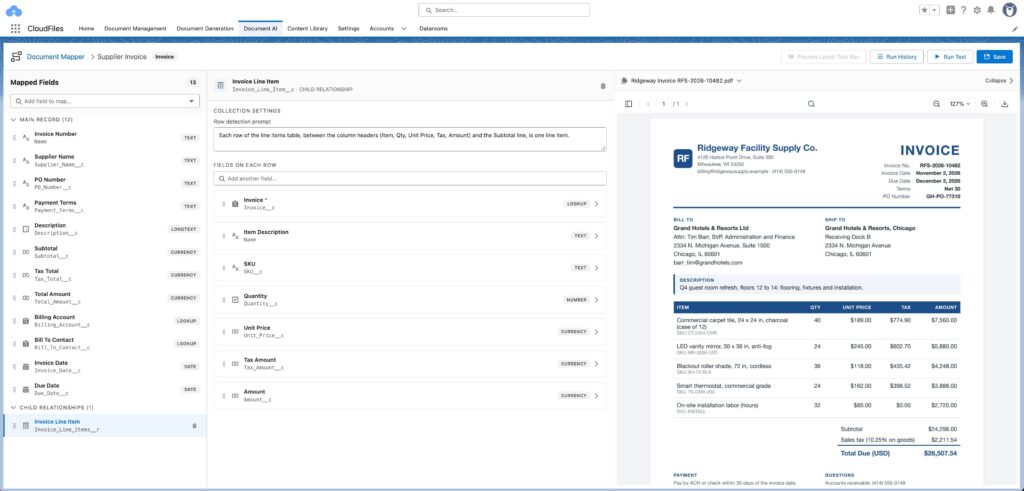
Step 3. Test and publish. Test runs show every value with a per-field confidence score and the reasoning behind it before anything is written. The published configuration runs from a list view button, a record page button or a Flow action.
Key features
- Document Mapper: no-code mapping from a document to Salesforce records, one plain-language line per field.
- One pass creates the parent record, resolves its lookups and creates child records such as line items, already linked.
- Lookup matching plans (exact, fuzzy or multi-step), with documents held back when there is no match or more than one.
- Picklist values matched to the exact Salesforce values, even when the document words them differently.
- AI split: separates a merged PDF into labeled files and fires an event for each.
- Datasets: run Document Mapper and workflows across many documents together, with Salesforce data, for checks such as duplicate invoices or contract version comparison.
- Reads PDF, DOCX, XLSX, PPTX, CSV, PNG and JPEG, including scans and handwriting, with prompts in any language.
- Flow actions to process, query and split documents from any automation.
- Every run logged, with one-click reprocessing.
- Doc AI Workflows: a visual builder for multi-step document processes. Read, classify and extract, find or create Salesforce records, branch on a decision, loop over line items and run a Salesforce Flow. Each workflow is test-run before it is published, and can run straight through, hold before the first write, or need approval for every write.
Best fit
For me, CloudFiles Document AI fits best when the goal is for documents to become finished Salesforce records, not a payload a developer still has to map. The person who understands the process, usually the Salesforce admin, is the person who builds it. Teams whose documents include Word, Excel or CSV files, teams that receive merged PDFs, and teams that want to test their own documents before a procurement conversation will find it the shorter path.
MuleSoft IDP Quick Overview
MuleSoft IDP is Salesforce’s intelligent document processing product, sold in two forms:
- Anypoint IDP. Document actions are built in Anypoint Platform, published to Anypoint Exchange, and called through the IDP API, a Mule app or MuleSoft RPA. It needs an Anypoint org that is not a trial org, with Einstein enabled and linked to a Salesforce org that has Einstein generative AI turned on.
- MuleSoft for Flow: IDP. Configured in the Document Processing tab of the Salesforce Automation app and used through a Flow action, “Extract Data from Document”. It does not need Anypoint Platform or RPA infrastructure.
In both, a document action reads a document and returns the fields you defined. You start from an Invoice or Purchase Order template, or from a generic action with fields described in plain language, or define your own schema. From October 2026 the AI can also propose a schema from a sample document. You choose the model for each action from a list of GPT, Gemini and Claude models accessed through the Einstein Trust Layer, and you set a confidence threshold per field. A document with a field below its threshold, or a required field missing, goes to a human reviewer.
What comes back is data, not records. The IDP API “returns a response in JSON format with all the extracted fields”, and on the Flow path the admin builds a flow that maps each returned field into Create Records or Update Records elements.
Setup and configuration
- Choose the path. Anypoint IDP needs Anypoint Platform permissions (Build Actions or Manage Actions), Einstein for Anypoint, and a link to the Salesforce org. MuleSoft for Flow: IDP is set up inside Salesforce.
- Build the document action. Upload a sample, define or generate the fields, choose the model and set confidence thresholds.
- Publish the document action. Each publish creates a new version in Anypoint Exchange, and integrations call a specific version.
- Build what happens next. In Flow, map the returned fields to Salesforce fields, add Decision elements for confidence, and add Create Records elements for each object. On the API path, submit the document, then poll for the result no more often than every 10 seconds.
Insight:
Did you know? MuleSoft IDP is billed in Automation Credits: 30 credits per document page, on both the Anypoint and the Flow version, and a resubmitted or retried document is billed again in full.
Key features
- Invoice and Purchase Order templates, custom schemas and plain-language field prompts.
- AI-suggested schema from a sample document.
- Model choice per document action across GPT, Gemini and Claude.
- Per-field confidence thresholds with human review.
- Handwriting support, with accuracy that varies by model.
- Document actions reusable across Mule apps, RPA bots and APIs.
- Can be exposed as an action for Agentforce agents.
- Processes PDF, PNG, JPG and TIFF files.
Best fit
MuleSoft IDP is particularly suitable for organizations that already run Anypoint Platform with MuleSoft developers on staff, where reading a document is one step inside larger Mule or RPA integrations between systems outside Salesforce.

CloudFiles vs MuleSoft IDP: Document AI and OCR Capabilities
Many teams begin by looking for Salesforce OCR, but both solutions go further than reading text off a page. They differ in what they can read, how large a document they accept, and what they do when one file holds several documents.
In this section, we will compare file format support, document size, splitting merged files, working across several documents, language support, and how each solution handles AI models.
| CloudFiles vs MuleSoft IDP: Document AI and OCR Capabilities | ||
|---|---|---|
| Capability | CloudFiles Document AI | MuleSoft IDP |
| File formats | PDF, DOCX, XLSX, PPTX, CSV, PNG, JPEG | PDF, PNG, JPG, TIFF |
| Document size | Up to 500 pages per file, with selected page ranges processed when only part of a file matters | Up to 50 pages and 8 MB per file in the UI; up to 150 pages and 15 MB per API request |
| Merged PDFs | AI split separates them into labeled files and fires an event for each | No splitter; MuleSoft’s documented approach is a prompt that flags where each new document starts, with the split logic built separately |
| Several documents at once | Datasets run Document Mapper and workflows across many documents together, with Salesforce data alongside | One document per request |
| Scans and handwriting | Yes | Yes, with accuracy that varies by the model chosen |
| Prompt language | Any language | English is the fully supported prompt language |
| Choosing the AI model | Chosen per task by Document AI; nothing to migrate when a model retires | Chosen per document action by the admin, and actions are moved to a new model when one retires (for example, GPT-4o on January 31, 2027) |
| Total Stars Achieved | ⭐⭐⭐⭐⭐ | ⭐⭐⭐ |
CloudFiles Document AI covers more of the documents a Salesforce team actually receives: Office files and CSVs are read directly, a merged onboarding pack is split into its parts, and Datasets run processes across many documents at once, such as checking whether an invoice has already been paid.
MuleSoft IDP handles the core PDF and image path well, and its multimodal models read scans and handwriting. The format list, the per-file limits and the absence of a splitter leave the surrounding work to the implementation team.
From Extracted Data to Salesforce Records: CloudFiles vs MuleSoft IDP
This is the largest practical difference between the two solutions. Reading a document is half of the work. The other half is putting the values on the right records, matched to the right account, with every line item attached to its parent.
In this section, we will compare what each solution returns, how values are mapped to fields, how child records and lookups are handled, and how results are reviewed before anything is written.
| From Extracted Data to Salesforce Records: CloudFiles vs MuleSoft IDP | ||
|---|---|---|
| Area | CloudFiles Document AI | MuleSoft IDP |
| What you get back | Created and updated Salesforce records | JSON from the API, or extracted values in Flow |
| Mapping to fields | Document Mapper: one plain-language line per field, picklists matched to exact values | Built in Flow, field by field, or in a Mule app |
| Line items and child records | Parent, lookups and children created in one pass, already linked | A loop, a mapping step and a Create Records element for each child object, built by hand |
| Matching to existing records | Matching plans (exact, fuzzy or multi-step); no match or several matches holds the document back | Matching logic written in Flow or code |
| Review before writing | Per-field confidence and reasoning on every test run; failed runs logged and reprocessed in one click | Per-field thresholds send documents to a reviewer; on the Flow path the review screen is built in Flow |
| Multi-step processes | Doc AI Workflows chain classify, extract, match, decide and update in one visual workflow, with a review policy per workflow and every run logged | Built in Flow or a Mule app around the extraction step |
| Total Stars Achieved | ⭐⭐⭐⭐⭐ | ⭐⭐ |
With CloudFiles, the record is the finish line. An admin picks the target object, writes one line per field, and tests on sample documents until the values and confidence look right. An invoice with one account and a dozen line items becomes a linked set of Salesforce records in one run. When a process needs more than one mapping, such as checking an invoice against its purchase order and holding mismatches for approval, a Doc AI Workflow chains those steps visually, test-runs them on real documents and logs every run.
With MuleSoft IDP, extraction and record creation are two separate jobs, and the product does the first. Teams that build in Flow every day will find the second job familiar, and it is still a build project for each document type.
CloudFiles vs MuleSoft IDP: Usability and Administration Comparison
Technical capabilities are only part of choosing a Salesforce document automation solution. Administrators also need to consider how easily they can configure it, update processing rules, manage changes, and maintain it as business requirements evolve.
This section compares CloudFiles and MuleSoft IDP based on the steps required for installation and initial configuration, who can build and modify Salesforce document workflow automation, how configuration changes and versions are managed, what happens when an AI model is retired, whether teams can test the solution before purchasing, and what implementation support is available.
| Usability and Administration Comparison: CloudFiles vs MuleSoft IDP | ||
|---|---|---|
| Area | CloudFiles Document AI | MuleSoft IDP |
| Initial setup | Install from AppExchange, connect storage, configure the Document Mapper and test it on your own documents | Anypoint path: Anypoint permissions, Einstein for Anypoint, a link to the Salesforce org and a connected app. Flow path: document action in the Automation app, then the flows around it |
| Who configures it | The Salesforce admin, in plain language | The admin for the document action; Flow builders or MuleSoft developers for what happens to the data |
| Changing a configuration | Edit the Document Mapper and test again | Some options, such as Customize Schema, cannot be enabled for an existing action, so a new action must be created |
| Versions and clean-up | One configuration, edited in place | Each publish creates a new Exchange version; a published action cannot be deleted, only renamed “(Deprecated)”, and deleting its Exchange asset breaks the integrations that call it |
| Model upkeep | None | Actions must be moved to a new model when a model retires |
| Trial | Install from AppExchange and test your own documents in Document Mapper test runs | No trial documented |
| Implementation support | Free implementation support included | Your own team or a paid partner |
| Total Stars Achieved | ⭐⭐⭐⭐⭐ | ⭐⭐⭐ |
CloudFiles keeps the whole lifecycle in one admin-facing workspace, and evaluation starts before any commitment. MuleSoft for Flow has made building a document action simpler, and teams with a MuleSoft practice will know the surrounding work. The difference is ownership: a CloudFiles configuration belongs to an admin, while a MuleSoft IDP implementation belongs to a build team.
CloudFiles vs MuleSoft IDP: Licensing and Scalability Comparison
The cost of a document AI solution depends on more than its subscription price. Teams also need to account for additional licenses, usage-based charges, infrastructure requirements, and data protection policies.
This section compares CloudFiles and MuleSoft IDP across five areas: pricing, usage metering, required licenses and services, data residency, and compliance.
| CloudFiles vs MuleSoft IDP: Licensing and Scalability Comparison | ||
|---|---|---|
| Area | CloudFiles Document AI | MuleSoft IDP |
| Pricing | Pricing is tailored to each organisation’s requirements. Contact CloudFiles for a quote. | No public price per credit; quote-based |
| How usage is counted | Org-based pricing for the whole Salesforce org, on one contract | 30 Automation Credits per page, tracked in the Salesforce Digital Wallet; resubmits and retries billed again |
| What else is needed | Nothing beyond CloudFiles | Anypoint path: a non-trial Anypoint org and Einstein generative AI in the Salesforce org. Flow path: the MuleSoft for Flow: IDP add-on |
| Where documents are processed | In the data residency region chosen at setup (USA, Europe, UK or Australia); files stay in the customer’s own storage | US East (Virginia) or EU Central (Frankfurt), following the Anypoint control plane; results kept 24 hours, reviewed documents 7 days, incomplete tasks 30 days, not configurable |
| Compliance | Independently audited for SOC 2 Type II. Certified to ISO 27001, ISO 27017 and ISO 27018. Compliant with HIPAA and GDPR. | Covered by Salesforce and MuleSoft’s own trust programs |
| Total Stars Achieved | ⭐⭐⭐⭐ | ⭐⭐⭐ |
The real difference is the shape of the purchase. CloudFiles Document AI is one product on one contract, with implementation support included and no other platform to license. MuleSoft IDP is priced per page from a credit pool, and depending on the path it brings Anypoint or Einstein into the decision. For an organization that already pays for those, that cost is already sunk and the calculation changes.
Looking for MuleSoft Alternatives for Document Processing?
MuleSoft is an integration platform designed to connect Salesforce with other business applications and services. CloudFiles does not replace those integration capabilities. The comparison here focuses specifically on document processing: extracting information from business documents and turning it into Salesforce records.
For teams evaluating MuleSoft IDP for this purpose, CloudFiles Document AI offers an alternative that does not require Anypoint Platform. The two solutions can also work side by side: MuleSoft handles integrations between business systems, while CloudFiles processes documents, matches extracted information to Salesforce records, and maps it to the appropriate fields and related objects.
One product distinction is worth noting. Salesforce also offers Data 360 Document AI, a separate document-processing capability within Data 360. It requires a Data 360 license, Einstein Generative AI, and Agentforce. It supports two processing modes: transactional processing, which returns structured JSON through an API, and batch processing, which stores extracted information in Data 360 Data Lake Objects (DLOs) for further use in data pipelines, automation flows, and Agentforce actions.
With transactional processing, developers can route the JSON output to Salesforce records using Apex callouts or another integration layer. This requires additional implementation to map the extracted values to Salesforce objects and fields. Data 360 Document AI is therefore another option to consider, but it is distinct from both MuleSoft IDP and CloudFiles Document AI.
CloudFiles vs. MuleSoft IDP: Final Verdict
Both solutions have now been examined from several angles, covering their document processing capabilities, Salesforce record creation, administration, configuration requirements, and licensing. These factors also matter when evaluating Salesforce tools for productivity and deciding which solution best supports a team’s daily workflows.
The individual scores are in, and it’s time to bring them together, calculate the final results, and find out which solution takes the lead. Which one comes out on top: CloudFiles Document AI or MuleSoft IDP?
| Final Comparison: CloudFiles Document AI vs MuleSoft IDP | ||
|---|---|---|
| Section | CloudFiles Document AI | MuleSoft IDP |
| Document Processing Capabilities | ⭐⭐⭐⭐⭐ | ⭐⭐⭐ |
| From Data to Salesforce Records | ⭐⭐⭐⭐⭐ | ⭐⭐ |
| Usability and Administration | ⭐⭐⭐⭐⭐ | ⭐⭐⭐ |
| Licensing | ⭐⭐⭐⭐ | ⭐⭐⭐ |
| Total Stars Achieved | 19 ⭐ | 11 ⭐ |
CloudFiles Document AI Takes the Lead!
CloudFiles Document AI is the stronger choice for Salesforce teams that want documents to become Salesforce records, with the admin who knows the process building it. It reads more formats, splits and cross-checks documents, creates records with their line items and lookups in one pass, and comes on one contract with no Anypoint prerequisite.
MuleSoft IDP suits organizations with an Anypoint estate and MuleSoft developers, where document extraction is one step in integrations that run between systems outside Salesforce.

Mykhailo is a Salesforce Certified Platform Administrator with development experience in the fintech field. Since 2021, he has gained the Double Star Ranger rank on the Salesforce Trailhead education platform, where he acquired 26 Superbadges in Business Administration, Process Automation, Security, and more. With a decade of expertise in consulting and compliance, he aspires to translate complex technical concepts into accessible content, helping organizations make the most of Salesforce. Mykhailo is passionate about using technology for everyday needs, enjoys reading sci-fi and non-fiction books, and playing video games. He also has an interest in history and outdoor activities such as hiking, camping, and kayaking.
 Previous Post
 Next Post