





Why Connect Stripe with Salesforce?
Connecting Stripe with Salesforce can serve different purposes depending on how a company manages payments. When payment information is kept separate from customer and sales data, teams may need to manually move information between systems.
Connecting Stripe with Salesforce can help reduce this manual work by bringing payment information into the same environment where teams already manage customer and sales data. Depending on the business process, the integration may also support workflows such as creating Stripe subscriptions from Salesforce Opportunities, automating invoice creation, initiating payment actions from Salesforce records, or building a custom quote-to-cash process around the existing Salesforce data model.
But not every Salesforce Stripe connector takes the same approach. Some applications provide ready-made payment workflows, while others give Salesforce teams the building blocks to create and maintain their own processes.
To see what is available, we searched Salesforce AppExchange for Stripe-related apps.
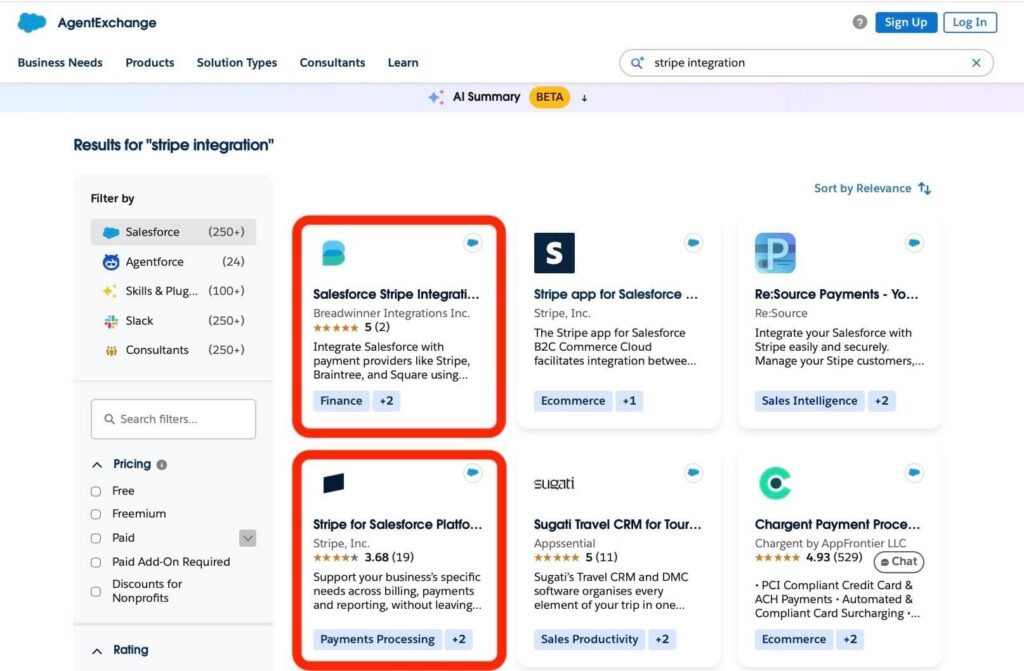
Stripe Integration by Breadwinner appeared first in the relevant search results and had customer reviews available, making it a natural choice for the comparison. We also included Stripe for Salesforce Platform, the official Salesforce app from Stripe, to see how Stripe’s own approach compares with a third-party app.
The 2 apps take different approaches to connecting Stripe and Salesforce. Breadwinner focuses on providing prebuilt payment workflows within Salesforce, while Stripe for Salesforce Platform offers built-in Billing data synchronization alongside Stripe API access, Salesforce Flow, and Apex for custom payment and subscription workflows.

In this article, we compare both approaches across key features, security, usability, and setup to help determine which one is a better fit for different Salesforce payment processing requirements.
- Salesforce Stripe Integration by Breadwinner
- Stripe for Salesforce Platform Quick Overview
- Breadwinner vs Stripe for Salesforce: Key Features
- Security Comparison: Breadwinner vs Stripe for Salesforce
- Breadwinner vs Stripe for Salesforce: Usability and Setup Comparison
- Final Comparison: Best Stripe Connector Salesforce
- FAQs About Salesforce Stripe Integrations
- 1. What is the best Stripe integration for Salesforce?
- 2. Can Breadwinner connect Salesforce to payment processors other than Stripe?
- 3. Does Stripe for Salesforce Platform automatically sync billing data?
- 4. Can I create Stripe payments and subscriptions directly from Salesforce?
- 5. Do I need developers to integrate Stripe with Salesforce?
Salesforce Stripe Integration by Breadwinner
Salesforce Stripe Integration – Subscriptions, Payments & Revenue Data is a Salesforce app developed by Breadwinner Integrations Inc. It connects Salesforce with Stripe and also supports Braintree and Square. The app holds a 5⭐ rating on AppExchange, based on 2 reviews. This Stripe universal connector for Salesforce brings payment processor data into Salesforce, where it can be linked to Salesforce records and used in payment-related workflows.
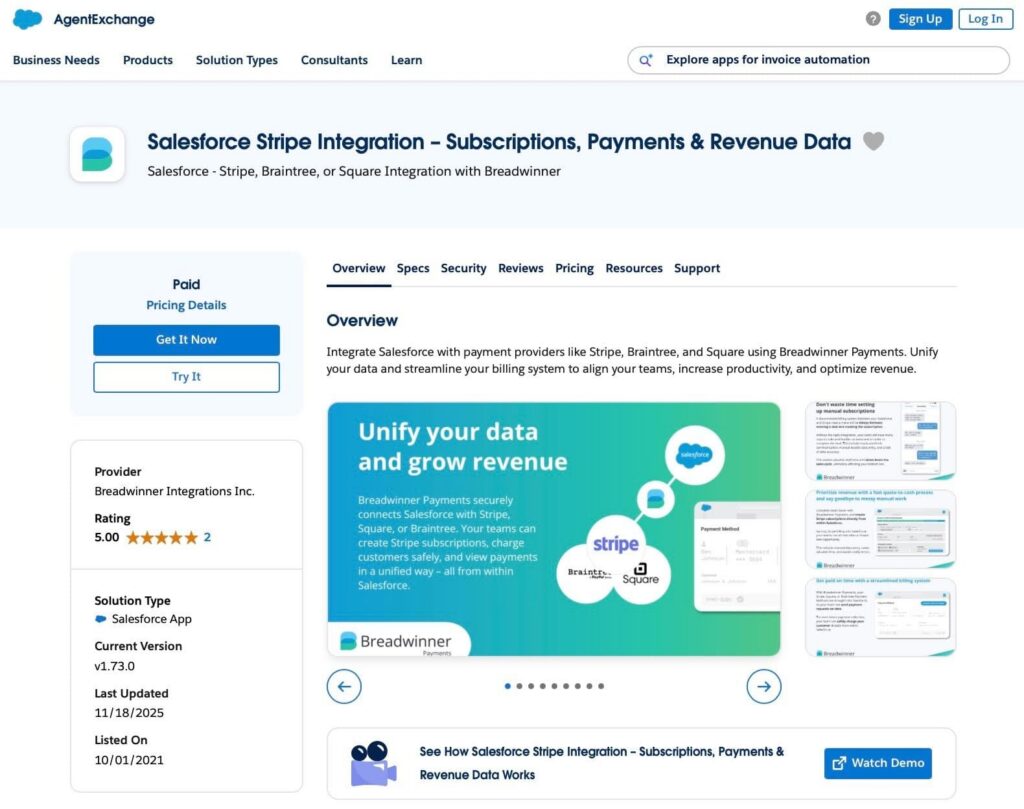
The app includes Salesforce tabs and custom objects for working with payment data. For Stripe, the app provides Salesforce objects representing customers, payment methods, transactions, subscriptions, invoices, line items, products, prices, price tiers, and coupons.
Breadwinner supports data synchronization from Stripe to Salesforce, as well as actions initiated from Salesforce that create or update supported records in Stripe. After the initial connection, Stripe data is imported into Salesforce, and subsequent changes are synchronized. Salesforce users can create supported Stripe records through the Guided Wizard and Custom Guided Wizard. Developers can also use the Global API for supported operations, including creating and updating customers, charging customers, and creating subscriptions, alongside other approaches discussed in a Stripe Salesforce integration review.
Breadwinner Stripe Salesforce Connector Setup
Setup starts with installing the app in Salesforce and connecting a Stripe account in Test or Live Mode.
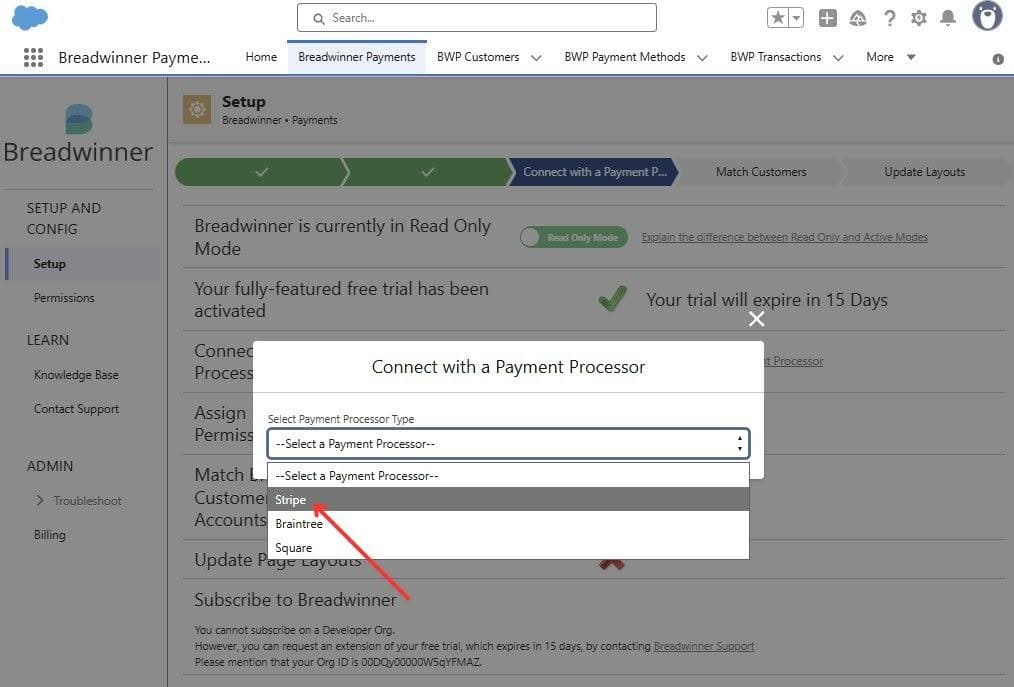
The Stripe user connecting the account needs an Admin or Developer role, after which Breadwinner begins importing historical Stripe data into Salesforce.
Administrators also need to configure Salesforce permissions and match Stripe customers with Salesforce Accounts or Contacts. For invoice and subscription workflows that use Salesforce Products, they must also match those products with the corresponding payment processor products.
For invoice and subscription workflows that use Salesforce Products, those products must first be matched with the corresponding processor products.
Key Features
Breadwinner covers both payment data synchronization and payment actions from Salesforce.
Key capabilities include:
- Stripe customer, payment, subscription, invoice, product, and price synchronization,
- Customer creation, one-time charges, refunds, and subscription management,
- Payment method creation and payment links,
- Support for Stripe, Square, and Braintree,
- Salesforce Flow, Apex, and API-based customization.
The app represents Stripe data through Salesforce objects that mirror key payment entities. This gives Salesforce teams data they can use with reporting, formulas, Flow, Apex, and other Salesforce functionality.
Insight:
Did you know that IT teams spend 39% of their time designing, building, and testing custom integrations?
According to Salesforce’s Connectivity Report, connecting systems can take up a significant share of IT teams’ time.
Prebuilt integrations can help reduce custom development work when connecting payment data with Salesforce.
Stripe for Salesforce Platform Quick Overview
Stripe for Salesforce Platform is a Salesforce app developed by Stripe, Inc., listed on AppExchange and has a 3.68⭐ rating based on 19 reviews. It provides built-in Stripe Billing data synchronization and Salesforce objects for billing data, alongside Stripe API access, Salesforce Flow, and Apex for custom payment and subscription workflows.

The Stripe billing connector for Salesforce provides built-in synchronization for Stripe Billing data and Salesforce custom objects for supported billing records. It also supports custom workflows through Stripe API actions, Salesforce Flow, and Apex, including subscription automation based on Salesforce Orders and Quotes.
This approach gives Salesforce developers and technical administrators flexibility to adapt Stripe functionality to their existing Salesforce processes. However, implementing specific workflows may require configuring Salesforce Flow or writing custom logic, depending on the business requirements.
Stripe Connector for Salesforce Platform Setup
Setup starts with installing the app in Salesforce and completing the initial setup wizard to connect Stripe to Salesforce. Administrators authorize the Salesforce org, connect a Stripe account using API keys, configure synchronization preferences, and install the required Stripe API extension.
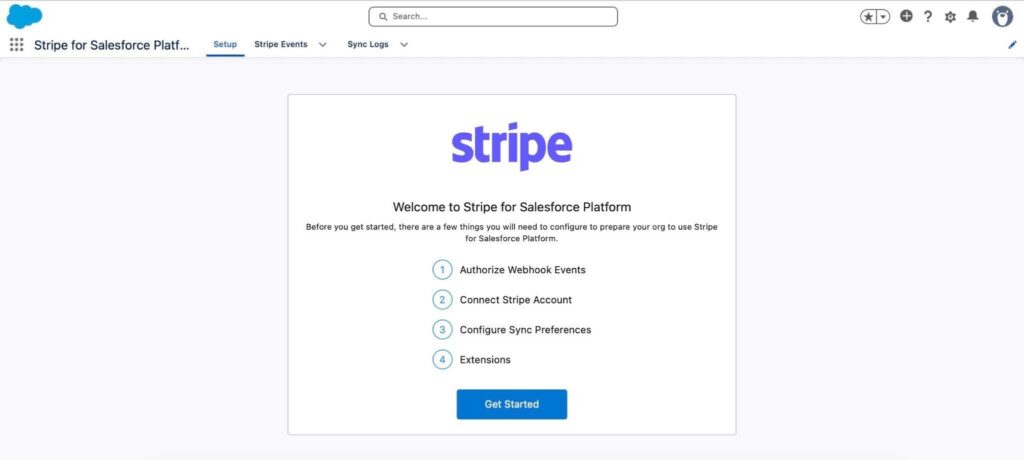
After the initial setup, administrators can enable real-time or scheduled Stripe Billing sync, configure metadata and custom-field mappings, and subscribe to Stripe Events. Salesforce Flow and Apex can be used to build additional payment and subscription automation.
Key Stripe for Salesforce Features
Key capabilities include:
- One-click real-time or scheduled synchronization of Stripe Billing data to Salesforce.
- A prebuilt Salesforce data model for Stripe Billing objects, including invoices, subscriptions, products, and prices.
- Subscription lifecycle management, including creation, upgrades, downgrades, and cancellations.
- Order-to-subscription and Quote-to-subscription workflows, including out-of-the-box Flow templates.
- Payment processing, Stripe Events, API actions, and custom automation through Salesforce Flow and Apex.
- Guided setup for connecting Stripe accounts and configuring synchronization.
These capabilities give Salesforce teams tools to build payment and billing processes around their existing Salesforce data and automation.
Breadwinner vs Stripe for Salesforce: Key Features
So, both apps connect Salesforce with Stripe data, but they differ in how users create payment records and build workflows. Breadwinner includes guided processes for creating payments, invoices, and subscriptions from Salesforce. Stripe for Salesforce Platform combines built-in Stripe Billing sync and prebuilt subscription workflows with Flow, Apex, and API tools for custom automation. Let’s compare their key features and assign a star rating to each app in every category to determine the overall winner.
| Breadwinner vs Stripe for Salesforce: Key Features | ||
|---|---|---|
| Feature | Breadwinner | Stripe for Salesforce Platform |
| Synchronization approach | Syncs Stripe data to Salesforce and supports creating or updating Stripe records from Salesforce | Offers one-click real-time or scheduled Billing sync, with Flow and Apex for custom integrations. |
| Payments | Supports creating charges and managing payment operations from Salesforce. | Supports payment processing and reconciliation in Salesforce through Stripe API actions and objects. |
| Invoices | Creates Stripe invoices from Salesforce and syncs invoice data back to Salesforce. | Provides Salesforce custom objects for Stripe invoices and invoice line items; Flow and Apex can support custom invoice workflows. |
| Subscriptions | Supports creating and managing Stripe subscriptions from Salesforce. | Supports subscription creation, upgrades, downgrades, and cancellations, plus Order-to-subscription and Quote-to-subscription workflows. |
| Products & prices | Syncs Stripe products, prices, price tiers, and coupons. | Provides Salesforce custom objects for Stripe products and prices, with default mapping from Salesforce PricebookEntry records to Stripe Prices. |
| Guided workflows | Guided Wizard and Custom Guided Wizard for creating Stripe records from Salesforce. | Guided setup wizard for connecting Stripe and configuring synchronization. |
| Automation & customization | Supports Guided Wizard, Custom Guided Wizard, Apex and Flow extensibility, and a full API. | Supports custom workflows through Salesforce Flow, Apex, Stripe API actions, and Stripe Events. |
| Payment processors | Stripe, Square, and Braintree. | Stripe. |
| Total stars | ⭐⭐⭐⭐⭐ | ⭐⭐⭐⭐ |
The table highlights that Breadwinner is the stronger choice for businesses that want guided payment, invoice, and subscription workflows within Salesforce, with support for multiple payment processors. Stripe for Salesforce Platform is better suited to teams that want to build custom payment and billing automation using Salesforce Flow and Stripe capabilities. Overall, Breadwinner takes the lead for ready-to-use functionality, while Stripe for Salesforce Platform offers flexibility for teams with specific development requirements.
Security Comparison: Breadwinner vs Stripe for Salesforce
Payment integrations need security controls at both the Salesforce and payment-processing levels. Breadwinner Payments adds an integration layer between Salesforce and payment processors such as Stripe, while Stripe for Salesforce Platform connects Salesforce directly to Stripe’s services.
Both providers have SOC 2 Type II assurance, but their security credentials differ. Stripe also holds SOC 1 reports and PCI DSS Service Provider Level 1 certification. Its security documentation details additional protections for card data, infrastructure, and API access.
| Security Comparison: Breadwinner vs Stripe for Salesforce | ||
|---|---|---|
| Security Area | Breadwinner | Stripe for Salesforce Platform |
| Raw card data | Card numbers, CVVs, and bank details remain with the payment processor. Breadwinner stores tokenized payment-method records and processor references, not raw card details. | Stripe stores card numbers in its isolated Card Data Vault (CDV), separate from its main infrastructure. |
| Credentials and access | Connects to Stripe through account authorization. A Stripe Admin or Developer grants the requested permissions. Salesforce permission sets and sharing rules control user access to Breadwinner records. | Uses Stripe API credentials, including restricted keys that limit access to specified API operations. Stripe also supports role-based access, MFA, SSO, and API-key restrictions. |
| Default write access | Read-only by default. Write operations require an administrator to enable Active Mode and use supported guided workflows or API methods. | Write operations depend on configured Salesforce Flows, Apex actions, and Stripe API-key permissions. |
| Data encryption | Breadwinner confirms TLS encryption in transit and encryption at rest for its integration infrastructure and retained operational data. | AES-256 encryption for card numbers at rest, separate storage of decryption keys, and TLS 1.2 or later for connections. Internal server-to-server communication uses mutual TLS (mTLS). |
| Security assurance | SOC 2 Type II audited annually, covering Breadwinner’s Salesforce integration products and supporting infrastructure. | Annual SOC 1 and SOC 2 Type II reports, plus PCI DSS Service Provider Level 1 certification. The PCI audit covers the Card Data Vault and secure development of integration code. |
| Total stars | ⭐⭐⭐⭐ | ⭐⭐⭐⭐⭐ |
Both applications provide security controls for Salesforce access and payment workflows, but Stripe has broader documented payment-platform protections and compliance credentials. Breadwinner’s strengths are its separately audited integration infrastructure, Salesforce permission controls, and read-only-by-default data model. When Breadwinner uses Stripe as its processor, Stripe’s payment-processing security controls also protect the card data.
Breadwinner vs Stripe for Salesforce: Usability and Setup Comparison
The setup process and day-to-day experience differ between Breadwinner and Stripe for Salesforce Platform. Both require an initial connection and configuration, but they differ in how administrators prepare Salesforce records, configure access, and make payment workflows available to end users. The comparison below focuses on the practical work involved in setting up and maintaining each integration.
| Breadwinner vs Stripe for Salesforce: Usability and Setup Comparison | ||
|---|---|---|
| Usability Area | Breadwinner | Stripe for Salesforce Platform |
| Installation | Salesforce managed package installed from AppExchange. | Salesforce app and required Stripe API extension. |
| Initial setup | Connect the payment processor and import historical data into Salesforce. | Connect the Stripe account and configure the app and synchronization settings. |
| Salesforce record setup | Match payment customers to Salesforce Accounts or Contacts and configure related lists on record pages. | Use the provided Stripe Billing objects and mappings; adjust mappings or add custom automation as needed. |
| Configuration effort | Configure customer matching, optional field mappings, permissions, and write access where needed. | Enable real-time or scheduled Billing sync and configure mappings; use existing templates or add Flow/Apex for custom processes. |
| Getting started as an end user | Users can launch guided operations from Salesforce Accounts or Contacts. | Users can work with synchronized Stripe data and use the Flows configured for their organization. |
| Technical skills | Standard guided operations can be configured without building every workflow from scratch; custom automation can require developer involvement. | Standard app capabilities are available, while custom workflows may require Salesforce Flow configuration or Apex development. |
| Ongoing administration | Manage permissions, customer matching, field mappings, and any enabled write operations. | Manage Stripe credentials, synchronization settings, and the Flows implemented for the organization’s requirements. |
| Total stars | ⭐⭐⭐⭐⭐ | ⭐⭐⭐⭐ |
Breadwinner offers a more guided experience for teams that want to carry out payment operations directly from Salesforce, although administrators still need to configure record matching, permissions, and write access. Stripe for Salesforce Platform requires administrators to configure synchronization and the Flows needed for their processes, giving teams flexibility over the implementation. Breadwinner may be easier to adopt for standard payment workflows, while the better choice for a particular organization depends on its existing Salesforce expertise and configuration requirements.
Final Comparison: Best Stripe Connector Salesforce
After checking and comparing the key features, setup, usability, setup, and security, it’s time to count the stars and see which app for payment processing in Salesforce comes out on top.
| Final Comparison: Breadwinner vs Stripe for Salesforce | ||
|---|---|---|
| Comparison category | Breadwinner | Stripe for Salesforce Platform |
| Features | ⭐⭐⭐⭐⭐ | ⭐⭐⭐⭐ |
| Security | ⭐⭐⭐⭐ | ⭐⭐⭐⭐⭐ |
| Usability and setup | ⭐⭐⭐⭐⭐ | ⭐⭐⭐⭐ |
| Total score | 14 | 13 |
Breadwinner Payments scores higher overall, particularly in usability and setup, and features. The choice ultimately depends on whether a business needs ready-made payment workflows or more flexibility when building processes around Stripe.
When Stripe Is the Better Choice
Stripe for Salesforce Platform is a better fit for companies that need deeper access to Stripe’s billing data model and API capabilities. Its main advantage is the flexibility it gives Salesforce developers to build workflows around Stripe’s own functionality.
The app is particularly useful when a business needs to:
- Work with detailed billing records: Use dedicated Salesforce objects for Discounts, Subscription Schedules, Subscription Phases, and Subscription Items.
- Build custom integrations: Access Stripe API actions through Flow, Stripe objects and methods through Apex, and additional API endpoints through AgnosticInvocable.
- Automate around Stripe events: Use Stripe Events to trigger Salesforce Flows or Apex logic when relevant changes occur in Stripe.
- Synchronize billing data: Enable real-time or scheduled Billing Sync to bring supported Stripe records into Salesforce.
This approach suits companies with Salesforce development resources that need more control over how Stripe functionality fits into their existing processes.
When Breadwinner Is the Better Choice
Breadwinner is a better fit for companies that want ready-made payment workflows in Salesforce without building every operation with Flow or Apex. Its Guided Wizard lets users create customers, payments, invoices, and subscriptions from Salesforce records, with a review step before sending data to the payment processor.
The app is particularly useful when a business needs to:
- Run payment operations from Salesforce: Create customers, charges, invoices, and subscriptions through guided workflows rather than developing custom automation for each operation.
- Work with multiple payment processors: Connect Stripe, Square, and Braintree through one Salesforce managed package. Available operations vary by processor.
- Create payment records from different Salesforce objects: Use the standard Guided Wizard from Accounts or Contacts, or configure the Custom Guided Wizard to launch payment operations from other standard or custom objects.
- Keep payment history in Salesforce: Synchronize customers, transactions, payment methods, invoices, and subscriptions into Salesforce objects for reporting and access from related records.
This approach suits companies that prioritize ready-to-use payment functionality, need to support multiple processors, and want to minimize custom integration development.
For businesses that want ready-made payment workflows without extensive custom development, Breadwinner is a practical option to consider. A free trial lets you explore its features and determine whether they meet your team’s requirements.
FAQs About Salesforce Stripe Integrations
Choosing a Salesforce payments Stripe connector depends on the payment operations a business needs, the level of customization required, and the resources available to maintain the integration. Here are answers to common questions about Breadwinner and Stripe for Salesforce Platform.
1. What is the best Stripe integration for Salesforce?
There is no universal choice. Breadwinner might be a better fit for companies that want guided payment operations, ready-made workflows, and support for multiple payment processors. Stripe for Salesforce Platform might suit teams that need direct access to Stripe API capabilities and more control over custom payment and billing automation.
2. Can Breadwinner connect Salesforce to payment processors other than Stripe?
Yes. Breadwinner supports Stripe, Square, and Braintree through its Salesforce app. However, available operations vary by processor. For example, Breadwinner supports invoice and subscription creation with Stripe and Square, while Braintree supports customer and payment operations.
3. Does Stripe for Salesforce Platform automatically sync billing data?
No. Billing synchronization is an optional feature that administrators must enable for a connected Stripe account. They can choose real-time or scheduled synchronization to bring supported Stripe Billing records, including invoices, subscriptions, products, and prices, into Salesforce.
4. Can I create Stripe payments and subscriptions directly from Salesforce?
Yes. Breadwinner provides Guided Wizard options for creating supported payments and subscriptions from Salesforce records. Stripe for Salesforce Platform provides Stripe API actions for Flow and Apex access, allowing teams to build payment and subscription processes within Salesforce. It also offers subscription management functionality and templates for automating subscription workflows.
5. Do I need developers to integrate Stripe with Salesforce?
Not necessarily. Breadwinner’s standard Guided Wizard supports payment operations without requiring custom development for every workflow, although administrators still need to configure the integration. Stripe for Salesforce Platform provides prebuilt API actions for Salesforce Flow, which administrators can use to build automation. More advanced custom integrations may require Apex development.

Mykhailo is a Salesforce Certified Platform Administrator with development experience in the fintech field. Since 2021, he has gained the Double Star Ranger rank on the Salesforce Trailhead education platform, where he acquired 26 Superbadges in Business Administration, Process Automation, Security, and more. With a decade of expertise in consulting and compliance, he aspires to translate complex technical concepts into accessible content, helping organizations make the most of Salesforce. Mykhailo is passionate about using technology for everyday needs, enjoys reading sci-fi and non-fiction books, and playing video games. He also has an interest in history and outdoor activities such as hiking, camping, and kayaking.
 Previous Post