





Is Document Data Truly Usable Inside Your Salesforce Org?
Salesforce manages structured records across sales, service, finance, and operations, but a significant part of business input still arrives through documents such as contracts, invoices, onboarding forms, and scanned files. A study by AIIM and Deep Analysis found that unstructured data accounted for a median 57% of organizations’ overall storage volume.
While these files are attached to records or stored within the system, the information inside them is not immediately usable in Salesforce data models. It typically requires manual review and entry before it can support automation, reporting, or validation logic.
This creates a gap between document storage and operational data use inside Salesforce.
In practice, this appears across common workflows. Contract terms are reviewed manually before approvals move forward. Onboarding processes pause while data is extracted from uploaded forms. Finance teams reconcile invoice details against CRM records. Compliance checks rely on manual validation rather than structured rules.
Even in mature Salesforce implementations, document processing often sits outside standard automation flows and requires human intervention.
Closing this gap requires turning document content into structured Salesforce data that can be directly used in objects, flows, and automation rules. So, how do you turn document content into usable Salesforce data in practice? Let’s find out.
- Common Ways Teams Handle Document Processing in Salesforce
- Exploring Solutions for Salesforce Document AI Processing
- CloudFiles Document AI Overview: A Salesforce-Native Document Intelligence Layer
- How to Get CloudFiles Document AI Salesforce
- Configuration of CloudFiles Document AI in Salesforce
- Key Features of CloudFiles Document AI
- Use Cases of CloudFiles Document AI
- What Other Users Say About CloudFiles Document AI
- Why This Approach Stands Out
- Pricing and Trial Overview
- Conclusion: What CloudFiles Document AI Changes in Document Parsing Salesforce
Common Ways Teams Handle Document Processing in Salesforce
When document handling starts creating friction in Salesforce, teams usually adopt a few practical approaches depending on process maturity, document consistency, and internal capacity. In most cases, it is not a single decision, but an evolution over time. This pressure is reinforced by the fact that unstructured data is growing 3x faster than structured data, which means the volume of documents entering Salesforce workflows is increasing much faster than the systems designed to process them.
- Manual processing: Users open documents, read the content, and enter values into Salesforce fields. Flow may support approvals or validations, but interpretation stays fully manual. This approach is good for low volumes or highly variable documents, but it becomes inefficient when volume increases or when consistent accuracy is required.
- Rule-based extraction tools (template-driven OCR): Data is extracted using predefined templates, layouts, or fixed patterns. This works well when documents follow a stable structure, such as standardized invoices or repetitive forms, but it becomes difficult to maintain when formats change or when multiple document variations need to be supported.
- Intelligent Document Processing (IDP): AI-based systems extract data from structured, semi-structured, and scanned documents using OCR and machine learning models. This approach is well suited for mixed document types and higher volumes, but in many setups it operates outside Salesforce and requires integration work, which can add complexity to the overall architecture.
- Salesforce-native automation (Flow + Files integration): Document processing is connected more closely to Salesforce workflows, where extracted data updates records and triggers automation. This works well when teams want tight alignment with CRM processes, but its effectiveness still depends on the quality and reliability of the underlying document extraction layer.
Across these approaches, the trade-off is consistent: teams balance simplicity, flexibility, maintenance effort, and how naturally the solution fits into Salesforce workflows.
Insight:
Around 61% of enterprises already use AI, which is pushing companies to focus more on practical implementation in real business processes. At the same time, Intelligent Document Processing adoption has grown by 34%, showing a clear move toward automating document-heavy work where manual effort is still high.
Exploring Solutions for Salesforce Document AI Processing
Once these limitations become clear, the next question is usually what can be improved directly inside Salesforce without adding external complexity or changing existing CRM processes. This is why AppExchange (now AgentExchange) solutions were reviewed, as it offers native options designed to extend Salesforce without disrupting its core architecture, especially across the category of Salesforce productivity apps.
During research, the goal was to identify Salesforce-native solutions that improve how documents are processed, structured, and used inside CRM workflows. The focus was on reducing manual handling of files without introducing additional systems or breaking existing Salesforce automation.
Based on the challenges outlined earlier, a simple set of criteria was used to evaluate potential approaches:
- ability to run as a native Salesforce experience, with processing in a region the customer chooses,
- support for working directly with Salesforce Files and standard objects,
- capability to extract structured data from different document types,
- flexibility to handle both structured and unstructured documents,
- integration with Salesforce Flow and existing automation logic,
- ease of configuration without heavy development effort.
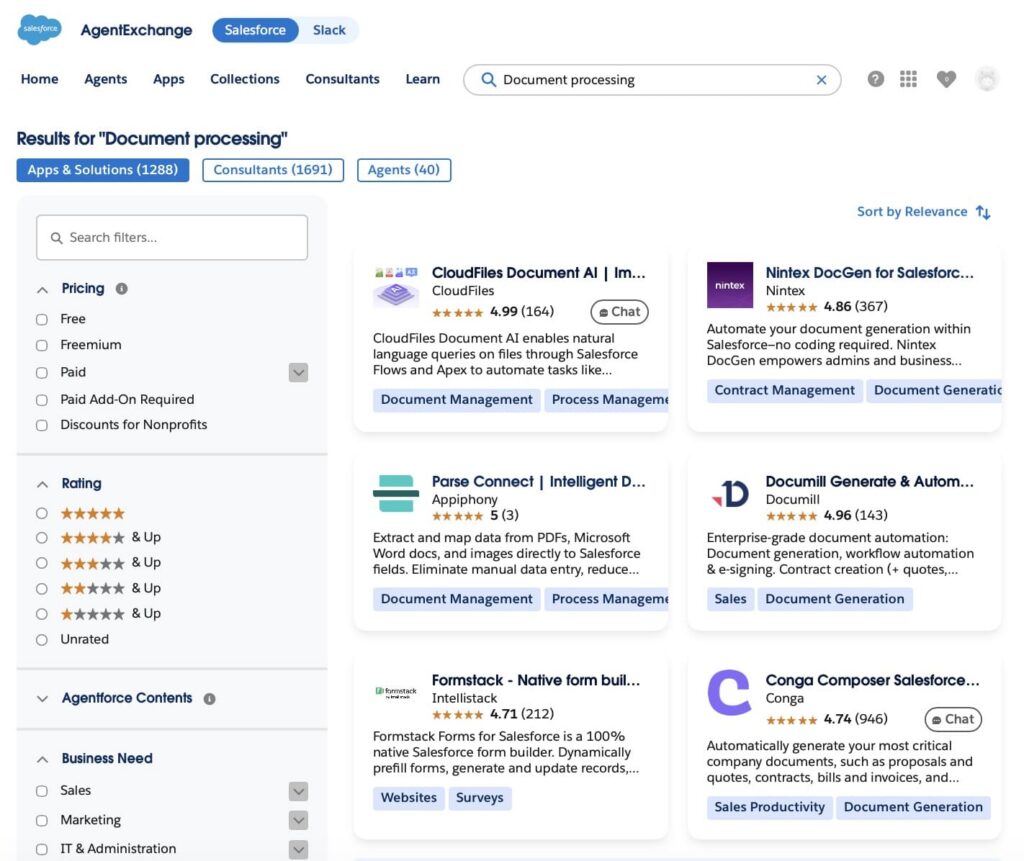
In this context, CloudFiles Document AI appeared at the top of the AppExchange search when reviewing native options for Salesforce intelligent document processing.
During evaluation, it became clear that the solution is designed to work directly within Salesforce, using Salesforce Files, Flow, and standard data models as the operational layer. Instead of treating documents as something external to CRM processes, it focuses on making document content usable inside existing Salesforce workflows.
The platform applies AI-based Salesforce OCR and extraction to read structured, semi-structured, and unstructured documents, and then maps extracted data back into Salesforce records. From a practical standpoint, this approach is relevant for teams that want to reduce manual document handling while keeping automation inside Salesforce, rather than relying on separate standalone document processing systems.
CloudFiles Document AI Overview: A Salesforce-Native Document Intelligence Layer
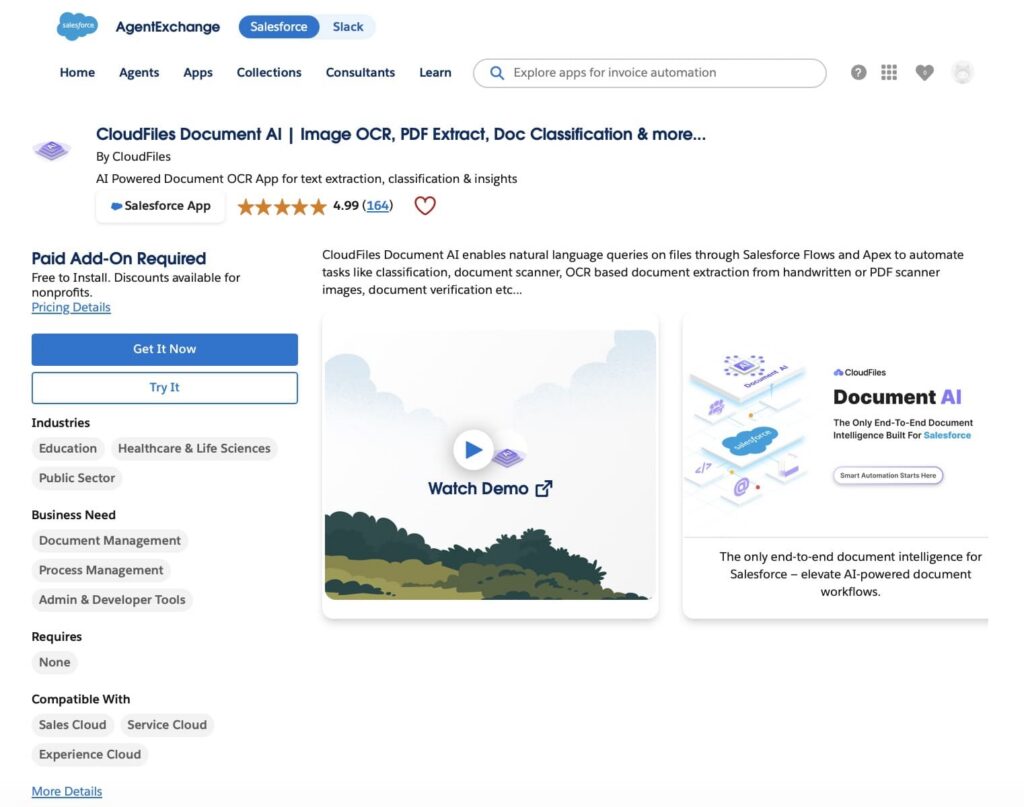
CloudFiles Document AI is an end-to-end document intelligence layer built natively for Salesforce.
It is designed to work directly with Salesforce Files and standard CRM objects, allowing document content to move into Salesforce processes without external systems or separate processing layers.
At its core, the platform goes beyond simple extraction. It combines OCR Salesforce and a multi-agent system designed to support extraction, classification, querying, and processing of different document types, including PDFs, scans, images, and handwritten forms.
The result is that documents can be not only read, but also understood and used inside Salesforce workflows. This includes extracting structured fields, classifying document types, and converting content into formats that can update records or trigger automation through Salesforce Flow.
A key capability is document querying. Users can interact with documents using NLP in Salesforce to retrieve specific information, compare multiple files, or generate structured outputs such as tables, JSON, or CSV. This allows documents to be used as an active data source rather than static storage.
CloudFiles Document AI also supports automation scenarios where document events trigger actions inside Salesforce. File uploads or updates can initiate processing logic, populate fields, and support downstream workflows without manual intervention.
From a compliance and infrastructure perspective, the platform is built for enterprise environments and is independently audited for SOC 2 Type II, certified to ISO 27001, and compliant with HIPAA and GDPR.
Overall, CloudFiles Document AI is positioned as a native intelligent document parsing Salesforce layer that turns files into structured data, enables document-level querying, and connects document content directly to Salesforce automation and workflows.
How to Get CloudFiles Document AI Salesforce
CloudFiles Document AI can be accessed from AppExchange in three ways depending on the evaluation or deployment stage: sandbox, test drive org, or production.
1. Try in a sandbox environment.
Organizations can install CloudFiles Document AI in a sandbox to test intelligent document processing Salesforce, validate extraction accuracy, and see how it fits existing Flow and CRM processes without affecting production data.
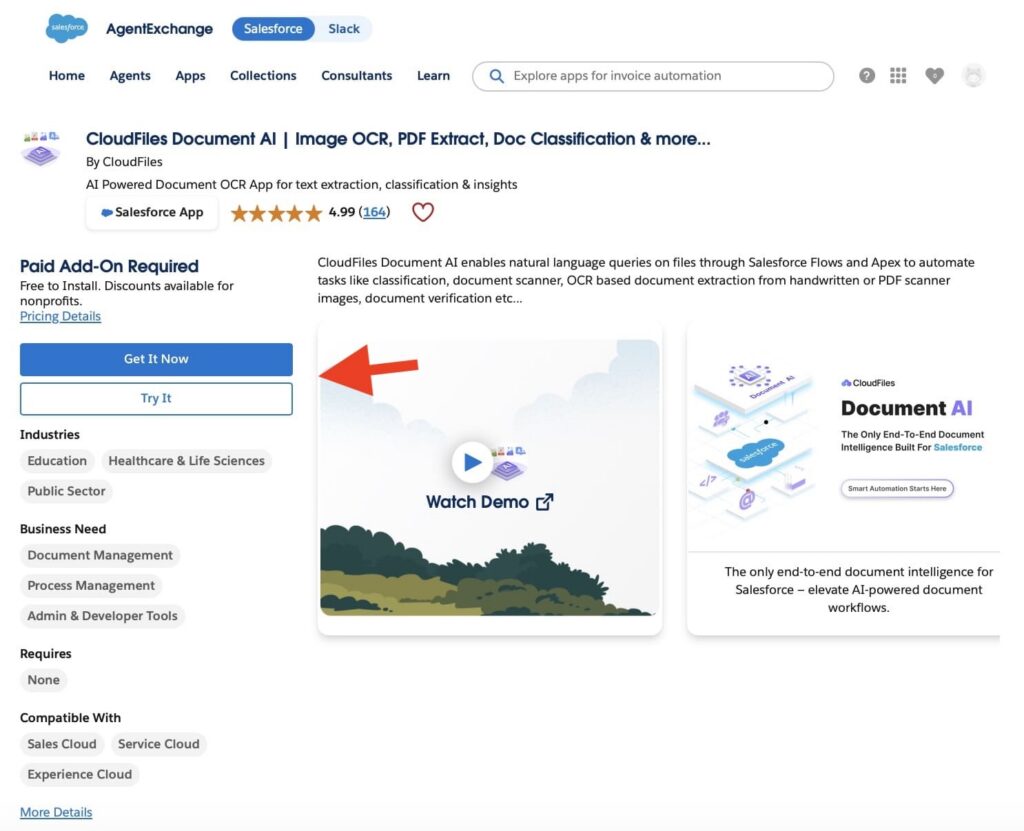
2. Explore via a test drive org.
A test drive option is available through AppExchange, allowing users to explore the solution in a pre-configured Salesforce environment and review core capabilities without setup effort.
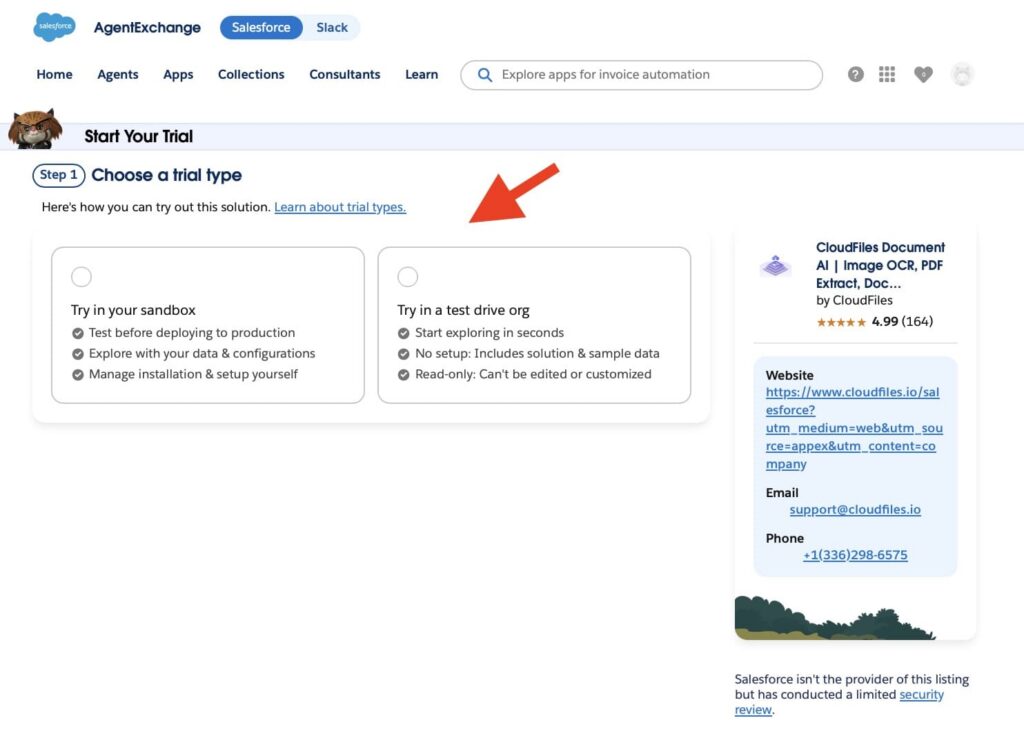
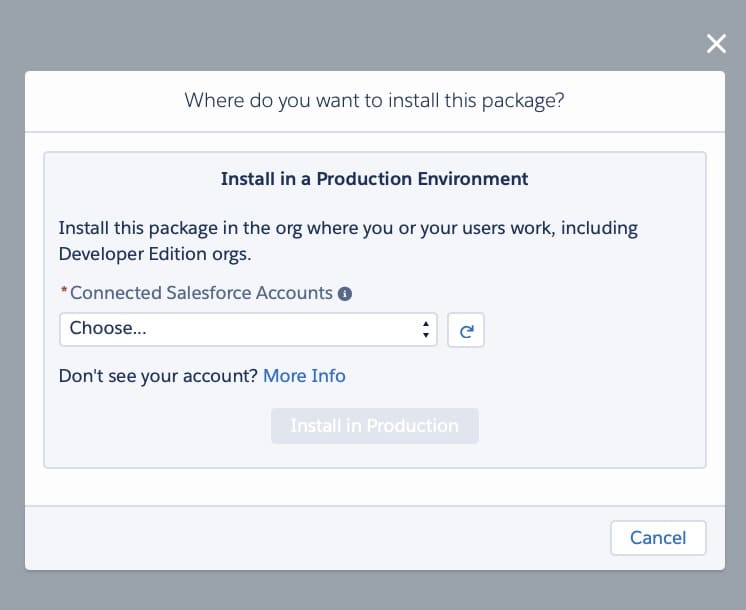
3. Install in production via AppExchange.
For live environments, installation is done directly from the Salesforce AppExchange listing using the “Get It Now” option. The standard Salesforce package installation flow is used, after which the application becomes available inside the org for configuration and permission setup.
Configuration of CloudFiles Document AI in Salesforce
After installing CloudFiles from Salesforce AppExchange, configuration is handled inside Salesforce using the CloudFiles setup.
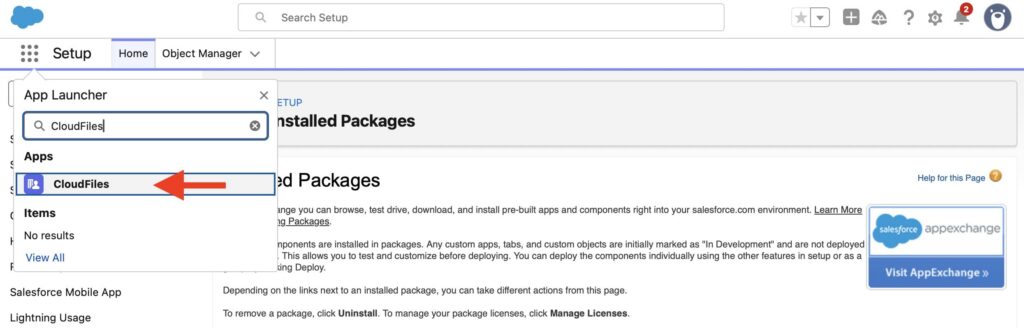
It is structured around connecting the org, defining how documents are processed, and controlling access and usage.
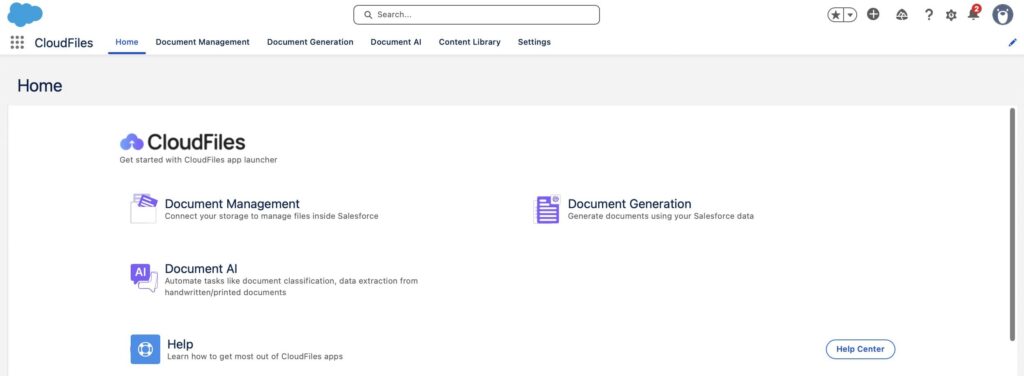
Step 1. Connecting Salesforce Org
The first step is connecting the Salesforce org with CloudFiles. Before starting the connection, users select a preferred data region (USA, EU, UK, or Australia). This determines where CloudFiles data is stored to support data residency requirements.
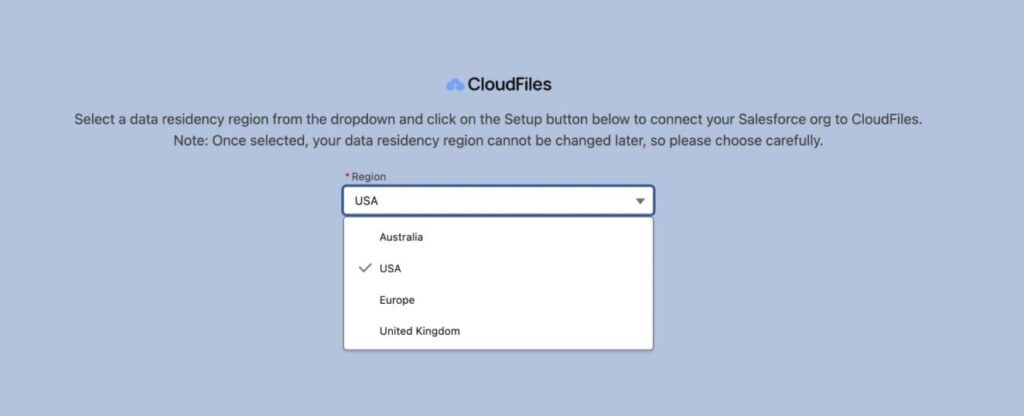
After selecting the region, users click “Setup” to start the connection. Salesforce then shows an “Allow Access” prompt, where the user confirms the connection by selecting “Allow”. Once approved, the Salesforce org is connected to CloudFiles and the setup is completed, making CloudFiles features available inside the org.
Step 2. Document Mapper Setup
The next step is to configure the Document Mapper. It is a configuration-driven extraction and mapping layer that converts uploaded documents into Salesforce record operations. It uses field-level prompts to extract data from documents, normalize the output, and map values directly into Salesforce fields. It can also create related child records from repeating structures such as invoice line items.
1. Create a new configuration.
The process starts by creating a Document Mapper configuration that defines:
- the target Salesforce object (standard or custom),
- the extraction and mapping rules used for the document,
- how results will be written into Salesforce records.
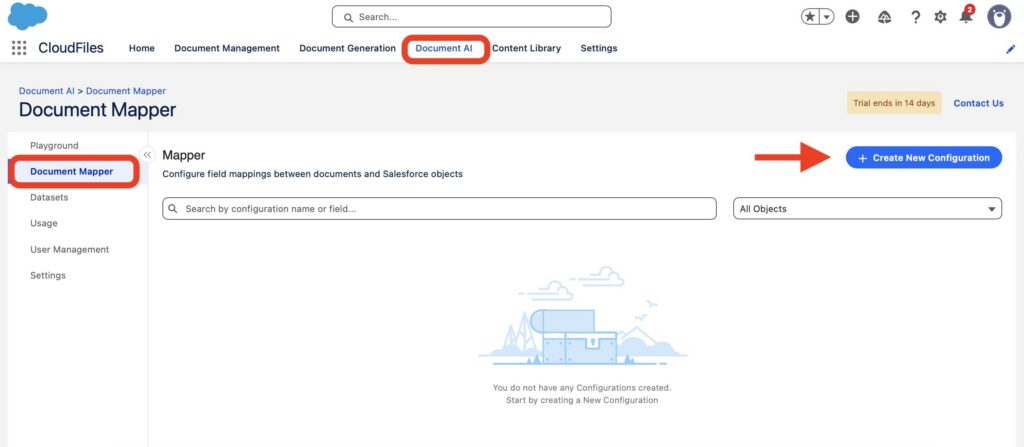
A configuration is created in:
CloudFiles App → Document AI tab → Document Mapper → Create New Configuration.
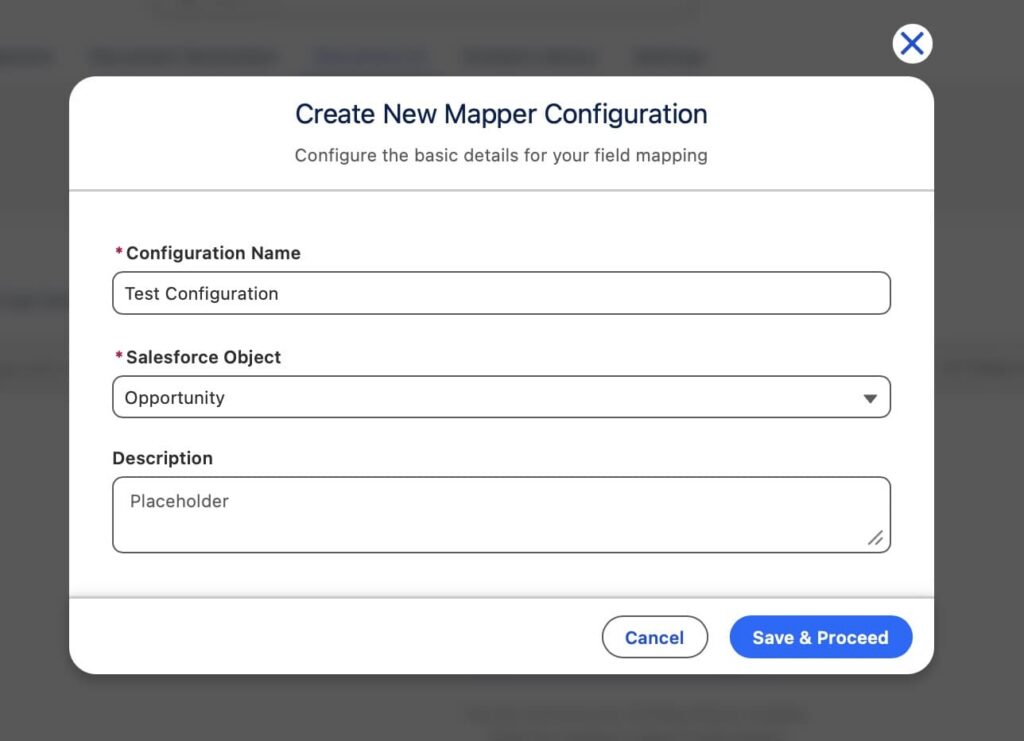
In this step, you define a configuration name to identify the use case, select the target Salesforce object (Account, Opportunity, or custom object), and optionally add a description for internal context. Once saved, the configuration becomes the base for all extraction logic.
2. Current Object mappings.
This section defines how fields from a document are mapped to the main Salesforce record.
Each mapping consists of:
- a Salesforce target field,
- a natural language prompt for extraction.
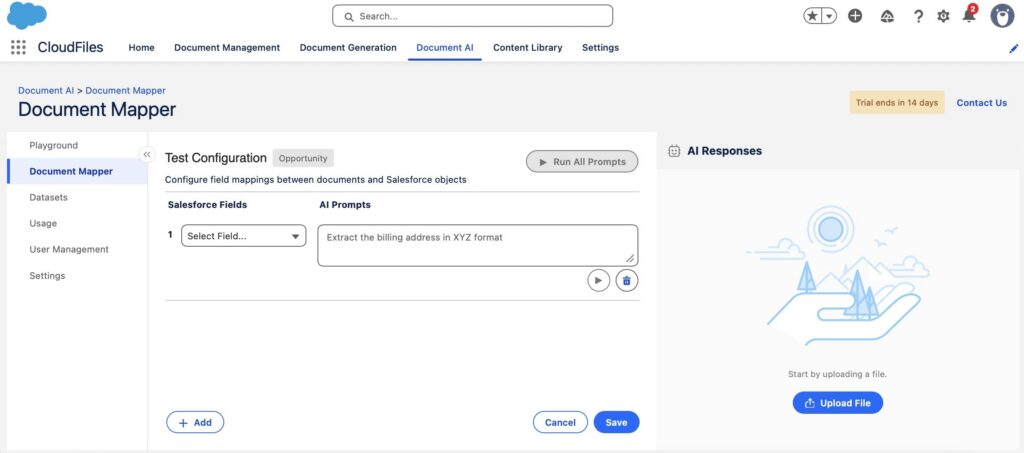
The prompt tells CloudFiles what to extract and how to format it. For example, extracting invoice date from the header or returning totals as numeric values only.
This step ensures extracted data is structured and consistent before writing into Salesforce fields.
3. Related Object mappings.
Use Related Object Mappings when you need to create child records from the data in a document. This allows CloudFiles to extract multiple rows and create one related record per row (for example, Line_Item__c or OpportunityLineItem).
To set it up, open the Related Object section, select the child object, and add a top-level prompt that identifies the repeating structure, for example: “Extract all line item rows from the invoice table.”
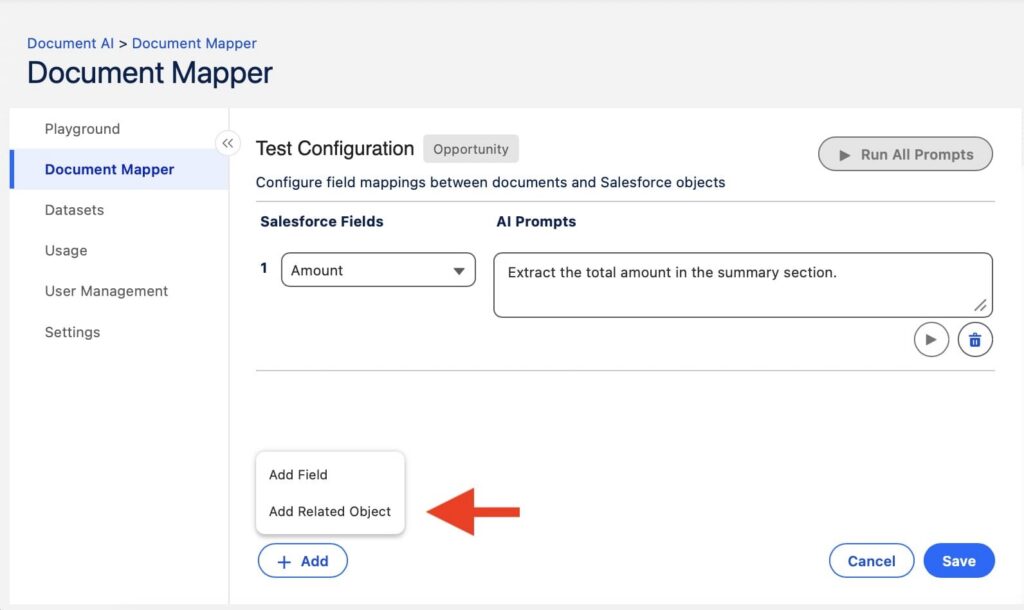
Then add field mappings for the child object. Each field uses a prompt that defines what to extract from each row, such as product name, quantity, unit price, and line total, with clear output formats to keep values consistent across rows.
4. Running the prompts.
After configuration, the setup is validated using real documents.
The process includes:
- Uploading a sample PDF,
- Running a single prompt or all prompts,
- Reviewing extracted values and formats,
- Refining prompts if results are not accurate.
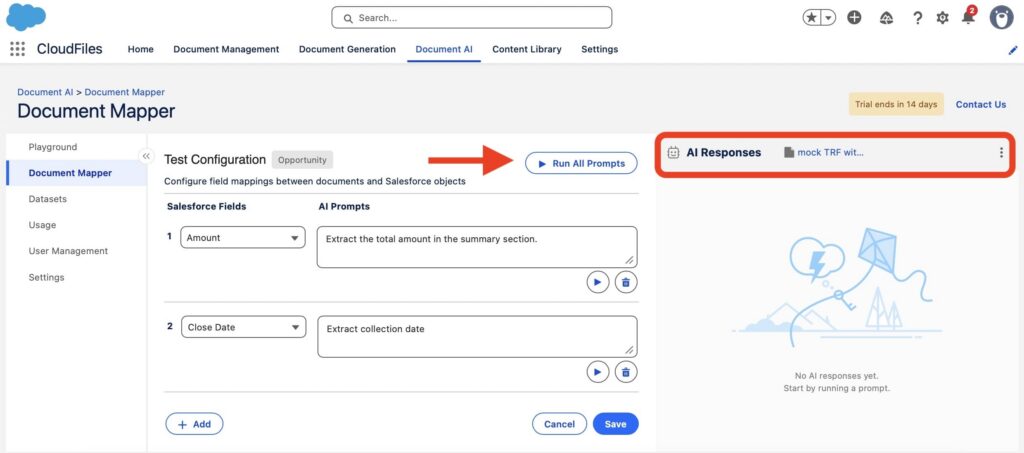
This ensures extraction quality before activation.
5. Enable User access.
Once validated, Document Mapper is made available to users through Salesforce UI entry points.
There are two main options:
- List view button for processing multiple records,
- Record detail button for processing a single record.
Both options allow users to upload a document directly from Salesforce and trigger extraction. The system then automatically creates or updates Salesforce records based on the configuration.
Key Features of CloudFiles Document AI
CloudFiles Document AI is a Salesforce-native end-to-end document intelligence layer that processes and structures data from documents stored in Salesforce Files, document AI OCR and automation through Flow.
1. Universal File Intelligence
CloudFiles can process documents in their original format without conversion. This includes PDFs, scanned files, images, handwritten documents, and common office formats such as Word, Excel, and PowerPoint.
It is designed to read content from different document types and handle variations in quality, structure, and format. Documents can also be ingested from Salesforce Files and connected external storage systems where supported.
2. Multi-Agent AI with Precision Control
Document processing is handled through multiple specialized AI agents instead of a single model.
Each agent is responsible for a specific task such as extracting structured information, identifying and classifying document types, interpreting content across sections, and preparing structured outputs for Salesforce.
This approach allows each step of document processing to be handled independently, giving more control over how results are produced.
3. Intelligent Document Queries
Once processed, documents can be queried directly inside Salesforce.
Users can ask questions in natural language, extract specific information without manual review, compare multiple documents, and generate structured outputs such as tables, JSON, or CSV.
This turns documents into a usable data source inside Salesforce processes instead of static storage.
4. Automation with Salesforce Flow
CloudFiles Document AI works through Salesforce Flow as the main automation layer.
Document processing can be triggered by events such as file uploads, record updates, or attachments to Salesforce objects.
Flow then coordinates document processing, extraction of structured data, record updates, and downstream automation steps inside Salesforce workflows.
5. Actionable Document Outputs
Processed documents can directly drive actions inside Salesforce.
This includes updating standard and custom records, triggering approvals and workflow steps, splitting document bundles into structured files, and renaming or organizing files based on extracted data.
The output is designed to be immediately usable inside Salesforce automation and CRM processes.
Use Cases of CloudFiles Document AI
CloudFiles Document AI, a native document intelligence layer for Salesforce, is typically used in environments where document-heavy processes slow down operations or require repeated manual work. The main value appears when documents need to be turned into structured Salesforce data or used directly in automation workflows.
- Smart data extraction: Processing structured and semi-structured documents such as invoices, KYC forms, medical forms, and onboarding documents. It also handles line items, tables, handwriting, and scanned inputs where manual entry is usually required.
- Document approvals and validation: Checking documents for completeness, missing signatures, and consistency with Salesforce data. This reduces manual review effort in approval chains and improves control over incoming documents.
- Document intelligence across files: Working with information across multiple documents, including summarization of long files, comparison between documents, detection of inconsistencies, and interpretation of unstructured content such as contracts or reports.
- AI-powered document search: Searching inside documents using natural language queries instead of opening files one by one. Users can retrieve specific information across large document sets directly in Salesforce.
- Document organization and management: Splitting large documents into smaller files, renaming them based on extracted data, and structuring document sets for downstream Salesforce processes and automation.
Industries That Benefit from CloudFiles Document AI
Across Salesforce environments, document-heavy processes appear in almost every industry, but the way CloudFiles Document AI is used follows a consistent pattern: documents contain operational data that needs to be extracted, structured, and pushed directly into Salesforce records and workflows. The table below shows typical industry applications where this applies in practice.
| Industries That Benefit from CloudFiles Document AI | |
|---|---|
| Industry | How it is used in Salesforce environments |
| Financial Services / Banking | Extracts income, identity, and employment data from documents to support loan applications, verification, and compliance checks |
| Healthcare | Populating records and triggering clinical or administrative workflows |
| Legal | Extracts key clauses from contracts, validates document completeness, and supports review before e-signature or filing processes |
| Education | Processes transcripts and academic records, extracts grades and credits, and updates student information in Salesforce systems |
| Manufacturing | Handles supplier documents, compliance records, and operational forms to reduce manual handling in procurement and logistics workflows |
| Government | Supports processing of citizen forms, applications, and identity documents with structured validation and audit readiness |
| Insurance | Automates claims intake, extracts policy and incident data, and supports faster claims assessment workflows |
| Transport & Logistics | Processes shipment documents, customs forms, and delivery records to improve tracking and operational efficiency |
What Other Users Say About CloudFiles Document AI
To understand how CloudFiles Document AI performs in real Salesforce environments, feedback from AppExchange reviews provides useful signals about adoption, usability, and operational impact.
CloudFiles is currently rated 4.99 out of 5 (based on 164 reviews), with consistently high ratings across all submissions and no visible low-rating patterns.
Across reviews, several clear patterns emerge:
- Significant reduction in manual document work: Users consistently mention time saved on data entry and document handling, especially for PDFs, forms, and Salesforce document scanning.
- Ease of setup for Salesforce admins and technical users: Users describe configuration as straightforward, particularly when building document-driven automations such as extraction, classification, routing, and file processing.
- High accuracy on complex documents: Reviews frequently mention strong performance on unstructured or multi-format documents, including scanned files and documents with multiple data fields.
- Practical impact on daily operations: Users note improved consistency in Salesforce data and reduced reliance on manual review steps across document-heavy processes.
- Responsive and hands-on support experience: Support is repeatedly described as fast and helpful during implementation and troubleshooting, especially when building automation flows.
A customer from AbleNet Inc. highlighted efficiency gains in reviewing incoming documents and emphasized the support experience during adoption:
“CloudFiles has made our document review process faster and smoother. Their support team is incredibly helpful, guiding us through every step to ensure quick turnaround and maximum efficiency,” said Shealyn Benson, Director of Business Systems, AbleNet Inc.
Why This Approach Stands Out
Several aspects of CloudFiles Document AI stand out when compared with traditional document processing approaches.
1. Built to Operate Inside Salesforce
Many document processing solutions work as external platforms that exchange data with Salesforce through integrations. CloudFiles takes a different approach by operating directly within Salesforce and working with Salesforce Files, Flow, and the existing data model. This keeps document processing closer to the business processes it supports.
2. Multi-Agent Processing Instead of a Single AI Step
CloudFiles uses multiple specialized agents that handle different tasks such as extraction, classification, querying, and processing. This creates a more structured approach to document handling and gives teams greater control over how document data is interpreted and returned to Salesforce.
3. Human Oversight Remains Part of the Process
While AI performs the heavy lifting, organizations can keep validation and approval steps where required. This is particularly relevant for teams working with contracts, compliance documents, financial records, or other business-critical information.
4. Enterprise Compliance and Data Governance
CloudFiles aligns with major compliance standards, including SOC 2, HIPAA, GDPR, and ISO 27001. Your files stay in your own storage and CloudFiles never re-hosts them. Documents sent for AI processing are handled in your chosen residency region and are never used to train AI models.
5. No-Code Automation for Salesforce Teams
Most document workflows can be configured through Salesforce Flow without custom development. This reduces the need for custom code and makes ongoing process updates easier to manage.
Pricing and Trial Overview
Pricing for CloudFiles Document AI, is tailored to each organisation’s requirements. Contact CloudFiles for a quote.
The listing on AppExchange indicates that volume discounts are available for larger deployments, and pricing can be adjusted for organizations with broader or more complex usage requirements through direct engagement with the vendor.
A 14-day free trial is available, allowing teams to test document extraction, classification, and Salesforce automation workflows in a real environment before committing to production use. Trial extensions may also be provided depending on evaluation needs.
Conclusion: What CloudFiles Document AI Changes in Document Parsing Salesforce
In Salesforce environments, documents are already part of core records like Accounts, Opportunities, and Cases. The real challenge is converting what’s inside those files into structured data that can be used in automation and reporting. CloudFiles Document AI addresses this by bringing document processing directly into Salesforce workflows. Instead of leaving information inside PDFs or scans, it focuses on turning it into usable CRM data.
It is best understood as a document intelligence layer for Salesforce: documents arrive, are read in your own business context, routed by what they turn out to be, and written where they belong. You can start with a free trial through a sandbox or test drive org, which helps validate whether the solution fits specific workflow needs before full rollout.
Overall, it is a practical option for Salesforce teams aiming to reduce manual document handling while keeping everything within the platform.

Antonina is a Salesforce Admin with six certifications: Salesforce Certified Platform Foundations, Platform Administrator, Platform Administrator II, CPQ Administrator, AI Associate, and Agentforce Specialist. She started working with Salesforce in 2021 as Intern Salesforce Developer. Now, a 2-Star Ranger on Trailhead, she continues to expand her skills and knowledge. She helps manage Salesforce systems, automate tasks, and improve processes. Antonina loves learning new things and exploring better ways to use technology. In her free time, she enjoys reading, playing sports, and exploring new tech ideas.
 Previous Post