



The Insurance Claim Cannot Wait for a Long Build
An insurer wants to give customers a digital way to report claims, but the customer-facing intake process is not ready yet. The business needs to turn its requirements into a working form, connect the submitted information to Salesforce, and publish the form for customers without spending weeks on the build.
The challenge is that even a focused claims intake can involve multiple pieces: the right questions, conditional logic, supporting documents or photos, Salesforce data mapping, and testing the complete submission.
Insight:
The quality of a digital claims experience can affect customer retention.
J.D. Power’s 2025 U.S. Claims Digital Experience Study found that 52% of auto and homeowners insurance customers who rated their digital claims experience as “poor” or “just OK” were likely to leave or not renew with their insurer.
Among customers who rated the experience “excellent” or “perfect”, only 4% were likely to leave or not renew.
When a claims team needs a customer-facing intake ready quickly, how the form is built can make a difference.
To ensure a fair comparison and determine which approach is more effective, the same customer-facing claims intake will be created using Salesforce’s native capabilities and an AI-assisted form builder. Both builds will use the same requirements, allowing us to compare the steps, configuration work, and overall build effort required to reach a working Salesforce-connected form.
So, how does Salesforce’s approach compare with an AI-assisted build, and can the same customer-facing claims form or Salesforce donation form be ready faster with AI?
- What We Will Compare: Two Approaches to Salesforce Claims Management
- Titan AI Studio: A Faster Way to Build the Claims Intake
- Salesforce: Building an Insurance Claims Intake with Native Capabilities
- Comparing Build Speed: Titan vs. Salesforce
- Titan vs. Salesforce: What Else Is Different?
- Salesforce vs. Titan: Comparing the Effort for Ongoing Claims Management in Salesforce
- Final Takeaway: Which Approach Is Faster for Insurance Claims Intake?
What We Will Compare: Two Approaches to Salesforce Claims Management
To answer these questions, the following two approaches will be used. The first approach uses the FNOL (First Notice of Loss) capabilities in Salesforce Insurance Claims Management. The second uses Titan AI Studio, an AI-assisted builder within Titan Experience Studio that generates Salesforce-connected forms from natural-language prompts. The generated form can then be refined in Titan’s visual builder, including its Salesforce mappings and submission logic.
Both builds start with the same claims requirements, but the form is built differently. Salesforce uses its FNOL framework and OmniScript to create the customer-facing claims flow, while Titan AI Studio generates the initial form from a natural-language description and can create the Salesforce mappings and submission logic as part of that generated form.

For the comparison, we will use a common auto insurance scenario: a customer has been involved in a vehicle accident and needs to submit a new claim online. The intake needs to capture the information the insurer needs to record the claim and begin processing it in Salesforce.
The intake will include:
- Policyholder information: name, email, phone number, and policy number.
- Accident details: date, time, location, and a description of what happened.
- Vehicle information: vehicle details and the type of damage.
- Other parties: information about another driver involved in the accident.
- Claim details: the type of loss and any additional information needed to process the claim.
The completed form must collect the required information, validate necessary fields, submit the data to Salesforce, and display a confirmation after a successful submission.
By comparing the steps and build effort, we can see which intelligent intake for insurance claims reaches a working claims intake form faster.
Titan AI Studio: A Faster Way to Build the Claims Intake
Before we start the test, let’s first look at what Titan AI Studio is and how it changes the way we approach the initial claims intake build.
How Titan AI Studio Works
At the core of Titan’s form-building platform is Salesforce First Web Studio, an all-in-one Salesforce-connected platform for building forms, portals, documents, eSign experiences, and surveys.
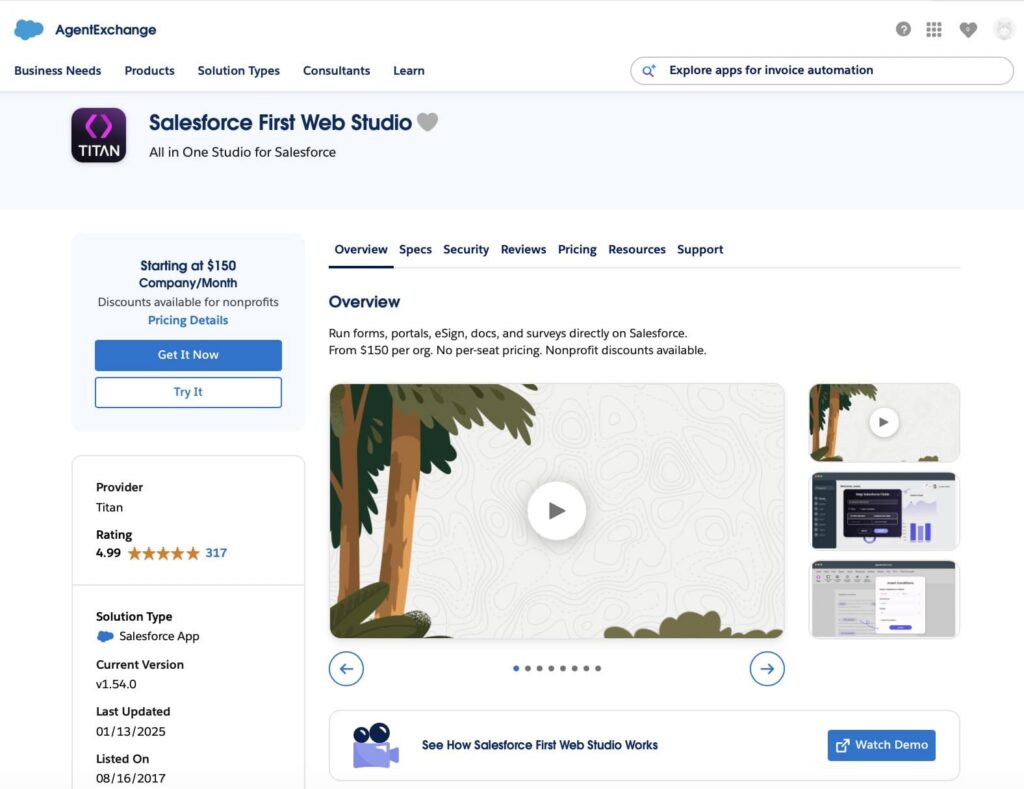
AI Studio powers Salesforce First Web Studio by turning plain-language prompts into working forms, portals, or flows. Instead of starting with a blank canvas, users can describe the experience they need, and AI Studio generates an initial version based on the prompt and the Salesforce data model. The result can then be refined with follow-up prompts or edited directly in the no-code visual builder.
The form connects to Salesforce through field mappings and Salesforce actions. Titan’s Experience Studio also supports conditional logic and file uploads, giving the form the capabilities needed for a claims intake.
What Titan AI Studio Can Do for the Claims Intake
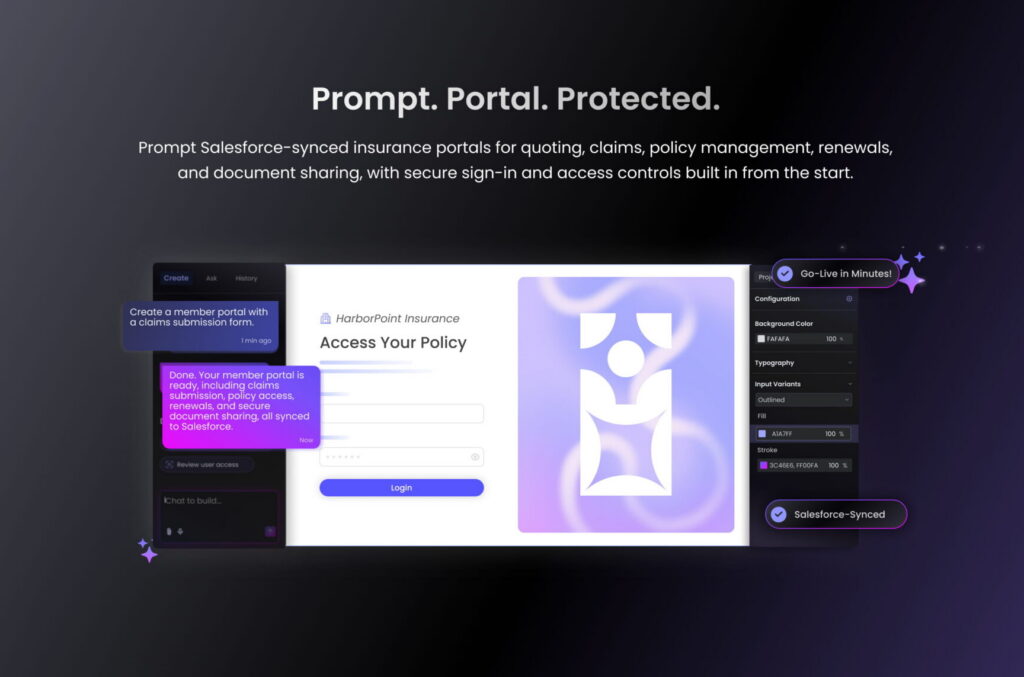
For this claims intake, Titan AI Studio covers the main building blocks needed to move from the initial requirements to a Salesforce-connected form. The relevant capabilities are:
- Fields and form structure: AI Studio can generate common input types, sections, headings, buttons, responsive containers, and multi-step forms. This provides the basic structure for policyholder, accident, vehicle, and claim information.
- Conditional behavior: Titan’s Experience Studio supports conditions that can show or control parts of the form based on the customer’s responses, such as displaying additional questions when another vehicle is involved.
- Salesforce connection: Form inputs can be mapped to Salesforce fields, and Salesforce Push actions can send the submitted information to Salesforce records.
- File uploads: Titan supports file uploads that can be included in the Salesforce submission, which can be used for accident photos or supporting documents.
- AI-assisted changes: After the initial generation, the form can be modified through follow-up prompts or directly in the visual builder.
Together, these capabilities cover the main requirements of our scenario: collecting the claim information, asking additional questions when needed, accepting supporting files, and sending the completed submission to Salesforce.
Creating the Claims Intake With Titan AI Studio
Now we can put AI Studio to work. Instead of starting with a blank form and building the claims intake piece by piece, we give Titan the requirements in a natural-language prompt and let it create the first version.
Step 1: Start the project.
We open a new Titan project and launch AI Studio from the Web Builder. The project will become the customer-facing claims form.
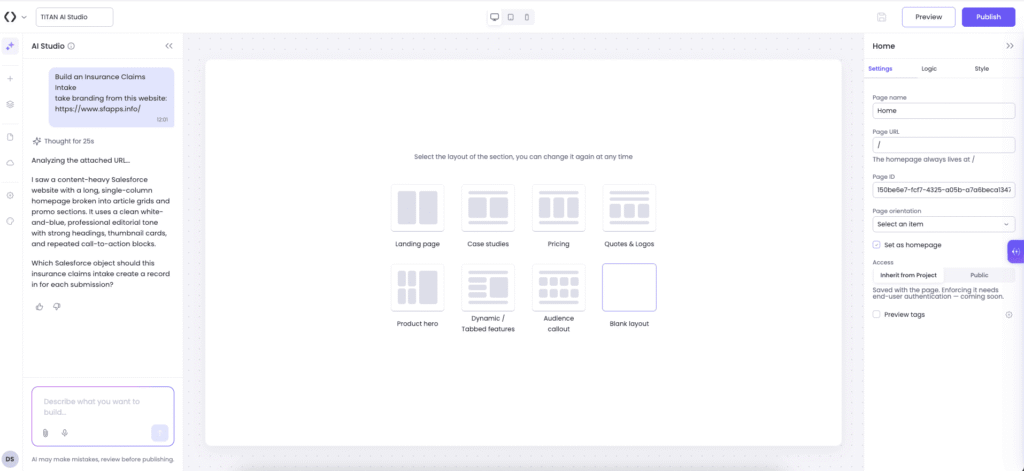
Step 2: Describe the claims intake.
The first prompt gives AI Studio the full claims scenario. It describes the information the customer needs to provide, the sections needed for the form, the conditional questions, the supporting files, and the Salesforce submission requirements.
The goal is to give AI Studio enough context to build more than a collection of fields. The prompt describes how the form should work as a complete claims intake. AI Studio reviews the request and the Salesforce data model and asks questions about the design, UX, UI, and Salesforce mapping to guide the user toward the best possible execution from the first prompt.
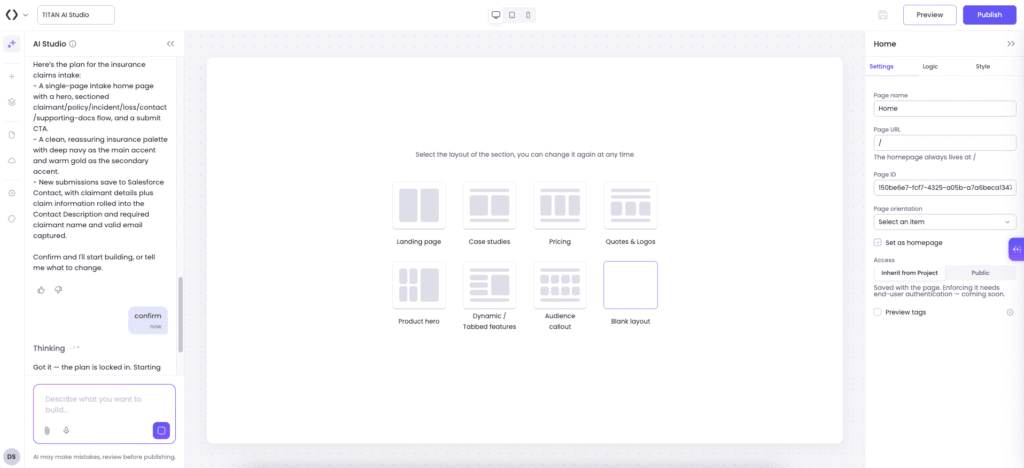
Step 3: Generate the first version.
AI Studio turns the prompt into a form directly in the Web Builder. The first version can include the requested fields, sections, labels, buttons, layout, and Salesforce Push action.
This is the first major difference from the native build. Instead of creating the basic structure manually, we already have a working starting point to review.
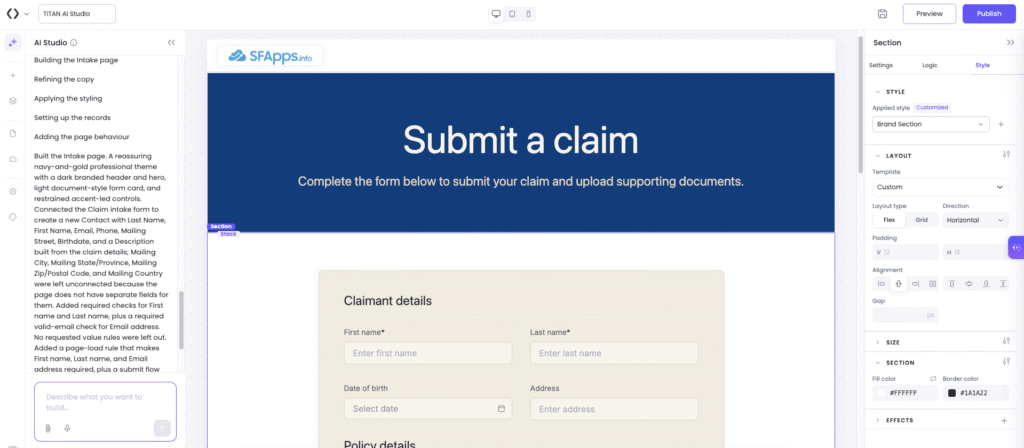
Step 4: Review and refine.
The generated form is checked against the original requirements. We look for missing fields, incorrect sections, unsuitable labels, and any requirements that were not reflected in the first version.
When something needs to change, we can ask AI Studio to modify the existing form rather than starting again. Small changes can also be made directly in the visual builder.
Step 5: Add the claims logic.
The form needs to react to the customer’s answers. For example, selecting that another vehicle was involved should display the additional information needed for that vehicle.
Titan supports conditional behavior, allowing the form and Salesforce actions to respond to the information entered by the customer.
Step 6: Add supporting files.
The claims intake also needs to accept evidence such as accident photos or documents. Titan’s file-upload functionality can be added to the form and configured as part of the Salesforce submission.
Step 7: Check the Salesforce connection.
The final configuration connects the form inputs with the Salesforce fields required for the claim. The Salesforce Push action is reviewed to make sure the submitted information is sent to the correct records.
At this stage, we are no longer looking at an AI-generated mock-up. The form has the structure, logic, Salesforce connection, and supporting-file functionality required for the actual claims scenario.
Step 8: Preview and test.
Finally, we preview the form as a customer would see it and run the claims scenarios defined for the comparison. The test checks both sides of the process: whether the customer can complete the form as expected and whether the submitted information reaches Salesforce correctly.
The result is a Salesforce-connected claims intake that started with a natural-language description rather than a blank form.
Insight:
38% of property-claims customers now use digital tools to report FNOL, showing that digital claims intake has become a significant channel for insurers and customers.
Salesforce: Building an Insurance Claims Intake with Native Capabilities
Salesforce approaches the build from the other side. Instead of generating the customer-facing form first, we start with the insurance claims process from Salesforce and configure its FNOL experience for our scenario.
Salesforce Insurance Claims Management and FNOL
Salesforce Insurance Claims Management includes a dedicated First Notice of Loss (FNOL) process for reporting a loss and opening a claim. The customer-facing experience is built with OmniScript, while Salesforce claims services handle the processing behind it.
What Salesforce Provides for This Claims Intake
Salesforce Insurance Claims Management provides the capabilities needed to support the main requirements of the claims intake, including:
- Policy and vehicle information, including the policy and insured vehicles involved in the claim.
- Accident information, such as the incident type, date, and description.
- Vehicle damage, including damage to the insured vehicle and information about another vehicle involved.
- Injury information for people affected by the accident.
- Police-report information and supporting evidence, including photos and documents.
- Claim processing, including coverage verification, claim creation and updates, and the execution of configured claim rules.
Creating the Claims Intake in Salesforce
Salesforce recommends using one or more OmniScripts to implement the First Notice of Loss (FNOL). These OmniScripts provide the front-end flow through which policyholders, brokers, or insurance agents can notify the insurer of a loss and initiate a claim.
The exact flow can vary based on the business requirements. A typical Claims Intake can include the following components:
Step 1. Extract information about the policy.
Configure the FNOL to extract information about the policy and the insured items associated with it. This information can then be used throughout the claim intake process.
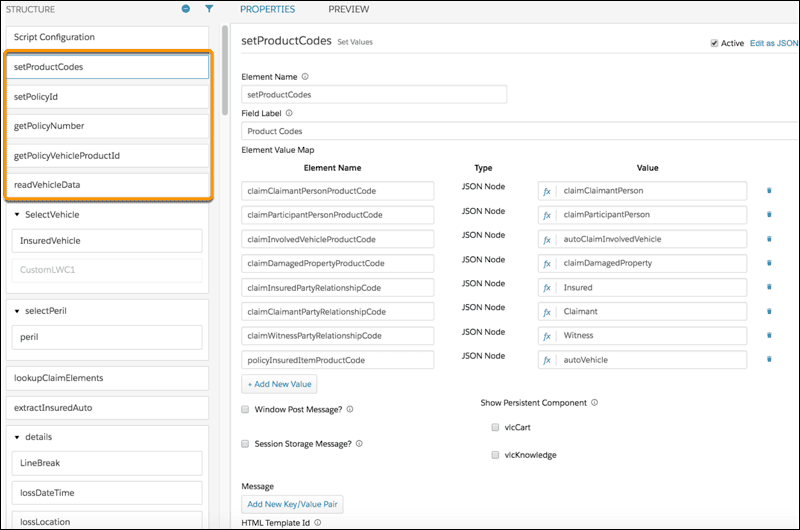
2. Gather data about the loss.
Configure the FNOL to collect initial information about the loss. Depending on the business scenario, this can include the type of loss, affected insured items or parties, third-party involvement, and the date and time of the loss.
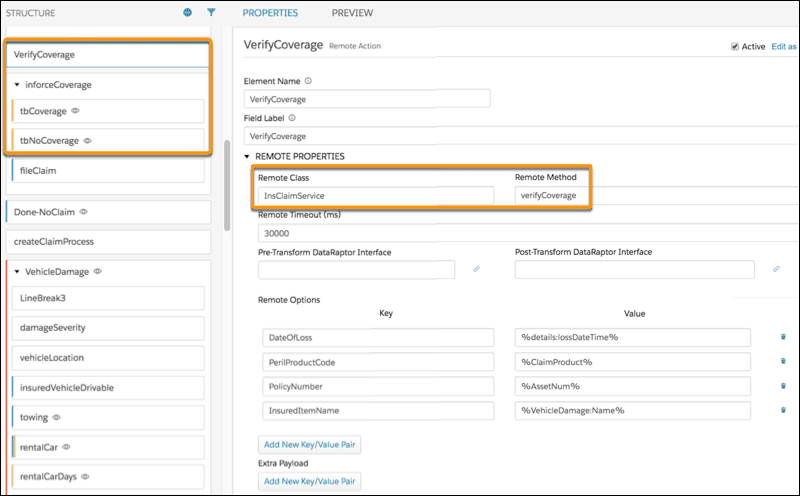
3. Verify coverage.
The FNOL can use InsClaimService:verifyCoverage to determine whether the policyholder had coverage in force on the date of the loss.
4. Create the claim.
Once coverage has been verified, InsClaimService:createUpdateClaim can be used to create the initial claim record. This service can be invoked directly from an OmniScript or through an Integration Procedure when additional processing is required.
5. Add more claim details.
After the initial claim has been created, the FNOL can collect additional information. Depending on the requirements, this can include damaged insured items, injured insured people, third-party damaged property, third-party injured people, and other participants such as witnesses.
6. Upload supporting documents.
The FNOL can also support the collection of documents required or useful for the claim. These can include photos, police reports, repair estimates, and receipts.
7. Run claim rules.
The FNOL can use InsClaimService:invokeProductRules to run the rules configured for the claim. Based on the configured rules, the process can add claim line items to coverages or set the claim status.
The two approaches take a different route to the same result. Salesforce gives us the claims process and FNOL structure first, while Titan AI Studio gives us the form structure from the requirements first. Now we can compare what that difference means in practice, including how much work is needed to get the same claims intake working.
Comparing Build Speed: Titan vs. Salesforce
The two approaches reached the same claims-intake requirements, but the work involved was different. The useful comparison is how quickly each approach moved from the initial requirements to a working customer-facing form, and how much manual configuration was needed along the way, a relevant consideration as some insurers have increased the share of claims handled virtually or digitally from single digits to as high as 55%.
| Build Speed: Titan AI Studio vs. Salesforce Insurance Claims Management | ||
|---|---|---|
| Build Area | Titan AI Studio | Salesforce |
| Starting point | Requirements provided as a natural-language prompt | Claims-intake requirements defined for the scenario |
| Initial form | Form structure generated from the prompt | Claims intake experience configured using OmniScript |
| Fields and layout | Generated as part of the initial form | Fields and layout configured according to the requirements |
| Conditional logic | Added or refined in the generated form | Configured within the OmniScript |
| Supporting files | Added to the generated form | Evidence collection configured for the claims intake |
| Salesforce connection | Mappings and Salesforce actions configured for the form | Salesforce claims services and data mappings configured for the scenario |
| Changes and corrections | Follow-up prompts or visual builder | OmniScript and related Salesforce configuration |
| Overall effort | Less manual work to produce the initial customer-facing form | More manual configuration required to assemble and configure the claims-intake experience |
| Build speed | ⭐⭐⭐⭐⭐ | ⭐⭐⭐⭐ |
The difference is most noticeable at the beginning of the build. Titan AI Studio can generate the initial form structure directly from the requirements, allowing fields and the basic layout to appear together.
With Salesforce, the claims-intake experience is configured using OmniScript and Salesforce capabilities. The required fields, layout, conditional logic, evidence collection, Salesforce mappings, and claims-processing actions need to be configured to match the specific scenario.
This means Salesforce provides a broader set of insurance and claims capabilities, but bringing those capabilities together into the specific customer-facing intake requires more configuration work than generating the initial form structure in Titan AI Studio.
Titan vs. Salesforce: What Else Is Different?
Build speed is the main difference measured in this test, but the two approaches also differ in how the finished form is designed and managed.
Titan AI Studio does more than generate individual fields. From a natural-language request, it can create the form structure, labels, buttons, layout, and supported Salesforce actions. The generated form can then be refined through additional prompts or edited directly in the builder.
The native approach uses OmniScript and Insurance Claims Management Salesforce capabilities to configure the claims intake experience. The form structure, fields, conditional logic, evidence collection, Salesforce mappings, and claims-processing actions are configured to meet the requirements of the specific scenario.
| Form Implementation: Titan AI Studio vs. Salesforce Insurance Claims Management | ||
|---|---|---|
| Section | Titan AI Studio | Salesforce |
| Form design | AI-generated structure, styling, fields, and layout, with visual refinement | OmniScript-based configuration of the claims intake experience |
| Record creation | AI can generate Salesforce mapping and record-creation logic | Claim creation and related processing are configured through Salesforce claims capabilities |
| Branding | AI can apply the project theme and generate styling from the prompt | Styling is configured within the Salesforce experience |
| External form | Generated form can be prepared for web publication | Claims intake can be exposed through the appropriate Salesforce experience for external users |
| Mobile support | AI Studio generates responsive layouts | OmniScript provides the responsive customer-facing experience |
| Changing requirements | Changes can be requested through follow-up prompts using Titan’s no-code drag and drop builder | Changes are made through OmniScript and related Salesforce configuration |
| Overall | ⭐⭐⭐⭐⭐ | ⭐⭐⭐⭐ |
The difference is also visible in the overall form-building experience. Titan AI Studio provides a direct path from a written requirement to a working form, with the initial structure generated automatically and subsequent changes made through prompts or the visual builder.
Salesforce provides the underlying insurance and claims functionality, but the specific form structure, fields, logic, evidence collection, mappings, and processing need to be configured for the scenario.
For someone focused primarily on creating the customer-facing intake, Titan AI Studio can therefore provide a more direct and straightforward form-building experience, while Salesforce provides a more configuration-oriented approach built around its broader claims-management capabilities.
Salesforce vs. Titan: Comparing the Effort for Ongoing Claims Management in Salesforce
Insurance claims intake automation rarely stays exactly the same after it is built. New questions may be added, fields may need to move, or the form may require different logic as the business process changes.
Titan AI Studio is designed to work with an existing form as well as create a new one. Follow-up prompts can add fields, change sections, move elements, update values, and modify Salesforce mappings. The changes can then be reviewed directly in the builder.
The Salesforce claims intake can also be changed after the initial configuration. OmniScript provides controls for adding and editing elements, configuring conditional views, changing data handling, and testing the updated flow. Active OmniScripts must be changed through a new version rather than edited directly.
| Ongoing Change: Titan AI Studio vs. Salesforce Insurance Claims Management | ||
|---|---|---|
| Change | Titan AI Studio | Salesforce |
| Add a new question | Follow-up prompt or visual editing | Add and configure an OmniScript element |
| Change the form structure | Prompt or visual builder | Modify the OmniScript structure |
| Change conditional behavior | AI-assisted change and visual review | Configure Conditional View and related logic |
| Change Salesforce mapping | Prompt or manual mapping | Update the relevant Salesforce configuration |
| Change supporting-file requirements | Modify the form configuration | Modify the relevant claims-intake elements and configuration |
| Test the change | Review the updated form and Salesforce result | Preview/test the updated OmniScript and Salesforce result |
| Overall maintenance effort | ⭐⭐⭐⭐⭐ | ⭐⭐⭐⭐ |
The important point is that both approaches remain editable after the initial build. The difference is in how those changes are made.
Titan AI Studio adds a natural-language layer to the form or claims intake portal for insurance brokers, allowing changes to be requested through prompts as well as made directly in the builder. Salesforce provides direct configuration through OmniScript and its related Salesforce components, giving the implementation team control over the form structure, conditional logic, data handling, and claims-processing configuration.
Final Takeaway: Which Approach Is Faster for Insurance Claims Intake?
It is time to sum up the results and answer the main question: which approach makes the claims-intake form faster to build?
Both approaches were tested against the same requirements, from collecting the policyholder and accident information to handling vehicle details, other parties, claim information, validation, Salesforce submission, and confirmation.
Here is what the Salesforce web form builder comparison showed:
| Final Comparison: Titan AI Studio vs. Salesforce Insurance Claims Management | ||
|---|---|---|
| Comparison Section | Titan AI Studio | Salesforce |
| Build speed | ⭐⭐⭐⭐⭐ | ⭐⭐⭐⭐ |
| What else is different | ⭐⭐⭐⭐⭐ | ⭐⭐⭐⭐ |
| Ongoing changes | ⭐⭐⭐⭐⭐ | ⭐⭐⭐⭐ |
| Overall result | 15 ⭐ | 12 ⭐ |
The difference comes mainly from how each approach moves from requirements to a working customer-facing claims intake. Titan AI Studio can generate the initial form from the requirements, including automated claims intake for commercial insurance with its structure and fields, and then refine it through prompts or the visual builder. Salesforce uses OmniScript and Insurance Claims Management capabilities to configure the required claims-intake experience, including its fields, logic, evidence collection, Salesforce mappings, and claims processing.
For this test, Titan AI Studio provided the faster path to a working customer-facing claims intake. Salesforce provides broader insurance and claims-management capabilities, while Titan AI Studio focuses on reducing the effort required to create and configure the customer-facing form.
That is the key takeaway from the comparison: when the goal is to build a Salesforce-connected claims intake form quickly, AI-assisted form generation can reduce the work between the initial requirements and a usable result.

Antonina is a Salesforce Admin with six certifications: Salesforce Certified Platform Foundations, Platform Administrator, Platform Administrator II, CPQ Administrator, AI Associate, and Agentforce Specialist. She started working with Salesforce in 2021 as Intern Salesforce Developer. Now, a 2-Star Ranger on Trailhead, she continues to expand her skills and knowledge. She helps manage Salesforce systems, automate tasks, and improve processes. Antonina loves learning new things and exploring better ways to use technology. In her free time, she enjoys reading, playing sports, and exploring new tech ideas.
 Previous Post
 Next Post