



When Salesforce File Storage Starts Becoming a Business Problem
Salesforce Files work well until documents become part of business processes. Contracts may require version history and controlled access, while invoices need to stay associated with the right record. Onboarding documents may also need to be sent to people outside the Salesforce org. As these requirements grow, the question is no longer just where documents are stored. It becomes how they are organised, who can access them, and how they remain connected to the business records and processes they support.
This becomes more important as more teams start using Salesforce to manage documents:
- Sales teams may attach proposals and contracts to opportunities.
- Service teams may add screenshots, manuals, and troubleshooting files to cases.
- Customer success teams may keep onboarding documents with account records.
- Finance teams may need invoices and other financial documents associated with the right customer or transaction.
As the volume and variety of documents grow, keeping everything inside Salesforce can make document management harder to control. Files may need different access rules, clearer folder structures, version management, or sharing options that extend beyond Salesforce users.
At the same time, many companies already have established storage platforms such as Amazon S3, OneDrive, Google Drive, or SharePoint integration with Salesforce. These systems may already be part of the company’s IT strategy, security model, and document management processes.
The growing use of cloud storage also reflects a broader shift in how organizations manage business data. According to Fortune Business Insights, the global cloud storage market is projected to grow from USD 197.8 billion in 2026 to USD 809.99 billion by 2034. As companies expand their use of cloud-based storage, Salesforce does not necessarily need to become the primary location for every business document.
This creates a challenge: how to keep documents accessible from Salesforce while maintaining the organization, access controls, and document management practices they already use.
To solve this problem, many organizations start exploring Salesforce file storage options available on AppExchange (now AgentExchange). These solutions help connect Salesforce with external storage platforms and provide different approaches to managing documents outside the Salesforce database.
For this comparison, we selected two AppExchange solutions: CloudFiles and S3-Link, because both address the challenge of storing Salesforce files externally while keeping them accessible within Salesforce.
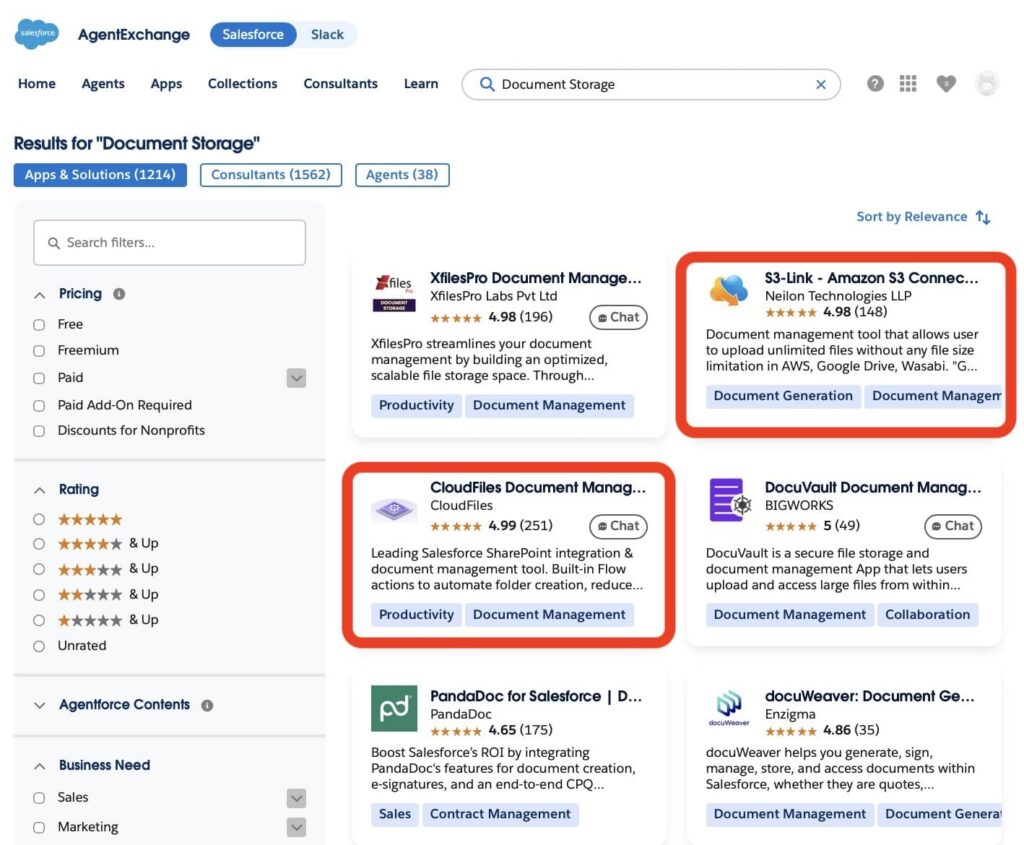
In this article, we will compare CloudFiles and S3-Link across key areas such as functionality, usability, storage capabilities, security, and overall fit for Salesforce organizations.
The goal is to understand how these solutions work, what challenges they solve, and which option provides the best approach for different business needs.
To make the comparison as objective as possible, each evaluation category will include a scorecard and star rating based on the capabilities of both solutions. At the end of the article, we will combine the results from all categories to calculate the final score and determine the overall winner.
- CloudFiles Quick Overview: Salesforce File Management Beyond Storage
- S3-Link Quick Overview: Focused Salesforce S3 Connector
- CloudFiles vs S3 Link Salesforce: Document Management Capabilities
- Usability and Administration Comparison: CloudFiles vs S3 Link
- Security and Governance: Which App Has You Covered?
- CloudFiles vs S3-Link: Licensing and Scalability Comparison
- Wrapping Up: Finding the Right File Storage in Salesforce
CloudFiles Quick Overview: Salesforce File Management Beyond Storage
Overview
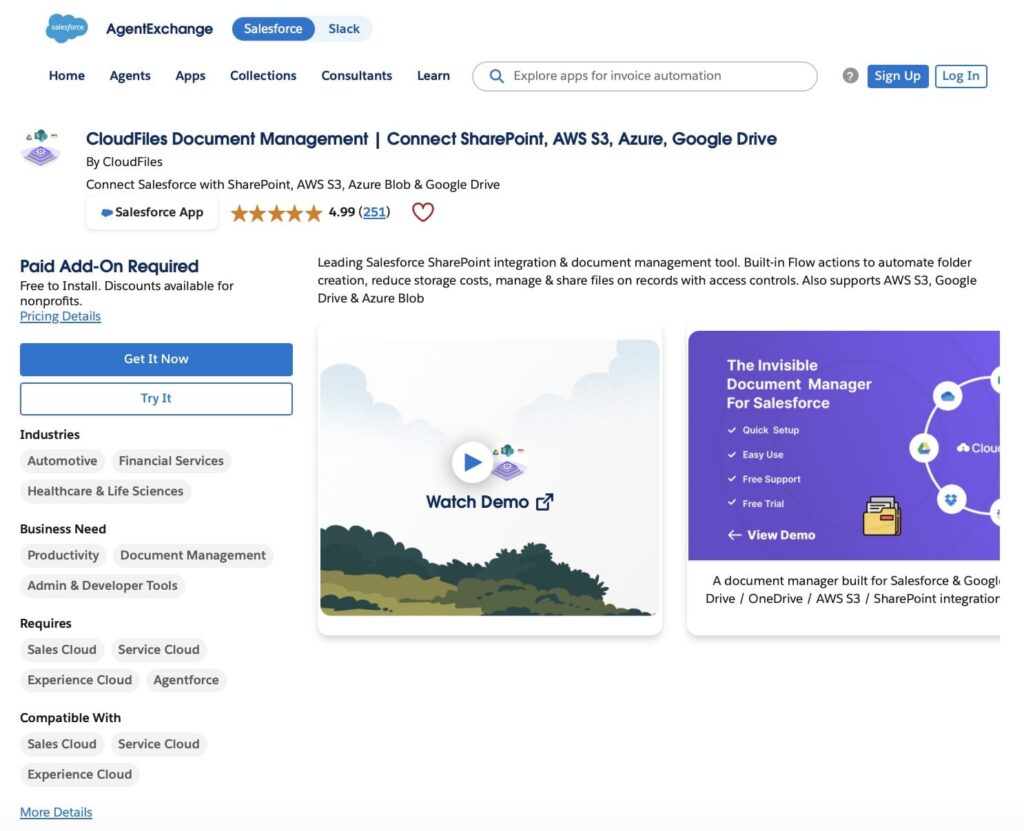
CloudFiles Document Management is developed by CloudFiles and is designed to help Salesforce organizations manage documents without relying solely on Salesforce file storage.
At its core, the app connects Salesforce with external storage platforms such as Amazon S3, SharePoint, OneDrive, Google Drive and more, allowing users to access and manage files directly from Salesforce while keeping the documents stored externally.
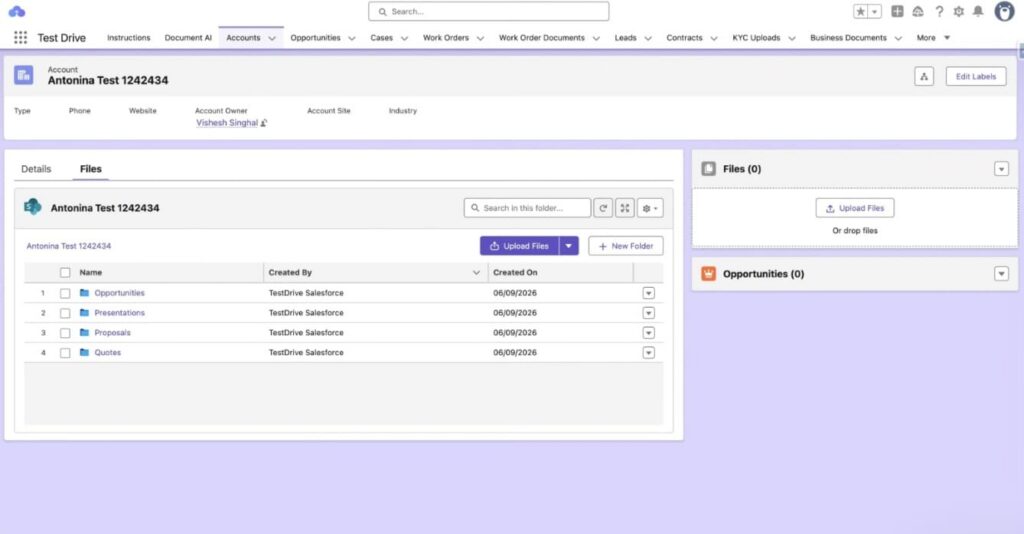
As a Salesforce document management solution, CloudFiles covers multiple stages of the document lifecycle. Teams can organize files, automate folder creation, connect documents to Salesforce records, and manage files stored across different storage providers without leaving Salesforce.
Setup and configuration
The process of installing and configuring CloudFiles can be broadly divided into the following steps:
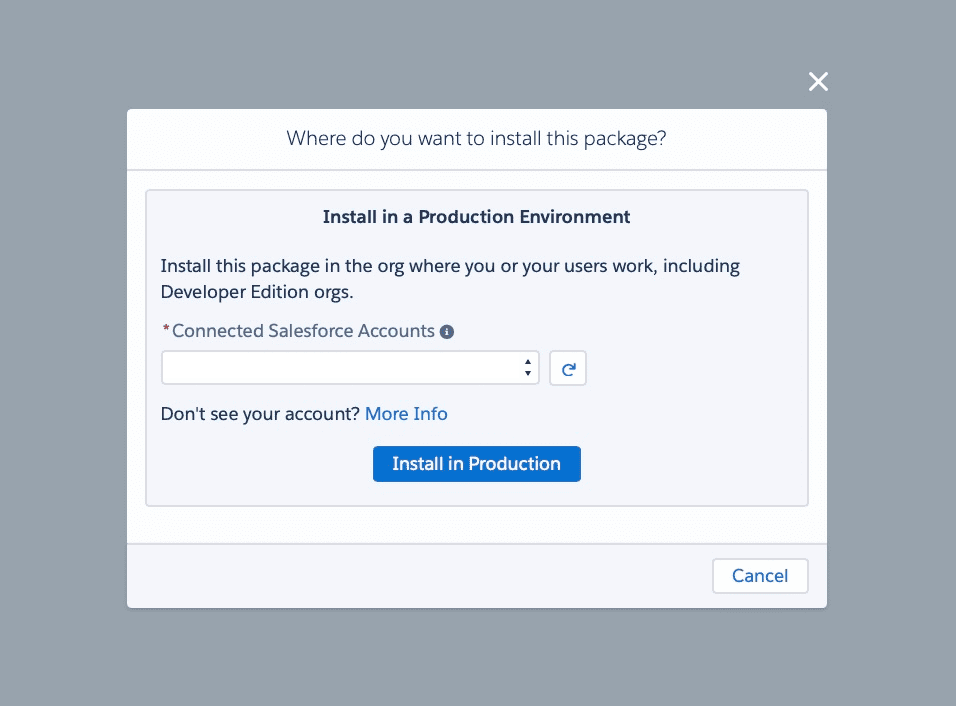
- Install the managed package and access CloudFiles. After installing the package from AppExchange, the administrator can open the CloudFiles application from the Salesforce App Launcher and start the initial setup.
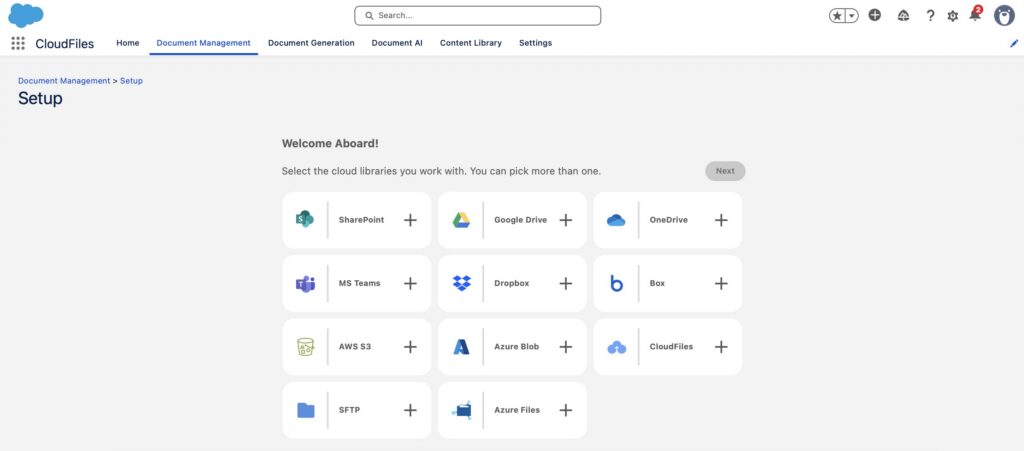
- Connect the external storage platform. CloudFiles supports Amazon S3, SharePoint, OneDrive, Google Drive, Azure Blob Storage, Box, and Dropbox. During setup, administrators connect the storage provider that will be used for document storage and configure the required authentication.
- Configure document organization and user access. Administrators can define folder structures, record-linking rules, document libraries, and permission settings to control how users access and manage files.
- Add CloudFiles to Salesforce pages and enable optional features. The final step is adding CloudFiles components to Lightning record pages, configuring optional capabilities such as Flow automation and metadata synchronization. Document Generation and Document AI ship in the same package and are licensed separately.
Key features
CloudFiles supports a wide range of document management capabilities:
- External file storage.
- Amazon S3, SharePoint, Google Drive, Azure Blob integration.
- Automatic folder creation.
- Record-linked document management.
- File previews inside Salesforce.
- File version control.
- Document sharing and collaboration.
- Custom Lightning widgets.
- Experience Cloud support.
- Salesforce Flow integration.
Best fit
For me, CloudFiles fits best when an organization wants more than simply moving files out of Salesforce storage.
The platform is particularly relevant for companies that need centralized document management across multiple storage systems, want to automate document-related processes, or expect their document requirements to grow over time. Organizations using Amazon S3 today but potentially adding SharePoint, OneDrive, or other repositories in the future may also benefit from the platform’s storage-agnostic approach.
Companies primarily looking for a complete document management strategy (including storage management, document generation, workflow automation, and AI-powered document processing), are likely to find CloudFiles more aligned with their long-term Salesforce roadmap than a solution focused exclusively on storage integration.
S3-Link Quick Overview: Focused Salesforce S3 Connector
Overview
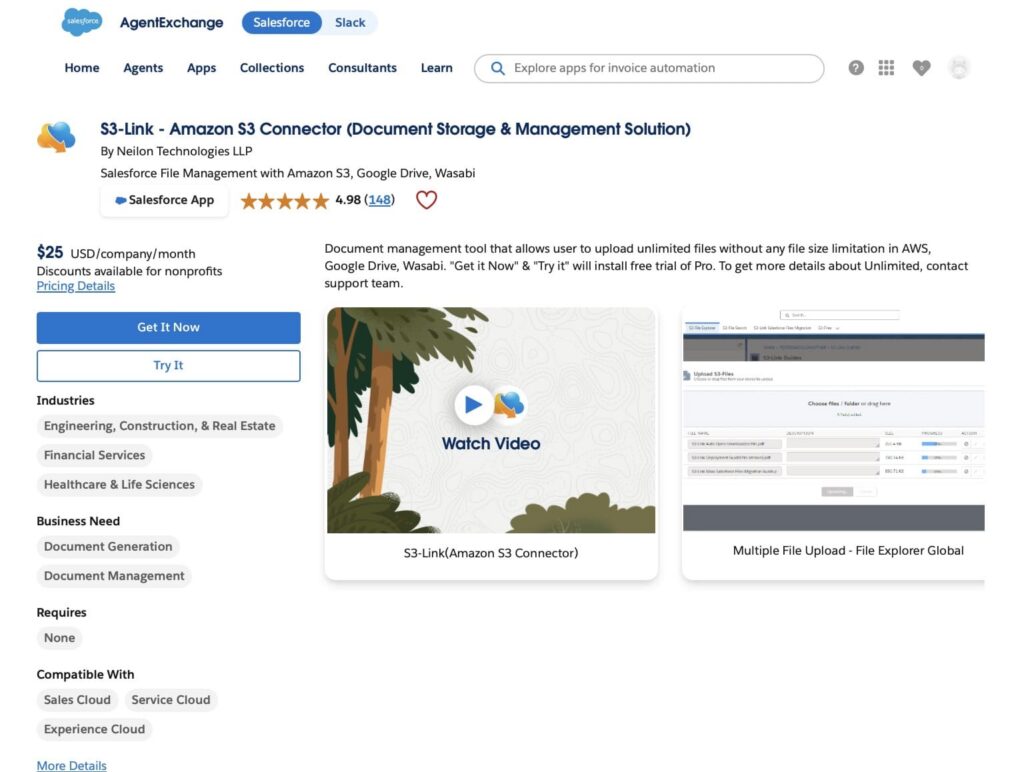
S3-Link by Neilon Technologies is designed for organizations that want to connect Salesforce with external cloud storage platforms, such as Salesforce to S3 Amazon, and manage files outside Salesforce storage limits.
The main purpose of S3-Link is to move Salesforce files outside the Salesforce platform while keeping them connected to Salesforce records. Instead of storing documents directly in Salesforce File Storage, organizations can use connected external storage repositories and manage files through Salesforce.
The solution is primarily focused on Salesforce Amazon S3 integration. Vendor materials also reference additional storage connections, including Wasabi, while other storage integrations require separate verification.
Setup and configuration
Getting S3-Link ready requires connecting Salesforce with an existing Amazon S3 environment and configuring how files will be managed:
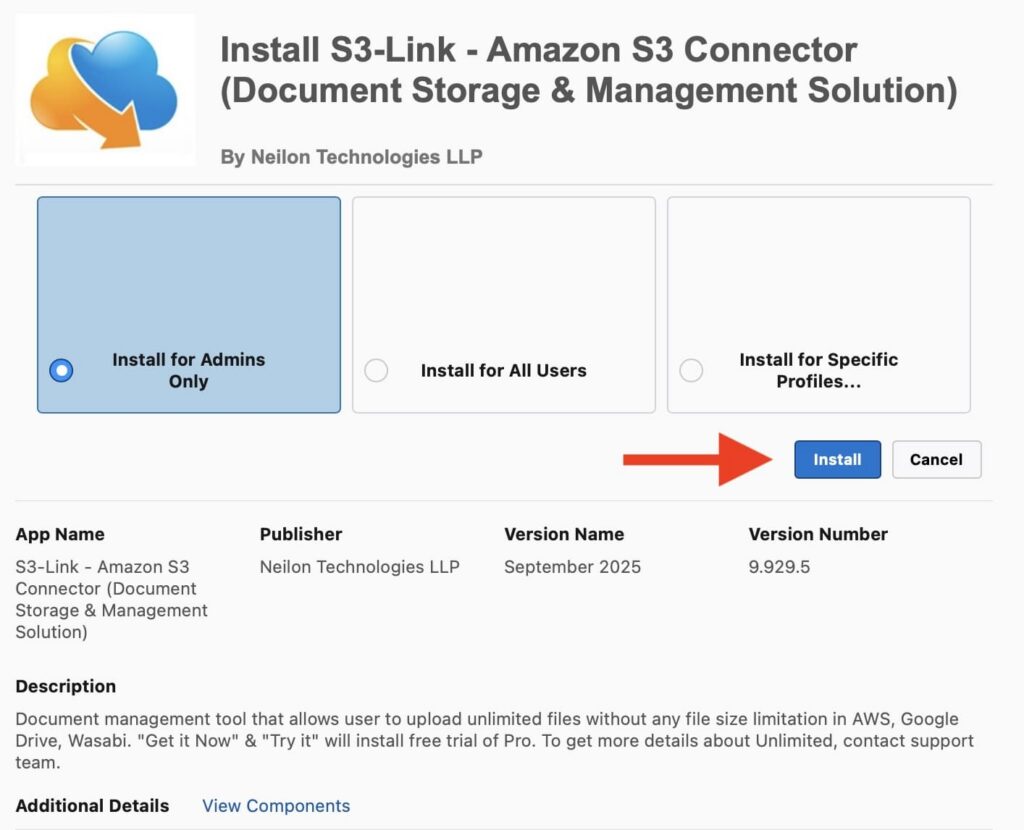
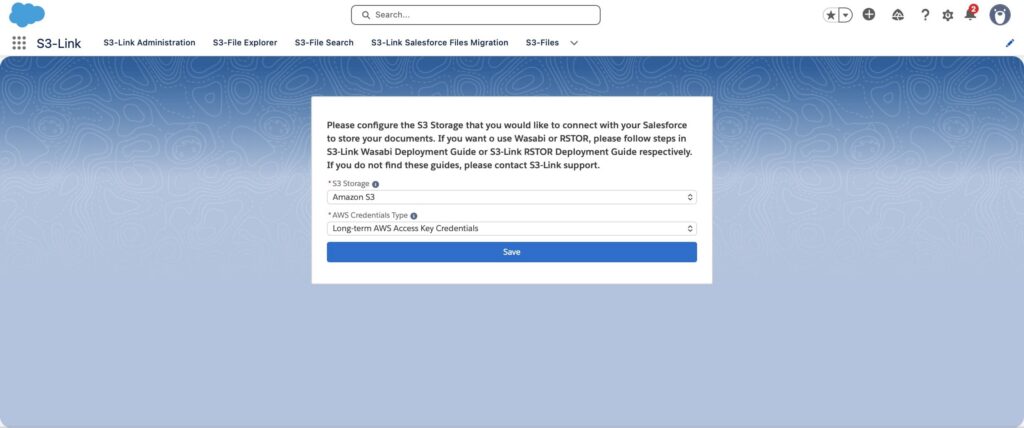
- After installing the managed package from AppExchange, you can open S3-Link from the Salesforce App Launcher, go to the Administration tab, and initialize the application configuration.
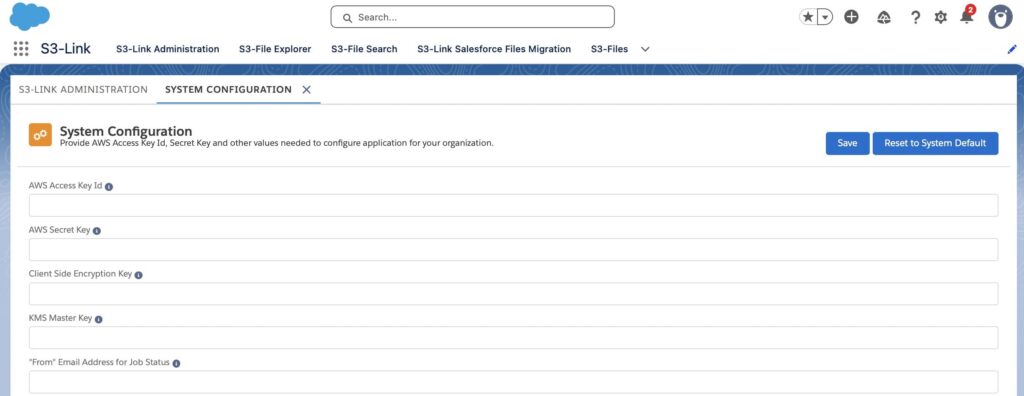
- Provide the required Amazon S3 credentials, including the AWS Access Key ID and AWS Secret Key, to allow Salesforce to connect with the AWS environment.
- Link existing Amazon S3 buckets or create new buckets directly from S3-Link. A default bucket can be selected where files attached to Salesforce records will be stored.
- The final step is assigning the required permission sets and granting access to Salesforce users who need to manage files through the application.
Key features
S3-Link focuses on Salesforce and Amazon S3 file management capabilities:
- Connect Salesforce with external storage platforms, including Amazon S3 and vendor-documented additional storage options.
- Move large volumes of Salesforce Files to external storage and reduce Salesforce storage consumption.
- Automate file movement based on schedules or defined conditions.
- Share download links and allow external uploads without Salesforce login.
- Support file editing, annotations, PDF merging, and integrations with document generation solutions.
Best fit
S3-Link is particularly suitable for companies already using Amazon S3 and looking for a Salesforce Amazon S3 connector that allows them to maintain their existing storage architecture instead of moving documents into a new repository.
Insight:
Did you know? Amazon S3 is one of the most widely adopted cloud storage platforms in the world, with a reported 85.92% market share in the object storage category and more than 1.2 million customers. This makes Amazon S3 one of the leading choices for organizations looking to store and manage large volumes of data outside their core business applications. Its popularity is one of the reasons Salesforce teams often consider Amazon S3 when looking for alternatives to native Salesforce file storage.
CloudFiles vs S3 Link Salesforce: Document Management Capabilities
Both Salesforce file storage solutions help organizations manage documents outside native Salesforce storage, but they address different business requirements and follow different approaches to external file management.
In this section, we compare the key capabilities of both solutions, including storage flexibility, document management, Salesforce integration, automation, file migration, and external sharing.
| Capability Comparison: CloudFiles vs S3-Link | ||
|---|---|---|
| Capability | CloudFiles | S3-Link |
| Primary Use Case | External document management solution that connects Salesforce with multiple storage platforms and keeps documents accessible from Salesforce records. | Salesforce file management and storage optimization solution that connects Salesforce with external storage platforms. |
| External Storage Platforms | Supports multiple repositories, including SharePoint, OneDrive, Google Drive, Amazon S3, Azure Blob Storage, Box, and Dropbox. | Supports Amazon S3, Google Drive, and Wasabi (as mentioned on AppExchange). |
| Storage Reduction Strategy | Moves Salesforce files to external repositories while maintaining Salesforce-based access, helping organizations reduce Salesforce storage consumption. | Designed to offload Salesforce Files, Attachments, Email Attachments, Reports, and Chatter files to external storage, helping organizations reduce Salesforce storage consumption. |
| Document Management Approach | Provides a Salesforce-native document workspace with file browsing, previews, uploads, organization, metadata synchronization, and lifecycle management. | Provides Salesforce-based management of files stored in connected external repositories, including upload, download, folder management, search, and file operations. |
| File Archiving & Retention | Supports automated file movement and document lifecycle processes through Salesforce automation tools. | Provides automated file archiving capabilities, including moving files to external storage based on defined conditions or schedules. |
| Automation Support | Supports Salesforce Flow, Apex, APIs, and automated folder creation based on Salesforce records. | Supports Flow, Apex, APIs, and automated file movement into the storage. |
| Large File Handling | Supports external storage access and file management across connected repositories. | Focused on unlimited file storage, no file size limits, large-volume uploads, and bulk file migration. |
| External File Sharing | Supports secure external sharing, customer/vendor access, branded portals, and Experience Cloud scenarios. | Provides secure upload/download links with expiration and password protection. |
| Document Collaboration | Supports document organization, metadata management, previews, engagement analytics, and collaboration workflows. | Supports file editing, annotation, PDF merging, and integration with document generation solutions. |
| Total Stars Achieved | ⭐⭐⭐⭐⭐ | ⭐⭐⭐⭐ |
While both platforms help reduce dependency on file storage Salesforce, CloudFiles focuses on providing a broader document management strategy across multiple storage platforms, and S3-Link specializes in Salesforce external file management and storage optimization through connections with external repositories, including Salesforce S3 integration and other supported platforms.
CloudFiles is designed for organizations that need flexibility across different repositories, advanced document organization, collaboration features, and deeper control over the document lifecycle. S3-Link is better suited for companies that want to reduce Salesforce storage consumption, connect Salesforce with external repositories such as Amazon S3, Google Drive, or Wasabi, and manage files directly from Salesforce.
Usability and Administration Comparison: CloudFiles vs S3 Link
Choosing a Salesforce document management solution is not only about technical capabilities. The long-term success of the solution also depends on how easy it is for administrators to configure, maintain, and adapt the system as business requirements change.
In this section, we will compare CloudFiles and S3-Link from an administration and usability perspective, including setup complexity, storage flexibility, user adoption, Salesforce record experience, and long-term scalability.
| Usability and Administration: CloudFiles vs S3-Link | ||
|---|---|---|
| Area | CloudFiles | S3-Link |
| Initial Setup | ✅ Moderate. Requires installing the package, connecting the selected external storage library, and configuring document management settings. | ✅ Moderate. Requires installing the package, initializing the application, configuring Amazon S3 settings, and assigning user access. |
| Multiple Storage Options | ✅ Strong. Supports multiple external storage providers, including SharePoint, Google Drive, OneDrive, Amazon S3, Azure Blob Storage, Box, and Dropbox. | ❌ Moderate. Supports Amazon S3, Google Drive, and Wasabi. |
| User Adoption | ✅ High. Users can manage, organize, and access documents directly from Salesforce through a document management interface. | ✅ High. Users can upload and access files from Salesforce records while files are stored externally. |
| Admin Flexibility | ✅ High. Administrators can configure different storage libraries and adapt the solution to different external repositories. | ⚠️ Limited compared with multi-storage solutions. The vendor claims support for additional storage platforms, including Google Drive and Wasabi; however, available documentation confirms configuration capabilities primarily for Amazon S3. |
| Record-Level Experience | ✅ Strong. Supports record-linked document access, folder organization, and document management from Salesforce. | ✅ Strong. Provides Salesforce access to files stored in connected external repositories. |
| Future Scalability | ✅ High. Suitable for organizations that may use different storage platforms as requirements change. | ⚠️ Best documented for Amazon S3 environments. Additional storage connections are referenced by the vendor but require further verification. |
| Total Stars Achieved | ⭐⭐⭐⭐⭐ | ⭐⭐⭐ |
CloudFiles provides more flexibility for organizations that need to support different storage strategies or expect their document management requirements to evolve. Its documented support for multiple external repositories gives administrators more options when designing a long-term document management approach.
S3-Link provides a focused approach for organizations that want to connect Salesforce with external storage and reduce Salesforce storage consumption. Salesforce AWS S3 integration is the primary integration documented by the vendor, while additional storage connections are referenced but have more limited publicly available configuration documentation.
Based on usability and administration, CloudFiles receives a higher score because of its broader range of verified storage integrations and document management capabilities.
Security and Governance: Which App Has You Covered?
Security is a critical consideration when moving Salesforce files outside the platform. Organizations need to understand not only where documents are stored, but also how access is controlled, how storage policies are managed, and whether the solution can support future business requirements.
In this section, we will compare CloudFiles and S3-Link based on Salesforce security integration, external storage security, governance flexibility, and the ability to support different enterprise storage strategies.
| Security and Governance: CloudFiles vs S3-Link | ||
|---|---|---|
| Area | CloudFiles | S3-Link |
| Salesforce Security Model | ✅ Yes. Uses Salesforce permission sets and granular document permissions. | ✅ Yes. S3-Link is a Salesforce native app and provides access control through Salesforce permissions and S3-Link configuration settings. |
| External Storage Security | ✅ Yes. Security is inherited from the connected storage provider and CloudFiles access controls. | ✅ Yes. Uses HTTPS/SSL for data transmission, AWS Signature Version 4 for request signing, client-side encryption (AES-128/AES-256), and server-side encryption (AES-256/KMS) for Amazon S3 storage. |
| File and Folder Permissions | ✅ Strong. Granular permissions for document actions and folder management. | ✅ Strong. Access control uses Salesforce permissions together with AWS access configuration, including AWS credentials and bucket policies. |
| Multi-Provider Governance | ✅ Yes. Supports multiple storage providers through a single Salesforce solution. | ⚠️ Governance documentation is primarily available for Amazon S3. Vendor documentation also confirms Wasabi support; other storage connections require separate verification. |
| Enterprise Compliance | ✅ Independently audited for SOC 2 Type II. Certified to ISO 27001. Compliant with HIPAA and GDPR. | S3-Link stores documents directly in the customer’s Amazon S3 environment. |
| Enterprise Storage Strategy | ✅ Flexible. Supports organizations using different storage providers across departments and regions. | ⚠️ Best documented for organizations using Amazon S3 as external storage. Vendor documentation also confirms Wasabi support. |
| Total Stars Achieved | ⭐⭐⭐⭐⭐ | ⭐⭐⭐ |
CloudFiles provides more flexibility from a governance perspective because organizations can choose between multiple documented storage providers and manage different storage strategies through one Salesforce solution.
S3-Link provides documented security controls for Salesforce access and Amazon S3 storage, including authentication and encryption capabilities. Amazon S3 is the primary documented storage integration, while additional storage connections referenced by the vendor require separate verification.
CloudFiles vs S3-Link: Licensing and Scalability Comparison
When evaluating document management solutions, subscription costs are only part of the equation. Organizations should also consider storage flexibility, vendor dependency, and how easily the solution can scale as business requirements evolve.
In this section, we compare CloudFiles and S3-Link based on licensing approach, storage strategy flexibility, and long-term scalability considerations.
| Licensing and Scalability Comparison: CloudFiles vs S3-Link | ||
|---|---|---|
| Area | CloudFiles | S3-Link |
| Pricing Model | Pricing is tailored to each organisation’s requirements. Contact CloudFiles for a quote. | Per-company pricing starting at $25/month, with Pro and Unlimited plans available. Per-user pricing is also available on request. |
| Free Trial | 14-day free trial. | 30-day free trial. |
| Storage Flexibility | Supports multiple storage providers, allowing organizations to choose or change storage platforms over time. | Designed primarily around Amazon S3 integration, with vendor-documented support for additional storage connections. |
| Vendor Lock-In Risk | Lower. Organizations can choose from multiple supported storage providers. | Higher compared with multi-provider solutions. Amazon S3 is the primary documented storage integration, which may provide less flexibility for organizations requiring a wider range of verified storage providers. |
| Long-Term Scalability | High. Suitable for organizations that may expand across different storage platforms and business requirements. | Moderate to High. Scales well within AWS environments. |
| Multi-Storage Strategy | Supported. | ⚠️ Limited. Amazon S3 is the primary documented storage integration. The vendor references additional storage connections, but broader multi-storage strategy capabilities require further verification. |
| Total Stars Achieved | ⭐⭐⭐⭐ | ⭐⭐⭐⭐ |
Both solutions offer pricing models that can work for different types of organizations, making direct cost comparisons difficult without considering company size, user count, and storage requirements.
The more significant difference lies in storage strategy and long-term flexibility. CloudFiles allows organizations to work with multiple documented storage providers and adapt their document management architecture as requirements evolve. S3-Link provides a focused external storage integration approach with Amazon S3 as its primary documented integration.
Wrapping Up: Finding the Right File Storage in Salesforce
Choosing the right Salesforce document management solution depends on more than reducing storage usage. Organizations need to evaluate their document strategy, security requirements, administration needs, and how the solution can support future business growth.
CloudFiles and S3-Link both help Salesforce teams manage files outside native Salesforce storage, but they address different business requirements. CloudFiles provides a broader document management experience, combining Salesforce-native access with external storage capabilities, document organization, automation options, metadata management, and secure file sharing. Its support for multiple storage platforms allows organizations to adapt their document strategy as requirements change, while it can also be used with a single repository when needed.
S3-Link focuses on Salesforce file storage optimization by connecting Salesforce with external storage platforms, with Amazon S3 as the primary documented integration. It is designed for organizations that need to move Salesforce Files and other Salesforce-managed content outside Salesforce storage while maintaining access through Salesforce and using external storage capabilities.
| Final Comparison: CloudFiles vs S3-Link | ||
|---|---|---|
| Section | CloudFiles | S3-Link |
| Document Management Capabilities | ⭐⭐⭐⭐⭐ | ⭐⭐⭐⭐ |
| Usability and Administration | ⭐⭐⭐⭐⭐ | ⭐⭐⭐ |
| Security and Governance | ⭐⭐⭐⭐⭐ | ⭐⭐⭐ |
| Licensing and Scalability | ⭐⭐⭐⭐ | ⭐⭐⭐⭐ |
| Total Stars Achieved | 19 ⭐ | 14 ⭐ |
The Winner: CloudFiles!
CloudFiles is the stronger choice for Salesforce organizations looking for a broader document management solution with flexibility in how documents are stored, organized, accessed, and governed. Its ability to support different storage strategies while providing advanced document management capabilities makes it a strong fit for organizations with evolving document requirements.
S3-Link is an option for organizations that want to connect Salesforce with external storage, with Amazon S3 as the primary documented integration. It is designed for companies that need to move Salesforce files outside Salesforce storage limits while maintaining access to those files from Salesforce.

Antonina is a Salesforce Admin with six certifications: Salesforce Certified Platform Foundations, Platform Administrator, Platform Administrator II, CPQ Administrator, AI Associate, and Agentforce Specialist. She started working with Salesforce in 2021 as Intern Salesforce Developer. Now, a 2-Star Ranger on Trailhead, she continues to expand her skills and knowledge. She helps manage Salesforce systems, automate tasks, and improve processes. Antonina loves learning new things and exploring better ways to use technology. In her free time, she enjoys reading, playing sports, and exploring new tech ideas.
 Previous Post