




QuickBooks Data Visibility Across Teams
What if financial information was available when you needed it, instead of after a series of messages, report requests, and follow-ups with other teams? The challenge is not the lack of financial data but the time it takes to access it. Teams often need quick answers to questions about invoices, payments, balances, or revenue before they can move work forward. However, that information is frequently stored in systems managed by other departments, making even simple requests dependent on messages, reports, and manual updates.
To illustrate this, consider an organization where financial information is managed in QuickBooks, while customer, sales, and operational activities are managed in Salesforce. Sales teams need payment visibility, operations teams rely on financial information to support day-to-day processes, and leadership teams depend on accurate revenue data for decision-making. As a result, finance teams often spend time answering requests and sharing information across departments.
Managing these requests through manual updates and recurring reporting tasks takes time, creates repetitive operational work across departments, and slows down access to financial information when teams need it most. As a result, organizations are looking for ways to give teams faster access to financial information while reducing the need for manual updates and recurring reporting.
Insight:
49% of CFOs say automating processes to free up employees for higher-value work is their top priority for finance talent.
Traditional Salesforce integration with QuickBooks helps connect systems and synchronize financial data between platforms, making QuickBooks data available within Salesforce. While integration remains an important part of sharing data between systems, teams still need to discuss customers, payments, invoices, and other finance-related questions during their daily work. Instead of searching for information and manually sharing it across messages, some organizations also use conversational financial intelligence platforms such as Kipper by Breadwinner to retrieve and discuss financial information more easily.
In this article, we will look at how businesses share QuickBooks finance information across different teams and operations, what challenges appear when finance visibility is limited, and how tools such as Kipper are helping teams retrieve and share financial information more easily during their daily work.
- Common Ways Businesses Share QuickBooks Data Across Teams
- Conversational Financial Intelligence for Salesforce and QuickBooks
- Step-by-Step Guide: Sharing QuickBooks Finance Data Across Salesforce Teams with Kipper
- What About Security and Finance Data Access?
- Best Practices for Sharing QuickBooks Finance Data Across Teams
- FAQs About Kipper and QuickBooks Finance Access
- 1. Can teams retrieve QuickBooks finance information without opening QuickBooks?
- 2. What type of QuickBooks information can teams access?
- 3. Does Kipper replace Salesforce dashboards and reports?
- 4. Can organizations control who sees financial information?
- 5. Can Kipper modify QuickBooks data?
- 6. Does conversational finance Intelligence replace QuickBooks and Salesforce integration?
- Final Thoughts on Salesforce Integration with QuickBooks
Common Ways Businesses Share QuickBooks Data Across Teams
Salesforce teams, finance departments, QuickBooks Teams, and other business users can access QuickBooks finance information in different ways during customer, sales, and operational activities. Some approaches rely on manual sharing, while others make the data easier to retrieve inside the tools teams already use every day.
| Comparing Common Approaches to Accessing QuickBooks Data | ||
|---|---|---|
| Approach | How Finance Data Is Shared | Main limitation |
| Manual finance requests | Sales or operations teams ask finance teams for invoice status, payment updates, balances, or customer finance details in Slack, Teams, email, or meetings | Finance teams spend time answering repeated questions manually |
| Shared reports and spreadsheets | Finance data is shared through exported spreadsheets, recurring reports, Salesforce dashboards, or BI tools | Teams may still rely on outdated reports, manually refreshed spreadsheets, or delayed finance updates |
| Internal finance notifications and updates | Finance teams proactively send payment updates, overdue invoice reminders, or customer balance information through Slack channels, email threads, or internal messages | Finance information can become fragmented across multiple conversations and difficult to track consistently |
| Salesforce QuickBooks Integration | QuickBooks data such as invoices, payments, balances, and customer information is synchronized with Salesforce, allowing teams to view financial information alongside customer records. | Teams may still need to manually look up and share financial information during work-related discussions. |
| Kipper conversational finance access | Teams retrieve accurate finance information from QuickBooks, directly inside internal team chats through natural language conversations with AI. This solution gives teams read-only, permission-based access to financial information, with audit tracking. | Requires structured visibility rules across departments and teams |
Among these approaches, Salesforce QuickBooks integration and AI-powered tools can work particularly well together. Integrations help make financial information available across systems, while AI-powered tools provide an additional way to interact with that information. This can be especially useful for organizations using a QuickBooks Slack integration or Microsoft Teams QuickBooks workflows. In the next section, we will take a closer look at the AI-powered approach and how it works in practice using QuickBooks together with Salesforce.
Conversational Financial Intelligence for Salesforce and QuickBooks
Kipper (formerly Breadwinner AI) is an AI-powered tool that allows users to retrieve financial information from systems such as QuickBooks, Xero, and Stripe directly within Slack and Microsoft Teams using natural language questions.
Instead of searching through reports, spreadsheets, or multiple records, users can ask questions directly in Slack or Microsoft Teams and receive answers based on data from connected financial systems.
Examples of information teams can retrieve include:
- invoice and payment status
- accounts receivable and outstanding balances
- customer payment history
- inventory levels and related financial information
- finance and revenue data across connected systems
Instead of searching for information and sharing it manually, users can ask questions in Slack or Microsoft Teams and receive answers based on data from connected financial systems. This allows teams to access financial information directly within their existing collaboration tools.
Step-by-Step Guide: Sharing QuickBooks Finance Data Across Salesforce Teams with Kipper
To better understand how conversational finance access works in practice, let’s walk through a simplified example using Kipper together with QuickBooks and Slack. The goal of this setup is to make QuickBooks finance information easier to access across sales, finance, operations, and customer teams working around Salesforce-related processes.
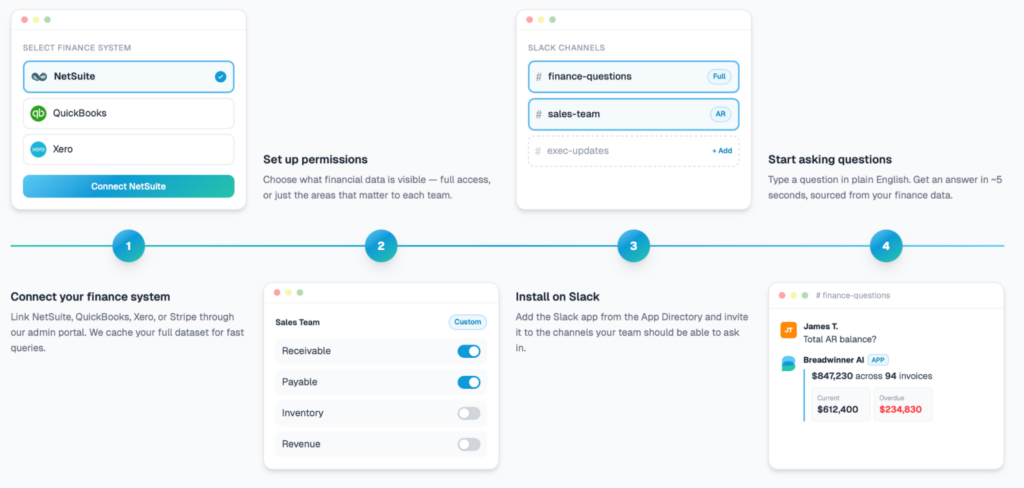
Step 1. Connect QuickBooks to Kipper
The first step is connecting the company’s QuickBooks account to Kipper through the admin setup portal. Kipper uses a secure, read-only connection to access finance data such as invoices, balances, payments, expenses, and customer information. The data is cached in a secure cloud database and kept updated through webhooks for fast access to current finance information.
Step 2. Configure Permissions and Financial Access
After QuickBooks is connected, administrators can configure which users or departments are allowed to access financial information. Access can be controlled through permissions, while query logs help organizations track how financial information is being accessed and used.
Step 3. Connect Slack or Microsoft Teams
The next step is connecting Slack or Microsoft Teams, depending on where teams communicate daily. Kipper supports both Slack QuickBooks integration and QuickBooks Teams integration, allowing users to access QuickBooks data directly inside channels, chats, or DMs without logging into QuickBooks or requesting exported reports from finance teams.
Step 4. Ask Questions About QuickBooks Data
Once setup is complete, users can ask finance questions in plain English directly inside Slack or Microsoft Teams.
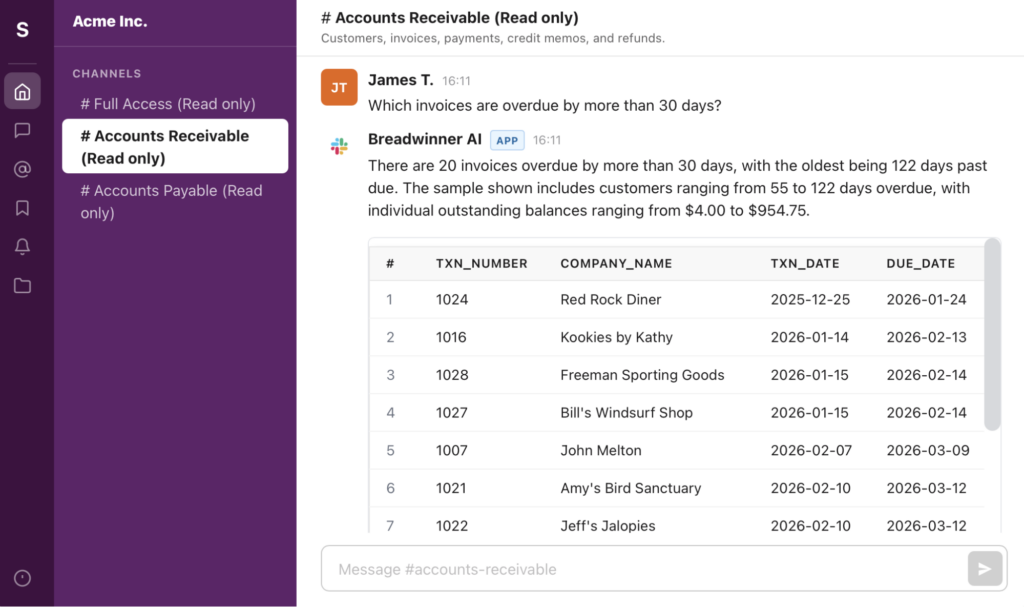
Kipper retrieves structured answers from QuickBooks data and returns them directly inside the conversation, helping support faster QuickBooks finance data communication during daily operational and customer activities.
Together, these steps show how financial information can be made easier to work with. However, making data more accessible should also go hand in hand with protecting sensitive information. We will take a closer look at these considerations in the next section.
What About Security and Finance Data Access?
Giving teams easier access to QuickBooks finance data naturally raises important questions around security, permissions, and governance. For many organizations, especially those working across Salesforce, finance systems, and collaboration platforms, choosing trusted and well-governed operational AI tools is becoming increasingly important.
IBM’s research found that 63% of organizations lacked AI governance policies to manage AI and reduce the risk of unapproved AI tools being used across the organization. This highlights the growing importance of using trusted, permission-based, and properly governed approaches when operational finance information becomes accessible across teams.
Unlike generic AI chat tools, Kipper is read-only, permissioned, and fully audited. Users can retrieve financial insights directly within their existing team conversations, but they cannot modify QuickBooks.
- Controlled Finance Visibility: Administrators can configure which users or departments are allowed to access specific financial information. This helps organizations share financial information with the right people without giving everyone full access to accounting data.
- Read-Only Access to Accounting Data: The platform uses read-only access for QuickBooks finance data. Teams can retrieve invoice, balance, payment, and customer finance information, while accounting records remain protected from direct modification.
- Governance and Audit Visibility: The platform is audited and permission-based, helping organizations maintain governance visibility when finance information is accessed through conversational requests inside Slack or Microsoft Teams.
- No Need for Direct QuickBooks Access: Users do not need direct QuickBooks logins to retrieve finance information. Instead of requesting exported reports or switching between systems, teams can access the information they need directly inside existing collaboration tools.
The specific controls and setup may vary from one organization to another. However, when financial information is shared across multiple systems and teams, it is important to choose an approach that aligns with the organization’s requirements, policies, and compliance obligations.
Best Practices for Sharing QuickBooks Finance Data Across Teams
1. Start With Limited Finance Access
When introducing QuickBooks finance visibility across Salesforce teams, it is usually better to start with limited access for specific departments or operational use cases first. This helps organizations validate which information teams actually need during daily work.
2. Make Sure Teams Know How to Use the Tool
Before expanding access, make sure teams understand how to retrieve financial information and use the tool correctly. Even a short training session can help prevent confusion and improve adoption.
3. Keep QuickBooks Data Focused on Operational Decisions
QuickBooks finance visibility works best when it supports real operational decisions inside Salesforce-related activities. Examples include verifying payment status before progressing deals, checking overdue balances during renewals, or confirming customer payment activity before processing requests.
4. Reduce Dependency on Manual Reporting
Teams should avoid relying entirely on exported spreadsheets or recurring finance updates once operational finance visibility becomes available. Keeping finance access inside existing collaboration tools helps reduce repetitive reporting work across departments.
5. Review Permissions as Finance Visibility Expands
As more Salesforce teams begin accessing QuickBooks finance information, organizations should continue reviewing permissions, visibility settings, and governance controls to make sure finance access remains appropriately managed.
FAQs About Kipper and QuickBooks Finance Access
1. Can teams retrieve QuickBooks finance information without opening QuickBooks?
Yes. Kipper is designed to make QuickBooks finance information accessible directly inside Slack or Microsoft Teams conversations. Teams can retrieve accurate finance information during daily Salesforce-related customer and operational activities.
2. What type of QuickBooks information can teams access?
Teams can retrieve information such as invoice status, payment activity, customer balances, overdue invoices, accounts receivable visibility, inventory visibility, and other operational finance information connected to QuickBooks data.
3. Does Kipper replace Salesforce dashboards and reports?
Not necessarily. Salesforce dashboards and reports are still useful for reporting and analysis. Kipper is designed to help users retrieve financial information quickly when they need it during team discussions in the familiar collaboration tools.
4. Can organizations control who sees financial information?
Yes. Organizations can configure permissions and control which users or departments are allowed to access specific QuickBooks finance information. Access can be managed through permissions, and user activity can be tracked for auditing purposes.
5. Can Kipper modify QuickBooks data?
No. The platform uses read-only access for QuickBooks finance data. Users can retrieve finance information, but they cannot modify QuickBooks accounting records.
6. Does conversational finance Intelligence replace QuickBooks and Salesforce integration?
No. Conversational finance access does not replace a QuickBooks Salesforce integration. It works alongside a Salesforce QuickBooks connector by helping approved users retrieve QuickBooks finance information during daily sales, customer, and operational work.
Final Thoughts on Salesforce Integration with QuickBooks
Salesforce QuickBooks integration helps make financial information available alongside customer and business data. However, teams often need quick answers to questions about invoices, payments, balances, and other financial information while discussing customers and ongoing work.
Kipper adds another way to access that information. For teams that rely on Slack, it can make the Slack to QuickBooks connection more practical by letting users retrieve QuickBooks data directly within team conversations.
For organizations that regularly share financial information across teams, this can help reduce manual requests, save time, and make information easier to use when it is needed.

Mykhailo is a Salesforce Certified Platform Administrator with development experience in the fintech field. Since 2021, he has gained the Double Star Ranger rank on the Salesforce Trailhead education platform, where he acquired 26 Superbadges in Business Administration, Process Automation, Security, and more. With a decade of expertise in consulting and compliance, he aspires to translate complex technical concepts into accessible content, helping organizations make the most of Salesforce. Mykhailo is passionate about using technology for everyday needs, enjoys reading sci-fi and non-fiction books, and playing video games. He also has an interest in history and outdoor activities such as hiking, camping, and kayaking.
 Previous Post
 Next Post