




4 Hours Lost to Manual Salesforce to Xero Billing
Time can disappear quickly when finance has to move information between Salesforce, spreadsheets, and Xero.
A technology company with recurring revenue accounts and more complex billing requirements needed to turn Salesforce forecasting data into accurate invoices in Xero, but the process depended on manual work. Finance extracted data from Salesforce, used Excel to review and adjust the figures, and then used the resulting information to create invoices in Xero. Several people had to coordinate the process, creating opportunities for errors and differences between forecasted and actual revenue.
The process took around 4 hours per week.
Insight:
Manual work still takes up a significant share of finance teams’ time. Research found that finance organizations spend 51% of their time on manual work, and 43% of finance leaders say this workload could limit their ability to scale over the next 12 months.
Finance also has to reconcile information across systems and work with sales and account management teams to make sure the numbers are correct before invoices are generated.
This type of manual process is not unusual. When Salesforce and Xero are used separately, finance teams can spend time exporting data, checking spreadsheets, entering invoices, and making sure information matches across systems.
So, how can finance teams reduce this work and save time? In this article, we will look at where that time is lost, what changes when Salesforce and Xero are connected, and how a Salesforce Xero integration can reduce manual work in the invoicing process.
- Where Finance Teams Lose Time Without Salesforce Xero Integration
- How Xero Salesforce Integration Solves the Problem
- Different Ways to Connect Salesforce and Xero
- How to Create Xero Invoices from Salesforce with Breadwinner
- What Changes for the Finance Workflow?
- Xero Integration with Salesforce: Frequently Asked Questions
- Conclusion: Reducing Manual Work Between Salesforce and Xero
Where Finance Teams Lose Time Without Salesforce Xero Integration
So, where is the time actually going?
Consider a typical process where the information needed for billing already exists in Salesforce. Instead of flowing directly into Xero, that information may need to be collected, exported, reviewed, and prepared before it can be used for invoicing.
A typical workflow can involve:
- Sales and customer information is updated in Salesforce. Changes to Accounts, Opportunities, Products, pricing, quantities, billing details, or customer agreements are recorded in the CRM.
- The information needed for invoicing is collected. The relevant Salesforce data is exported or provided to the team responsible for preparing invoices.
- The data is prepared outside Salesforce. Excel or another spreadsheet may be used to review, adjust, or organize the information.
- The numbers are confirmed. Sales, Account Management, or another team may need to verify changes to pricing, quantities, customer details, or other billing information.
- The final information is entered into Xero. The prepared data is manually transferred to create the invoice.
- Corrections create additional work. If something is missing or incorrect, the information has to be confirmed, changed, and entered again.
None of these steps is particularly complex on its own. The problem is the manual movement of the same information between Salesforce, spreadsheets, teams, and Xero.
Insight:
Manual processes also create a risk of errors. Research into finance functions found that 75% experience material accounting errors every month, highlighting the importance of data accuracy in finance operations.
The more invoices and transactions a finance team processes, the more time these individual steps consume. The work is not limited to entering invoice data. It also includes exporting records, preparing spreadsheets, confirming information, correcting errors, and checking that the final invoice contains the right details.
This is the hidden workload created when the two systems are disconnected. Finance becomes responsible for manually carrying information from the CRM into the accounting process.
In the next section, we will look at how a Salesforce to Xero integration changes this workflow by connecting the two systems directly and reducing the manual steps between Salesforce data and Xero invoices.
How Xero Salesforce Integration Solves the Problem
The main change is that Salesforce and Xero no longer have to rely on people to move information between them.
When the information required for an invoice is already available in Salesforce, an integration can use that data to populate the relevant information in Xero instead of requiring someone to export it, prepare it in Excel, and enter it again manually.
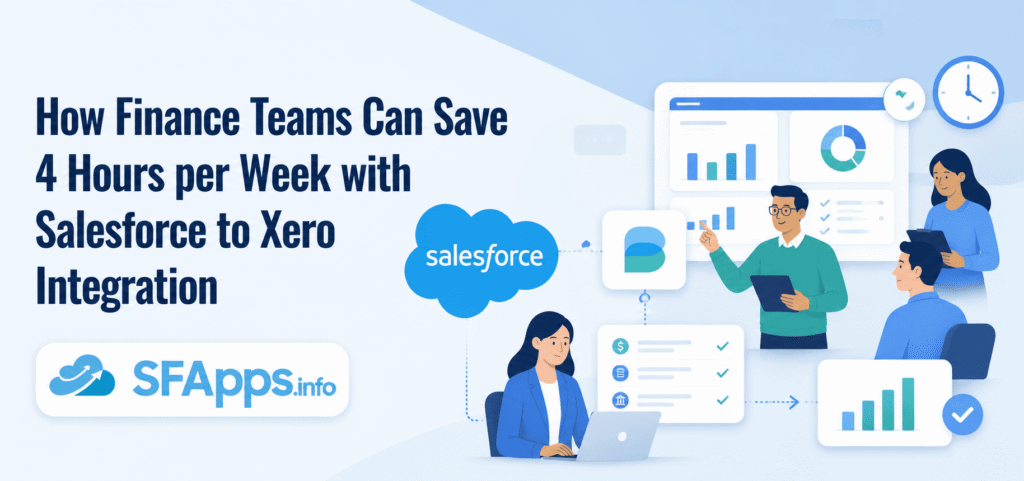
For example, the workflow can look like:
Opportunity → invoice data → Xero Invoice
An Opportunity can contain products or services, quantities, prices, and other information required for billing. An integration can use those values to populate a Xero invoice, reducing the need to rebuild the invoice manually in Xero. Depending on the integration and configuration, invoice creation can be initiated from Salesforce or automated as part of a Salesforce process.
The customer relationship can also be maintained between the two systems:
Salesforce Account → Xero Contact
This connects the Salesforce customer record with the appropriate Xero customer. The relationship does not have to be one-to-one. A Salesforce Account can be associated with multiple Xero Contacts, which can be useful when a customer has different billing entities, departments, or branches.
The practical difference is the number of manual steps involved. Instead of taking Salesforce data out of the CRM, preparing it separately, and then re-entering the same information in Xero, the integration can carry the relevant Salesforce data into the invoicing workflow.
For example:
Customer + products + quantities + prices + billing details → Xero invoice
Once the required Salesforce information is ready, it can be used to populate the invoice without manually copying each field into Xero. The exact level of automation depends on the connector and how the Salesforce workflow is configured.
This is where the time saving comes from. The integration does not remove the invoicing process itself. It removes repetitive work around the invoice, such as exporting data, copying fields, preparing spreadsheets, and re-entering information.
The key change is that the finance process still exists, but fewer people have to act as the connection between Salesforce and Xero.
So, how do you actually connect Salesforce and Xero? Next, we will look at what is involved in setting up the integration and how the data can move between the two systems.
Different Ways to Connect Salesforce and Xero
Once a company decides to connect Salesforce and Xero, there are several ways to implement the integration. The right approach depends on the complexity of the workflow, the number of systems involved, and how much control the technical team needs.
Build a Custom Integration
A development team can build the connection using the Xero API and Salesforce technologies such as Apex and Flow.
This gives the company control over the integration architecture, data mapping, business logic, and user experience. It can be a good option when the integration has requirements that cannot be handled by an existing solution.
But the development work does not end when Salesforce successfully sends a record to Xero. The team also needs to handle authentication, API limits, data mapping, error handling, retries, logging, changes to the Xero API, and ongoing maintenance.
For a straightforward Salesforce-to-Xero requirement, building all of this internally may mean taking on development and maintenance work that the business does not actually need to manage itself.
Use Middleware or an iPaaS Platform
Another option is to place a middleware or integration platform between Salesforce and Xero.
This approach becomes useful when Salesforce and Xero are only two parts of a larger integration architecture. For example, a company may need to connect Salesforce with Xero, an ERP, a data warehouse, an e-commerce platform, and several other applications. An iPaaS can provide a central place to manage those integrations.
The trade-off is that the company introduces another platform into the architecture. That means another system to configure, monitor, secure, and maintain, as well as another layer between Salesforce and Xero.
Use a Native Salesforce Connector
For companies whose main requirement is to connect Salesforce with Xero, there is another approach: use a purpose-built Salesforce application.
This keeps the integration close to the Salesforce environment rather than requiring the company to build the connection itself or introduce a separate middleware platform.
A native Salesforce application can work with Salesforce objects, fields, permissions, automation, and other platform capabilities. That can make it easier to build the integration into existing Salesforce processes.
This is also where Salesforce AppExchange, now part of the AgentExchange, becomes relevant.
Rather than searching the wider market for an integration and then determining whether it fits the Salesforce architecture, Salesforce teams can evaluate applications built specifically for the platform. The comparison should still be technical: the fact that an application is listed on AppExchange does not by itself make it the right choice.
The important questions are:
- Which Salesforce objects can be used to create Xero invoices?
- Which Xero records can be brought into Salesforce?
- Can the integration support the required data mappings?
- Can it work with Salesforce Flow or other automation?
- How does it handle Xero Contacts and Salesforce Accounts?
- Does it support one or multiple Xero organizations?
- What happens when a synchronization fails?
- Can users see and resolve integration errors?
- What permissions and security controls are available?
- How much Apex or other custom development is still required?
For a company whose main requirement is to connect both systems, a native Salesforce Xero connector can therefore be a practical middle ground: less development and infrastructure to maintain than a custom integration, while avoiding the additional integration layer of an iPaaS when there is no need for one.
With these requirements in mind, we checked the native Salesforce options available on AppExchange.
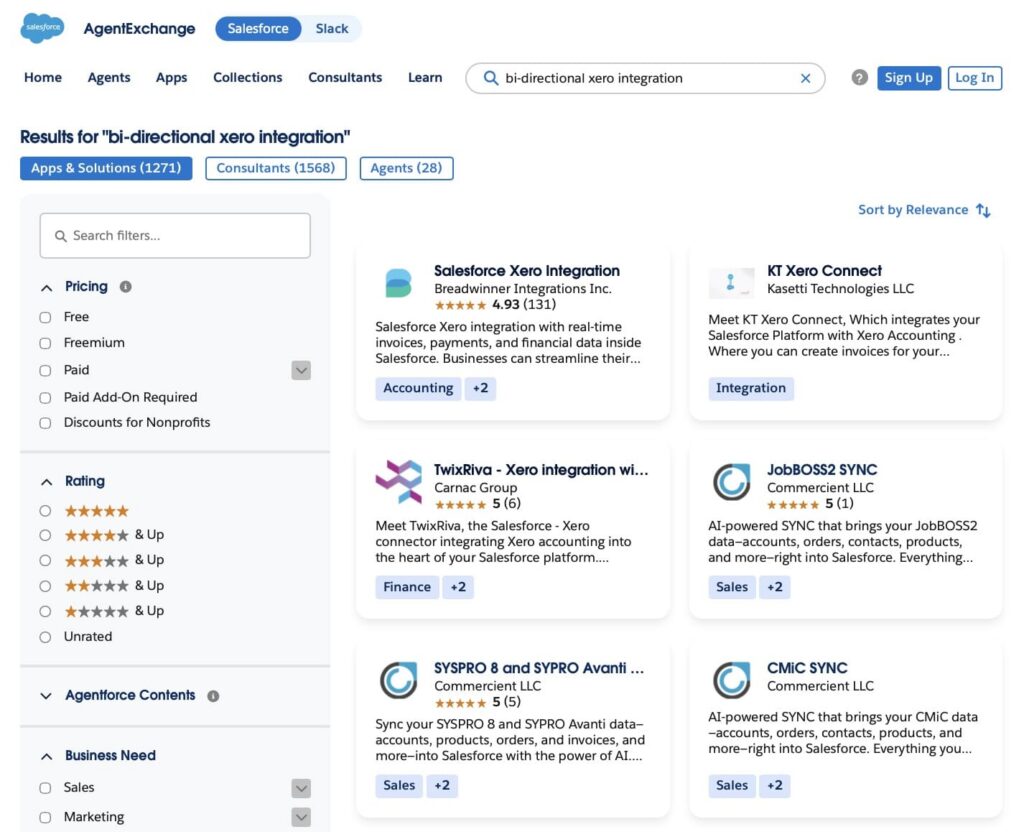
Breadwinner stood out as a close match for this use case. Its capabilities address the finance workflows we were looking for, including creating Xero invoices from Salesforce data, working with Xero Contacts, and bringing invoice and payment information into Salesforce.
The next step is to look at how Breadwinner connects Salesforce and Xero and how that connection works in practice.
How to Create Xero Invoices from Salesforce with Breadwinner
Breadwinner is a native Salesforce application built specifically to connect Salesforce and Xero. It brings Xero financial data into Salesforce while also allowing Salesforce data to be used in Xero workflows, so teams can work with the information they need without manually moving it between the two systems.
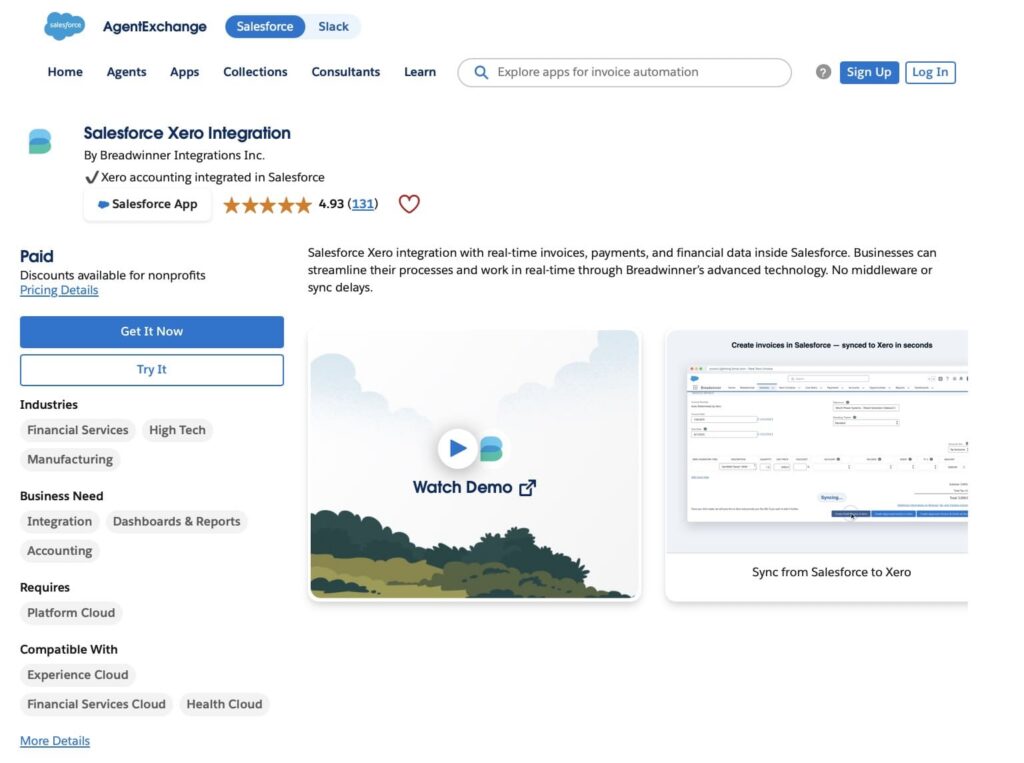
The connection works in both directions. Xero contacts, invoices, payments, and other supported records can be synchronized into Salesforce, while Salesforce data can be used to create and manage Xero transactions.
1. Install Breadwinner in Salesforce.
The first step is to install Breadwinner in the Salesforce org.
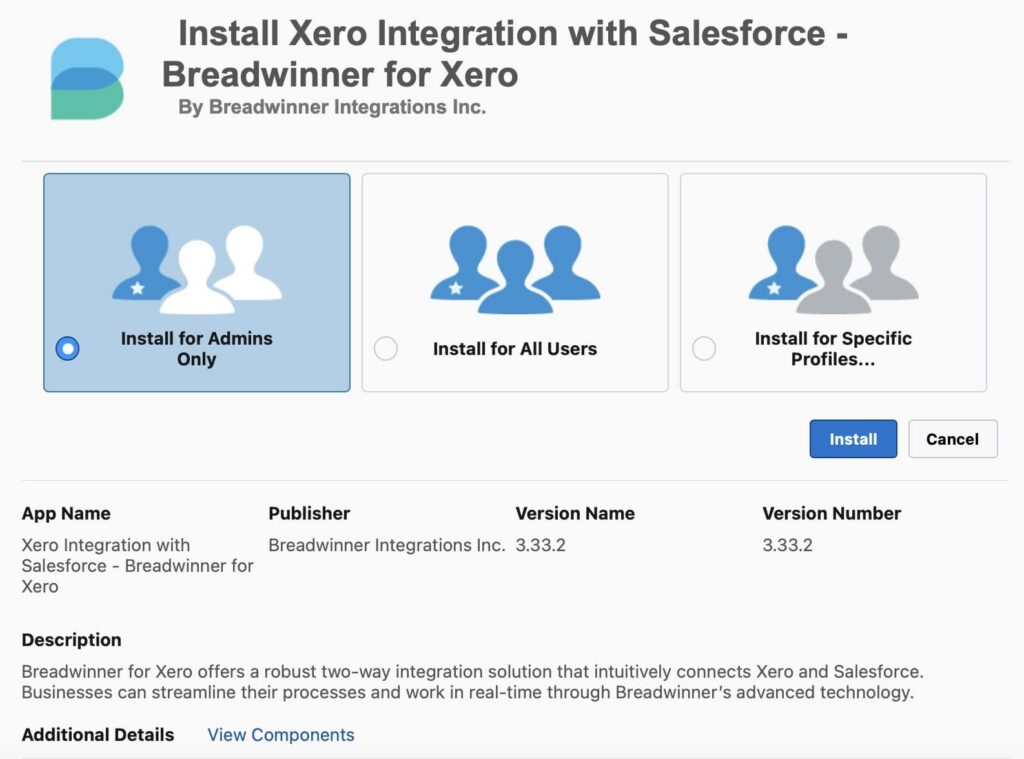
Once installed, the Salesforce administrator can access the Breadwinner configuration and begin setting up the connection to Xero.
2. Connect Salesforce to Xero.
Establish the connection between the Salesforce org and Xero. The Xero organization is authorized through the app, allowing the integration to communicate with Xero and exchange supported data.
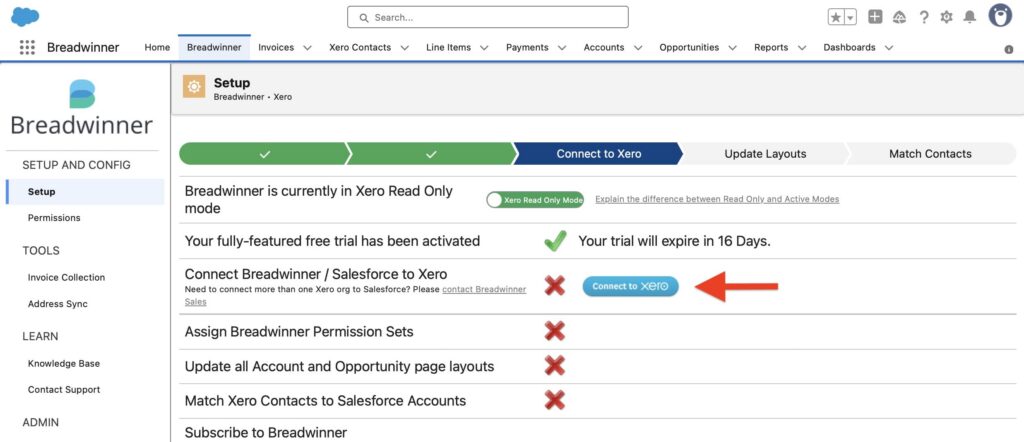
If a company uses more than one Xero organization, additional Xero organizations can be connected to the same Salesforce org with their own configuration.
3. Configure the integration.
Continue with the Breadwinner configuration by following the setup steps to assign the required permissions and match Xero Contacts to Salesforce Accounts.
The configuration determines how Salesforce and Xero records relate to each other and which users can work with the synchronized data. Once the Xero Contacts are matched to the relevant Salesforce Accounts, the integration can associate Xero financial records with the correct customer records in Salesforce.
4. Create Xero Invoices from Salesforce.
Once the Salesforce and Xero customer relationship is in place, Salesforce data can be used to create invoices in Xero.
For example:
Opportunity → Xero Invoice
The Opportunity and its related products can provide information used to prepopulate the invoice, including line-item data and other invoice fields, depending on the configuration and edition. Breadwinner’s invoice workflow can use this data to prepopulate the Xero invoice rather than requiring users to enter the same information again. Breadwinner supports invoice creation from Opportunities, Accounts, or custom objects.
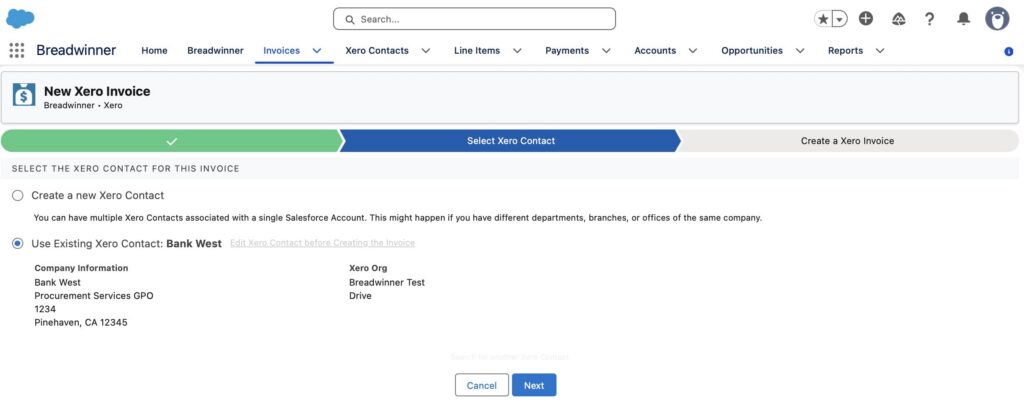
This is where the integration directly addresses the manual process described earlier. The information does not need to be exported to Excel simply to be prepared for entry into Xero.
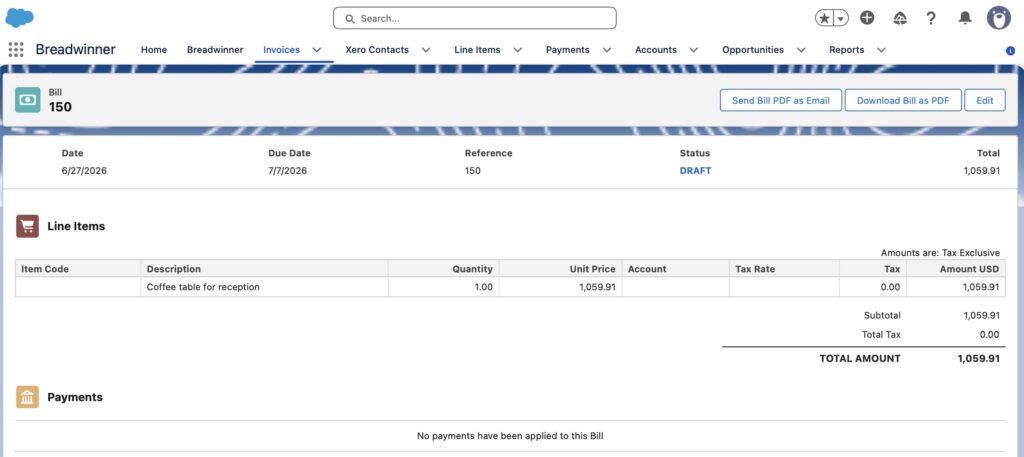
5. Bring Xero Invoices and Payments into Salesforce.
The connection also works in the other direction.
Xero invoices can be replicated into Salesforce, with invoice status and amounts available on Salesforce Account and Opportunity records. This allows users working in Salesforce to see relevant billing information without having to look up the invoice separately in Xero.
Payment records can also be synchronized into Salesforce with the appropriate Breadwinner plan. This gives teams access to payment information alongside the customer and sales data already available in the CRM.
For example, a Salesforce user can see that an invoice is outstanding or paid while working with the customer’s Salesforce record, rather than having to request that information from another team.
6. Use Xero data in Salesforce automation.
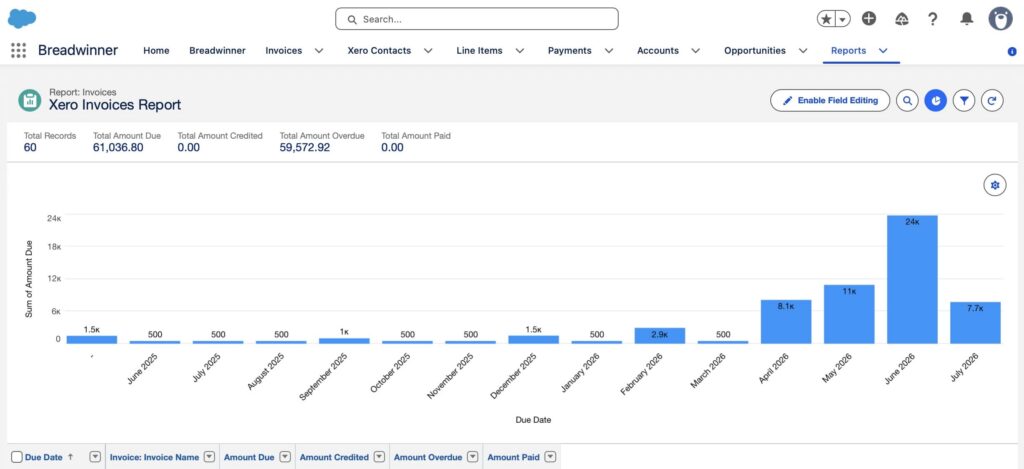
The synchronized Xero data is available as Salesforce data, which means it can be used with standard Salesforce reports, dashboards, Flows, and other automation.
This is important because the integration does not have to operate as a separate screen that users visit only when they need accounting information. Xero data can become part of existing Salesforce processes.
7. Connect multiple Xero organizations.
For companies working with more than one Xero organization, Breadwinner can connect multiple Xero organizations to a single Salesforce org. Each connected organization can have its own mappings, permissions, sync settings, and currency configuration. This capability is available as an add-on to the Pro and Business plans.
This can be useful when different countries, subsidiaries, or legal entities maintain separate Xero organizations while Salesforce remains the central CRM.
What Changes for the Finance Workflow?
So, what does this change look like in practice? Let’s compare the workflow before and after connecting Salesforce and Xero with Breadwinner. The table below shows where manual work is removed and where financial information becomes available directly in Salesforce.
| Salesforce to Xero Workflow: Before and After Integration | |
|---|---|
| Before Integration | With Breadwinner |
| Salesforce data is exported for invoicing | Relevant Salesforce data can be used in the Xero invoicing workflow |
| Finance prepares or adjusts the data in Excel | Invoice information can be populated from Salesforce records |
| Invoice details are entered manually into Xero | Xero invoices can be created from Salesforce |
| Finance checks invoice information against Salesforce data | Relevant Xero invoice information is available in Salesforce |
| Payment information is checked separately in Xero | Supported Xero payment data can be synchronized into Salesforce |
| Corrections require additional manual data entry | Salesforce and Xero data can be synchronized through the integration |
| Excel and manual work connect the two systems | Breadwinner connects the Salesforce and Xero workflows |
The result is a simpler process. Information that is already available in Salesforce can be used in Xero without going through a spreadsheet first, while relevant invoice and payment information from Xero can be brought back into Salesforce. This gives finance and other teams a shared view of the customer and financial data they need, without requiring them to manually move the information between systems.
Xero Integration with Salesforce: Frequently Asked Questions
Before making Salesforce integration with Xero, finance and Salesforce teams usually have questions about what can be connected, how invoices are created, whether custom development is required, and how much manual work can actually be removed. Here are the most common questions to consider.
1. How can Salesforce integrate with Xero?
Salesforce can be connected to Xero through the Xero API, custom Apex development, middleware or an integration app available on AppExchange. A native Salesforce connector can handle much of the connection and synchronization work without requiring a company to build and maintain the integration from scratch.
2. What data can be synchronized between Salesforce and Xero?
The available data depends on the integration and its configuration. With Breadwinner, supported Xero data includes Contacts, invoices, payments, credit notes, Items, and Products. The integration also supports field mappings so Salesforce data can be matched to the relevant Xero fields.
3. Can Salesforce users create Xero invoices?
Yes. A Salesforce-to-Xero integration can allow users to create Xero invoices from Salesforce. With Breadwinner, invoice information can be populated from Salesforce records, including line items and relevant accounting fields, depending on the workflow and configuration.
4. Can finance teams see Xero payments in Salesforce?
Yes. Xero payment records can be synchronized into Salesforce, allowing users to access payment information alongside Salesforce customer and sales data. This capability depends on the integration and plan being used.
5. Does a Salesforce to Xero integration require custom code?
Not necessarily. A native connector can provide the core connection without requiring the company to develop the integration itself. Custom Apex or API development may still be useful when the business has a specific workflow that goes beyond the connector’s standard capabilities. Breadwinner provides Apex and API capabilities for these types of extensions.
6. How can you connect Xero to Slack without Salesforce?
You can connect Xero to Slack directly without using Salesforce. A dedicated integration can connect to Xero and make selected financial data available in Slack, allowing users to access information such as invoices, payments, balances, and bills without switching between systems.
7. How much time can a Salesforce-to-Xero integration save?
There is no standard number of hours. The potential saving depends on how the current billing process works, how many transactions the team handles, how much data is entered manually, and how often the process is repeated.
The best way to estimate the potential saving is to measure the current process: how long it takes to export Salesforce data, prepare it, enter it into Xero, correct errors, and reconcile the information. The more manual steps an integration removes, the greater the potential time saving.
Conclusion: Reducing Manual Work Between Salesforce and Xero
The technology company from our opening scenario used an integration to connect Salesforce to Xero, allowing revenue schedules and forecasts to flow into Xero as invoices without manual extraction, spreadsheets, or duplicate data entry. This changed the billing process from a manual handoff between systems to a connected workflow.
The result was around 4 hours of finance time recovered every week, while the team also gained a more consistent process for moving from forecasting to billing.
The exact saving will vary by company, but the principle is simple: when billing data already exists in Salesforce, connecting Salesforce and Xero can remove repetitive manual work and leave finance teams with more time for work that requires their attention.
If your finance team is still moving billing data between Salesforce and Xero manually, Breadwinner is worth evaluating to see how much time the integration could save in your own workflow.

Antonina is a Salesforce Admin with six certifications: Salesforce Certified Platform Foundations, Platform Administrator, Platform Administrator II, CPQ Administrator, AI Associate, and Agentforce Specialist. She started working with Salesforce in 2021 as Intern Salesforce Developer. Now, a 2-Star Ranger on Trailhead, she continues to expand her skills and knowledge. She helps manage Salesforce systems, automate tasks, and improve processes. Antonina loves learning new things and exploring better ways to use technology. In her free time, she enjoys reading, playing sports, and exploring new tech ideas.
 Previous Post
 Next Post