


When Salesforce Quoting Requires More Than Standard Features
Salesforce already provides native quoting capabilities through Opportunities, Products, Price Books, and Quotes. These features allow sales teams to manage products, build quotes, and track deals without leaving Salesforce. For some organizations with straightforward sales processes, the standard functionality might be enough.
Challenges typically appear when products, pricing models, and approval requirements become more complex. A sales team may need to sell configurable products, apply volume-based discounts, manage subscriptions, bundle multiple products together, or follow approval processes based on margins and pricing exceptions. Handling these scenarios manually can increase administration effort and make quoting slower.
Insight:
Did you know that failed adoption rates for legacy CPQ solutions have been reported as high as 67%? This highlights why choosing the right CPQ approach is critical, as technology alone does not guarantee successful user adoption.
While Salesforce provides the foundation for managing products and pricing, advanced quoting processes often require additional functionality. This may include guided product selection, automated pricing rules, discount controls, approval workflows, quote document generation, and support for more complex sales models.
This is where CPQ tools for Salesforce come into the picture. They extend Salesforce quoting capabilities by helping sales teams configure products, calculate pricing automatically, apply business rules consistently, and generate accurate quotes with fewer manual steps.
When organizations start looking for ways to improve their quoting process in Salesforce, AppExchange (now AgentExchange) is often one of the first places they search. The marketplace includes a wide range of quoting and CPQ solutions, from lightweight quote generation tools to enterprise platforms designed for complex product configuration and pricing management.
While reviewing AppExchange for Salesforce configure, price and quote solutions, the focus was on tools that help sales teams create quotes more efficiently while staying inside Salesforce. We also looked for solutions that support product management, pricing control, quote generation, and sales process automation.
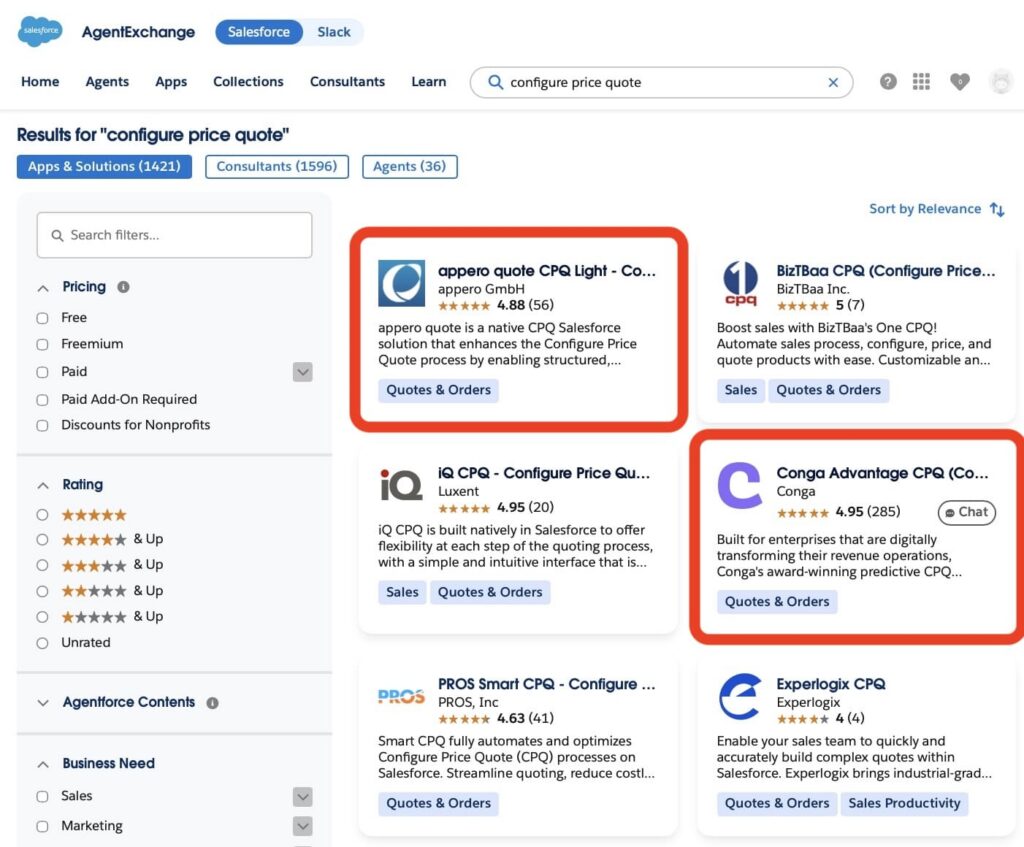
appero quote and Conga CPQ stood out because both aim to improve the quote creation process, but they approach the challenge differently. appero quote focuses on simplifying quote generation and helping sales teams move faster, while Conga CPQ provides a broader configure-price-quote framework designed for organizations with more complex product catalogs, pricing structures, and approval requirements.
To compare them fairly, we will evaluate both solutions across four practical areas: features, pricing, setup and user experience, and overall fit for different business requirements. Each section will include a side-by-side comparison and a star rating. At the end of the article, we will combine the results to identify which solution delivers the strongest overall value for Salesforce teams.
Let the comparison begin.
- appero quote: Flexible Salesforce Quoting Solution
- Conga Salesforce CPQ: The Enterprise CPQ Platform
- Feature-by-Feature Comparison: appero quote vs Salesforce CPQ Conga
- Setup and User Experience Comparison
- Pricing Comparison: appero quote vs Conga for Salesforce CPQ
- Key Considerations When Choosing a Salesforce CPQ Tool
- Final Results: Which CPQ Tool Comes Out on Top?
appero quote: Flexible Salesforce Quoting Solution
appero quote is a Salesforce-native CPQ solution that helps users create quotes directly from Opportunities in Salesforce. The application is positioned as a CPQ Light solution and focuses on quote creation, price calculation, product configuration, and quote document generation within the Salesforce platform.
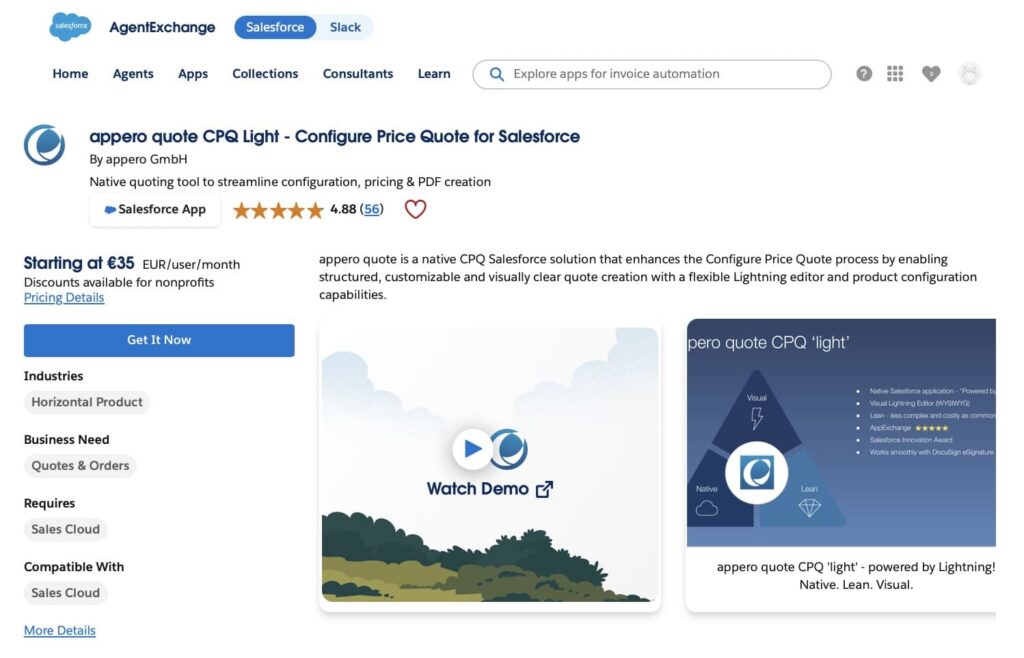
Key features include:
- Product configuration: Users can organize products through Product Groups and configure quotes using AddOns and static Bundles. Product properties can be used either to influence pricing or provide additional product information.
- Price calculation: appero quote supports tiered pricing, automatic and manual discounts based on configured pricing rules, markups/surcharges, price dependencies, lower price limits, approval processes, and multi-level sales structures.
- Quote document builder: The app provides a Template Wizard that allows users to create and customize quote documents using templates, mergefields, and reusable content blocks. Quotes can include product images, descriptions, product groups, totals and subtotals, and company-specific layouts and branding.
- Native Salesforce application: The solution is built on Salesforce Lightning and keeps quote-related data within the Salesforce platform.
- Quote-to-cash support: appero quote can be combined with DocuSign for electronic signatures and JustOn for invoicing as part of a broader quote-to-cash process. Customers can also use other preferred solutions depending on their business requirements.
Why teams choose appero quote:
Based on the vendor’s positioning, appero quote is designed for organizations that need more flexibility and advanced quoting capabilities than standard Salesforce Quotes while avoiding the complexity of larger enterprise CPQ platforms. The solution focuses on quote creation, pricing calculations, and document generation directly within Salesforce.
Setup and First Quote Creation
The first steps with a Salesforce CPQ solution often show how easily administrators can configure the system and how quickly sales teams can start creating quotes. For companies comparing CPQ tools, setup effort and the connection between configuration and daily quoting activities can influence the overall user experience.
1. appero quote setup in Salesforce.
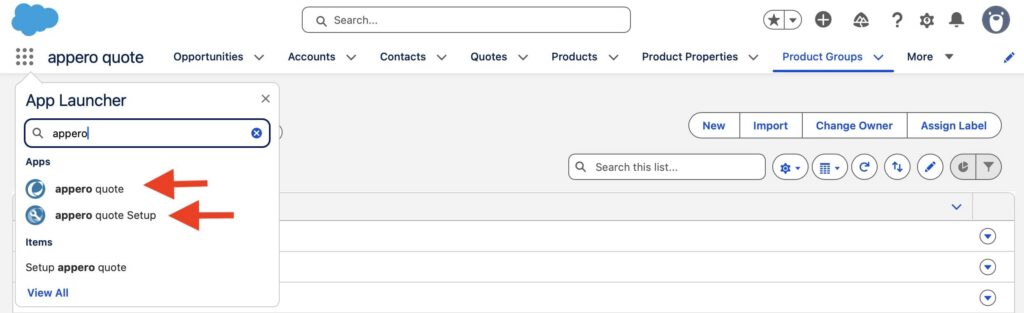
appero quote is installed directly inside Salesforce and provides two applications: appero quote Setup for administrators and appero quote for daily quote management.
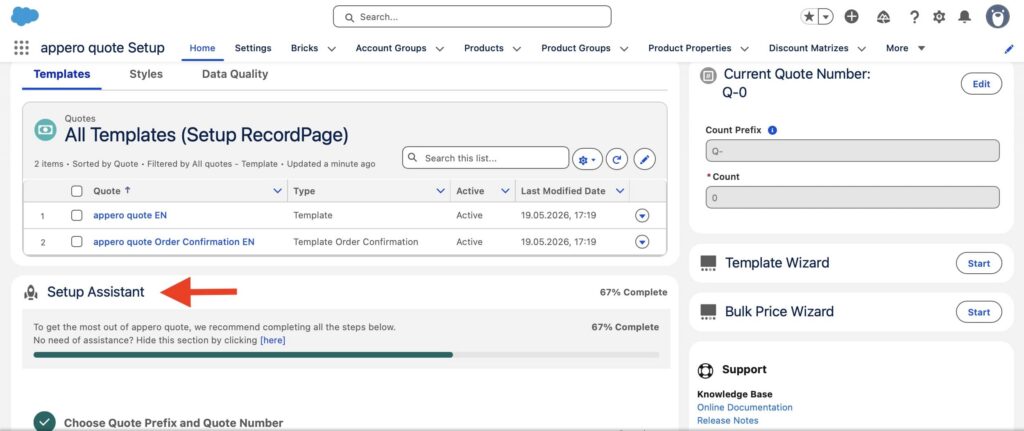
The setup, as described in the appero review, guides administrators through the initial configuration using the Setup Assistant. Instead of managing different settings separately, admins can follow a structured process to configure the main elements required for quoting, including quote numbering, Product Groups, quote templates, Opportunity integration, and user access.
Once the initial setup is completed, users can work with quotes directly from Salesforce records. The application integrates with Salesforce objects such as Opportunities, Products, and Price Books, keeping the quoting process connected to existing CRM data.
2. Creating Quotes with appero quote.
Quote creation takes place directly in the quote editor, where users can configure products, adjust quantities, and see real-time calculations for line items and totals. The same interface allows users to customize the document by editing texts, images, and other content elements before generating the final quote.
The quote editor supports product groups, bundle structures, grouped calculations, graduated pricing, discounts, surcharges, and price dependencies. This allows sales teams to create quotes while applying the pricing logic configured by administrators.
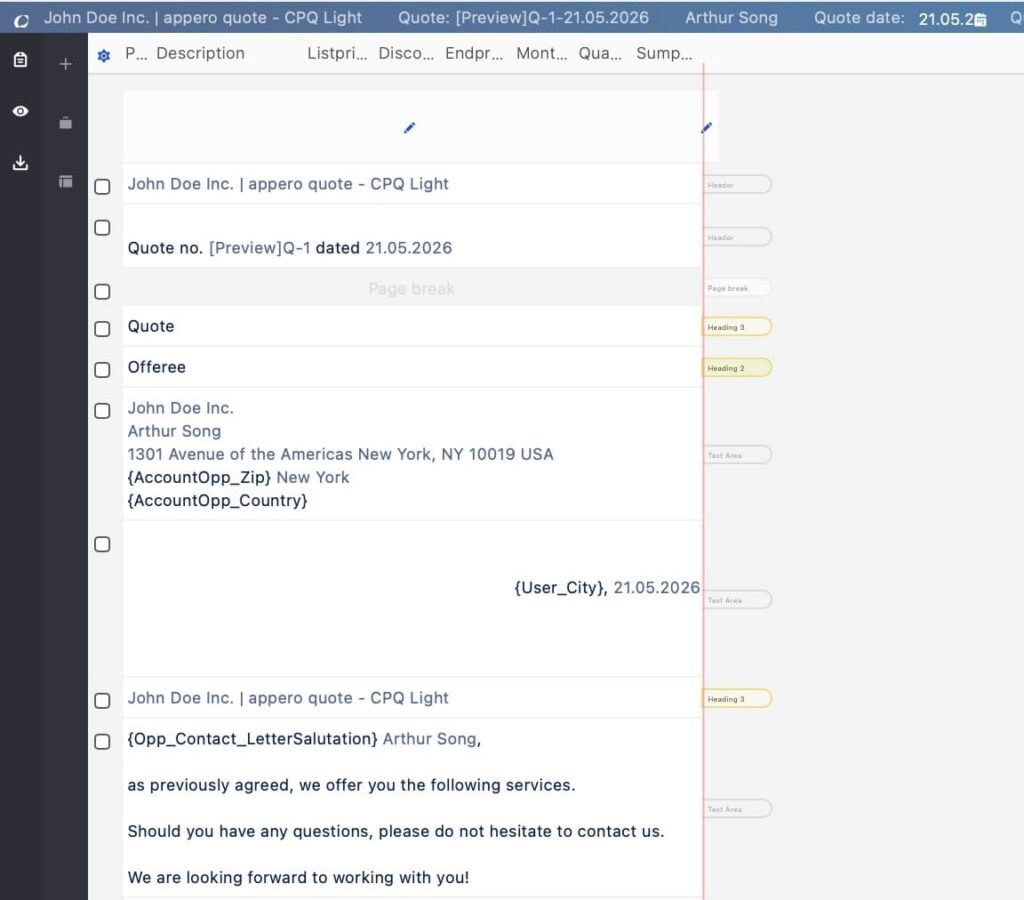
3. Quote templates and document generation.
appero quote uses quote templates to structure quote documents and define the elements included in generated offers. Templates can contain quote items, text elements, mergefields, and Bricks. Each template is assigned a style that controls the document layout, including CSS formatting and letterhead settings.
4. Working with appero quote in Salesforce.
Because appero quote is built natively on Salesforce Lightning, administrators can manage configuration, permissions, and quote-related processes within the Salesforce environment. Sales users can create and manage quotes without moving data between different platforms.
The overall experience is designed around keeping quote creation, pricing logic, and document generation directly within Salesforce using Salesforce data.
Conga Salesforce CPQ: The Enterprise CPQ Platform
Conga CPQ is a Salesforce CPQ solution designed to support complex configure, price, and quote processes. The platform provides tools for managing product structures, pricing rules, bundles, options, attributes, and quote workflows to support organizations with advanced quoting requirements.
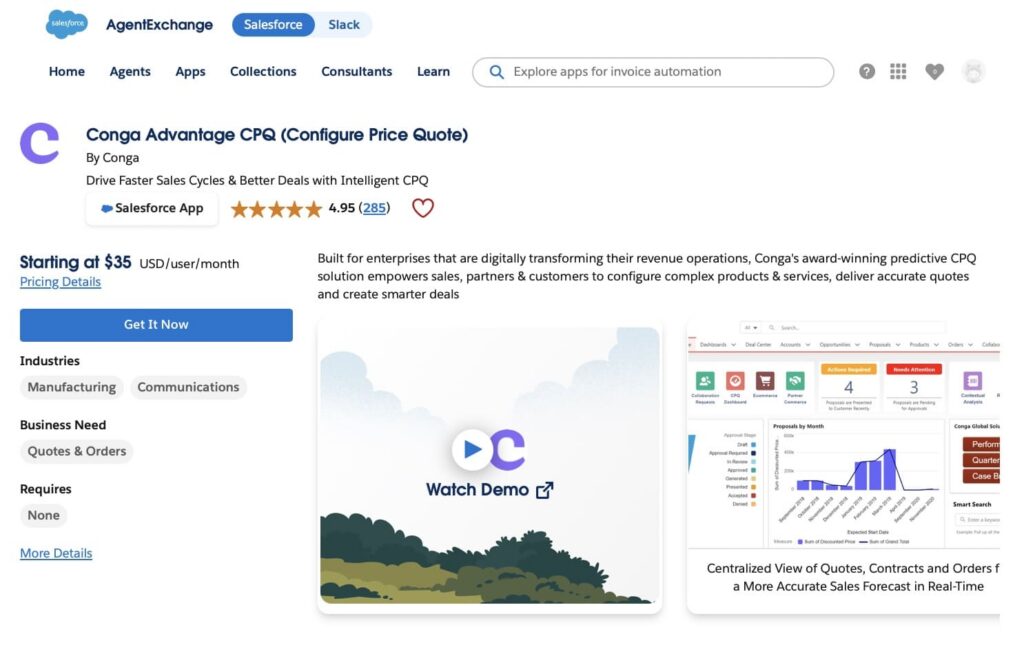
Conga CPQ works with Salesforce data and CPQ-specific configuration elements, including products, product options, attributes, pricing rules, and quote records. The solution allows sales teams to configure products, calculate prices, and create quotes using predefined rules and configurations.
Key features include:
- Product configuration: Conga CPQ allows administrators to define complex product structures using products, bundles, options, attributes, and configuration rules. These configurations control product selection, option availability, attribute dependencies, and validation during the quoting process.
- Pricing and calculation rules: The platform supports pricing configuration through price lists, price rules, price matrices, discounts, and pricing adjustments. These rules can apply product-specific, conditional, and tiered pricing logic to calculate quote values based on configured products, options, and business requirements.
- Quote creation and management: Users can create quotes and proposals from Salesforce Opportunities, select and configure products, apply pricing, and finalize quote details through the CPQ interface. The quoting process manages product configurations, pricing information, and proposal records throughout quote preparation.
- Proposal generation: Conga CPQ supports generating proposal documents from Quote/Proposal records using configured templates. Generated documents can include product configuration details, pricing information, and quote data, with options to combine additional documents and supporting materials.
Why teams choose Conga CPQ:
Conga CPQ is designed for enterprise organizations that need to manage complex configure-price-quote processes with advanced product configuration, pricing models, and business rules. The solution supports sophisticated product structures, complex pricing scenarios, and configurable approval workflows, helping organizations manage large-scale quoting requirements within Salesforce.
Configuring Conga CPQ in Salesforce
Unlike solutions that can be installed directly through a self-service AppExchange process, organizations need to go through an evaluation process with Conga and receive access to the required packages.
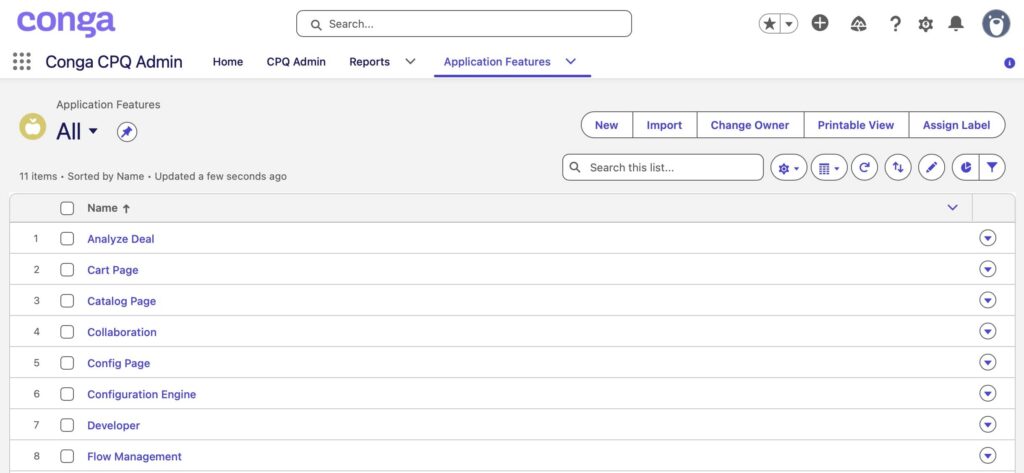
The installation process involves deploying multiple Conga packages in a specific order. The required components include core CPQ packages such as Conga Base Library, Conga Quote Management, Conga Configuration & Pricing, Conga CPQ API, and Conga CPQ Setup. Additional packages may be required depending on the implementation scope, such as approval workflows, integrations, contract management, or electronic signature capabilities.
After the packages are installed, administrators configure the main CPQ components inside Salesforce. This includes setting up products, product structures, pricing information, calculation rules, configuration rules, and user access. These settings define how products are configured, how prices are calculated, and which business rules are applied during the quoting process.
Because Conga CPQ supports complex product models and enterprise pricing scenarios, the initial setup typically requires more planning and configuration effort compared with lighter CPQ solutions.
1. Creating Quotes with Conga CPQ.
Conga Quote generation for Salesforce CPQ can be done through both user interfaces and APIs, depending on the implementation approach. For sales users, quotes can be created through the Conga CPQ interface by entering quote information, selecting a price list, choosing products, adjusting quantities, and applying configured pricing adjustments. The system then generates the quote based on the configured product and pricing rules.
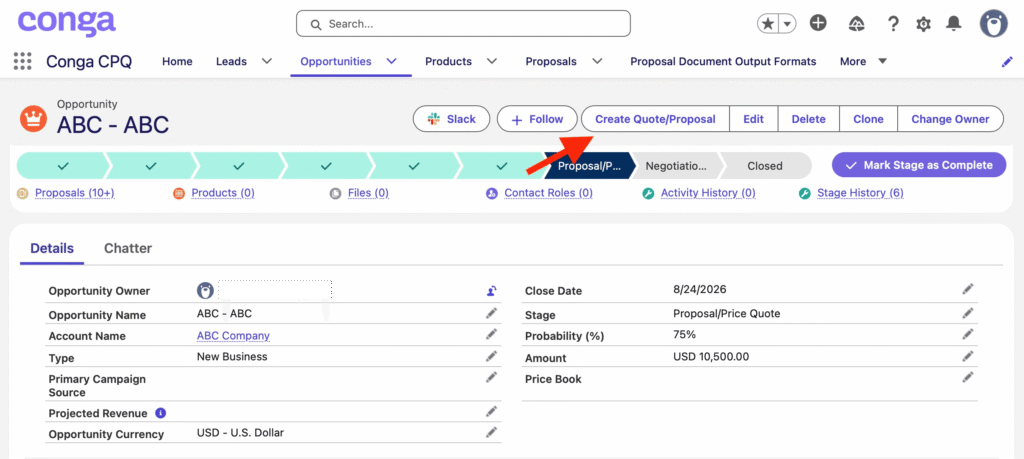
For implementation teams, Conga CPQ provides APIs that allow developers to create and manage quotes programmatically. Quote creation requires passing required information such as quote name, price list details, and related records, including account and opportunity information. APIs can also be used to retrieve, update, and manage quote data as part of custom quoting processes or integrations.
2. Quote documents and output.
After the quote is configured, Conga CPQ can generate proposal documents using quote information. The generated output includes the configured products, pricing details, and other information required for customer communication.
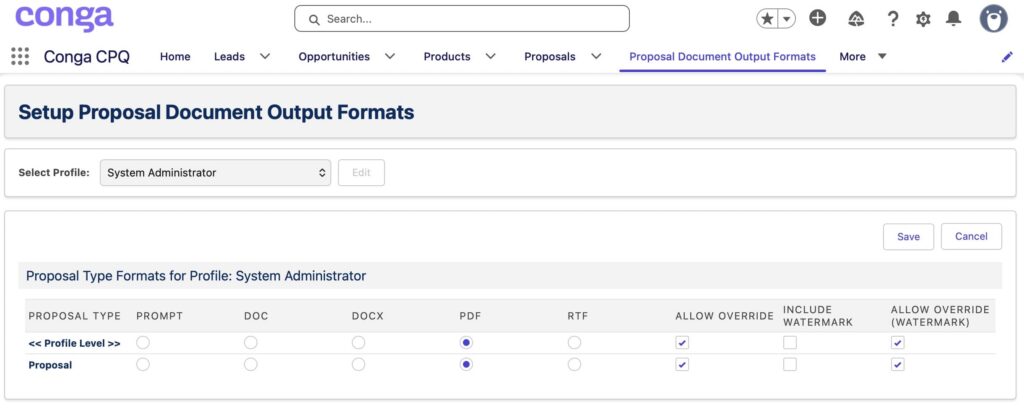
3. Working with Conga CPQ in Salesforce.
Conga CPQ extends Salesforce with configure, price, and quote capabilities by connecting product configuration, pricing rules, and quote generation in one workflow. The solution provides administrators with tools to manage CPQ logic and gives sales teams a structured process for creating quotes within Salesforce.
Feature-by-Feature Comparison: appero quote vs Salesforce CPQ Conga
When comparing Salesforce CPQ solutions, the biggest differences usually appear in how each platform handles product configuration, pricing, quote creation, and administration. These differences make each solution better suited to different business requirements and quoting processes. According to a study of 200 business leaders, CPQ solutions shorten lead-to-quote time by 27%. While both appero quote and Conga CPQ help Salesforce teams manage quoting processes, they follow different approaches.
appero quote focuses on Salesforce-native quote creation through its visual quote editor, where users configure products, view real-time pricing calculations, and edit document content within a single interface. Conga CPQ follows a more configuration-driven approach, supporting advanced product configuration, pricing rules, and configurable CPQ processes for organizations with more complex quoting requirements.
| Features Comparison: appero quote vs Conga CPQ | ||
|---|---|---|
| Capability | appero quote | Conga CPQ |
| Salesforce Integration | ✅ Built natively on Salesforce, appero quote works with standard Salesforce records such as Opportunities, Products, and Price Books while extending the platform with custom objects including Product Groups, Product Properties, Bundle Products, and Discount Rules to support the quoting process. | ✅ Built on Salesforce, Conga CPQ extends the platform with CPQ-specific objects and configuration components, including products, bundles, attributes, price lists, proposal records, and pricing rules, to support complex configure, price, and quote processes. |
| Product Management | ✅ Uses Product Groups to organize quote items for calculation and presentation. Products can also be associated with Product Properties to support grouping, reporting, and quote templates. | ✅ Uses product catalogs, categories, and hierarchies to organize products. Administrators can define standalone products, bundles, options, and attributes as part of the product model. |
| Product Configuration | ✅ Supports AddOns, Bundle Products, and Product Properties to guide product selection, define fixed product combinations, and apply pricing or informational properties during quote creation. | ✅ Supports configurable products, attributes, options, constraint rules, attribute-based configuration, nested bundles, and option validation to control product selection during quote creation. |
| Pricing Management | ✅ Supports tiered pricing, multiple discount levels, markups and markdowns, price calculations based on products or Product Groups, pricing product properties, and lower price limits with approval logic. | Supports pricing through Price Lists, Price List Items, Price Rules, Rule Sets, and Price Matrices, enabling conditional, multidimensional, tiered, and adjustment-based pricing calculations. |
| Quote Creation | ✅ Allows users to create quotes directly from Salesforce Opportunities using configured products, pricing logic, and quote templates. Users can further customize the quote document through the visual quote editor, including quote items, texts, images, and reusable content elements. | ✅ Allows users to create quotes and proposals from Salesforce Opportunities through a guided CPQ workflow, including product selection, configuration, cart management, quote analysis, and proposal generation. APIs are also available to support custom quoting processes and integrations. |
| Quote Templates & Documents | ✅ Provides configurable quote templates and Styles for document structure, branding, and formatting. | ✅ Supports quote and proposal templates for generating customer-facing documents from quote data. |
| Product Bundling | ✅ Supports AddOn Products, Bricks, and static Bundle Products with parent-child relationships. Bundle Products can be configured as Component or Accessory types. | ✅ Supports bundled products with associated options and option groups, including multi-level bundles and configurable bundle structures. |
| Pricing Automation | ✅ Calculates quote prices based on configured Price Calculation properties, including markups, markdowns, price matrix logic, and defined price limits during quote calculation. | ✅ Executes configured Price Rules, Rule Sets, and Price Matrices to automatically apply pricing adjustments based on product, quantity, attributes, and other pricing criteria during CPQ calculations. |
| Stars Achieved | ⭐⭐⭐⭐⭐ | ⭐⭐⭐⭐⭐ |
Key Takeaways
- Product Configuration: Conga CPQ provides broader product configuration capabilities with configurable bundles, options, attributes, and rules that control product selection and combinations. appero quote focuses on structured product selection using Product Groups, AddOn Products, static Bundles, and Product Properties during quote creation.
- Pricing: Both solutions provide configurable pricing capabilities. Conga CPQ offers a more advanced pricing framework with Price Rules, Price Matrices, and configurable pricing logic for complex scenarios. appero quote supports automatic and manual discounts based on configured pricing rules, markups/surcharges, price dependencies, lower price limits, and approval processes.
- Quote Creation: appero quote enables users to create quotes directly from Salesforce Opportunities using configured products, pricing logic, and quote templates, with additional control over quote document creation and customization through its visual quote editor. Conga CPQ supports quote creation as part of a broader CPQ workflow that combines product configuration, pricing calculations, quote analysis, and proposal generation.
Both solutions achieve 5⭐ star ratings, as they provide strong CPQ capabilities but address different business needs. appero quote fits teams looking for a Salesforce-native quoting solution with strong quote document customization and structured product management capabilities. Conga CPQ provides a broader CPQ framework designed for organizations managing more complex product configurations, pricing models, and quoting processes.
Setup and User Experience Comparison
The daily user experience can be an important factor when selecting a Salesforce CPQ solution. Both appero quote and Conga CPQ work inside Salesforce, but they provide different approaches to configuring and managing quoting processes.
appero quote provides guided setup tools for configuring quote templates, products, and Salesforce pages. Conga CPQ includes a wider CPQ configuration model with product catalogs, bundles, attributes, pricing rules, and quote processes that need to be configured based on business requirements.
We will compare both solutions based on setup approach, user experience, administration, and scalability to understand how each tool fits different Salesforce quoting requirements.
| appero quote vs Conga CPQ: Setup and User Experience | ||
|---|---|---|
| Category | appero quote | Conga CPQ |
| Initial setup | ✅ Provides guided Salesforce setup with tools such as Setup Assistant and Template Wizard for configuring quotes, templates, products, and Opportunity integration. | ⚠️ Requires installation and configuration of multiple CPQ packages, followed by setup of product models, pricing structures, rules, and quote processes. |
| Learning curve | ✅ Easy to understand and learn for Salesforce users familiar with CRM processes. The application provides a structured interface inside Salesforce, guided configuration options, and documentation resources that help administrators and users understand the quoting process. | ❌ Requires different knowledge areas for administrators, developers, and sales users. Admins configure products, bundles, pricing rules, and CPQ processes, while technical teams may work with APIs and integrations. |
| Training requirements | ✅ Mainly focused on Salesforce users and administrators working with quoting processes. | ❌ Requires broader CPQ knowledge across configuration, development, and sales processes. Conga provides dedicated training resources and credentials for users who need deeper product knowledge. |
| Sales user experience | ✅ Users can create and manage quotes from Salesforce by selecting products, configuring product properties directly in the quote editor, applying pricing logic, and using quote templates for document creation. | ✅ Users configure products from catalogs, select available options and attributes, and generate quotes with pricing calculated based on configured pricing rules and logic. |
| Administration | ✅ Configuration is managed through Setup Assistant including creating Product Groups, Configuring Quote templates and adding Quotes to Opportunity pages. | ✅ Administrators manage a broader CPQ configuration model, including product catalogs, product structures, bundles, options, attributes, pricing structures, price rules, and CPQ process settings. |
| Scalability | ✅ Scales with growing quoting requirements by allowing teams to extend product structures, pricing configurations, and quote document capabilities while keeping the quoting process simple and easy to manage. | ✅ Scales for complex enterprise environments by supporting large product catalogs, advanced configuration models, complex pricing scenarios, and highly structured CPQ processes across larger sales organizations. |
| Stars Achieved | ⭐⭐⭐⭐⭐ | ⭐⭐⭐⭐ |
Key Takeaways
- Setup: appero quote provides guided Salesforce configuration, while Conga CPQ requires setup of broader CPQ components.
- User Experience: appero quote provides better Salesforce quoting experience, while Conga CPQ provides a more extensive CPQ workflow with product configuration and pricing logic.
- Administration: Both solutions require Salesforce configuration, but Conga CPQ includes more CPQ-specific elements to manage.
appero quote scores higher ⭐ for ease of setup and faster time to value. Conga CPQ provides a broader CPQ framework, but its advanced configuration model requires more implementation effort and administration.
Pricing Comparison: appero quote vs Conga for Salesforce CPQ
Pricing is an important factor when selecting a Salesforce CPQ solution, especially because CPQ costs can depend on the number of users, required functionality, and the complexity of the quoting process.
appero quote provides publicly available license pricing based on the number of users, while Conga CPQ lists a starting price available only on AppExchange. Both solutions follow a subscription model where costs increase with the number of users and required capabilities.
We will compare both solutions based on pricing transparency, licensing approach, and cost considerations to understand how each option fits different Salesforce teams.
| Pricing Comparison: appero quote vs Conga CPQ | ||
|---|---|---|
| Category | appero quote | Conga CPQ |
| Pricing Model | ✅ User-based subscription pricing. Starts from €37.50 per user/month for smaller teams, with pricing decreasing for larger license volumes. | ⚠️ AppExchange lists the starting price at $35 USD per user/month. The actual pricing is not publicly available on the Conga website and requires a direct pricing request. |
| Pricing Transparency | ✅ Public pricing tiers are available on the vendor website. | ❌ Starting price is available only on AppExchange, while final pricing may depend on selected requirements and agreement. Pricing mentioned in reviews differs from the AppExchange starting price, so customers should expect pricing to vary based on their specific needs. |
| License Structure | ✅ Licenses are required for Salesforce users who need access to appero quote functionality. | ✅ Requires Conga CPQ licenses for users who need access to CPQ functionality, with licensing based on purchased packages and user requirements. |
| Scaling Impact | ✅ Costs decrease based on number of licenses and contract duration. | ❌ Costs might depend on business requirements, selected CPQ capabilities, implementation scope, and the level of configuration needed. |
| Best Fit | ✅ Teams that prefer a clear pricing model with publicly available license tiers. | ✅ Organizations looking for a CPQ platform with a published entry price and broader CPQ capabilities. |
| Stars Achieved | ⭐⭐⭐⭐⭐ | ⭐⭐⭐⭐ |
Key Takeaways
- Pricing Transparency: appero quote, one of the Conga CPQ alternatives, provides more detailed pricing information with published license tiers, while Conga CPQ shows a starting price on Salesforce AppExchange and requires a direct pricing request for final costs.
- License Model: Both solutions use user-based licensing, but the Conga’s final cost depends on the selected licenses, required capabilities, and business requirements.
appero quote receives 5⭐ stars for clearer pricing visibility, with published license tiers that help teams estimate costs upfront. Conga CPQ receives 4⭐ stars because final pricing depends on specific requirements, selected capabilities, configuration scope, and implementation needs.
Insight:
Watch out: the CPQ price tag goes beyond the license fee. Over 45% of small enterprises identify high upfront deployment and training costs as the main barrier to adoption. Implementation complexity, configuration requirements, and training efforts can have a major impact on the final investment.
Key Considerations When Choosing a Salesforce CPQ Tool
Choosing between Salesforce CPQ solutions depends on how your company manages products, pricing, and quoting today. The right option is not only about the number of features available, but also about whether the solution matches the complexity of your sales process.
Before selecting a CPQ tool, consider the following questions:
1. How complex are your products and pricing models?
The first consideration is the structure of your offerings. Companies selling standard products with straightforward pricing may only need a Salesforce-based quoting solution with product management, pricing calculations, and quote generation.
Organizations that manage product bundles, configurable offerings, multiple pricing rules, or complex product relationships may require a broader CPQ framework with more configuration capabilities.
2. How much control do you need over pricing?
Pricing requirements often determine how much CPQ functionality a company needs. If pricing mainly depends on standard product prices, discounts, and simple adjustments, a lighter quoting approach may be enough.
Companies with multiple pricing rules, product dependencies, discount structures, or complex calculation logic should evaluate solutions that provide deeper pricing configuration.
3. How should the quoting process fit into Salesforce?
Sales teams usually adopt CPQ solutions faster when the quoting process matches their existing Salesforce workflows. Consider how users create quotes, configure products, review pricing, and generate customer documents.
A solution focused on Salesforce-native quoting may fit teams that want to keep the process simple, while a broader CPQ platform may better support organizations with more structured quoting requirements.
4. What will your future sales process look like?
A CPQ decision should consider future requirements, not only current needs. Companies introducing new product models, expanding pricing structures, or managing more complex sales scenarios should select a solution that can support those changes over time.
The best Salesforce CPQ tool is the one that provides the right balance between required functionality, process complexity, and long-term business goals.
Final Results: Which CPQ Tool Comes Out on Top?
Choosing a CPQ solution is not about finding the platform with the longest feature list. The real goal is finding a solution that matches the way your sales team works, the complexity of your products, and the level of control you need over pricing and quoting.
Throughout this comparison, we looked at features, day-to-day usability, and pricing. Both appero quote and Conga CPQ help Salesforce teams move beyond standard quoting processes, but they approach the challenge differently.
Let’s see how they scored.
| Final Results: appero quote vs Conga CPQ | ||
|---|---|---|
| Section | appero quote | Conga CPQ |
| Feature Comparison | ⭐⭐⭐⭐⭐ | ⭐⭐⭐⭐⭐ |
| Setup and User Experience | ⭐⭐⭐⭐⭐ | ⭐⭐⭐⭐ |
| Pricing Comparison | ⭐⭐⭐⭐⭐ | ⭐⭐⭐⭐ |
| Total Stars Achieved | 15 ⭐ | 13 ⭐ |
After comparing all categories, appero quote scores 15 ⭐ stars overall, while Conga CPQ totals 13 ⭐ stars. This makes appero quote the winner for organizations looking for a practical Salesforce CPQ solution that balances quoting capabilities, usability, pricing transparency, and Salesforce alignment.
Pros and cons of Conga CPQ make it a strong choice for businesses with advanced CPQ requirements, but many Salesforce teams may find that appero quote provides the functionality they need without introducing the complexity often associated with larger CPQ platforms.

Antonina is a Salesforce Admin with six certifications: Salesforce Certified Platform Foundations, Platform Administrator, Platform Administrator II, CPQ Administrator, AI Associate, and Agentforce Specialist. She started working with Salesforce in 2021 as Intern Salesforce Developer. Now, a 2-Star Ranger on Trailhead, she continues to expand her skills and knowledge. She helps manage Salesforce systems, automate tasks, and improve processes. Antonina loves learning new things and exploring better ways to use technology. In her free time, she enjoys reading, playing sports, and exploring new tech ideas.
 Previous Post
 Next Post