



The CRM–ERP Data Gap in Growing Organizations
To better understand the challenges of managing customer and operational data across platforms, let’s imagine a company that builds IoT connectivity solutions used worldwide: from fleet tracking to equipment monitoring. As the business grows, Salesforce becomes the primary CRM for managing customer and opportunity data, while NetSuite supports operational processes such as inventory, orders, and fulfillment.
Without a connection between the two systems, sales execution becomes more complex. To prepare a single quote, sales representatives need to pull information from different platforms: customer data from Salesforce, inventory availability from NetSuite, and pricing information from operational systems. Each deal requires repeated switching between platforms, slowing down the quote-to-invoice process and creating friction between Sales and Supply Chain.
The core issue is not the capability of the systems themselves but the separation between them. Salesforce holds customer and opportunity data while NetSuite becomes the source of operational truth for inventory and fulfillment. Without a connected layer critical information remains distributed across systems instead of being available directly within the sales workflow.
Insight:
Can you imagine that in many enterprises, integration projects consume nearly 39% of IT teams’ time? A large share of operational effort is not spent on improving processes, but on keeping disconnected systems like CRM and ERP aligned.
The goal to connect Salesforce with NetSuite in this context is not about transferring records between platforms. It is about removing system boundaries from day-to-day sales execution so that teams can work with complete and consistent operational data directly inside Salesforce.
This article explains how CRM and ERP systems such as Salesforce and NetSuite can be connected to improve operational visibility, and how integration architecture determines the quality of shared operational context across both systems, including Salesforce-native approaches that provide this unified view.
- Why NetSuite and Salesforce Visibility Becomes a Challenge
- NetSuite Salesforce Integration Is Not Just Data Transfer
- How to Evaluate a NetSuite to Salesforce Integration Strategy
- How to Connect Salesforce with NetSuite
- Key Salesforce NetSuite Integration Capabilities
- Business Impact of NetSuite Integration with Salesforce
- FAQs About Salesforce and NetSuite Integration
- Conclusion: Turning Disconnected Systems Into One Operational View
Why NetSuite and Salesforce Visibility Becomes a Challenge
Sales execution and operational execution follow different lifecycle models. In Salesforce, customer and opportunity data evolves continuously as deals progress through stages. In NetSuite, operational data such as inventory levels, order status, and financial records are updated according to fulfillment, logistics, and accounting cycles.
Because these lifecycle models are not aligned, the information required to progress a deal is often produced outside the system where the decision is being made, and at a different point in time.
This leads to a structural dependency on indirect validation. Instead of making decisions based on data available directly within Salesforce, teams rely on external lookups to confirm operational conditions before advancing a deal. Over time, this shifts execution away from a single system context and introduces fragmentation in how decisions are validated and recorded.
At scale, this is no longer a process inefficiency. It becomes a structural limitation caused by the absence of a shared operational layer between CRM and ERP systems.
Industry research reflects this shift. Around 62% of organizations report adoption of cloud-based integration frameworks, while more than 54% prioritize real-time data exchange as a core requirement for operational systems. This indicates that the demand for synchronized operational visibility is now a standard architectural expectation rather than an optional capability.
NetSuite Salesforce Integration Is Not Just Data Transfer
A common mistake is to treat integration as a technical task defined by moving NetSuite data into Salesforce and validating that records appear correctly.
In a NetSuite to Salesforce environment, integration is not a one-time data movement process. It defines how two active systems operate together in day-to-day execution, each maintaining its own role in the business process.
At a technical level, the challenge is how data is structured and represented when it is exposed across systems that serve different operational purposes.
NetSuite is composed of multiple record types, each following its own lifecycle and rules, such as:
- Customer financial setup and credit terms, managed at the customer entity level and tied to billing and payment behavior,
- Order structures with line-level detail, where headers and items follow separate transactional logic,
- Invoice and payment records, updated through the accounting lifecycle and aging processes,
- Fulfillment events linked to warehouse and inventory movements, recorded as distinct transaction steps,
- Pricing and contract-based item relationships, driven by item pricing rules, price levels, or contract configurations,
- Subsidiary and legal entity structures, used in multi-company setups to separate financial reporting and operations.
These entities are created, updated, and completed at different stages of the business cycle, and each follows its own lifecycle model with distinct status transitions.
When exposed in Salesforce, operational and financial information requires a structure that supports use in CRM processes while preserving alignment with the source system. Data representation inside Salesforce depends on how records are modeled, related, and maintained through synchronization rules defined at the integration layer.
For Salesforce admins and developers, integration becomes a system design exercise focused on how data flows between systems.
Key architectural decisions include:
- defining system ownership across the lifecycle of each object,
- selecting which NetSuite records are exposed in Salesforce,
- selecting synchronization patterns based on business requirements,
- managing bidirectional updates to avoid data conflicts,
- designing high-volume objects such as orders and order lines within Salesforce limits.
NetSuite and Salesforce integration is controlled data exposure between systems with different execution responsibilities.
The effectiveness of the architecture depends on whether Salesforce becomes a reliable operational context for decision-making or a synchronized reflection of ERP data without defined usage structure.
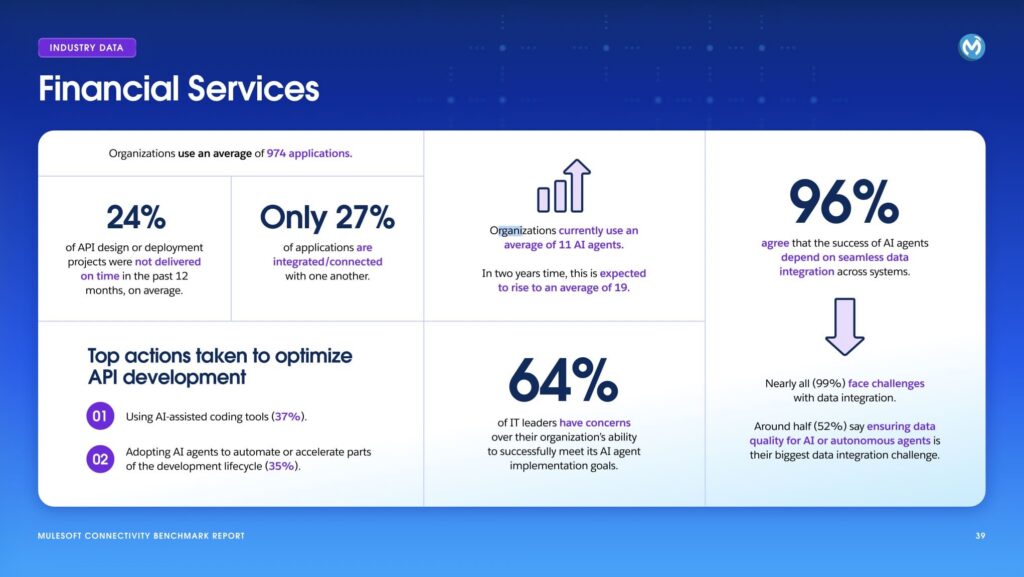
2026 MuleSoft Connectivity Benchmark Report highlights how widespread the integration gap is in financial services. Organizations use an average of 974 applications, and 24% of API design or deployment projects were not delivered on time in the past 12 months, on average. Nearly all organizations (99%) report challenges with data integration, and 64% of IT leaders express concerns about meeting integration goals required for business operations.
How to Evaluate a NetSuite to Salesforce Integration Strategy
There is no single Salesforce NetSuite integration model that fits all NetSuite and Salesforce environments. The appropriate approach depends on how operational data is consumed, how much control the organization requires over synchronization logic, and how long the solution is expected to operate as part of the core architecture.
Before selecting an integration strategy, evaluation typically focuses on a few structural dimensions.
1. Evaluate the role of operational data in Salesforce.
The first consideration is the role NetSuite data plays inside Salesforce.
In some environments, integration is limited to financial visibility. In others, it extends into operational areas such as order management, inventory availability, fulfillment status, or payment tracking.
The required scope of data determines synchronization complexity, required granularity, and how closely Salesforce reflects NetSuite operational state.
2. Assess lifecycle ownership and maintenance responsibility.
Integration becomes part of the long-term system architecture rather than a one-off implementation.
Key ownership areas include:
- monitoring synchronization failures and data consistency
- managing API and platform changes across both systems
- adapting integration logic when Salesforce data models evolve
- maintaining alignment between business process changes and integration rules
These factors typically determine whether a custom integration or a managed solution is more sustainable over time.
3. Define the system of execution.
A key architectural decision is where users perform operational work in daily execution.
Two models are typically used:
- NetSuite remains the working system for operational checks and transaction handling.
- Salesforce becomes the working layer where operational data is surfaced during sales execution.
This decision determines whether Salesforce acts only as a CRM system or extends into a unified workspace for sales and operational context.
4. Evaluate Salesforce-native architecture options.
Some integration approaches are built specifically for the Salesforce platform and operate directly within its environment rather than introducing external middleware layers.
In these models, NetSuite data is synchronized into Salesforce through managed configurations that define which objects are exposed and how they are maintained.
When evaluating Salesforce-native integration options on AppExchange (now AgentExchange), Breadwinner appears as a common example of this approach.
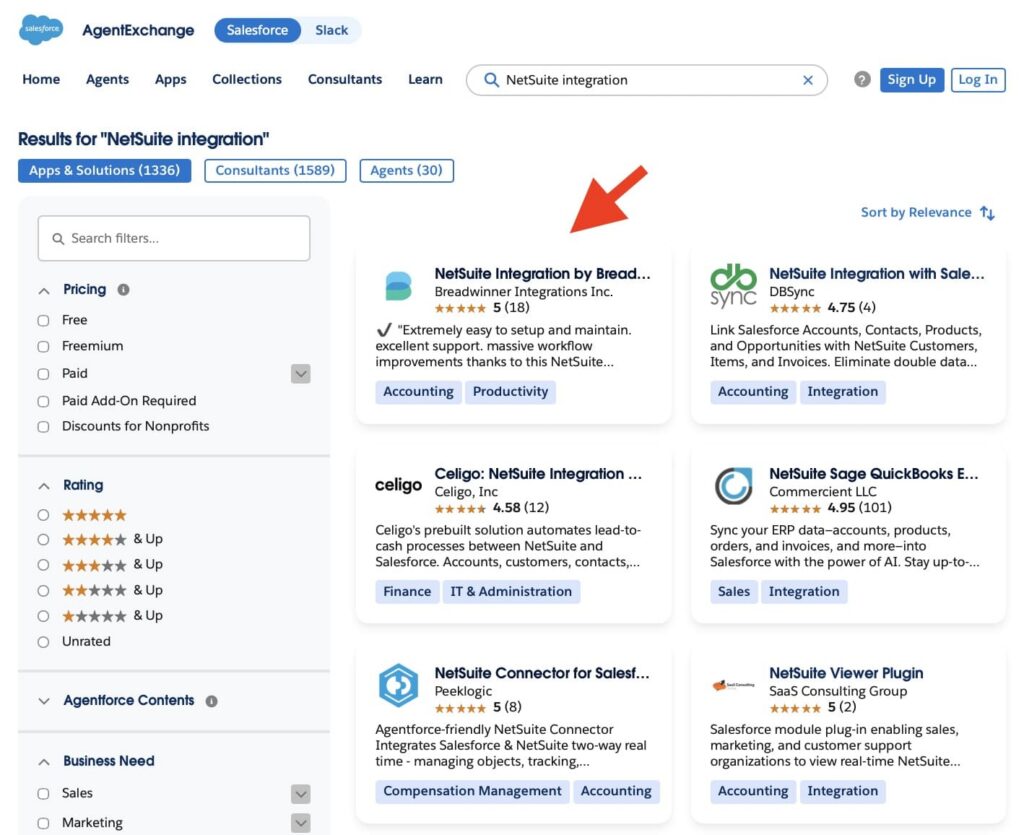
NetSuite Integration by Breadwinner is a Salesforce-native app that connects NetSuite and Salesforce. It allows selected NetSuite objects such as customers, orders, invoices, items, and fulfillment data to be represented inside Salesforce through configured data mappings.
This type of architecture is typically used when the primary goal is to connect Salesforce and NetSuite within a unified CRM-centric environment rather than building a broader multi-system integration platform.
How to Connect Salesforce with NetSuite
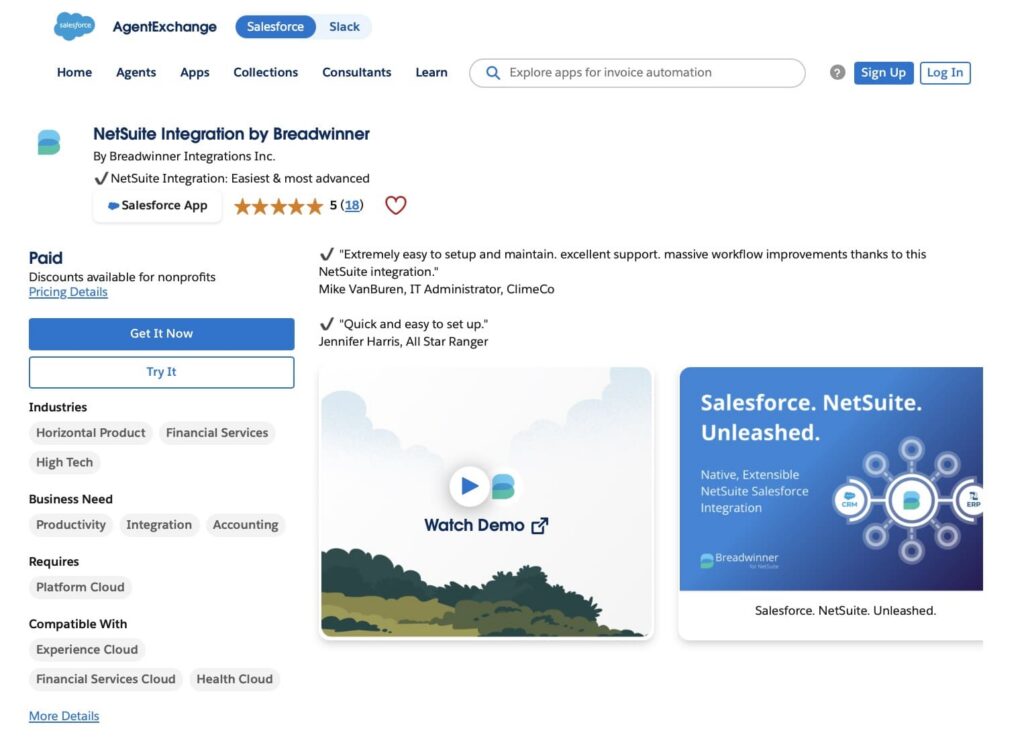
Breadwinner for NetSuite operates as a configuration-driven, Salesforce-native integration package that synchronizes NetSuite data directly into Salesforce. It defines how NetSuite records are represented inside Salesforce using configurable mappings, without relying on a separate middleware or ETL layer.
1. Integration Architecture
At the core of the solution is a configuration-based model embedded in Salesforce that defines how NetSuite data is represented in Salesforce objects.
It includes:
- mapping of NetSuite records to Salesforce standard and custom objects through configuration,
- definition of object relationships between NetSuite and Salesforce data models,
- configuration of field-level data representation rules,
- support for different data modeling approaches depending on CRM reporting needs.
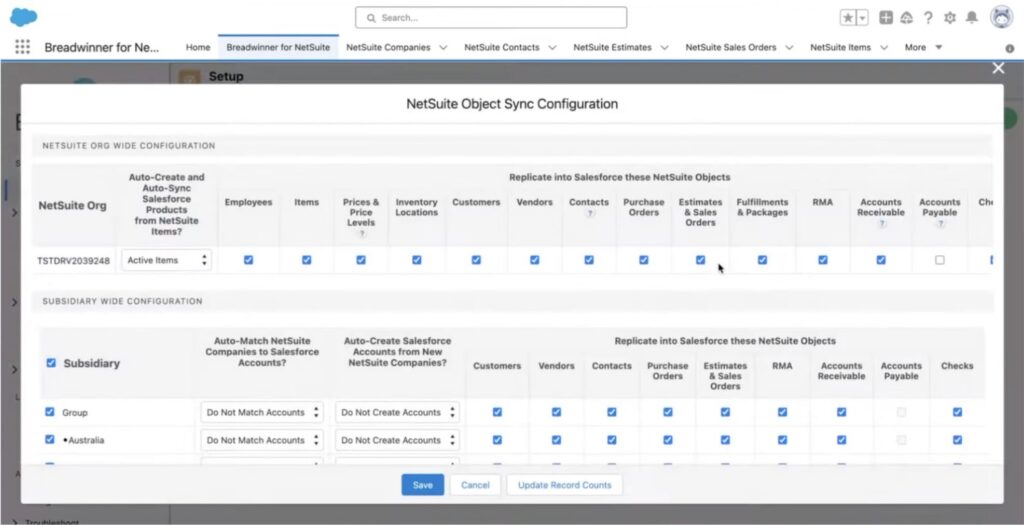
This architecture keeps integration logic inside Salesforce and avoids the need for external middleware components.
2. Data Synchronization Model
Data synchronization between NetSuite and Salesforce is handled through API-based connectivity, with synchronization logic managed through a Salesforce-native integration package.
It defines:
- how and when data changes are propagated between NetSuite and Salesforce using near real-time and background synchronization processes,
- which NetSuite objects are exposed in Salesforce and kept in sync based on configuration,
- direction of data flow depending on object type and integration rules (Salesforce to NetSuite or NetSuite to Salesforce),
- field-level rules that determine how updates are applied when records exist in both systems,
- controlled exposure of ERP data so only relevant financial and operational information, like with conversational AI for finance, is synchronized into Salesforce.
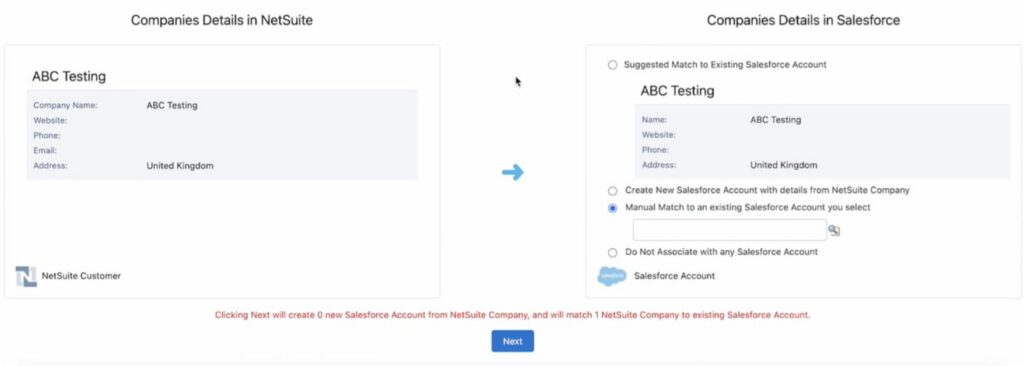
This model keeps Salesforce aligned with NetSuite while avoiding full ERP replication or external middleware-based transformation layers.
3. Execution Behavior Inside Salesforce
Once synchronized, NetSuite data can be stored in standard or custom Salesforce objects and becomes part of the Salesforce data model.
This allows the data to:
- be used in Salesforce reporting, dashboards, and list views,
- be related to CRM records such as accounts, contacts, and opportunities,
- follow Salesforce security, sharing, and field-level permission models,
- support Salesforce automation such as Flow, validation rules, and approval processes where applicable,
- support CRM-facing processes without requiring users to switch into NetSuite for operational visibility.
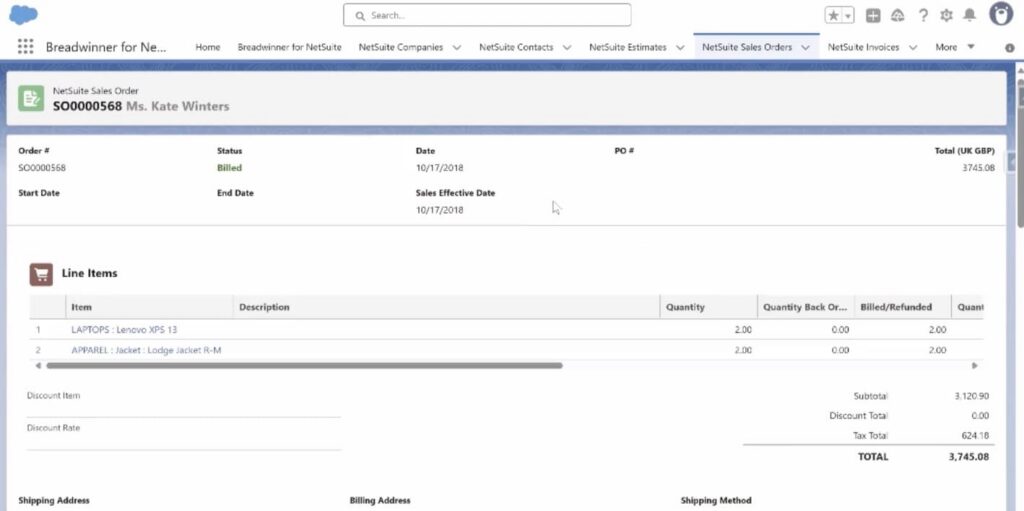
This approach enables Salesforce to act as the primary CRM workspace enriched with ERP data, while NetSuite continues to serve as the system of record for financial and operational transactions.
4. Operational Architecture Role
From an architectural standpoint, Breadwinner functions as a Salesforce-native integration solution purpose-built for synchronizing NetSuite data into Salesforce.
It supports a structured integration approach by:
- reducing reliance on external middleware platforms for standard NetSuite Salesforce synchronization use cases,
- minimizing the need for custom API development by using configuration-driven integration patterns,
- providing predefined synchronization behavior for common NetSuite objects such as customers, invoices, and orders,
- enabling Salesforce as the primary CRM visibility layer for NetSuite operational data.
This approach keeps integration logic within the Salesforce platform and avoids introducing an additional external integration stack for core synchronization scenarios.
5. Scope of Use in Enterprise Environments
This type of Salesforce and NetSuite integration is commonly used in Salesforce-led enterprise environments where Salesforce supports sales execution and customer engagement, while NetSuite typically remains the system of record for financial and operational processes.
The integration is designed around controlled data exposure rather than full ERP replication, allowing selected NetSuite data to be synchronized into Salesforce based on business and reporting needs. This ensures that Salesforce reflects the operational context required for CRM-driven workflows without duplicating the full NetSuite data model.
Key Salesforce NetSuite Integration Capabilities
When using a Salesforce-native integration approach such as Breadwinner, the focus is on enabling operational visibility and controlled data synchronization between NetSuite and Salesforce, rather than building custom integration logic or managing data movement externally.
The capabilities below reflect the typical functionality available when you connect NetSuite with Salesforce through Breadwinner.
| NetSuite Integration by Breadwinner: Core Salesforce Integration Capabilities | |
|---|---|
| Capability Area | What It Enables |
| Object Synchronization | Synchronization of NetSuite records such as customers, orders, invoices, and payments into Salesforce |
| Order Visibility | Access to NetSuite Sales Order information within Salesforce for CRM context and account visibility |
| Financial Visibility | Availability of invoice, payment, and billing data inside Salesforce for sales and account teams |
| Product and Item Data | Synchronization of NetSuite item and pricing data to support sales activities in Salesforce |
| Fulfillment Tracking | Visibility into order and fulfillment status from NetSuite within Salesforce records |
| Data Synchronization Control | Configuration-based control over which NetSuite data is exposed in Salesforce and how it is updated |
| System Role Separation | NetSuite remains the system of record for financial and operational transactions, while Salesforce provides the CRM interaction layer enriched with ERP data |
Business Impact of NetSuite Integration with Salesforce
When Salesforce and NetSuite are connected, the main change is not more data, but fewer external steps needed to move deals from sales to execution.
- Sales execution becomes more continuous: In disconnected setups, sales often pauses to confirm details in NetSuite or other systems, such as pricing, availability, or financial constraints. With integration, these signals are available directly in Salesforce, so deals progress without repeated external checks.
- Fewer post-sale corrections: Many issues appear after a deal is closed due to mismatches between sales assumptions and operational data. Bringing NetSuite data into Salesforce earlier reduces incorrect orders, pricing issues, and rework between teams.
- Operational work becomes more direct: Instead of interpreting requests across multiple systems, teams can act on structured data inside Salesforce. This reduces manual validation and speeds up execution, similar to how NetSuite Slack integration reduces context switching by bringing operational updates and actions into a single collaboration layer.
- Decision flow becomes traceable inside Salesforce: Without integration, delays across the quote-to-order process are hard to trace. With connected systems, approvals and status changes become visible inside a single flow, making bottlenecks easier to identify.
- Core impact: The key shift is not access to more information, but removal of hidden validation steps between systems. Deal execution becomes a structured flow rather than repeated coordination across disconnected tools.
FAQs About Salesforce and NetSuite Integration
Connecting Salesforce and NetSuite is about more than syncing records. Organizations often have questions about data visibility, system ownership, synchronization, and how users interact with both platforms. Here are some of the most common questions.
2. Does Salesforce become the system of record after integration?
No. NetSuite remains the system of record for financial, inventory, and operational transactions. Salesforce continues to manage customer relationships and sales activities while displaying selected NetSuite data needed for CRM workflows.
3. What NetSuite data can be synchronized with Salesforce?
Organizations typically synchronize customers, sales orders, invoices, payments, products, pricing, inventory information, and fulfillment status. The exact objects and fields available in Salesforce depend on the integration configuration and business requirements.
4. What can organizations synchronize with Breadwinner?
Breadwinner allows organizations to synchronize selected NetSuite objects into Salesforce, including customers, sales orders, invoices, payments, products, pricing, and fulfillment data. Which records are synchronized depends on the organization’s configuration, allowing Salesforce to display the operational information needed for CRM workflows while NetSuite remains the system of record for financial and operational transactions.
5. Is Salesforce and NetSuite integration only useful for sales teams?
No. While sales teams benefit from faster access to operational data, customer success, finance, and operations teams can also gain visibility into invoices, payments, fulfillment, and order status without constantly switching between systems.
6. How should organizations prepare before implementing Salesforce and NetSuite integration?
Before starting an integration project, organizations should identify which NetSuite records need to appear in Salesforce, define system ownership for each data object, review user permissions, and decide how synchronization should work. Planning these requirements early helps create a more scalable and maintainable integration architecture.
Conclusion: Turning Disconnected Systems Into One Operational View
After connecting Salesforce with NetSuite, the IoT company introduced at the beginning of this article removed the gap between sales execution and operational data by bringing NetSuite sales order, inventory levels, item pricing, and fulfillment status directly into Salesforce. Sales reps could work entirely inside the CRM, while still operating on near real-time ERP information.
With this shift, the sales-to-fulfillment process became more transparent. Opportunities, orders, and operational status were no longer split across systems, and teams gained a unified view of revenue and execution in one environment.
In this type of setup, the impact on visibility is not fixed. It depends on how fragmented the original system landscape was and how much NetSuite data is exposed into Salesforce. In implementations similar to the IoT company, organizations often achieve a significant increase in CRM-level operational visibility, in some cases reaching around 30% improvement in access to decision-relevant information.
If you’re working with both Salesforce and NetSuite, you can explore a free trial of Breadwinner and see how much visibility it brings into your day-to-day operations inside Salesforce.

Antonina is a Salesforce Admin with six certifications: Salesforce Certified Platform Foundations, Platform Administrator, Platform Administrator II, CPQ Administrator, AI Associate, and Agentforce Specialist. She started working with Salesforce in 2021 as Intern Salesforce Developer. Now, a 2-Star Ranger on Trailhead, she continues to expand her skills and knowledge. She helps manage Salesforce systems, automate tasks, and improve processes. Antonina loves learning new things and exploring better ways to use technology. In her free time, she enjoys reading, playing sports, and exploring new tech ideas.
 Previous Post
 Next Post